
Microsoft Copilot Cowork now includes a /app skill capable of designing, coding, and publishing a business application from a simple natural language description. This capability is currently reserved for organizations enrolled in the Frontier Preview program and foreshadows the arrival of an equivalent feature in Copilot Studio in the coming weeks. This article details how the /app skill works, licensing prerequisites, the governance model implemented by Microsoft, and managing consumption-based billing.
Cowork First, Copilot Studio Next
The rollout of Copilot-powered app creation is confirmed by a Message Center announcement MC1469329, intended for organizations in the Frontier Preview program. This message specifies two distinct timelines for two entry points that will ultimately provide access to the same capability:
- The /app skill of Copilot Cowork began rollout on September 8, with gradual activation over the following week. It requires a Microsoft 365 Copilot license and access to Cowork.
- The public preview of Copilot Studio integrating this same capability launches the week of September 14, as announced on the official Microsoft Copilot Studio blog.
Both experiences share the same logic: generate an application from an intention expressed in natural language, connected to your organization's data through approved connectors and Work IQ, the engine linking Copilot to the user's business context.
| Criterion | Copilot Cowork (/app) | Copilot Studio (public preview) |
|---|---|---|
| Rollout start | September 8, gradual activation | Week of September 14 |
| Required license | Microsoft 365 Copilot license + Cowork access | Copilot Studio preview access |
| Entry point | Natural language /app skill in Cowork | Dedicated creation environment |
| Typical usage | Rapid prototyping, conversational iteration | Refinement of apps from Cowork |
| Cost model | Copilot credits consumed at each step | Associated consumption-based billing |
Good to Know
An app created in Cowork can be opened and refined directly in Copilot Studio: the two experiences are not isolated, they are two entry points to the same generation engine.
Creating an Application with the /app Skill: Complete Walkthrough
Before you start, verify three things: access to Cowork, available Copilot Credits, and a clear idea of the need (data source, functional objective, target audience).
Express the Request via /app
In Cowork, invoke the /app skill or simply use a formulation like "create me an app that...". The example here targets an app that retrieves data from the Microsoft AI@Work roadmap and displays it in an application interface.
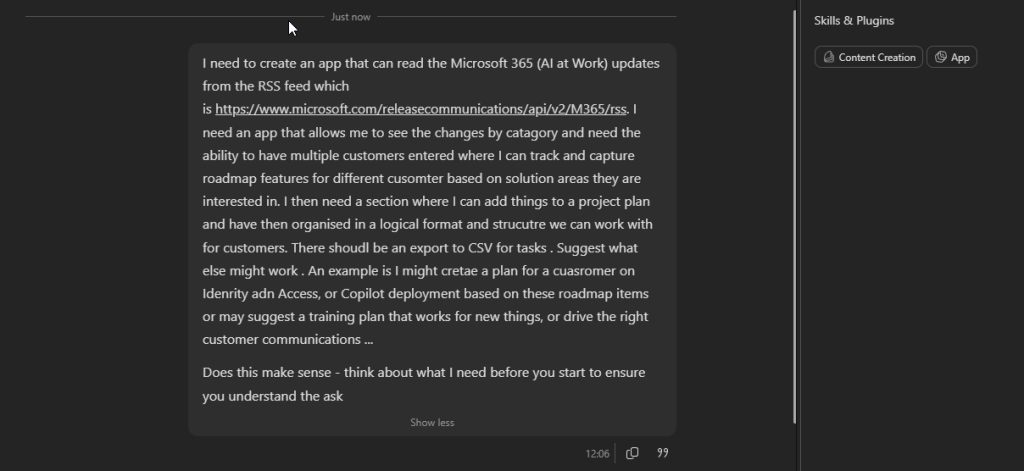
Copilot Plans the Application
Copilot begins by presenting its understanding of the request as tasks before starting construction. Depending on complexity, it may ask clarifying questions at this stage.
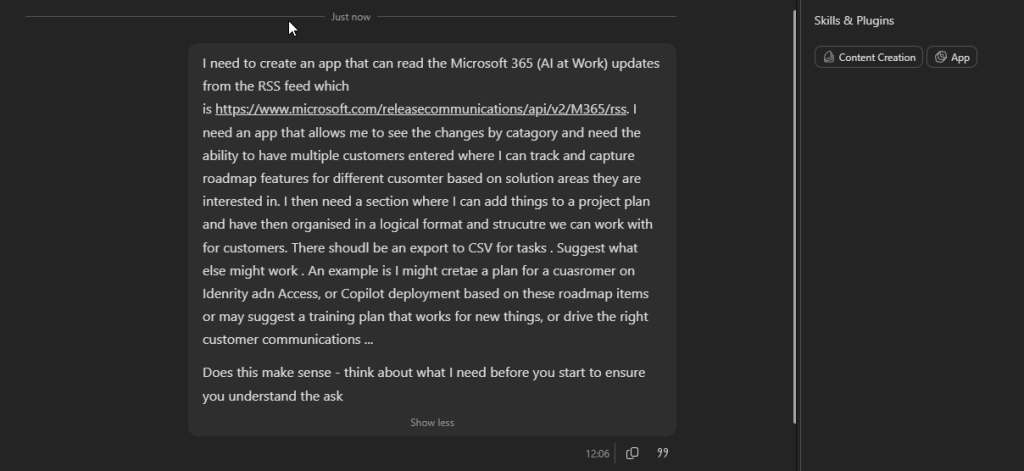
Clarifications Before Construction
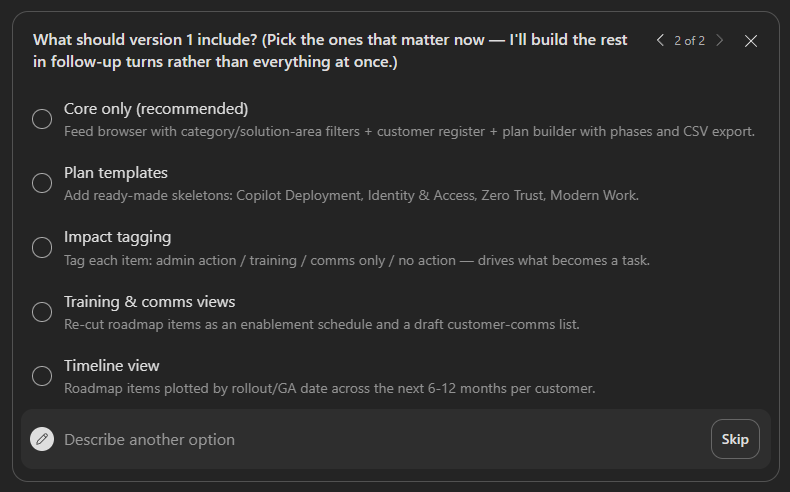
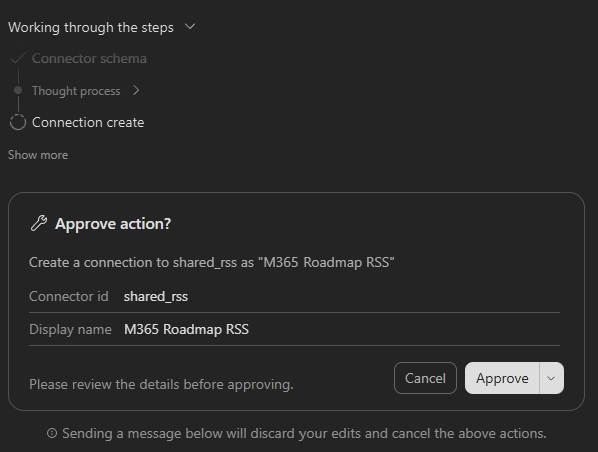
Copilot confirms certain choices before building the first version — for example, the desired level of functional depth for this initial iteration. Keep in mind that each exchange consumes Copilot Credits: it's better to refine through small iterations than to request everything at once.
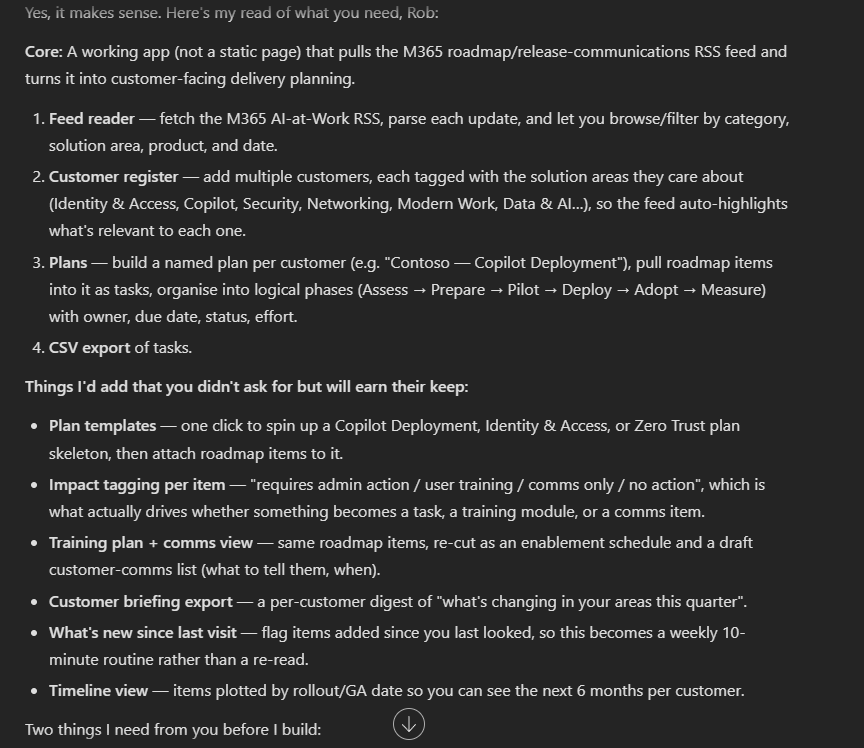
App Construction
The generation of the first version took approximately 10 minutes. You can interact during construction by typing adjustments. Use the /cost command to monitor credit consumption in real time.
Test and Adjust
In the initial version, Copilot built the interface but hadn't yet connected the actual RSS feed. Once the interface is validated, simply ask explicitly to connect to the data source: here, the native Microsoft RSS connector available in the Power Platform environment.
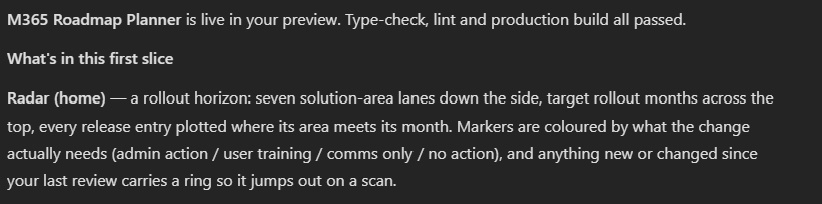
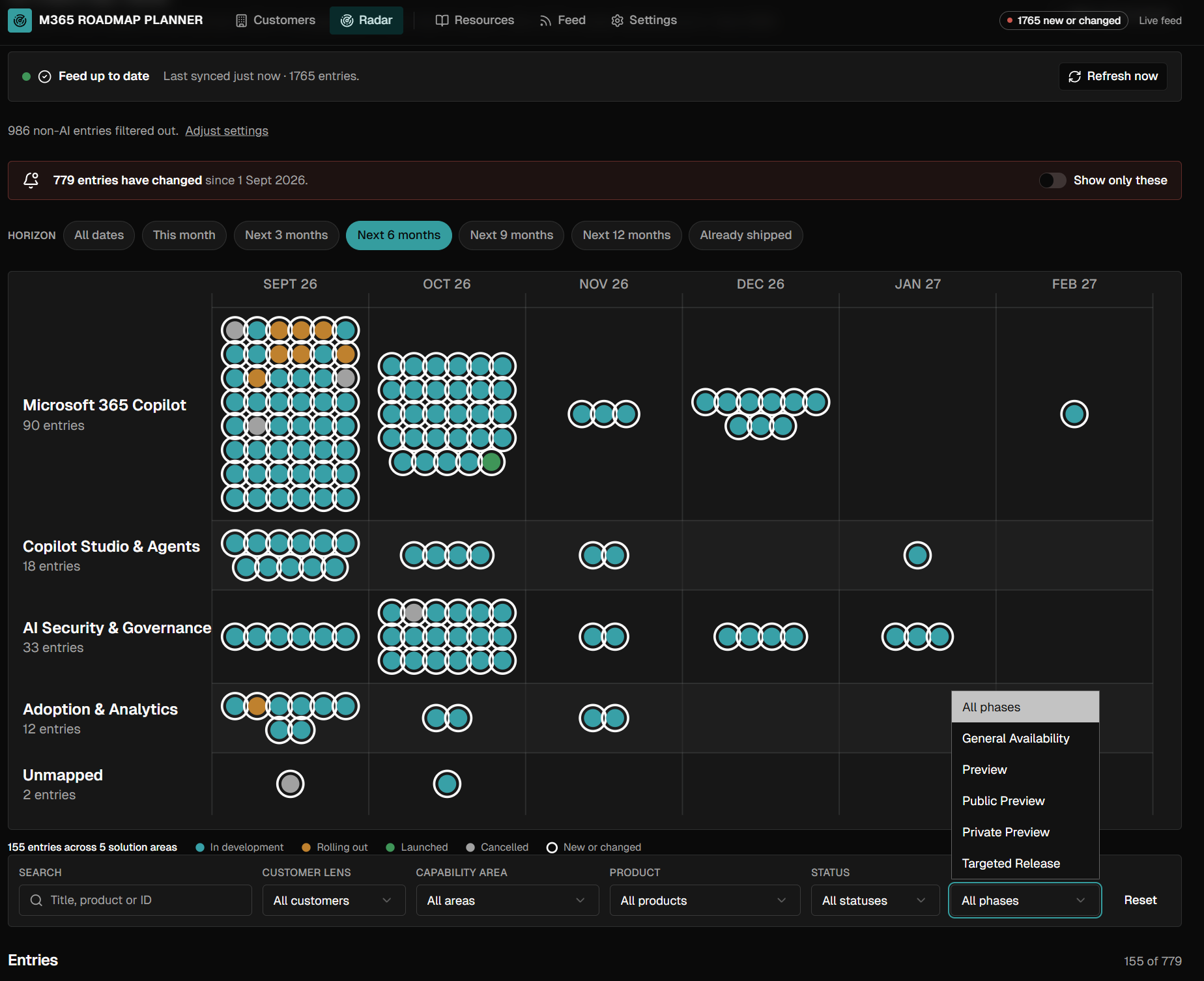
App Ready for Use
The final app displays live RSS data, custom tabs, and a settings menu allowing you to toggle global options. A few targeted adjustments ("add this filter", "add this tab") are enough to refine the result without starting over.
Governance: How Microsoft Manages Copilot-Generated Apps
The historical weakness of "citizen development" — the absence of centralized governance — is directly addressed in this release:
- A new app inventory appears in the Microsoft 365 admin center, under Apps > All apps in the Microsoft 365 admin center.
- Administrators can enable or disable the preview and restrict access to specific security groups.
- By default, "makers" work in a personal development environment, protected by default security settings and subject to existing policies. It's possible to ask Copilot to use a specific Power Platform environment, provided you already have access to it.
- Some connectors require prior IT configuration — Copilot generally signals this clearly when it encounters this blocking.
- All apps created rely on Microsoft Entra authentication and respect connector policies, data, compliance, and sharing policies already in effect on the tenant.
This is the first time Microsoft has given Copilot-generated applications a real place in the admin center, just like other tenant applications.
Organization-Wide Publication
An app can be kept for personal use or published securely across the organization. This shift to wide publication must be validated by an environment owner: verify the connectors used and data exposed before any tenant-wide sharing.
Consumption-Based Billing: Managing Copilot Credits
Both the construction and execution of these apps rely on a consumption-based billing model, described in MC1469329. It's easy to lose track of credits committed during an interactive construction session.
This model concretely means that:
- creating a business app no longer requires mobilizing a developer;
- sharing an app remains simple, respecting your company's security and governance standards;
- each step — construction, adjustment, execution — consumes Copilot Credits, which a team or cost center must bear budgetically.
This consumption logic is the same as that accompanying the general availability of Copilot Cowork earlier this year; it is now directly linked to the execution of generated applications.
Implementation: Preparing Access Scoping with Microsoft Graph
Before enabling the /app skill for the entire tenant, it's safer to restrict it to a pilot group via a security group, as allowed by the Microsoft 365 admin center. The following script creates this group and adds members to it.
- Required module:
Microsoft.Graph(submodulesMicrosoft.Graph.GroupsandMicrosoft.Graph.Users) — install viaInstall-Module Microsoft.Graph -Scope CurrentUser. - Minimum permission:
Group.ReadWrite.All(delegated), sufficient to create a security group and manage its members. - Output produced: the ID of the created group, to be used for scoping /app skill access in the Microsoft 365 admin center.
1# Install module if necessary (once per workstation)2# Install-Module Microsoft.Graph -Scope CurrentUser3 4param(5 [string]$NomGroupe = "Copilot-Cowork-AppBuilders-Pilot",6 [string[]]$MembresUPN = @("user1@contoso.com", "user2@contoso.com"),7 [switch]$DryRun8)9 10# Connection with least privilege principle: single delegated scope11Connect-MgGraph -Scopes "Group.ReadWrite.All"12 13# Check if group already exists to avoid duplicates14$groupeExistant = Get-MgGroup -Filter "displayName eq '$NomGroupe'"15 16if ($groupeExistant) {17 Write-Host "Group '$NomGroupe' already exists (ID: $($groupeExistant.Id))." -ForegroundColor Yellow18 $groupeCible = $groupeExistant19} else {20 if ($DryRun) {21 Write-Host "[Simulation] Security group '$NomGroupe' would be created." -ForegroundColor Cyan22 return23 }24 25 # Create a security group (non mail-enabled) dedicated to /app pilot26 $groupeCible = New-MgGroup -DisplayName $NomGroupe `27 -MailEnabled:$false `28 -MailNickname "copilotapppilot" `29 -SecurityEnabled:$true `30 -GroupTypes @()31 32 Write-Host "Group created: $($groupeCible.DisplayName) (ID: $($groupeCible.Id))" -ForegroundColor Green33}34 35# Add pilot members one by one to trace potential errors36foreach ($upn in $MembresUPN) {37 try {38 $utilisateur = Get-MgUser -UserId $upn -ErrorAction Stop39 40 if ($DryRun) {41 Write-Host "[Simulation] $upn would be added to the group." -ForegroundColor Cyan42 continue43 }44 45 New-MgGroupMember -GroupId $groupeCible.Id -DirectoryObjectId $utilisateur.Id46 Write-Host "Added: $upn" -ForegroundColor Green47 } catch {48 Write-Warning "Cannot add $upn : $($_.Exception.Message)"49 }50}51 52# ID to report in Microsoft 365 Admin Center > Apps > All apps53# to restrict /app skill access to this pilot group54Write-Host "Group ID to use for scoping: $($groupeCible.Id)"First run with -DryRun to validate the members list before any actual creation. Once you have the group ID, report it in Apps > All apps in the Microsoft 365 admin center to restrict /app skill access.
Pitfalls and Common Errors
- The /app skill doesn't appear in Cowork: the September 8 rollout is gradual over a week. Check your tenant status in MC1469329 before concluding there's a licensing block.
- The data connector isn't connected in the first version: this is observed behavior — Copilot builds the interface first, connection to actual data must sometimes be requested explicitly in the next step.
- Credit consumption spiraling: use
/costregularly during interactive sessions, especially during "add this, change that" iterations. - Copilot signals an unconfigured connector: this is normal for some premium or custom connectors — configuration must be done by IT in the targeted Power Platform environment.
- Cannot use a specific Power Platform environment: Copilot can only target environments the user already has legitimate access to; prior access request through the Power Platform administrator is necessary.
Key Takeaways
The /app skill changes the nature of low-code development: you no longer configure a workflow, you describe a result and Copilot orchestrates the design, data connection, and code. Before generalizing usage in your tenant:
- check the MC1469329 rollout status and available Microsoft 365 Copilot licenses;
- create a pilot security group to scope access from Apps > All apps in the admin center;
- designate a budget owner for Copilot Credits consumption linked to app construction and execution;
- systematically validate connectors and exposed data before any organization-wide publication.
If your organization already has a structured citizen development program on Power Platform, this capability naturally integrates as a prototyping accelerator — provided you maintain governance control from the first pilot group.
Official resources: announcements by Ryan Cunningham on the official Microsoft Copilot blog and the Copilot blog on Microsoft Tech Community let you follow this feature's evolution.