
A single Microsoft Copilot licence (formerly Microsoft 365 Copilot) assigned in the tenant gives your administrators access to a large share of SharePoint Advanced Management (SAM). What remains is knowing which features to enable, in what order, and which ones are not covered. This audit guide offers an executable sequence, from verifying entitlements all the way to troubleshooting.
Three licensing paths to access SAM
The Microsoft Learn documentation on SAM prerequisites currently describes three access paths. The most common one is also the simplest: at least one user in the tenant holds a Copilot licence, and that user does not need to be a SharePoint administrator.
| Access path | Condition | Good to know |
|---|---|---|
| Microsoft Copilot licence | At least one user in the tenant, administrator or not | Baseline: an eligible subscription (Office 365 E3, E5 or A5, Microsoft 365 E1, E3, E5 or A5, or government clouds) |
| SAM Plan 1 add-on | SharePoint K, P1 or P2 subscriptions | Required for restricted site creation by apps, not included with Copilot |
| Microsoft 365 E7 (Frontier Suite) | E7 subscription | Includes E5, Copilot, Entra Suite and Agent 365 |
The standalone add-on is the path people forget: it applies to organisations without Copilot, or to those that want restricted site creation. Before starting the audit, confirm that your administrators hold the SharePoint Administrator or SharePoint Advanced Management Administrator role.
What SAM includes with Copilot, and what it does not
The Learn page dedicated to SAM features included with Copilot (updated on 18 August 2026) organises the offering into three families.
- Sprawl control: site policy comparison, site ownership policy, inactive site policy and site attestation, each with a simulation mode and an active mode.
- Oversharing control: content management assessment, download blocking, enterprise app insights, per-site conditional access, Restricted Access Control (RAC), Restricted Content Discovery (RCD), reports on sharing links, on "Everyone except external users" and on permissions, and access review by owners.
- Lifecycle control: catalogue management, change history and recent administrator actions.
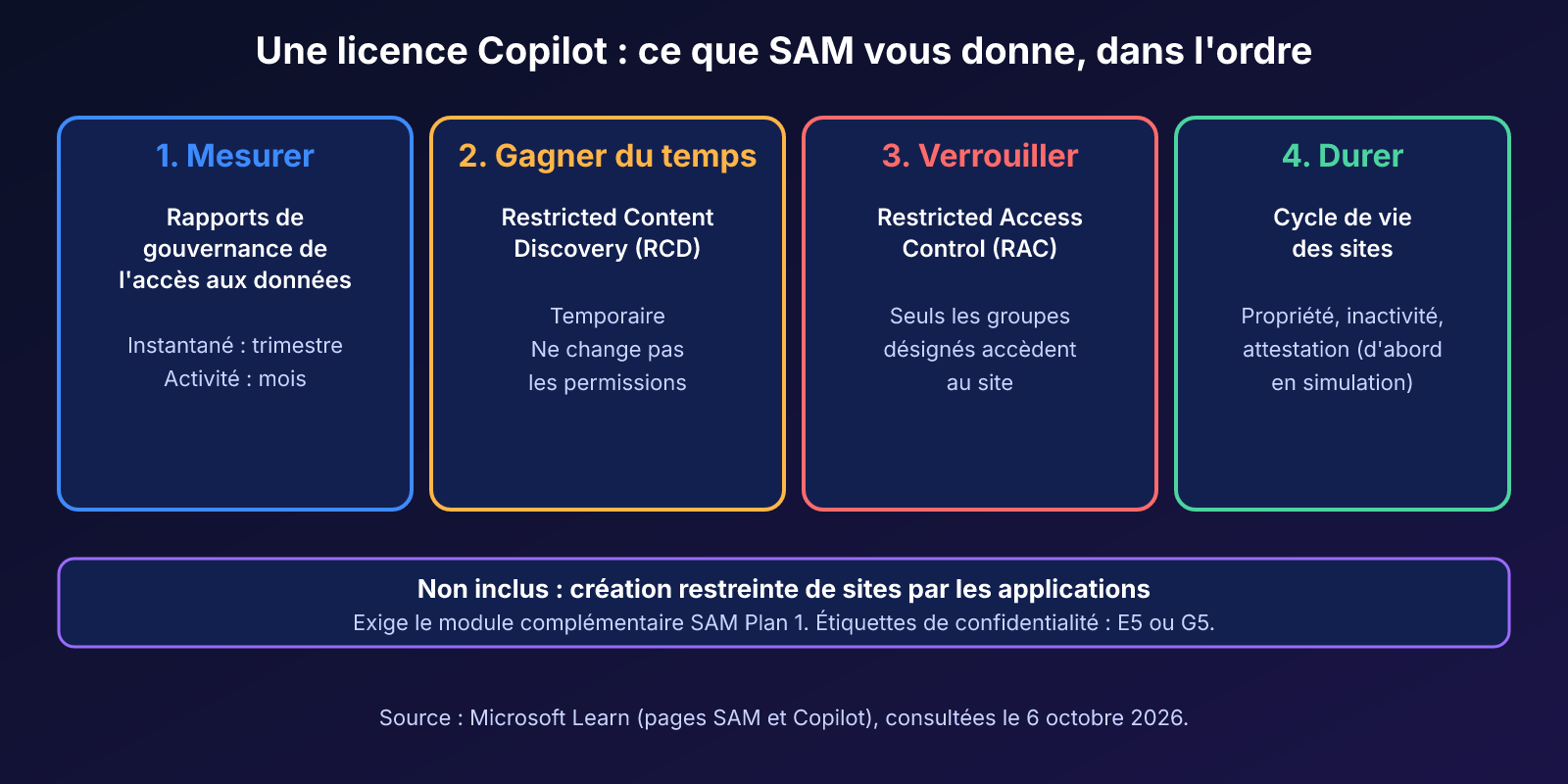
Three limits are worth knowing before you promise anything to your leadership. Restricted site creation by apps requires the SAM Plan 1 add-on. Advanced tenant renaming is not available in the GCC, GCC-High and DoD clouds. Finally, in commercial tenants, SAM is required beyond 10,000 sites.
10 000
Sites beyond which SAM is required (commercial tenants)
Microsoft Learn
10
Maximum groups per site for Restricted Access Control
Microsoft Learn
100
Maximum sites for Restricted SharePoint Search
Microsoft Learn
500 000
Items above which RCD propagation can take more than a week
Microsoft Learn
E5 alone does not unlock all of SAM
The Data Access Governance reports page specifies that an E5 administrator can view these reports, but not the other SAM features: no snapshots, no remediation actions. The help for Start-SPODataAccessGovernanceInsight states for its part that a SAM licence is required. Sensitivity labels require E5 or G5 and do not come with Copilot alone. So check what your tenant actually displays before building a plan.
Step 1: measure exposure with DAG reports
Data Access Governance (DAG) reports provide the quantified starting point for the audit. Two families coexist: snapshot reports, which capture the state of permissions, and activity reports, which cover the last 28 days (sharing links created, sharing with the whole organisation).
The site permissions report identifies the sites with the broadest access: thousands of users, external guests, the "Everyone except external users" group. A dedicated report also identifies files and folders made public through these special groups. Microsoft suggests one snapshot per quarter and one activity report per month.
In PowerShell, Start-SPODataAccessGovernanceInsight generates the reports and Get-SPODataAccessGovernanceInsight lists them. The SAM overview mentions other reports that are useful for a Copilot-focused audit: AI insights on DAG reports, a report on agents created in SharePoint, an agent access report, a permissions report for a given user, and the launch of site access reviews from a DAG report.
An illustrative scenario: after a first snapshot, you rank sites by extent of exposure and select the five most exposed. Those are the ones that will receive the controls in the following steps.
Step 2: buy time with Restricted Content Discovery
Restricted Content Discovery prevents a site's content from surfacing in organisation-wide search and in Copilot responses, including for recently accessed files. Microsoft Learn presents it as a temporary control, to give you time to review permissions (page updated on 22 September 2026).
In the SharePoint admin center, open the relevant site among the active sites, then the Settings tab. Enable the "Restrict content from Microsoft 365 Copilot" option, located next to "Restricted site access".
What RCD does and does not do:
- it does not change permissions: a user who already has access can open the content directly;
- it also removes the site's AI entry points, such as the Copilot button;
- it does not apply to OneDrive;
- it affects neither searches launched from within the site nor the summary of a document that is already open;
- the content remains in the index, so eDiscovery and Purview auto-labelling keep working.
The update is an index propagation effect: for a site with more than 500,000 items, it can take more than a week. Management of RCD can be delegated to site administrators through the DelegateRestrictedContentDiscoverabilityManagement parameter of Get-SPOTenant; they must then justify each change. Microsoft recommends sparing use, because excessive use impoverishes Copilot's responses.
In a July 2026 Tech Community post (updated in August), the FastTrack team recommends using RCD during the Copilot pilot, then disabling it after validation. It also suggests replacing "Anyone" links with scoped access with expiry, and running Entra access reviews on Microsoft 365 groups to spot stale memberships.
Restricted SharePoint Search is not a safe alternative
This other temporary control is not a security boundary. It is limited to 100 sites and Microsoft recommends disabling it once permissions are validated. A site that was recently accessed or shared via Teams or Outlook still appears in the results.
Step 3: lock down with RAC, then set up the lifecycle
Restricted Access Control (RAC) goes further than RCD: only members of the designated groups can access the site, even if they held a direct permission or a link. Each site accepts up to 10 security groups or Microsoft 365 groups, and both Copilot and search respect the policy. The feature must first be allowed at the tenant level with Set-SPOTenant -EnableRestrictedAccessControl $true, with a delay of up to one hour.
Lasting clean-up comes next: the ownership, inactive site and attestation policies do not delete any sites, they notify owners and administrators. Start in simulation mode and read the results before switching to active mode.

Implementation
This script checks your environment before the audit: availability of the DAG and RCD cmdlets, module version, state of RCD delegation. It can also enable RAC at the tenant level, but only if you ask it to, and it honours -WhatIf.
- Required module: Microsoft.Online.SharePoint.PowerShell, installed with
Install-Module -Name Microsoft.Online.SharePoint.PowerShell -Scope CurrentUser. - Permission: SharePoint Administrator or SharePoint Advanced Management Administrator role; check the prerequisites page to see which one suits your use.
- Output: a cmdlet availability table, the RCD delegation value, and the result of the RAC activation where applicable.
1[CmdletBinding(SupportsShouldProcess = $true)]2param(3 # Préfixe du locataire, par exemple contoso pour contoso-admin.sharepoint.com4 [Parameter(Mandatory = $true)]5 [string]$TenantName,6 7 # À fournir uniquement pour autoriser RAC à l'échelle du locataire8 [switch]$EnableRestrictedAccessControl9)10 11$ErrorActionPreference = 'Stop'12 13# 1. Vérifier la présence du module SharePoint Online14if (-not (Get-Module -ListAvailable -Name Microsoft.Online.SharePoint.PowerShell)) {15 throw 'Module absent. Exécutez : Install-Module -Name Microsoft.Online.SharePoint.PowerShell -Scope CurrentUser'16}17Import-Module Microsoft.Online.SharePoint.PowerShell -DisableNameChecking18 19# 2. Connexion au centre d'administration SharePoint20Connect-SPOService -Url ('https://{0}-admin.sharepoint.com' -f $TenantName)21 22# 3. Contrôler la disponibilité des cmdlets utilisées dans l'audit23$attendues = 'Start-SPODataAccessGovernanceInsight',24 'Get-SPODataAccessGovernanceInsight',25 'Get-SPORestrictedContentDiscoverabilityReport'26$disponibilite = foreach ($nom in $attendues) {27 $cmd = Get-Command -Name $nom -ErrorAction SilentlyContinue28 [pscustomobject]@{29 Cmdlet = $nom30 Disponible = [bool]$cmd31 Module = $cmd.Source32 Version = $cmd.Version33 }34}35$disponibilite | Format-Table -AutoSize36 37# 4. Lire (sans rien modifier) la délégation de la gestion de RCD38$tenant = Get-SPOTenant39Write-Host ('Délégation RCD aux administrateurs de site : {0}' -f $tenant.DelegateRestrictedContentDiscoverabilityManagement)40 41# 5. Activation facultative de RAC au niveau du locataire (propagation : jusqu'à une heure)42if ($EnableRestrictedAccessControl) {43 if ($PSCmdlet.ShouldProcess($TenantName, 'Set-SPOTenant -EnableRestrictedAccessControl $true')) {44 Set-SPOTenant -EnableRestrictedAccessControl $true45 Write-Host 'RAC autorisé au niveau du locataire.'46 }47}To generate DAG reports, do not copy an example found elsewhere: the parameters depend on the module version. Read the exact syntax with the two commands below.
1Get-Command -Name Start-SPODataAccessGovernanceInsight -Syntax2Get-Help -Name Get-SPODataAccessGovernanceInsight -FullRAC is a tenant-wide setting
Allowing RAC changes a global setting. Run the script with -WhatIf first, then without -EnableRestrictedAccessControl for a simple check. Then apply the policy site by site, starting with a pilot site, because a poorly calibrated policy cuts off access for legitimate users.
Troubleshooting
| Symptom | Probable cause | Resolution |
|---|---|---|
| A site's content still appears in Copilot after enabling RCD | Index propagation in progress; beyond 500,000 items, more than a week | Wait, track progress with Get-SPORestrictedContentDiscoverabilityReport, then retest |
| A user can still open the content of a site under RCD | RCD does not change permissions | Fix the permissions, or use RAC to restrict access |
| RAC has no effect right after activation | Tenant setting propagation delay (up to one hour) | Wait, then recheck the site policy |
| DAG reports without snapshots or remediation actions | Entitlements coming from an E5 licence alone, without SAM | Assign a Copilot licence or the SAM Plan 1 add-on, then recheck the display |
| Restricted site creation by apps unavailable | Feature not included with the Copilot licence | Acquire the SAM Plan 1 add-on |
| A site under Restricted SharePoint Search still surfaces | Site recently accessed or shared via Teams or Outlook | Do not treat it as a security boundary; fix the permissions |
Post-deployment checks
To validate once the controls are applied
- The three audit cmdlets are available and the module is up to date.
- The five most exposed sites are under RCD or RAC, and propagation is being tracked.
- Lifecycle policies are running in simulation mode.
- RCD delegation matches your governance choice.
Frequently asked questions
Do I need a Copilot licence for every SharePoint administrator?
No. According to the Learn prerequisites page, it is enough for at least one user in the tenant to hold a Copilot licence, and that user does not need to be an administrator. Your administrators must, however, hold the SharePoint Administrator or SharePoint Advanced Management Administrator role.
What if I do not have Copilot?
Two other paths exist: the SAM Plan 1 add-on for SharePoint K, P1 or P2 subscriptions, or Microsoft 365 E7. The add-on is also the only option for restricted site creation by apps.
Are RCD and RAC interchangeable?
No. RCD hides content from search and Copilot without touching permissions, and it is presented as temporary. RAC genuinely restricts access to the members of the designated groups, up to 10 groups per site.
Are sensitivity labels included with Copilot?
No. The Learn page states that sensitivity labels require E5 or G5. They are therefore not provided by the Copilot licence alone.
Where to start this week
The obstacle to auditing oversharing is no longer the licence, it is time. A narrow scope, five sites and one report, is better than a large project waiting for its budget.
Five-day action plan
- Confirm that at least one Copilot licence is assigned and that administrators have the right role.
- Run the check script, then generate the site permissions report and note the five most exposed sites.
- Apply RCD to those sites for the duration of the review, and track propagation.
- Create a site ownership policy in simulation mode and read the results before activation.
- Schedule a quarterly snapshot and a monthly activity report.
If your organisation is preparing a Copilot pilot, use RCD during the pilot and then lift it once permissions are validated, as the FastTrack team suggests. If your sensitive data must remain durably compartmentalised, aim for RAC rather than prolonging a temporary control. For Quebec organisations, personal information exposed through oversharing may constitute unauthorised access within the meaning of section 3.6 of the Act respecting the protection of personal information in the private sector: validate this point with your person in charge of personal information protection.
To frame the audit within a broader programme, see our technical checklist for preparing a Microsoft 365 tenant for Copilot and our governance strategies against data exposure.
Going further
- Prerequisites for SharePoint Advanced Management: the three licensing paths, the administration roles and the PowerShell setup.
- SharePoint Advanced Management features in Microsoft Copilot licenses: the table of included features by cloud and the restricted site creation exception.
- Restrict discovery of SharePoint sites and content (Restricted Content Discovery): prerequisites, delegation, monitoring and propagation delays for RCD.
- Limiting Microsoft 365 Copilot data exposure risk with Zero Trust apps and data controls: FastTrack best practices for reducing oversharing before a broad deployment.
- SharePoint Advanced Management overview: the up-to-date overview of SAM features, including the agent-related additions.