
Introduction: A Performance Challenge in Entra Environment
Integrating identities with Microsoft Entra ID imposes architectural constraints very different from those of traditional FIM/MIM environments. While the Synchronization Service processes modifications in batches, the Entra outbound provisioning service dispatches each change individually to the local provisioning agent, creating a workload fundamentally opposed to that of parallelized imports.
This distinction explains why PowerShell 7, excellent for massive imports (10k+ objects), becomes counterproductive during exports with the ECMA Connector Host (ECMA2Host). Version 6.1.0604.2026 and later of the PSMA Granfeldt connector introduce a solution: a mechanism for selecting the PowerShell engine per connector.
Understanding Workload Asymmetry: Imports vs Exports
Behavior in FIM/MIM Synchronization Service
In classic FIM/MIM environments, the PowerShell engine starts once at the beginning of an execution step and processes the entire batch. The cost of starting the Common Language Runtime (CLR) is paid only once, making the choice of engine almost irrelevant to overall throughput.
Entra Outbound Provisioning Event Architecture
The situation diverges radically with Microsoft Entra:
- Each modification (user addition, deletion, or update) generates a distinct event
- The provisioning agent transfers them one by one to ECMA2Host
- ECMA2Host invokes the connector once per object
- A new child PowerShell process is created for each event
In this model, the process startup cost dominates the total time per event. PowerShell 7 (pwsh.exe) entails:
- A full CoreCLR startup
- Runspace initialization
- Module discovery
- Typically 9 to 11 seconds before the first business code executes
In contrast, Windows PowerShell 5.1 runs in-process within the ECMA2Host service without a separate CLR startup, starting in less than one second.
Critical Timeout Risk
Microsoft Entra enforces a strict timeout of 60 seconds per event. When time per event approaches or exceeds this threshold, events return an error, quarantining the connector even if the target application actually processed the changes. The combination of "serial dispatch + 60-second ceiling + cold startup pwsh.exe" creates a high risk of false timeout positives.
The Solution: PowerShell Engine Selection per Export
New Checkbox in Global Parameters
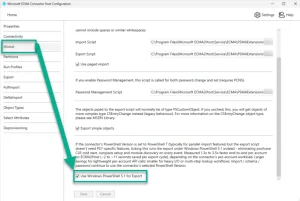
The PSMA connector now exposes a granular option on the global parameters page:
- Use Windows PowerShell 5.1 for Export
If the connector's PowerShell version is set to PowerShell 7 (typically for parallel import features) but the export script doesn't require PS7-specific features, enabling this checkbox executes the export under Windows PowerShell 5.1 instead.
Key Points of This Implementation
- Disabled by default for backward compatibility
- Controllable independently per connector: each connector can have its own configuration
- Measured production gains: between 1.3x and 3.5x faster depending on workload, saving 2 to 11 seconds per export event
Measuring Your Own Performance: The PSMA-Validation Tool
Why Empirical Validation?
Performance gains depend heavily on:
- The specific logic of your export scripts
- Network latency between the ECMA2Host server and the target API
- The workload per account that your scripts execute
- The integration protocol used
Microsoft has published a complementary tool to eliminate guesswork: PSMA-Validation.
Installing and Using PSMA-Validation
The tool comes as a single PowerShell module to be deployed on the ECMA2Host server and integrated into your existing export.ps1 script.
Integrate the module in Begin/Process/End phases
Add three lines to your export.ps1 script:
1Begin {2 . 'C:\ProgramData\PsmaValidation\PSMA-Validation.ps1'3 Write-PsmaProbe -Phase Begin4 5 # ...your existing Begin code...6}7 8Process {9 Write-PsmaProbe -Phase Process -Identifier $identifier10 11 # ...your existing Process code...12}13 14End {15 Write-PsmaProbe -Phase End16 17 # ...your existing End code...18}Capture data on both engines
The module records a JSON per phase in C:\ProgramData\PsmaValidation\probe.jsonl. Capture thirty minutes of cycles under PowerShell 7, then the same workload under Windows PowerShell 5.1.
Analyze results
Run the analyzer:
1. 'C:\ProgramData\PsmaValidation\PSMA-Validation.ps1'2Get-PsmaProbeSummaryYou get a breakdown per cycle:
- Process spawn time
- Script active time
- Inter-cycle gap (ECMA2Host architectural overhead)
- A final verdict recommending whether or not to enable the engine switch
Clean up after validation
Once you've made your decision, remove the three Write-PsmaProbe calls. No other cleanup needed.
PSMA-Validation Characteristics
The probe is non-intrusive, append-only, imposes an overhead of 5–20 ms per invocation, cross-process thread-safe, and its failures are silent: a log write failure never breaks an export.
Adapting Your Script to Windows PowerShell 5.1
Backward Compatibility: Most Scripts Work Without Modification
The majority of export scripts written for PowerShell 7 run without changes under Windows PowerShell 5.1. Only exceptions: a small set of constructors and behaviors specific to PS7 requiring adaptation.
PowerShell 7 Constructs to Replace
| PowerShell 7 Construct | Replacement compatible 5.1 and 7 | Notes |
|---|---|---|
| Null-coalescing operator (??) | Explicit if/elseif/else chain | The replacement works on both versions |
| try { } catch { } as RHS expression | try as independent statement | Separation of logic |
| Non-ASCII characters in single-quoted strings (→, —, smart quotes) | ASCII equivalents (->, --, ', ") | Avoids variable encodings |
| ConvertFrom-Json returning Double (PS7) vs Decimal (5.1) | Explicit cast [string][int64] at entry point | Normalizes data type |
| Add-Type with C# blocks referencing System.Net.Http | Explicit parameter -ReferencedAssemblies 'System.Net.Http' | Explicit assembly loading |
| Invoke-WebRequest default IE COM (fails NetworkService on 5.1) | Add -UseBasicParsing (no-op on PS7) | Ensures account compatibility |
Good to Know
Each of these replacements remains benign on PowerShell 7: the replaced code continues to work on PS7. An export script updated for 5.1 compatibility remains drop-in compatible with the PS7 path. You can toggle the checkbox without rewriting.
Progressive Migration Strategy
If a connector script cannot be updated immediately, simply leave the checkbox unchecked. The connector will continue to execute exports under PowerShell 7 exactly as before. This flexibility enables gradual per-connector transition without global blocking.
Deployment and Configuration
Versioning and Distribution
The feature is available in assembly version 6.1.0604.2026 and later of the PSMA Granfeldt. As with PS7 support for imports, the DLL is shared among all connectors on a given ECMA2Host server:
- Single deployment per ECMA2Host server
- Activation per connector as needed
Download Resources
- Source code and compiled binaries: Granfeldt PSMA GitHub Repository
- Companion validation tool: github.com/darrenjrobinson/PSMA-Validation
Deployment Best Practices
Test the PSMA-Validation tool first on a non-critical connector to validate gains before enabling the checkbox in production. Document your results and reuse the values for similar connectors.
Summary of Benefits
This enhancement to the PSMA Granfeldt connector directly addresses the architectural constraints of Microsoft Entra provisioning:
- Eliminates unnecessary cold-starts of pwsh.exe during serial exports
- Reduces critical timeout risk (60 seconds) in production
- Maintains PowerShell 7 for parallel imports with high performance
- Provides necessary instrumentation (PSMA-Validation) to decide empirically
- Offers per-connector granularity: tailor each integration to its specific workload
For large-scale Entra outbound provisioning environments, the targeted shift of exports to Windows PowerShell 5.1 represents a measurable gain in latency, reliability, and resilience against timeouts.