
What's New in the Multilingual Post-Stream Refinement Preview
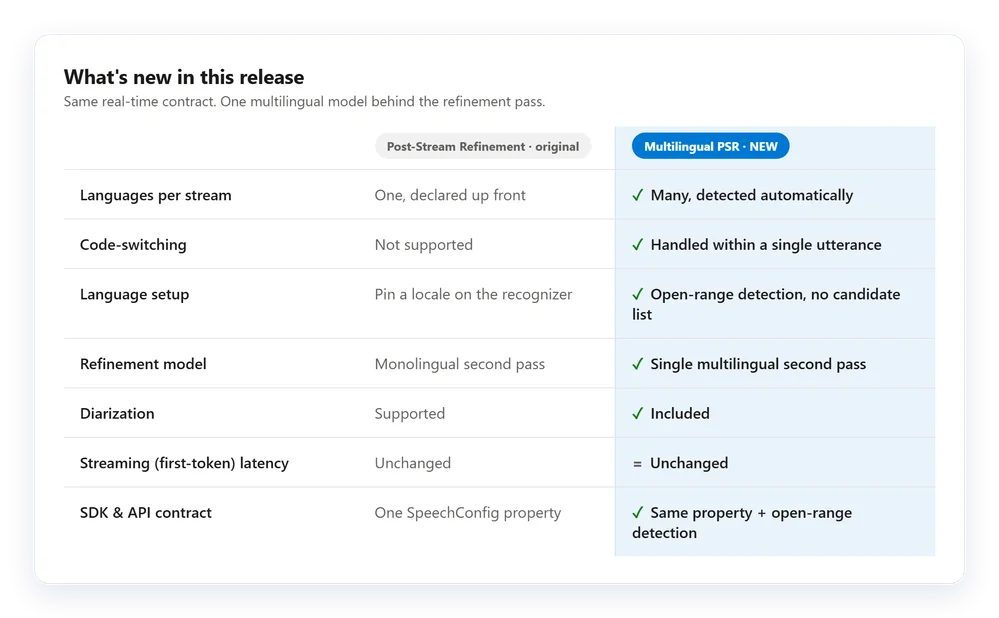
Previously, Post-Stream Refinement in Azure AI Speech (Microsoft Foundry) imposed a strict constraint: you had to declare a single locale before opening the audio stream. This requirement is now lifted. Multilingual Post-Stream Refinement enters public preview and enables, for the first time, a single real-time stream to recognize multiple languages within the same session, without candidate lists or prior locale declaration.
The engine automatically detects the spoken language, handles code-switching within the same utterance, and produces a refined final transcript. The latency of partial results (first token) remains unchanged — only the final segment benefits from the refinement pass.

Functional Context
Post-Stream Refinement combines the responsiveness of real-time streaming and the precision of a refinement model applied to the final transcript. The multilingual variant extends this pipeline to automatic language detection without modifying the latency contract for intermediate results.
Prerequisites Before You Start
Before enabling the feature in production, verify that your environment meets the following conditions:
- Speech SDK version 1.50 or later — earlier versions do not support the multilingual path. Update the Python package:
pip install azure-cognitiveservices-speech>=1.50.0. - Azure AI Speech resource deployed in one of the supported regions (see dedicated section below).
- Subscription key or managed identity with at least the
Cognitive Services Speech Userrole on the resource. - No candidate language list to provide: the
AutoDetectSourceLanguageConfig()configuration is instantiated without arguments.
SDK Version
If you are using Speech SDK < 1.50, calling AutoDetectSourceLanguageConfig() without arguments combined with PostRefinement will return an SPXERR_INVALID_ARG error. Check the installed version with pip show azure-cognitiveservices-speech before any deployment.
Supported Languages and Regions in Preview
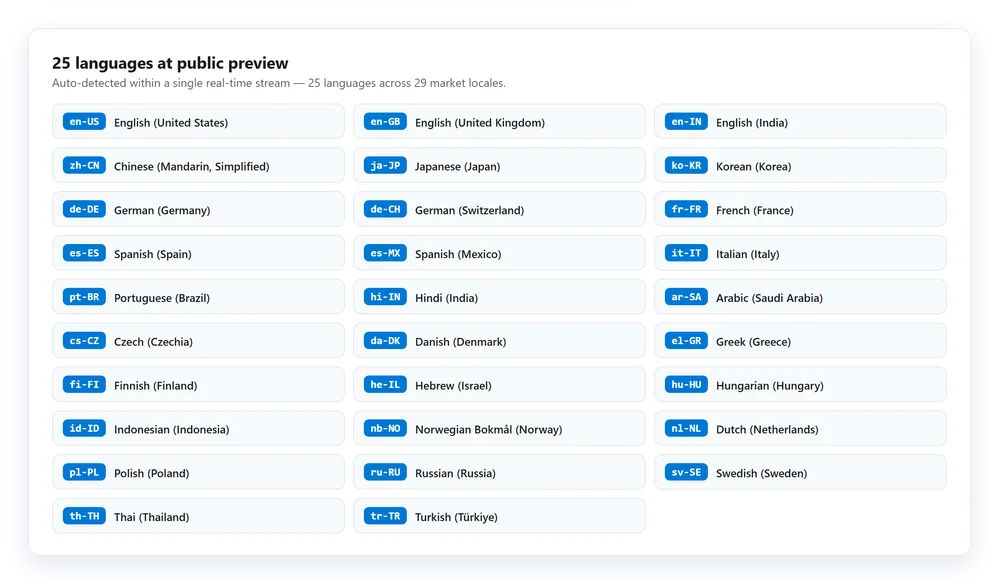
The preview covers 25 automatically detected languages, distributed across 29 market locales. Any combination of these languages can appear in the same stream without additional configuration.
The feature is available in the following six Azure regions:
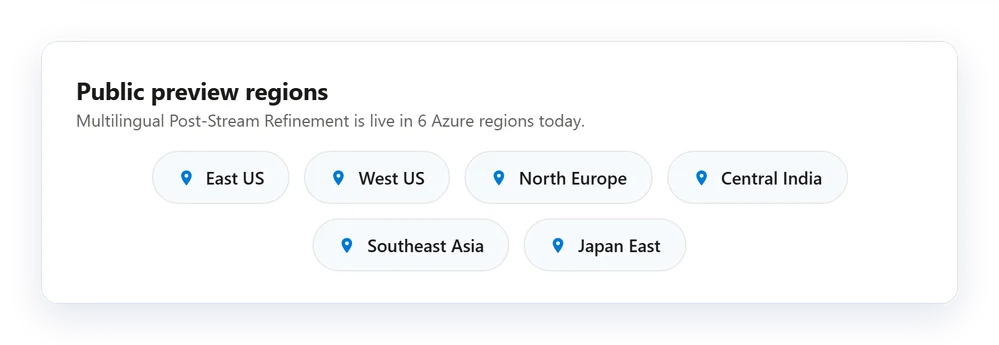
| Azure Region | Internal Name |
|---|---|
| East US | eastus |
| West US | westus |
| North Europe | northeurope |
| Central India | centralindia |
| Southeast Asia | southeastasia |
| Japan East | japaneast |
Regional Availability
If your Speech resource is hosted in a region outside this list (for example francecentral or westeurope), the multilingual refinement pass will not be available. You will need to create a new resource in one of the six supported regions or redirect your traffic.
Measured Quality Impact
Internal and partner evaluations on Tier-1 locales show the following gains:

- Reduction in Word Error Rate (WER) of approximately 10% on average for Tier-1 locales.
- Double-digit reductions on challenging cases: long utterances, proper nouns and named entities, mixed speech or code-switching.
- Partial results latency unchanged — only the latency of the final segment may increase slightly.
These figures are relative improvements compared to the standard real-time model. They vary depending on language, acoustic conditions, and content type.
Priority Use Cases
Refinement provides the most value to pipelines that retain the final transcript: meeting notes, call center analysis, compliance archiving, automatic AI summarization. If your application only consumes partial results for real-time display and discards them afterwards, the user experience remains identical, but any persisted transcript will benefit from improved accuracy.
Step-by-Step Activation
Install or Update the Speech SDK
Check the installed version, then update if necessary.
1# Check current version2pip show azure-cognitiveservices-speech3 4# Update to minimum required version5pip install --upgrade "azure-cognitiveservices-speech>=1.50.0"Expected result: Version: 1.50.x or higher in the output of pip show.
Retrieve Your Speech Resource Key and Region
From the Azure portal, navigate to your Speech resource > Keys and Endpoint. Copy KEY 1 and the Location/Region value (short format, e.g. eastus).
Alternatively, via Azure CLI:
1# List Speech resources in the tenant2az cognitiveservices account list `3 --query "[?kind=='SpeechServices'].{name:name, region:location, rg:resourceGroup}" `4 --output table5 6# Retrieve the primary key7az cognitiveservices account keys list `8 --name "<ResourceName>" `9 --resource-group "<RGName>" `10 --query "key1" `11 --output tsvMinimum required permission: Cognitive Services Speech User on the resource, or Reader + Cognitive Services Speech User.
Configure and Instantiate the Multilingual Recognizer
Here is the complete, ready-to-use Python code with all named parameters:
1import azure.cognitiveservices.speech as speechsdk2 3# --- Basic Configuration ---4speech_config = speechsdk.SpeechConfig(5 subscription="YourSpeechKey",6 region="YourSpeechRegion") # e.g. "eastus"7 8# --- 1) Enable Post-Stream Refinement Pass ---9speech_config.set_property(10 speechsdk.PropertyId.SpeechServiceResponse_PostProcessingOption,11 "PostRefinement")12 13# --- 2) Automatic Multilingual Detection (no candidate list) ---14auto_detect_config = speechsdk.languageconfig.AutoDetectSourceLanguageConfig()15 16# --- Audio Source: Default Microphone (replace with AudioConfig(filename=...) for a file) ---17audio_config = speechsdk.AudioConfig(use_default_microphone=True)18 19# --- Recognizer Instantiation ---20recognizer = speechsdk.SpeechRecognizer(21 speech_config=speech_config,22 auto_detect_source_language_config=auto_detect_config,23 audio_config=audio_config)24 25# --- Continuous Recognition with Callbacks ---26def on_recognized(evt):27 result = evt.result28 lang = result.properties.get(29 speechsdk.PropertyId.SpeechServiceConnection_AutoDetectSourceLanguageResult,30 "unknown")31 print(f"[{lang}] {result.text}")32 33recognizer.recognized.connect(on_recognized)34recognizer.start_continuous_recognition()35 36input("Press Enter to stop...\n")37recognizer.stop_continuous_recognition()The SpeechServiceConnection_AutoDetectSourceLanguageResult property returns the BCP-47 language code of the detected language (e.g. fr-FR, en-US) in each final result.
Verify That the Refinement Pass Is Active
To confirm that PostRefinement is properly applied, enable detailed SDK logging:
1import azure.cognitiveservices.speech as speechsdk2 3speech_config = speechsdk.SpeechConfig(4 subscription="YourSpeechKey",5 region="YourSpeechRegion")6 7# Enable SDK logging to a local file8speech_config.set_property(9 speechsdk.PropertyId.Speech_LogFilename,10 "speech_sdk.log")11 12speech_config.set_property(13 speechsdk.PropertyId.SpeechServiceResponse_PostProcessingOption,14 "PostRefinement")In the speech_sdk.log file, search for the string PostRefinement to confirm that the option is transmitted to the service. The absence of this string indicates that the property was not correctly set or that the SDK version is too old.
Troubleshooting Common Errors
Most common cause: SDK version below 1.50. Check with pip show azure-cognitiveservices-speech. If the version is correct, verify that AutoDetectSourceLanguageConfig() is instantiated without arguments (the candidate list must be absent for open multilingual mode).
Make sure that the SpeechServiceConnection_AutoDetectSourceLanguageResult property is read from result.properties and not from result.language (separate field). Also verify that your resource region is in the list of six supported regions.
Check in the logs that the string PostRefinement appears correctly. If you only consume recognizing events (partial results), refinement is only visible on recognized events (final result). Adjust your callbacks accordingly.
The user account does not have the Cognitive Services Speech User role on the resource. Assign this role via the Azure portal > your Speech resource > Access Control (IAM) > Add Role Assignment, or via PowerShell: New-AzRoleAssignment -ObjectId <PrincipalId> -RoleDefinitionName 'Cognitive Services Speech User' -Scope <ResourceId>.
Considerations for Production Deployment
Public Preview: SLA and Stability
This feature is in public preview. It is not covered by a Microsoft production SLA. Do not enable it on regulatory compliance flows or legal archives without first validating results on your actual audio corpus.
Points to anticipate before moving to production:
- Final segment delay: the refinement pass adds latency to the last result of each utterance. Measure this gap on your representative audio data before setting your application SLOs.
- Quota and pricing: Multilingual Post-Stream Refinement relies on the same Speech resource as your other calls. Check your quotas in the Azure portal > your resource > Metrics. The pricing applicable to the preview is documented on the Azure AI Speech pricing page.
- Residency (data residency): if your compliance requirements mandate that audio data remain in a specific geography, verify that the target region is in the list of six supported regions and matches your regulatory scope.
- Diarization included: the multilingual pass integrates diarization (speaker identification). No additional configuration is required, but verify that your downstream pipelines can consume this field if you need it.