
Frontier: the Copilot early access program
You discover a new Microsoft Copilot feature on LinkedIn, you open your tenant to test it — and it's nowhere to be found. This scenario is common. The person giving the demo is very likely enrolled in the Microsoft Frontier program, the early access mechanism for Microsoft 365 AI capabilities.
Frontier is not just for the curious. For IT teams and MSPs (Managed Service Providers), it's a concrete lever to anticipate changes before they reach production environments.
Preview features
Experiences accessible via Frontier are preliminary versions. The interface, behavior, and licensing conditions may change before general availability.
What Frontier brings concretely
Frontier provides access to new Copilot features before their general rollout. What sets it apart from a simple beta program is its level of control: configuration is performed at the tenant level, and the administrator determines precisely which users or groups receive access.
Typical use cases:
- Internal IT teams wanting to test new Copilot capabilities upstream
- Designated AI champions in the organization
- MSP teams wanting to gain experience before their customers ask questions
- Building documentation and training materials before broader deployment
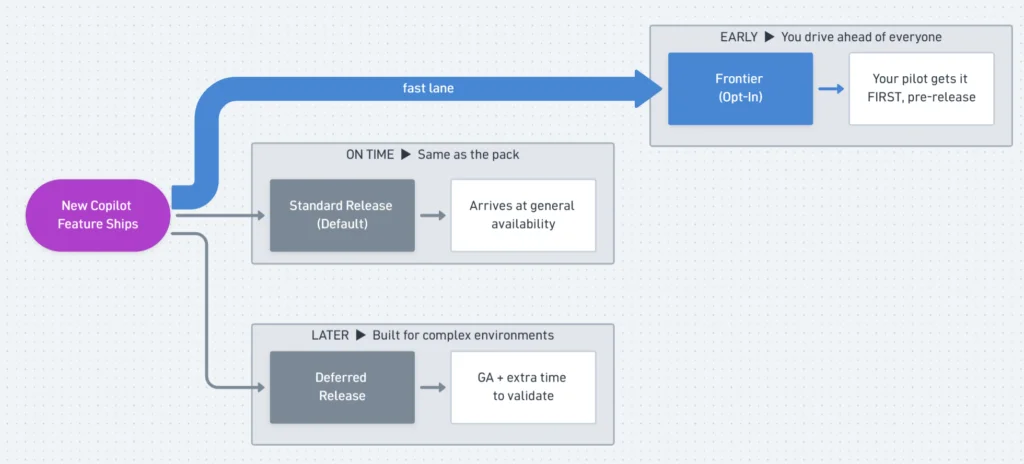
Prerequisites before activation
Before configuring Frontier, verify the following points:
- Eligible Microsoft Copilot subscription: an active subscription is required; Frontier is not available without a Copilot license.
- Appropriate administrative role: the Global Administrator role allows you to configure settings. Microsoft also offers more limited roles dedicated to managing AI and Copilot capabilities.
- Test tenant vs. production: in a production environment, favor a restricted pilot group rather than general deployment.
Propagation delay
Activating Frontier does not make features immediately available to all users. Allow up to 24 hours in some cases before new experiences appear.
Enable Microsoft Frontier from the admin portal
Access the Copilot section
In the Microsoft 365 Admin Center, navigate to the Copilot section in the main navigation menu.
Open settings
Click on Settings, then select View all to display all available options.
Locate Frontier
Find the Frontier entry in the settings list.
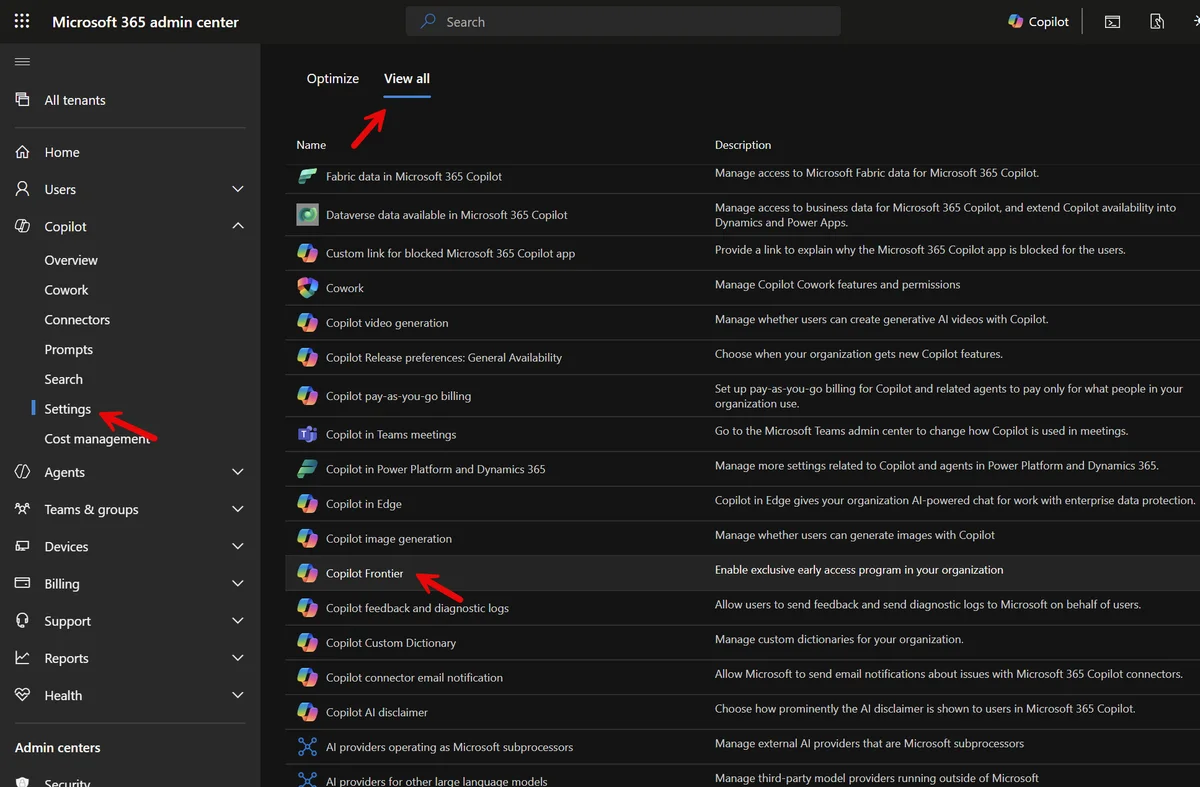
Target users or groups
Select the users or security groups who should receive early access. In production, start with a restricted group: IT administrators, AI champions, pilot users.
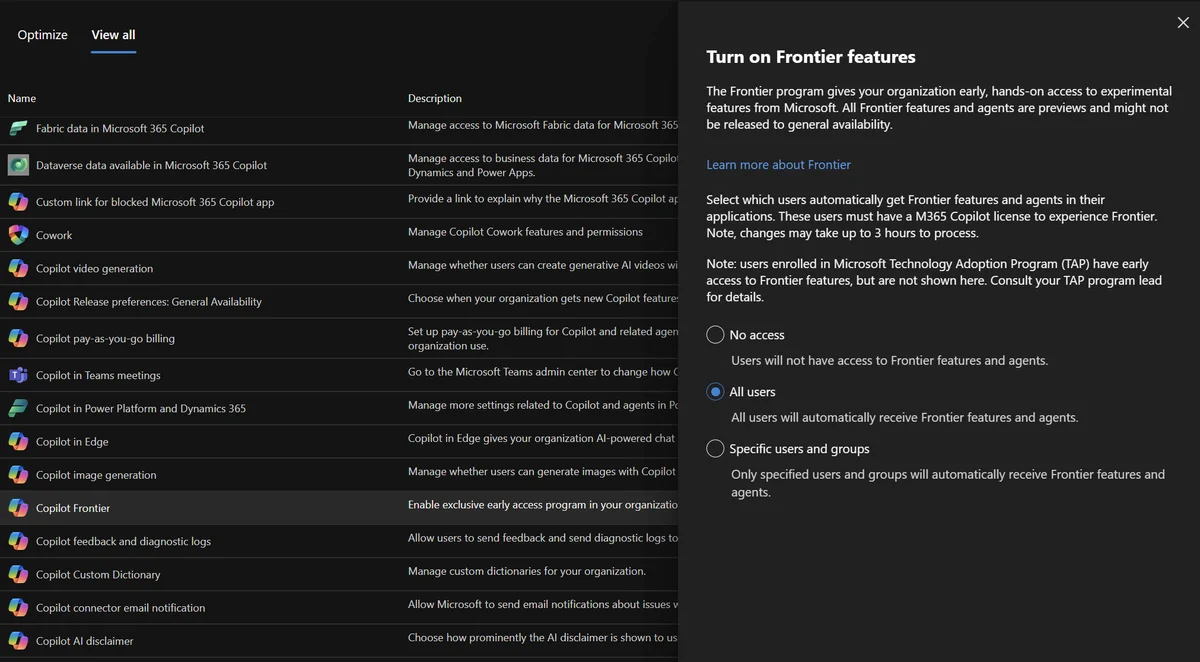
Save changes
Save the configuration. Targeted users will begin to see Frontier features according to the propagation delay specific to each experience.
Don't forget agent configuration
Some early-access Copilot experiences are distributed as Microsoft agents. If the organization has disabled Microsoft-built applications and agents, activating Frontier alone will not be sufficient to make these experiences accessible.
In the Microsoft 365 Admin Center, check the Agents section and confirm that apps and agents built by Microsoft are authorized.
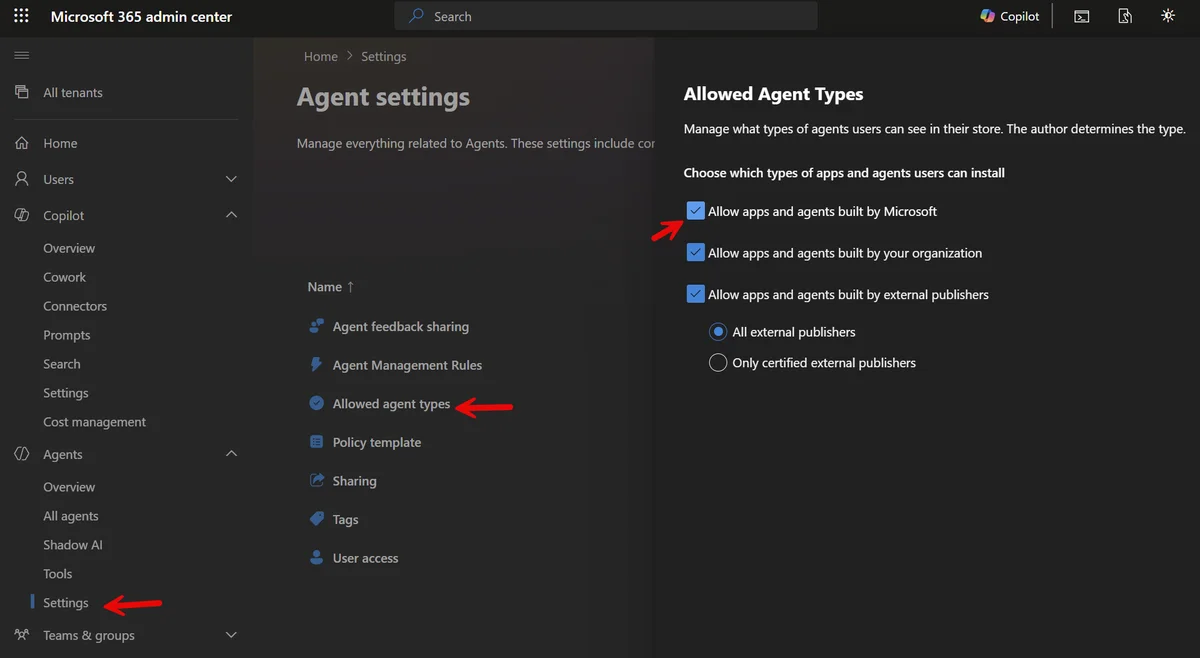
Individual agent targeting is also available. It is thus possible to activate Frontier for a broader pilot group while limiting the installation of a specific experimental agent to a restricted subset of users.
Deployment strategy
Combine Frontier targeting at the tenant level with individual agent targeting to refine the scope of exposure based on the maturity of each feature.
Strategic value for MSPs and IT teams
Frontier is not a gadget reserved for early adopters. Its true value is operational preparation.
Without early access, IT teams discover Copilot changes at the same time as end users — sometimes when tickets start arriving. With Frontier, the cycle reverses:
- Features are tested upstream
- Internal documentation is produced before deployment
- Rollout decisions (broad activation, limited group, deactivation) are made with full knowledge
For MSPs, the advantage is even more direct. Testing new capabilities in your own tenant before they appear in customer environments allows you to answer questions, anticipate support requests, and provide structured recommendations.
Key takeaways
- Microsoft Frontier is the early access program for Copilot features in Microsoft 365, configured at the tenant level.
- Activation requires an eligible Microsoft Copilot subscription and appropriate administrative rights.
- Configuration is performed in the Microsoft 365 Admin Center > Copilot > Settings > View all > Frontier.
- Verify that Microsoft agents are authorized in the Agents section of the portal, otherwise you may miss certain experiences.
- In production, deploy Frontier to a restricted pilot group before considering broader activation.
- Allow up to 24 hours before new features effectively appear for targeted users.