
If your users open Copilot from m365.cloud.microsoft, their address is changing: Microsoft is consolidating everything under copilot.cloud.microsoft. A proxy or firewall that still filters the cloud.microsoft domain can then cut off Copilot in the browser, in Edge and in the desktop app. You will know what to allow, how to test it from a workstation and how to tell a network problem from a licence problem.

What Microsoft is changing, and what stays the same
Microsoft has renamed Microsoft 365 Copilot to Microsoft Copilot, and Microsoft 365 Copilot Chat to Microsoft Copilot Chat. The app's main address is copilot.cloud.microsoft, as stated on the Microsoft Learn page on Microsoft Copilot requirements. m365.cloud.microsoft was introduced in January 2025, with automatic redirection from office.com and microsoft365.com; according to the Microsoft support page on the app transition, the old addresses now redirect to the new one.
Two Message center advisories frame the change:
- MC1454108 (published 13 August 2026, updated 2 September): the app becomes unified for personal and work accounts, with a simplified name, a new icon and the new web address. Microsoft states that security, compliance and enterprise controls do not change, and that the Application ID stays the same: your existing policies continue to apply.
- MC1462915 (published 27 August, updated 21 September): the network side. Background services and Copilot in Edge require a connection to
*.cloud.microsoft.
On the user side, a different background colour and the "Work" label in the navigation pane appear with a work or school account. For support, this is a practical clue: a screenshot without this label suggests a sign-in with a personal account.
Two advisories, two timelines: what can be stated as of 9 October 2026
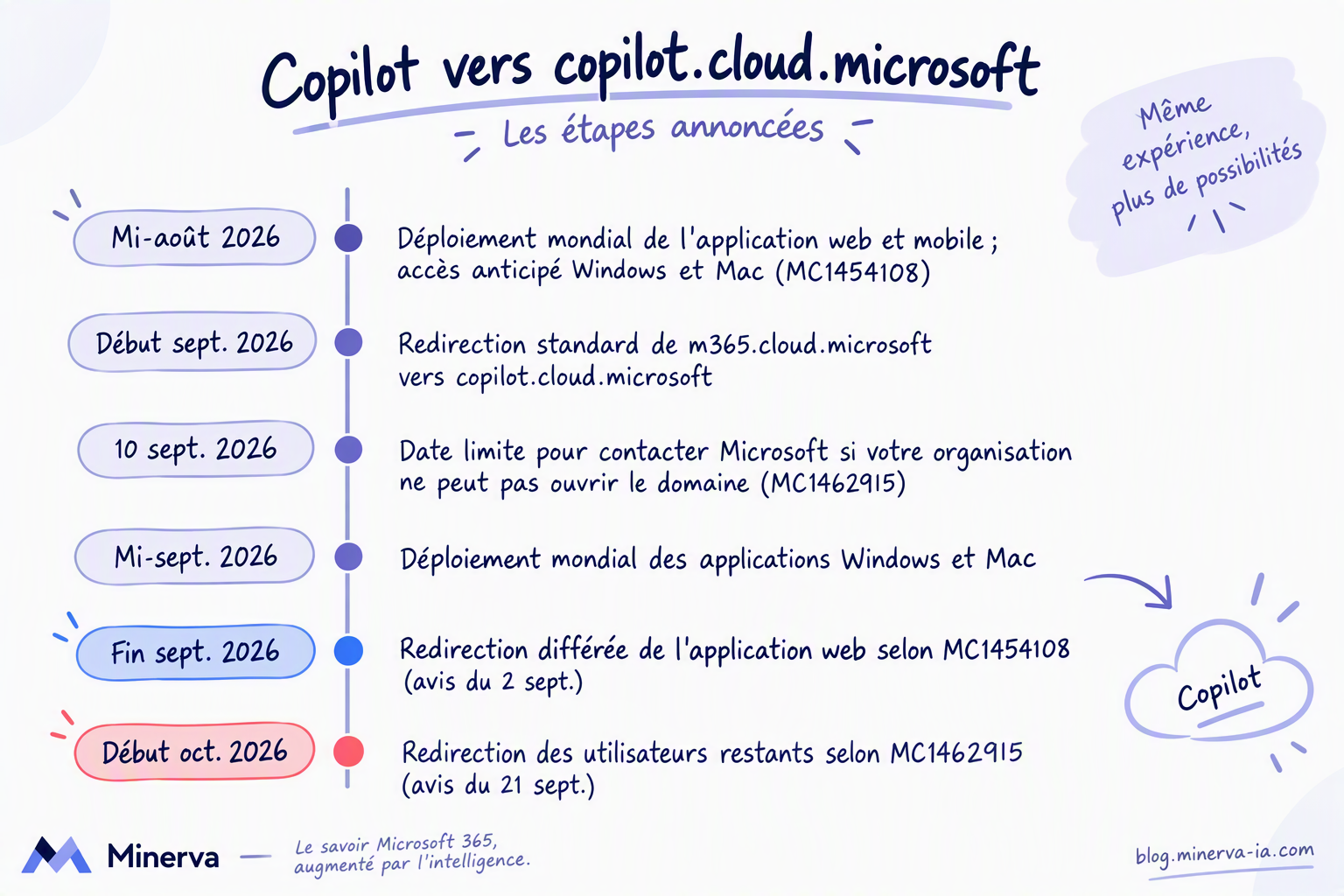
The two advisories do not give the same timeline. MC1454108 (updated 2 September) mentions a standard redirect from early September, then a deferred rollout in late September for the web app. MC1462915 (updated 21 September) states that users not redirected in September will be redirected in early October, and explicitly targets organisations that may have been blocking the address.
The most recent advisory prevails, but it sets no precise date. The release notes for Edge 156 beta (6 October) and Edge 155 stable (8 October) repeat the announcement "Update allow lists to *.cloud.microsoft before the Copilot URL redirect" and point to MC1462915. As of 9 October 2026, treat the redirect as imminent or already under way for your tenant.
January 2025
m365.cloud.microsoft introduced
Automatic redirection from office.com and microsoft365.com to the new address.
13 and 27 August 2026
MC1454108 then MC1462915 published
The first advisory announces the unified app, the second asks you to open *.cloud.microsoft.
Early September 2026
Standard redirect
Initial timeline from MC1454108, followed by a deferred rollout in late September for the web app.
10 September 2026
Deadline to contact Microsoft
Date set by Microsoft for organisations that could not open the domain. Your Microsoft representative remains the right contact.
Early October 2026
Redirect of remaining users
Timeline from MC1462915 (updated 21 September), with no specific day.
6 and 8 October 2026
Reminder in the Edge release notes
Edge 156 beta and Edge 155 stable ask you to update allow lists before the redirect.
Why allow all of *.cloud.microsoft, and not just a few addresses
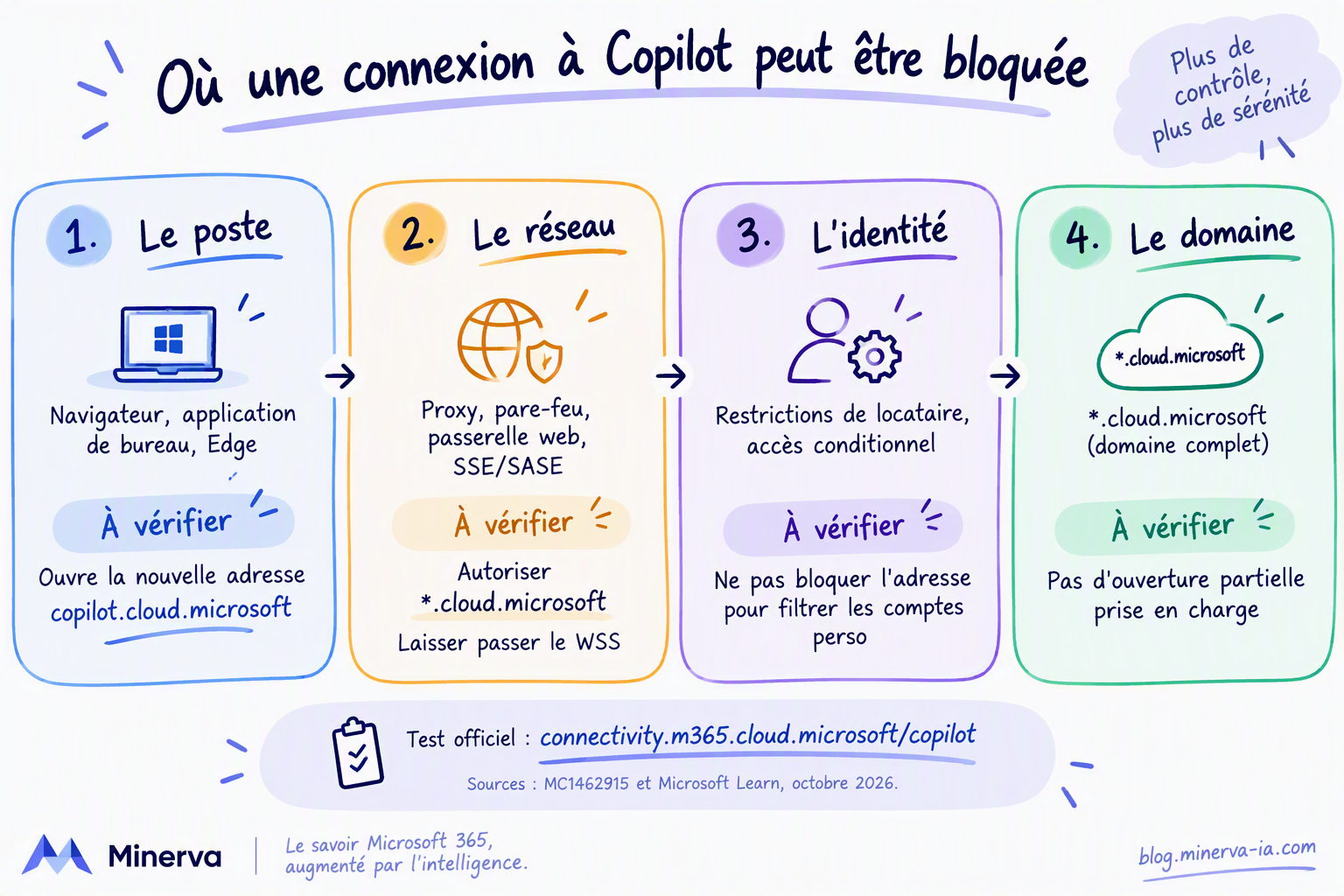
The Microsoft Learn documentation asks you to add *.cloud.microsoft to allow lists, on devices as well as in the network infrastructure. Microsoft does not support partially allowing this domain and advises against blocking individual domains or URLs, as the Manage Microsoft Copilot Chat page reminds us.
The logic lies in the design of the domain: cloud.microsoft groups Microsoft 365 apps under a single address, within the .microsoft top-level domain of which Microsoft is the sole registrant. The Unified cloud.microsoft domain for Microsoft 365 apps page specifies that it hosts neither third-party sites nor IaaS- or PaaS-type storage. A wildcard on this domain therefore does not open the door to third-party content, which makes the rule less risky than a wildcard on a public domain.
These addresses have appeared in the Microsoft 365 network guidance since 2023. If your rules are fed by the endpoints web service API, you are already covered; if you maintain them by hand, now is the time to check.
No address-by-address opening
Allowing only copilot.cloud.microsoft is not a supported configuration. Background services and Copilot in Edge rely on other addresses in the same domain.
WSS and TLS inspection: the quiet trap
Full secure WebSocket (WSS) connections must be opened to *.office.com, *.cloud.microsoft and copilot.cloud.microsoft. TLS inspection that gets in the way, or a proxy with timeouts that are too short, can break Copilot integrations: the page loads, but the assistant stays silent or disconnects. Microsoft offers a connectivity test dedicated to the Copilot app, in addition to the broader Microsoft 365 Connectivity Test tool.
Personal accounts: tenant restrictions rather than blocking
The app accepts work and personal accounts. If you were blocking copilot.cloud.microsoft to prevent sign-ins with personal Microsoft accounts, Microsoft recommends not blocking the address and using tenant restrictions (version 2). They target precisely this risk without cutting off access to the work app.
Who is affected and with which licence
Everyone goes through the new address, but functional access depends on the licence. The following table summarises the rules from the Microsoft Learn documentation.
| Offering | Required licence | Key point |
|---|---|---|
| Microsoft Copilot (paid version) | Copilot licence plus a qualifying base licence | Not available with the per-device licence of Microsoft 365 Apps for enterprise |
| Microsoft Copilot Chat | Included at no extra cost for eligible users with a Microsoft Entra ID account | Same domain to allow: no partial allowing of *.cloud.microsoft |
Managed devices: prerequisites for the unified app
For managed devices, Microsoft documents the deployment of the unified Copilot app with these requirements:
- EdgeUpdate 1.3.253.25 or later;
- the "Copilot Unification Allowed" policy;
- a general rollout to commercial customers that began in September 2026;
- no support in special clouds.
A point that is easy to miss: if you were filtering the old Copilot app in Recall snapshots, that policy does not carry over automatically to the new app. Microsoft points to its instructions for recreating it.
Implementation: a read-only diagnostic from a workstation
The script below checks, for each address, DNS resolution, the TCP connection on port 443 and the issuer of the certificate presented. An issuer that is not Microsoft often signals TLS inspection. It does not replace the official tool and does not test WSS: it is a quick look for a technician.
- Required module: none, compatible with Windows PowerShell 5.1 and PowerShell 7.
- Permissions: a standard user account is enough, with no administrative rights.
- Output: one object per address (Hote, DNS, Port443, Emetteur, Verdict). Nothing is modified or sent.
1<#2.SYNOPSIS3 Teste, depuis un poste, l'acces aux adresses de Copilot sur le domaine cloud.microsoft.4.DESCRIPTION5 Lecture seule : resolution DNS, connexion TCP sur le port 443 et lecture de l'emetteur6 du certificat presente. Un emetteur qui n'est pas Microsoft indique souvent une7 inspection TLS par un proxy. Ne remplace pas l'outil Microsoft 365 Connectivity Test8 et ne teste pas les connexions WSS.9#>10[CmdletBinding()]11param(12 [string[]]$HostName = @('copilot.cloud.microsoft', 'm365.cloud.microsoft'),13 [int]$TimeoutMs = 500014)15 16function Test-TlsEndpoint {17 param([string]$Name, [int]$TimeoutMs)18 19 $result = [ordered]@{ Hote = $Name; DNS = ''; Port443 = $false; Emetteur = ''; Verdict = '' }20 21 # Etape 1 : resolution DNS22 try {23 $addresses = [System.Net.Dns]::GetHostAddresses($Name)24 $result.DNS = ($addresses | Select-Object -First 2 | ForEach-Object { $_.IPAddressToString }) -join ', '25 }26 catch {27 $result.Verdict = 'DNS bloque ou introuvable'28 return [pscustomobject]$result29 }30 31 # Etape 2 : connexion TCP 443 avec delai maximal32 $client = New-Object System.Net.Sockets.TcpClient33 try {34 $pending = $client.BeginConnect($Name, 443, $null, $null)35 if (-not $pending.AsyncWaitHandle.WaitOne($TimeoutMs)) {36 $result.Verdict = 'Delai depasse sur le port 443'37 return [pscustomobject]$result38 }39 $client.EndConnect($pending)40 $result.Port443 = $true41 42 # Etape 3 : lecture de l'emetteur du certificat (le certificat n'est pas valide ici,43 # il est seulement lu ; ne reutilisez pas ce rappel pour echanger des donnees)44 $ssl = New-Object System.Net.Security.SslStream($client.GetStream(), $false, { $true })45 $ssl.AuthenticateAsClient($Name)46 $certificate = New-Object System.Security.Cryptography.X509Certificates.X509Certificate2($ssl.RemoteCertificate)47 $result.Emetteur = $certificate.Issuer48 if ($certificate.Issuer -match 'Microsoft') {49 $result.Verdict = 'Accessible, certificat Microsoft'50 }51 else {52 $result.Verdict = 'Accessible, mais emetteur non Microsoft : inspection TLS probable'53 }54 }55 catch {56 $result.Verdict = 'Echec de la connexion : ' + $_.Exception.Message57 }58 finally {59 $client.Close()60 }61 return [pscustomobject]$result62}63 64$HostName | ForEach-Object { Test-TlsEndpoint -Name $_ -TimeoutMs $TimeoutMs }Save it as Test-CopilotCloudMicrosoft.ps1, then run it. The -HostName parameter lets you add other addresses in the domain.
1.\Test-CopilotCloudMicrosoft.ps1 | Format-Table Hote, DNS, Port443, Verdict -AutoSize -WrapTo compare the office network and the virtual private network (VPN), export the result from each context and compare the files.
1.\Test-CopilotCloudMicrosoft.ps1 | Export-Csv -Path (Join-Path $env:TEMP 'copilot-reseau.csv') -NoTypeInformation -Encoding UTF8Open the Microsoft 365 connectivity test for Copilot from an office workstation, then from the VPN. It validates access to *.cloud.microsoft from your network and remains the reference, whereas the script is only a quick check.
The script does not validate WSS
A verdict of "Accessible, certificat Microsoft" proves that port 443 and DNS pass, not that WebSocket connections succeed. Always complete it with the official test and by checking the WSS rules.
Troubleshooting: from symptom to faulty rule
The script's verdicts map to common causes. After each rule fix, run the script again: the propagation delay depends on your proxy or firewall.
| Symptom | Likely cause | Resolution |
|---|---|---|
| DNS blocked or not found | DNS or URL category filtering applied to the cloud.microsoft domain | Allow all of *.cloud.microsoft, then run the script again |
| Timeout on port 443 | Firewall or proxy blocking or slowing outbound traffic to the domain | Check outbound rules, including for workstations connected over VPN |
| Accessible, but non-Microsoft issuer | TLS inspection by a proxy or web gateway | Review inspection for this domain and check that WSS passes |
| Copilot loads but stays silent or disconnects | WSS connections blocked, or proxy timeouts too short | Open WSS to *.office.com, *.cloud.microsoft and copilot.cloud.microsoft, then review the timeouts |
| Copilot unreachable although DNS and port 443 respond | Tenant restriction, Conditional Access or app control | Review these controls; prefer tenant restrictions to blocking an address |
| An old Recall policy no longer applies | It targeted the old app and does not carry over to the new one | Recreate it following Microsoft's instructions |
Checks after the fix
- The official Copilot test succeeds from an office workstation and from the VPN
- The script reports no unexpected non-Microsoft issuer
- WSS is open to the three required addresses
- A test user sees the "Work" label with their work account
- Support and internal documentation no longer mention the old name or
m365.cloud.microsoft
Frequently asked questions
Should I allow only copilot.cloud.microsoft?
No. Microsoft does not support partially allowing the addresses of *.cloud.microsoft: you must allow the full domain. WSS connections must also be opened to *.office.com, *.cloud.microsoft and copilot.cloud.microsoft.
How can I prevent personal accounts without blocking the address?
Microsoft recommends not blocking copilot.cloud.microsoft and using tenant restrictions. The app accepts work and personal accounts, so blocking the address also cuts off your legitimate users.
Does the redirect change my existing security policies?
According to MC1454108, security, compliance and enterprise controls do not change, and the Application ID stays the same. The only exception noted: a Recall policy targeting the old app must be recreated for the new one.
Does Copilot Chat require a paid licence?
No, for eligible users with a Microsoft Entra ID account: Copilot Chat is included at no extra cost. The paid version of Microsoft Copilot requires a Copilot licence and a qualifying base licence.
Where to start
The reflex to build: when a user reports that Copilot no longer responds, examine the network path first before suspecting the licence or data governance. An old firewall rule is enough to make a successful deployment look faulty.
Actions to chain
- Run the official test and the script from an office workstation and from the VPN
- Audit proxy, firewall, URL category, tenant restriction, Conditional Access and app control rules
- Add all of
*.cloud.microsoftto the allow lists, then check WSS - Notify support and update documentation and training
- Recreate the Recall policies targeting the old app
If your rules are fed by the endpoints web service API, focus on WSS and TLS inspection. If you manage them by hand, add the domain without delay: the redirect has no precise date. To follow other Copilot developments, see our summary of the Microsoft 365 Copilot news for June 2026.
Going further
- Microsoft Copilot requirements: licences, network requirements, WSS and connectivity test
- Manage Microsoft Copilot Chat: guidance for ensuring access to Copilot Chat and the custom link shown when the app is blocked
- Deploy the unified Microsoft Copilot application: prerequisites and deployment policies on Windows and Mac
- Microsoft Edge release notes for Stable Channel: the Edge-side announcement and the pointer to MC1462915
- Microsoft Copilot: 7 major new features to know: our article to broaden the view beyond the network