Why this retirement deserves your attention now
Since June 2022, the memberOf operator allowed rules for dynamic members in Microsoft Entra ID to extract the composition of one or more existing groups to feed a dynamic group, a dynamic administrative unit, or a self-assignment policy in Entitlement Management. The notification MC1448379 published on August 5, 2026 ends this functionality: Microsoft is permanently removing memberOf in early November 2026.
The particularity of this retirement: the affected objects will not be deleted. Their member processing will simply be frozen. Any access logic or license assignment that relies on these groups will enter stasis — with increasing drift from reality.
Feature never left preview
The memberOf operator never left preview status since its launch in 2022. Microsoft justifies the removal by scalability issues that make production promotion impossible.
What memberOf did concretely
The memberOf operator instructed Entra ID to extract the members of one to fifty source groups and include them in the dynamic member rule. A typical rule crossed this extraction with other user attributes — for example, selecting only members whose country is Ireland.
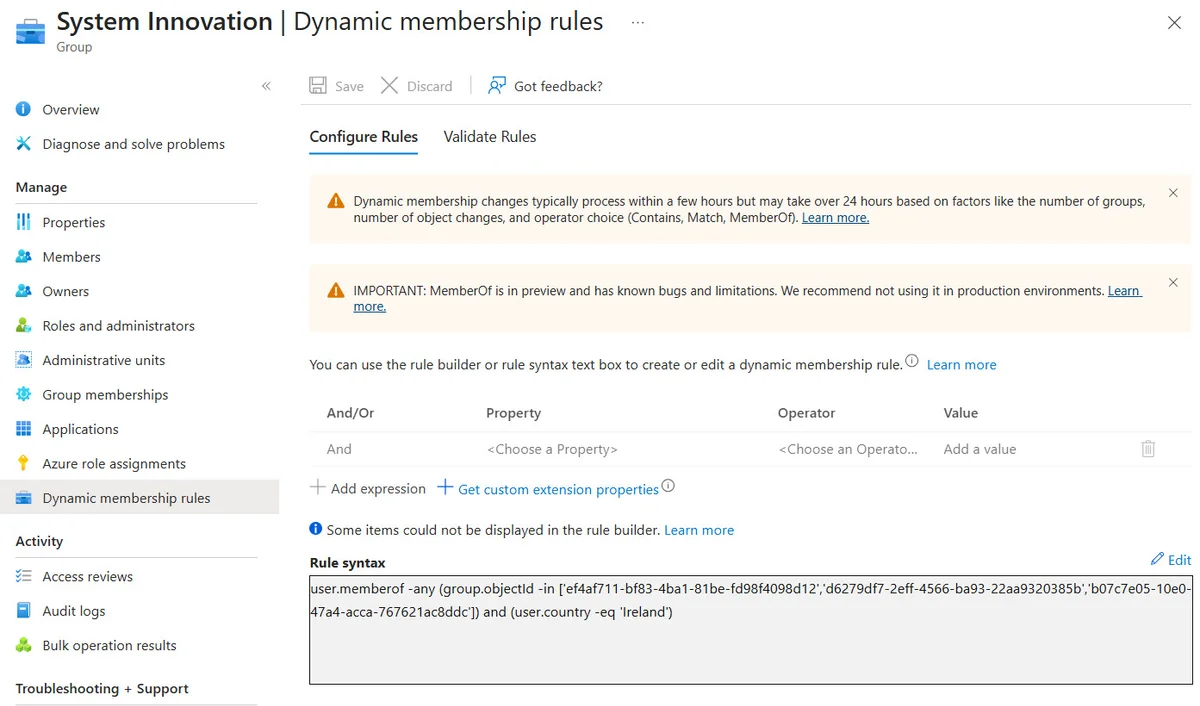
A notable behavior: if a group referenced in the rule is deleted, Entra ID continues to process the rule silently, without flagging the partial invalidity. This type of opacity is precisely what complicates migration — failing rules can exist for months without triggering an alert.
Exact scope of the retirement
The retirement of memberOf affects three types of objects in Entra ID:
- Dynamic groups using
user.memberOfordevice.memberOfin their membership rule - Dynamic administrative units with the same prefixes in their rule
- Entitlement Management self-assignment policies incorporating
memberOfin their conditions
| Object | Behavior after retirement | Functional impact |
|---|---|---|
| Dynamic group | Members frozen at final calculated state | Resource access and license updates not applied |
| Dynamic administrative unit | Members frozen at final calculated state | Administrative delegation potentially incorrect |
| Entitlement Management auto-assignment policy | Processing stopped | Access package assignment blocked |
Identifying affected objects with Microsoft Graph PowerShell
Microsoft recommends using Microsoft Graph PowerShell to inventory impacted objects before the cutover date. Here are the queries to execute.
Search for affected dynamic groups
An application with the GroupMember.Read.All permission is sufficient. An interactive session with an account holding the Group Administrator role is also valid — the Group.Read.All permission is not required for this operation.
1Connect-MgGraph -Scopes GroupMember.Read.All2 3[array]$Groups = Get-MgGroup -Filter "groupTypes/any(c:c eq 'dynamicmembership') and (startsWith(membershipRule,'user.memberOf') or startsWith(membershipRule,'device.memberOf'))" -All4 5$GroupsSearch for affected dynamic administrative units
The AdministrativeUnit.Read.All permission is required for this second inventory.
1Connect-MgGraph -Scopes AdministrativeUnit.Read.All2 3[array]$DynamicAdminUnits = Get-MgDirectoryAdministrativeUnit -Filter "membershipType eq 'Dynamic' and (startsWith(membershipRule,'user.memberOf') or startsWith(membershipRule,'device.memberOf'))" -All4 5$DynamicAdminUnitsSearch for Entitlement Management self-assignment policies
This use case is the least common. The following query returns all automatic assignment policies, whether or not they use memberOf. Manual review of each result remains necessary.
1$Uri = "https://graph.microsoft.com/v1.0/identityGovernance/entitlementManagement/assignmentPolicies"2$Data = Invoke-MgGraphRequest -Uri $Uri -Method Get -OutputType PsObject | Select-Object -ExpandProperty Value3$Data | Where-Object {$_.automaticRequestSettings}Licensing prerequisite
Access to Entitlement Management policies requires a Microsoft Entra ID Governance or Microsoft Entra ID P2 license. Without this license, the endpoint will not return results.
Why Microsoft chose removal rather than correction
The wording of MC1448379 is explicit: "the use of MemberOf can affect dynamic member processing at the tenant scale, even if only a single rule uses the operator". In other words, a single object using memberOf in a tenant can degrade the performance of calculating all dynamic groups in the tenant.
This scalability constraint likely prevented any production promotion since 2022. Microsoft does not announce an equivalent replacement functionality at this time.
No automatic migration
Microsoft will not automatically convert existing rules. Each administrator must identify their affected objects, analyze the underlying business logic, and rewrite the rules using only operators supported in production.
Preparing for migration before November 2026
Rewriting rules without memberOf requires returning to the source: which user or device attribute originally justified membership in the source groups? If these groups were themselves fed by attributes (department, location, job title), the dynamic rule can be rewritten directly on these attributes.
A few pointers to structure the migration:
- Audit the source groups referenced in each
memberOfrule: are they still active? What is their member logic? - Identify the common attribute among members of the source groups and use it directly in the new rule.
- Test in pre-production: create a parallel dynamic group with the new rule, compare its composition with the original object before switching.
- Document current rules before any modification, keeping the original
memberOfrule as a reference. - Check cascade impact: dynamic groups used for license assignment via group-based licensing or for access to SharePoint Online or Teams resources are priorities.
Key points to remember
- The
memberOfoperator is being removed from Entra ID in early November 2026 via notification MC1448379. - Affected objects will not be deleted, but their membership will be frozen — with progressive drift from the tenant reality.
- Three types of objects are affected: dynamic groups, dynamic administrative units, Entitlement Management self-assignment policies.
- The inventory is done via Microsoft Graph PowerShell with the
GroupMember.Read.AllandAdministrativeUnit.Read.Allpermissions. - No automatic migration is planned: rewriting rules is entirely the responsibility of administrators.
- The window to act is short — it's better to start the inventory immediately.