
Purview extends its enforcement arm beyond Microsoft 365
Until now, Microsoft Purview confined its Data Loss Prevention (DLP) and automatic labeling policies to data hosted in the Microsoft 365 ecosystem: Exchange Online, SharePoint Online, OneDrive, and Teams. Message center notification MC1449180 (published August 6, 2026, referenced under Microsoft 365 roadmap identifier 568075) changes that: DLP and Information Protection auto-labeling policies can now process data stored in non-Microsoft applications like Google Workspace and Box.
Preview availability is announced for mid-August 2026, general availability for early September 2026, with full worldwide rollout expected by late October 2026. This is not a simple checkbox option in a portal blade: implementation requires real technical and budgetary preparation.
Good to know
This extension does not function autonomously. It relies entirely on Microsoft Defender for Cloud Apps connectors, which serve as the interface between Purview and third-party platforms.
Understanding the role of Defender for Cloud Apps connectors
For Purview to read and act on data hosted outside Microsoft 365, you must first configure a Microsoft Defender for Cloud Apps connector for the target platform. In the case of Google Workspace, this involves configuring the Google Workspace connector — an operation that a Microsoft 365 administrator cannot perform alone.
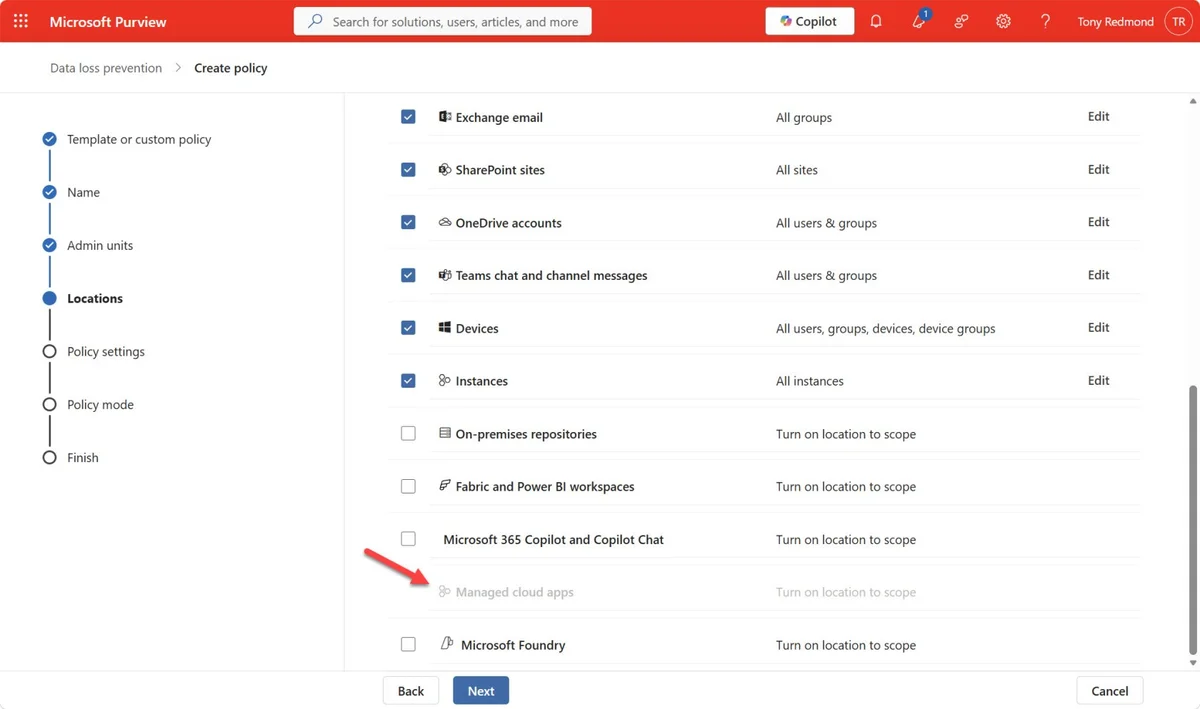
The connector retrieves user lists, activities, and files from the target platform. Once this connection is established, DLP policies can target the Managed cloud apps location just like SharePoint or Exchange.
Obtain permissions on the third-party platform
Ask the holder of the Super Admin role in Google Workspace (or the equivalent administrator role for Box, Dropbox, Salesforce, ServiceNow, AWS, or Cisco Webex) to create a project and authorize Defender for Cloud Apps to use its API credentials.
Connect the application in Defender for Cloud Apps
In the Microsoft Defender portal, Cloud apps > Connected apps section, add the connector corresponding to the target platform and validate OAuth authorization with the third-party administrator account.
Create or adapt the Purview policy
In the Microsoft Purview portal, create a DLP policy or auto-labeling policy and select the Managed cloud apps location (Non-Microsoft cloud apps) among the targeted locations.
Validate available actions
Verify for each connected application which policy actions are actually supported before relying on behavior observed in SharePoint or OneDrive.
Minimum required role
On the Microsoft 365 side, creating and modifying DLP policies requires at minimum the Compliance Administrator or Security Administrator role in Microsoft Entra ID. Configuring the Defender for Cloud Apps connector additionally requires global administration rights on the Microsoft tenant and a Super Admin-type role on the third-party platform.
Availability timeline
The rollout follows a staggered schedule, which provides time to plan the preview before the production switch:
| Phase | Announced date | Scope |
|---|---|---|
| Preview | Mid-August 2026 | Available for targeted testing |
| General Availability (GA) | Early September 2026 | Standard activation |
| Full worldwide rollout | Late October 2026 | All affected tenants |
Which DLP and Information Protection actions are actually available
Microsoft is clear on one point: "the policy conditions and actions available vary by application". You should therefore not expect to find the same arsenal of actions on Google Workspace or Box as on SharePoint Online. For example, the DLP quarantine action assumes SharePoint storage and probably has no equivalent on third-party platforms.
| Connected platform | DLP Policies | Information Protection Auto-labeling |
|---|---|---|
| Google Workspace | Yes | Yes |
| Box | Yes | Yes |
| Dropbox | Yes | No |
| Salesforce | Yes | No |
| ServiceNow | Yes | No |
| AWS | Yes | No |
| Cisco Webex | Yes | No |
The documentation details the actions supported by each connector. Systematically test actual behavior in preview before communicating a compliance promise to your security teams.
The trap of legacy Cloud App Security file policies
Policy conflict
If you are already using file policies from Defender for Cloud Apps on the same third-party platforms, disable or delete them before deploying the equivalent Purview policies. Running both mechanisms in parallel exposes you to "unexpected policy enforcement" — actions applied inconsistently or in duplicate.
This point is not cosmetic: Microsoft set the retirement of file policies to January 6, 2027 and explicitly recommends migrating to Purview policies. Any organization still using these legacy strategies has a limited window to plan its migration, regardless of whether it cares about extending to non-Microsoft applications.
Verify configuration with PowerShell
Before validating a production deployment, verify that your DLP policies properly cover the Managed cloud apps location via the ExchangeOnlineManagement module (Security & Compliance PowerShell):
1Connect-IPPSSession -UserPrincipalName admin@contoso.com2 3Get-DlpCompliancePolicy | Where-Object { $_.ThirdPartyAppsLocation -ne $null } |4 Select-Object Name, Mode, ThirdPartyAppsLocationTo inspect rules attached to a policy targeting third-party applications and verify enabled actions:
1Get-DlpComplianceRule -Policy "Google Workspace Data Protection" |2 Select-Object Name, BlockAccess, GenerateIncidentReport, NotifyUserOn the auto-labeling side, list existing policies and their scope (workload):
1Get-AutoSensitivityLabelPolicy | Select-Object Name, Mode, Workload, EnabledFinally, verify that affected users have the required license via the Microsoft.Graph module (PowerShell SDK v2.x):
1Connect-MgGraph -Scopes "User.Read.All"2 3Get-MgUserLicenseDetail -UserId user@contoso.com | Select-Object SkuPartNumberA SkuPartNumber corresponding to an E5 Compliance or E5 Information Protection and Governance offering confirms that the user is properly licensed to benefit from the service.
The cost calculation: licenses and Purview At Rest Protection billing
The cost of this extension breaks down into two distinct line items, and neither is negligible at a tenant scale:
| Cost item | Detail | Note |
|---|---|---|
| Purview Enterprise tier license | Likely Microsoft 365 E5 Compliance or E5 Information Protection and Governance | Microsoft has not yet published a detailed licensing guide |
| Purview At Rest Protection | Azure service billed on a pay-as-you-go basis | 1,000 non-Microsoft files = 1 'data asset', approximately $0.50 per month |
The total cost therefore adds the E5 licenses needed for affected users and At Rest Protection fees proportional to the volume of files ingested from connectors. On a tenant that synchronizes tens of thousands of Google Drive or Box files, the monthly At Rest Protection bill can quickly exceed the cost of the licenses themselves.
Budget tip
Request precise pricing from a Microsoft licensing specialist before any commitment: current documentation remains unclear on the exact mapping between E5 offerings and "non-Microsoft applications" features.
Troubleshooting: common errors
- The DLP policy does not show the "Managed cloud apps" location: verify that at least one Defender for Cloud Apps connector is active and in "connected" state for the target platform; without an operational connector, the location remains grayed out.
- Authorization error when connecting the connector: the OAuth token granted by the Google Workspace Super Admin (or equivalent) may have expired or been revoked; you must restart the consent process from the Defender portal.
- Inconsistent or duplicate actions on files: a classic sign of a conflict between a still-active legacy Cloud App Security file policy and a new Purview policy targeting the same location; disable the former.
- No data appearing after configuration: the initial synchronization of connectors can take several hours; wait before concluding configuration failure.
Should you deploy this Purview extension?
Importing Google Workspace or Box data into Azure so that Purview can process it is clearly not a maneuver intended for the average Microsoft 365 tenant. It is a feature designed for large organizations that manage sensitive information distributed across multiple cloud platforms and need a unified DLP strategy.
For these multi-cloud environments, the configuration complexity and recurring cost can be justified in light of data leak risks avoided. For the majority of Microsoft 365 tenants, however, the combination of connectors + E5 licenses + At Rest Protection billing makes it more of a niche solution, reserved for truly multi-platform use cases.
Key takeaways
- Purview DLP and auto-labeling now extend to Google Workspace, Box, and other third-party applications via Microsoft Defender for Cloud Apps connectors.
- Configuration requires the involvement of an administrator with elevated rights on the third-party platform, in addition to Purview roles on the Microsoft 365 side.
- Available policy actions vary by connected application: test them before committing.
- You must disable legacy Defender for Cloud Apps file policies before activating equivalent Purview policies; they will be removed on January 6, 2027.
- Cost combines E5 licenses and Purview At Rest Protection billing at the "data asset" level (1,000 files = $0.50/month) — to be precisely calculated before any production deployment.