
Introduction
Microsoft has announced the release of the Windows 11 security update scheduled for Tuesday, July 14, 2026. This update introduces significant improvements, including several new features, optimizations for existing features, and bug fixes.
Among the notable new features, the Point-in-time Restore feature and the Screen tint accessibility option stand out particularly. Additionally, you will find advances in Windows Update management, Widgets, Magnifier window, and much more.
Good to know
This update will be available for Windows 11 versions 25H2 and 24H2, which share the same essential features.
Major Windows 11 Features - July 2026
As usual, Microsoft uses Controlled Feature Rollout (CFR) technology to gradually deploy new features. This means their availability can vary from user to user.
Point-in-time Restore Feature
Introduced in this update, Point-in-time Restore recovery allows you to quickly restore a system to a previous working state. This feature relies on the Volume Shadow Copy Service (VSS) to automatically create restore points including settings, files, and applications. This can be particularly useful in case of technical issues.
Technical requirements:
- Enabled by default for Home and Pro editions.
- Requires a minimum of 200 GB of storage space.
Configuration and management:
Access Settings > System > Recovery to:
- Enable or disable the feature.
- Configure the frequency and retention of restore points.
- Adjust disk space usage.
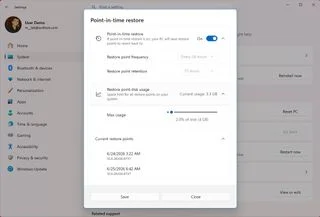
In case of issues, you can also access this feature from the Windows Recovery Environment (WinRE) and select a restore point.
Screen tint Accessibility Option
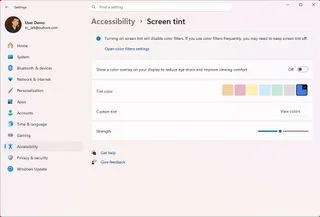
The Screen tint feature is a new option aimed at reducing visual fatigue by applying an overlay color to the screen. This option is accessible via Settings > Accessibility > Screen tint.
Customization:
- Choose from six predefined colors or create a custom color.
- Adjust the overlay intensity using a dedicated slider.
Tip
Although similar to the Night Light feature, Screen tint can work in parallel while automatically disabling color filters.
Windows Update Improvements
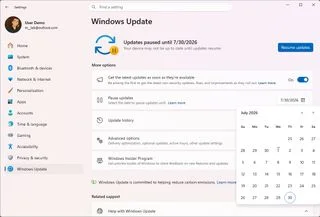
Windows Update benefits from new controls allowing users to pause automatic updates indefinitely. These adjustments offer increased flexibility without compromising system security.
Main new features:
- The "Pause updates" option includes a calendar view to manage pauses over a maximum period of 35 days.
- Ability to repeat the pause as many times as necessary.
Caution
After the pause expires, updates resume automatically. Remember to reconfigure if necessary.
Widgets Improvement
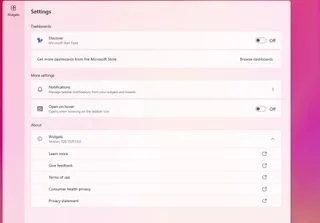
Widgets undergo a major overhaul aimed at reducing interruptions and further personalizing the user experience.
Key changes:
- Hover activation disabled by default.
- Reduction of badges and notifications on the taskbar.
- New customizable settings in the Widgets menu.
- Enhanced performance and reliability.
Other Important Improvements
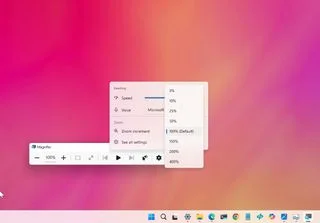
Magnifier Window Mode
The update now allows precise adjustment of the zoom level via specific percentages, up to 400%.
Printer Settings Changes
Printers are now installed by default via the IPP protocol, ensuring better compatibility. This configuration can be customized via Settings > Bluetooth & devices > Printers & scanners.
Bluetooth: Reliability and Compatibility
Microsoft introduces various fixes and improvements such as:
- Improved microphone status synchronization for headsets.
- Increased performance with accessories like AirPods and Beats.
- Stable connectivity after hibernation.
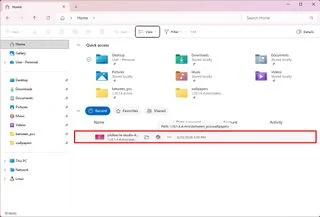
Modernized File Explorer
The Address Bar now allows paths with double backslashes and quotes, making it easier to enter complex folders. Furthermore, the speed of opening and renaming files has been optimized.
Conclusion
The July 14, 2026 update for Windows 11 brings a host of improvements and useful features. From the Point-in-time Restore system to improved Widgets and Windows Update management, this update aims to enrich the user experience while reducing daily frustrations.
Which feature are you most looking forward to? Feel free to share your thoughts!