When a consultant manages a dozen client tenants, every configuration change has to be repeated ten times. On November 17, 2026, Microsoft announced multi-tenant management in the Microsoft 365 admin center, available through the All tenants scope: tenant switching is generally available, and the rest is in public preview. This lab shows you how to test everything in a demo tenant without exposing a client, then compare the result with Lighthouse using a grid of criteria.
What is generally available and what remains in preview
Microsoft distinguishes four capabilities, only one of which is generally available. The rest may still change: the Microsoft Learn documentation states that interface labels and steps may change before general availability.
| Capability | Status | What you can test |
|---|---|---|
| Tenant switching | Generally available | Move from one authorised tenant to another without signing out or using a separate administrator account |
| Agent management | Public preview | Cross-tenant inventory, installation on selected tenants, availability, settings, permissions, blocking; risk and activity via Microsoft Agent 365 |
| Desired-state configuration | Public preview | Microsoft or custom baselines, assignment to tenants, drift detection then remediation |
| AI costs | Public preview | Consolidated consumption, per-tenant breakdown, reusable spend templates, limits and credit requests |
In the left-hand navigation, Learn names the menu "Tenants". The Agents, Configuration management and Cost management pages are found in the "All tenants" scope. Note the actual labels in your interface before writing a client procedure.
Availability varies by tenant
Microsoft states that availability and supported features vary depending on eligibility, licence, administrative roles, geographic region and rollout progress. No licence matrix is published in the announcement: validate it in your own demo tenant.
Lab prerequisites: relationships, delegated roles and licences
The All tenants scope only appears if the governing tenant has at least one supported relationship and your account holds a supported delegated role. If the menu is missing, one of these two conditions is not met, not the interface.
Centralisation does not remove the boundaries between tenants. Relationships and delegated roles decide which tenants are accessible and which actions are allowed. For the lab, plan for one governing tenant and at least two governed tenants: the configuration comparison covers exactly two tenants, and bulk actions return a separate result for each tenant.
Before starting the lab
- A demo governing tenant, with no client data
- At least two demo governed tenants
- A supported relationship between the governing tenant and each governed tenant
- A supported delegated role for the test account
- A log sheet to record the actual interface labels
How you create the relationship depends on your situation.
The connection goes through a customer relationship and GDAP (Granular Delegated Admin Privileges) in Partner Center. The partner's tenant is the governing tenant. The documentation Add and manage multiple tenants in your Partner Center account details tenant management on the Partner Center side.
Tenant Governance is not Multitenant Collaboration
Microsoft clarifies that Entra Tenant Governance is distinct from Multitenant Collaboration (MTO) in Microsoft 365. Do not mix the two in your lab notes. The status of Tenant Governance is also evolving: the Learn page on agents presents it as in preview, while our article Microsoft Entra Tenant Governance generally available covers its general availability. Check the status in your tenant.
Implementation
Before opening the portal, check that the expected relationships are active. This script reads the delegated admin relationships of the governing tenant via Microsoft Graph and exports the active relationships to CSV. It targets the partner case (GDAP). It does not appear in the preview pages: it relies on the Graph API for delegated admin relationships, whose scope you should confirm in the Graph reference.
- Required module: Microsoft.Graph.Authentication
- Minimum permission: delegated scope
DelegatedAdminRelationship.Read.All, read-only, with an account from the governing tenant authorised to view these relationships - Output: a table on screen and a CSV file (customer, tenant ID, relationship, expiry, role IDs)
1Install-Module -Name Microsoft.Graph.Authentication -Scope CurrentUser1[CmdletBinding()]2param(3 [string]$ExportPath = 'gdap-relations-actives.csv'4)5 6# Connexion en lecture seule avec le scope minimal7Connect-MgGraph -Scopes 'DelegatedAdminRelationship.Read.All' -NoWelcome8 9# Lecture de toutes les relations, avec suivi de la pagination10$uri = 'https://graph.microsoft.com/v1.0/tenantRelationships/delegatedAdminRelationships'11$relations = @()12while ($uri) {13 $page = Invoke-MgGraphRequest -Method GET -Uri $uri14 $relations += $page.value15 $uri = $page.'@odata.nextLink'16}17 18# Filtrage sur le statut actif et mise en forme19$actives = @($relations | Where-Object { $_.status -eq 'active' } | ForEach-Object {20 [pscustomobject]@{21 Client = $_.customer.displayName22 TenantId = $_.customer.tenantId23 Relation = $_.displayName24 Fin = $_.endDateTime25 Roles = (($_.accessDetails.unifiedRoles | ForEach-Object { $_.roleDefinitionId }) -join ';')26 }27})28 29$actives | Sort-Object Client | Format-Table -AutoSize30$actives | Export-Csv -Path $ExportPath -NoTypeInformation -Encoding UTF831Write-Host ('{0} relation(s) active(s) exportée(s) vers {1}' -f $actives.Count, $ExportPath)32 33Disconnect-MgGraph | Out-NullExpected result: one row per active relationship. If the table is empty even though you created relationships, they are either awaiting approval on the customer side or absent from the tenant you are signed in to. Roles are returned as role definition identifiers (GUIDs), to be matched against your role reference.
Four-step test path
Each step ends with an explicit check. Record in the log the result, the time spent and the gap between what the portal shows and what the documentation states.
Switch tenants without signing in again
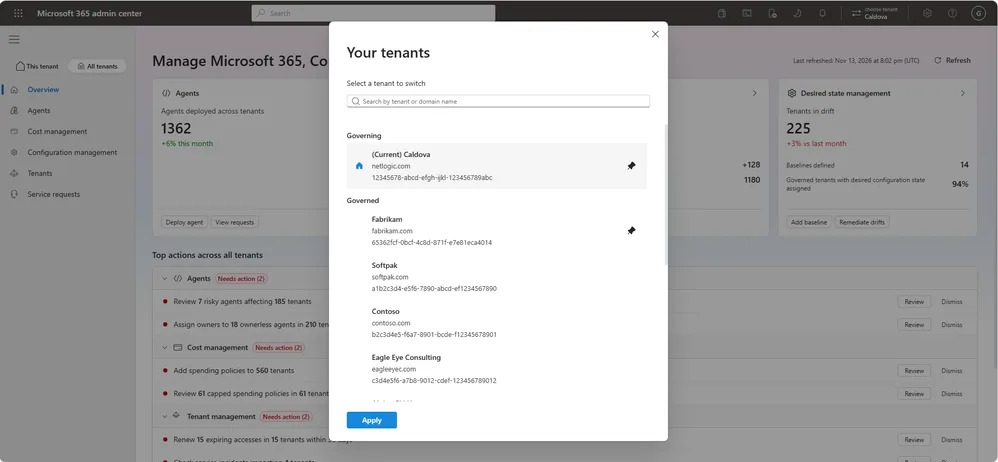
Open the Microsoft 365 admin center and select an authorised tenant in the connected tenants view. Check that you switch without signing out and without a separate administrator account for each tenant. Then verify that a tenant without a suitable delegated role remains inaccessible.
Inventory and install agents
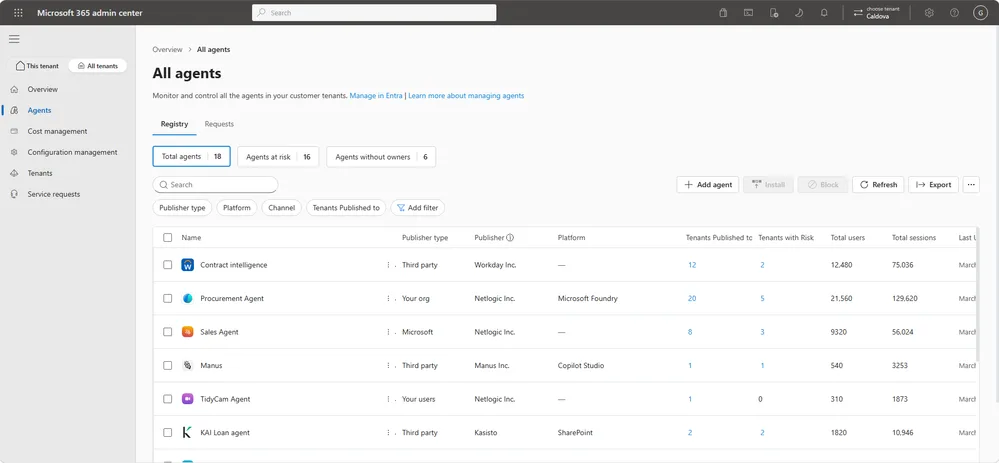
From All tenants, open the Agents page and review the cross-tenant inventory. Add a supported agent to the inventory, then check in a governed tenant that it is not installed: adding to the inventory does not install it automatically. Installation is then done on "All tenants" or on selected tenants.
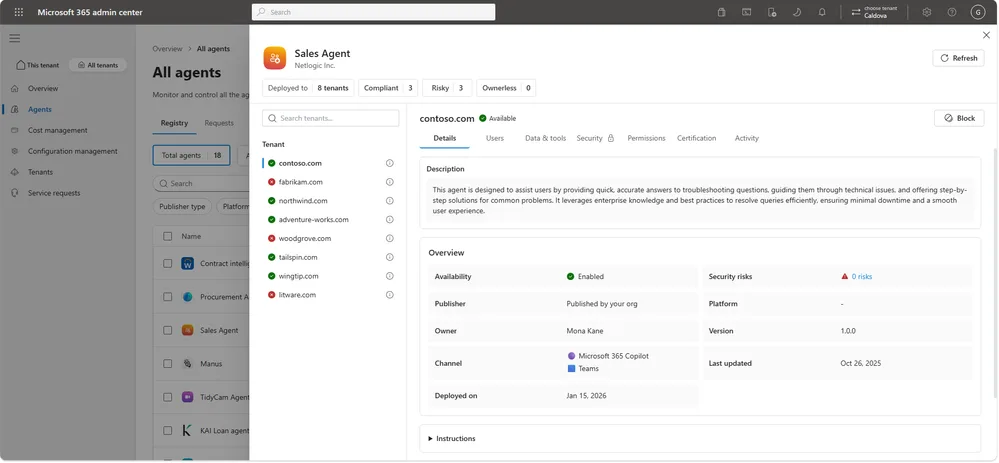
An agent's page brings together its access to data and tools, its permissions, its security policies and its usage per tenant. Risk and activity information relies on Microsoft Agent 365; our article Agent 365: centralised governance of AI agents covers this aspect in detail.
A bulk action affects every selected tenant
Installing, blocking or modifying an agent on "All tenants" applies to all eligible tenants. In the lab, limit the selection to your demo tenants and never connect a production client tenant before testing is complete.
Create a baseline and measure drift
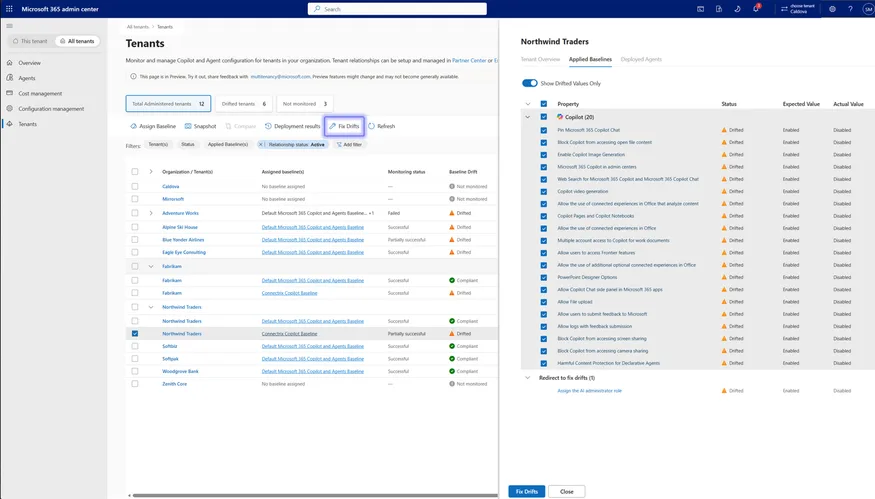
Configuration management covers Copilot, Entra, Exchange, Intune, Security & Compliance and Teams, among others. Learn recommends creating the baseline from a snapshot when a tenant already holds the configuration to replicate. Here is the logical sequence to test; the exact labels must be noted in your interface.
Capture a snapshot of the reference tenant
Choose the demo tenant whose configuration serves as the model.
Create the baseline
Start from the snapshot, a Microsoft-recommended baseline or a custom definition among the supported settings.
Assign the baseline to a governed tenant
A tenant can have several baselines assigned: test two on the same tenant.
Change a setting then check the drift
Deliberately change a setting in the governed tenant, wait for detection and note the observed delay. Finally compare exactly two tenants to check how readable the differences are.
Apply an AI spend template
Cost management displays consolidated consumption, lets you drill down into a tenant and apply a reusable spend template. In each tenant, the template creates an independent policy: existing policies do not stay linked to the template, so changing the template later does not update them. Test this by changing a limit in the template after applying it.
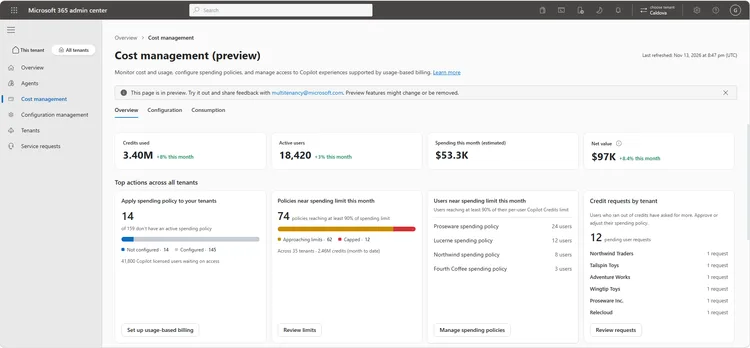
The service described by the documentation is Copilot Credits consumption. Bulk actions may partially succeed: note the result for each tenant rather than the overall message.
Comparing with Lighthouse: a test grid
This article does not document Lighthouse capabilities. The right-hand column is therefore a list of questions to settle in your own tenant, not a verdict. The log below saves you from comparing from memory: it generates one row per test and per tool.
| Criterion | All tenants (admin center) | To note on the Lighthouse side |
|---|---|---|
| Required relationships | GDAP via Partner Center or a Tenant Governance relationship, plus a delegated role | Which relationships and roles must be in place? |
| Scope | Tenant switching, agents, configuration, AI costs | Which of these four tasks can be accomplished? |
| Maturity | Generally available for tenant switching, preview for the rest | Status and licences required in your tenant |
| Configuration | Baselines, snapshot, comparison of two tenants, several baselines per tenant | Can drift be compared and corrected? |
| Bulk actions | Separate result per tenant, partial success possible | How errors are presented and how retry on failure works |
1# Génère un journal de test : une ligne par test et par outil2$tests = @(3 'Changement de tenant',4 'Inventaire et installation d’agents',5 'Baseline et détection de dérive',6 'Modèle de dépenses IA'7)8$outils = @('Admin center (All tenants)', 'Lighthouse')9 10$journal = foreach ($test in $tests) {11 foreach ($outil in $outils) {12 [pscustomobject]@{13 Test = $test14 Outil = $outil15 Resultat = ''16 DureeMin = ''17 Libelle = ''18 Remarque = ''19 }20 }21}22 23$journal | Export-Csv -Path 'journal-lab-multitenant.csv' -NoTypeInformation -Encoding UTF824Import-Csv -Path 'journal-lab-multitenant.csv' | Format-Table Test, Outil -AutoSizeIf your firm already uses Lighthouse day to day, treat the two tools as complementary as long as your log does not prove an overlap. Do not move any client process to a preview feature without a fallback plan.
Troubleshooting: common symptoms in preview
| Symptom | Probable cause | Resolution |
|---|---|---|
| The All tenants scope is missing | No supported relationship, or unsupported delegated role | Check the relationships (Partner Center or Entra Tenant Governance) and the roles of the test account |
| An added agent does not appear in a tenant | Adding to the inventory does not install the agent | Launch the installation on All tenants or on the selected tenants |
| A spend template change modified nothing | Each tenant receives an independent policy, not linked to the template | Reapply the template or edit the policy tenant by tenant |
| A bulk action shows partial success | Result assessed separately for each tenant | Open the per-tenant detail and handle failures one by one |
| Unable to act on costs despite GDAP | GDAP grants neither rights on Azure subscriptions nor commercial rights | Check Azure billing, subscription access and Partner Center commercial permissions separately |
| Labels differ from the documentation | Interface may change before general availability | Record the actual label in the log and re-read the relevant Learn page |
Where to start
Start with a minimal scope: three demo tenants, one test account, one relationship per tenant. Then add the tests one by one, from tenant switching to AI costs, noting label differences.
Next actions
- Create or check the relationships, then run the GDAP inventory script
- Run the four tests and fill in the log for each tool
- Validate the required licence and roles before any client pilot
- Document the interface labels with the test date
- Reopen the Learn pages with each preview update
If you are a partner with many clients, then focus the lab on configuration and costs, where the repetition effect is most expensive. If you are a multi-subsidiary enterprise, then start with the Tenant Governance relationship and the baseline, which condition everything else.
Going further
- Manage multiple tenants in the Microsoft 365 admin center: relationship prerequisites, delegated roles and use of the tenant switcher
- Manage agents across multiple tenants (preview): agent inventory, installation and blocking, with the preview's limits
- Manage configurations across multiple tenants: baselines, snapshots and tenant comparison
- Manage costs across multiple tenants: spend templates and the separation between GDAP, Azure and commercial rights
- Microsoft Tenant Governance: introduction and configurations: set up governing-governed relationships before the lab