
You have to decide where to plug your agents into Microsoft 365 context: Microsoft Foundry, Copilot Studio, a custom MCP client? Work IQ, the intelligence layer that connects Copilot and agents to an organisation's data, knowledge and tools, is at the heart of the answer. This comparison sets out an architect's criteria: access modes, authentication, governance, costs, compliance and pitfalls, then provides a script to audit consents.
What this comparison covers, and what it does not
The initial angle pitted Work IQ against Foundry IQ and Microsoft IQ. The facts verified as of 19 November 2026 concern Work IQ and its use from Microsoft Foundry (formerly Azure AI Foundry). We therefore attribute no characteristics to Foundry IQ or Microsoft IQ, for lack of a reliable source in this file.
Scope of the article
To place Work IQ in the overall architecture, read our analysis of Microsoft IQ and its intelligence architecture for AI agents and our article on the role of context in Microsoft IQ. Here, the comparison covers what is documented: the access paths to Work IQ and the alternatives to avoid.
Work IQ: a shared layer, not one more product
Microsoft presents Work IQ as the layer that already powers Microsoft Copilot: emails, meetings, conversations, files and working relationships serve as grounding for answers. Custom agents can rely on the same intelligence through the Work IQ APIs, including cross-session memory.
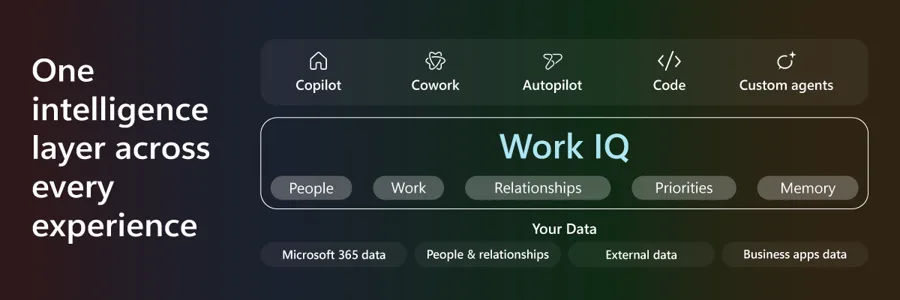
Among the Ignite 2026 news, the 17 November 2026 announcement cites several building blocks:
- the Listen capability, which triggers an agent on an event (new message, business event) instead of forcing it to poll in a loop;
- more than 60 native SharePoint operations (lists, libraries, approvals, Quick Steps, versions), the same ones as Copilot in SharePoint and Cowork;
- Business Applications in Work IQ, which brings CRM and ERP (preview) from Dynamics 365 and Power Platform data into the Microsoft 365 context;
- real-time Teams transcripts, usable during the meeting, and Engage (preview) for data on people and teams.
10
Generic MCP tools exposed by the Work IQ APIs
Microsoft Learn
60+
Native SharePoint operations in the Work IQ API
Microsoft, Ignite 2026 announcement
2
Scopes that separate read and action: WorkIQ.Read and WorkIQ.Act
Microsoft
For a broader view of the offering, see also our presentation of Work IQ in Microsoft 365 Copilot.
Four paths to give an agent Microsoft 365 context
The choice depends less on functionality than on the status of each path. The table cross-references information from the Microsoft Learn documentation and the Ignite announcement.
| Path | Documented status | Recommended use | Point of caution |
|---|---|---|---|
| Work IQ MCP (Foundry, MCP clients) | Endpoint generally available | Default choice for new projects | No retrieval-only mode without answer generation |
| Work IQ in Copilot Studio | Announced as generally available at Ignite; the Agent 365 documentation describes it as preview | Agents built in low-code | Sources diverge: check the status in your tenant |
| Per-application MCP servers (Mail, Calendar, SharePoint, Teams, Word) | Backward compatibility only | No new projects, no production | Migrate to Work IQ MCP |
| Source API (Dataverse, etc.) | Depends on the source | Deterministic retrieval | Microsoft recommends it when you want to retrieve without generation |
An architecture point that is often missed: the retrieve tool remains in public preview. If your requirements call for reproducible retrieval, the Microsoft Learn documentation for Business Applications in Work IQ recommends calling the source API rather than Work IQ MCP. That page also compares Work IQ MCP, Dataverse MCP and the Dataverse Ask API: Business Applications in Work IQ.
Delegated authentication: what it implies
Work IQ authentication is delegated only through Microsoft Entra ID, with no application-only mode, as stated in the Work IQ permissions reference. Each call runs with the rights of the signed-in user, and an administrator must first enable Work IQ in the tenant.
Direct consequence: an autonomous daemon-type agent, with no user, cannot rely on Work IQ as is. Think about this from the design stage.
Both scopes are delegated and require administrator consent. According to the Microsoft 365 developer blog post on Work IQ SharePoint tools, the behaviour differs markedly:
- with WorkIQ.Read alone, the agent receives only non-modifying tools: fetch, call_function, get_schema and search_paths;
- with WorkIQ.Act, it has the full set of tools.
The permissions reference page also details the WorkIQAgent.Ask scope. Apply least privilege: start with read, and add action only for agents that need it.
Governance: a tenant ceiling, per-agent policies
Microsoft sets out a principle: access control happens outside the language model. In the admin center, the administrator sets a tenant-wide ceiling (for example read, create and modify, but not delete). Each agent's policy can tighten this ceiling, never exceed it.
For agents registered in Agent 365, the designer proposes a policy, the administrator approves or rejects it, and Work IQ checks it on every call using the agent's own identity. A policy can allow an action, block it or require a person's confirmation: an agent can therefore update a CRM record without having a blank cheque.
Microsoft adds protection against prompt injection: before the agent sees content, an isolated model with no access to tools transforms it so that only a sanitised version is returned. Provenance signals are announced as under development, with no date.
A Foundry call can leave the Azure compliance boundary
The Foundry documentation states that a call to Work IQ can leave the Azure compliance boundary. Have your CISO or DPO validate this point before any production deployment on regulated data.
Costs and getting started on the Foundry side
Use of the Work IQ API is independent of the Microsoft 365 Copilot licence and billed on a pay-as-you-go basis, according to the Work IQ overview on Microsoft Learn. Governance and cost controls are found in the Microsoft 365 admin center. Microsoft also mentions a cost estimator to plan spending.
In Foundry, the entry point is the MCP endpoint https://workiq.svc.cloud.microsoft/mcp, not the A2A endpoint. Before configuring the agent, check that your workstations or firewalls allow the traffic out:
1# Tests DNS resolution and whether port 443 is open to the Work IQ host2Test-NetConnection -ComputerName workiq.svc.cloud.microsoft -Port 443The expected value is TcpTestSucceeded : True. It proves network connectivity, not authorisation: that depends on consent and billing.
Timeline: a foundation older than the Ignite announcement
The Ignite announcement presents as new items whose foundation already existed.
16 June 2026
General availability of the Work IQ APIs
Microsoft had announced this date for the Work IQ APIs, with 10 generic MCP tools and progressive disclosure. The details are in the announcement of the new Work IQ APIs.
17 November 2026
Extensions announced at Ignite
Listen, SharePoint tools, Business Applications in Work IQ, WorkIQ.Read and WorkIQ.Act permissions, plugin for ChatGPT Business and Enterprise. Plugins for Anthropic and Gemini for business are announced by Microsoft with no date.
Implementation: auditing WorkIQ administrator consents
Since the scopes require administrator consent, auditing the granted permissions is an architect's first check. The script below lists tenant-wide consents whose scope contains WorkIQ and indicates whether read or action was granted.
- Required module:
Install-Module Microsoft.Graph -Scope CurrentUser(or onlyMicrosoft.Graph.Identity.SignInsandMicrosoft.Graph.Applications). - Minimum permission: read-only via the delegated scope
Directory.Read.All, with a read role such as Global Reader. - Output: a table on screen and a CSV file
workiq-consentements.csv.
1# Connexion en lecture seule2Connect-MgGraph -Scopes 'Directory.Read.All' -NoWelcome3 4# Consentements administrateur (accordés pour tous les utilisateurs)5$grants = Get-MgOauth2PermissionGrant -Filter "consentType eq 'AllPrincipals'" -All6 7# Ne garder que ceux qui mentionnent un scope WorkIQ8$workIq = $grants | Where-Object { $_.Scope -match 'WorkIQ' }9 10if (-not $workIq) {11 Write-Warning 'Aucun consentement administrateur contenant WorkIQ trouvé dans ce tenant.'12}13else {14 $rapport = foreach ($g in $workIq) {15 # Résolution des noms de l'application cliente et de la ressource16 $client = Get-MgServicePrincipal -ServicePrincipalId $g.ClientId17 $ressource = Get-MgServicePrincipal -ServicePrincipalId $g.ResourceId18 [pscustomobject]@{19 Application = $client.DisplayName20 Ressource = $ressource.DisplayName21 Scopes = $g.Scope.Trim()22 Lecture = [bool]($g.Scope -match 'WorkIQ\.Read')23 Action = [bool]($g.Scope -match 'WorkIQ\.Act')24 }25 }26 $rapport | Sort-Object Application | Format-Table -AutoSize27 $rapport | Export-Csv -Path .\workiq-consentements.csv -NoTypeInformation -Encoding UTF828}29 30Disconnect-MgGraphThe script changes nothing. An application with Action set to True deserves a review: ask yourself whether it really needs to act or whether WorkIQ.Read is enough. An empty result can mean that consent has not been granted, or that the scope name differs from the one searched for: compare with the permissions reference page.
Troubleshooting: common symptoms
| Symptom | Probable cause | Resolution |
|---|---|---|
| 403 Forbidden from Foundry | Billing (Copilot Credits) not enabled for API calls | Enable billing in the Microsoft 365 admin center, then retest |
| The agent only sees fetch, call_function, get_schema and search_paths | Only WorkIQ.Read was consented | Grant WorkIQ.Act only if the agent must act |
| Failure with an application that has no user | Application-only authentication is not supported | Switch to a delegated flow with a signed-in user |
| No CRM or ERP data in the answers | Work IQ not enabled in the relevant Power Platform environment | Have a Power Platform administrator enable Work IQ in each environment |
| Call refused at startup | Work IQ not enabled in the tenant | Ask an administrator to enable Work IQ |
| Wrong endpoint in Foundry | Using the A2A endpoint instead of MCP | Target https://workiq.svc.cloud.microsoft/mcp |
For diagnosing 401 and 403 errors, the Foundry connection guide provides code examples. It also recommends testing permission filtering with representative users before deployment.
Frequently asked questions
Do you need a Microsoft 365 Copilot licence to use the Work IQ API?
No. According to Microsoft Learn, use of the Work IQ API is independent of the Microsoft 365 Copilot licence and billed on a pay-as-you-go basis. Plan for a dedicated budget and for enabling billing.
Can you call Work IQ with an application that has no user?
No. Authentication is delegated only through Microsoft Entra ID, and application-only authentication is not supported. Each call uses the rights of the signed-in user.
Can the old per-application MCP servers still be used?
They are reserved for backward compatibility in Agent 365. Microsoft advises against using them in production or for new projects and recommends Work IQ MCP, whose endpoint is generally available.
Can Work IQ MCP return raw data without a generated answer?
No, it does not offer a retrieval-only mode without answer generation. For deterministic retrieval, Microsoft recommends using the source API.
Where to start
The most worthwhile step is to validate permissions and billing before writing the first line of agent code.
Checks before going to production
- Work IQ is enabled in the tenant, and in each Power Platform environment if you use business data.
- Pay-as-you-go billing (Copilot Credits) is enabled for API calls.
- Administrator consent is limited to WorkIQ.Read; WorkIQ.Act is granted only to agents that must modify data.
- The tenant's action ceiling is defined in the Microsoft 365 admin center.
- Permission filtering has been tested with representative users.
- The question of the Azure compliance boundary has been validated by the CISO or DPO.
- No new project depends on the per-application MCP servers.
If your agent must run without a user, or if you need reproducible raw data, start from the source API first and reserve Work IQ for context and assistance scenarios. Otherwise, start read-only on a pilot scope, then widen it. To place these choices within the Copilot strategy, browse our 12 Microsoft AI concepts to master in 2026.
Going further
- Work IQ overview (Microsoft Learn): architecture, 10 MCP tools, policy engine and pay-as-you-go billing.
- Work IQ API permissions reference: scopes and administrator consent.
- SharePoint Tools for Work IQ: which scopes expose which SharePoint paths.
- Connect agents to Microsoft 365 with Work IQ (Foundry): code examples, 401/403 troubleshooting and governance notes.
- Business Applications in Work IQ: comparison of Work IQ MCP, Dataverse MCP and Dataverse Ask API.