
The Microsoft 365 September 2026 update wave touches nearly all pillars of IT administration: notification control in Teams, organizer transfer in Outlook, health attestation migration in Intune, and especially the scheduled end of the Public Preview for the MemberOf operator in Microsoft Entra ID. This article compiles the changes that require concrete action on your part, with precise deadlines and a ready-to-use script to audit your tenant before one of the most critical dates of the month.
Microsoft Teams: notifications, meeting security and moderation
Six new features arrive on Teams between late September and late October 2026, with varying impacts on user experience and governance:
- Temporary notification pause: users can suspend all notifications for a chosen period without modifying their existing settings (rollout early October to late October 2026).
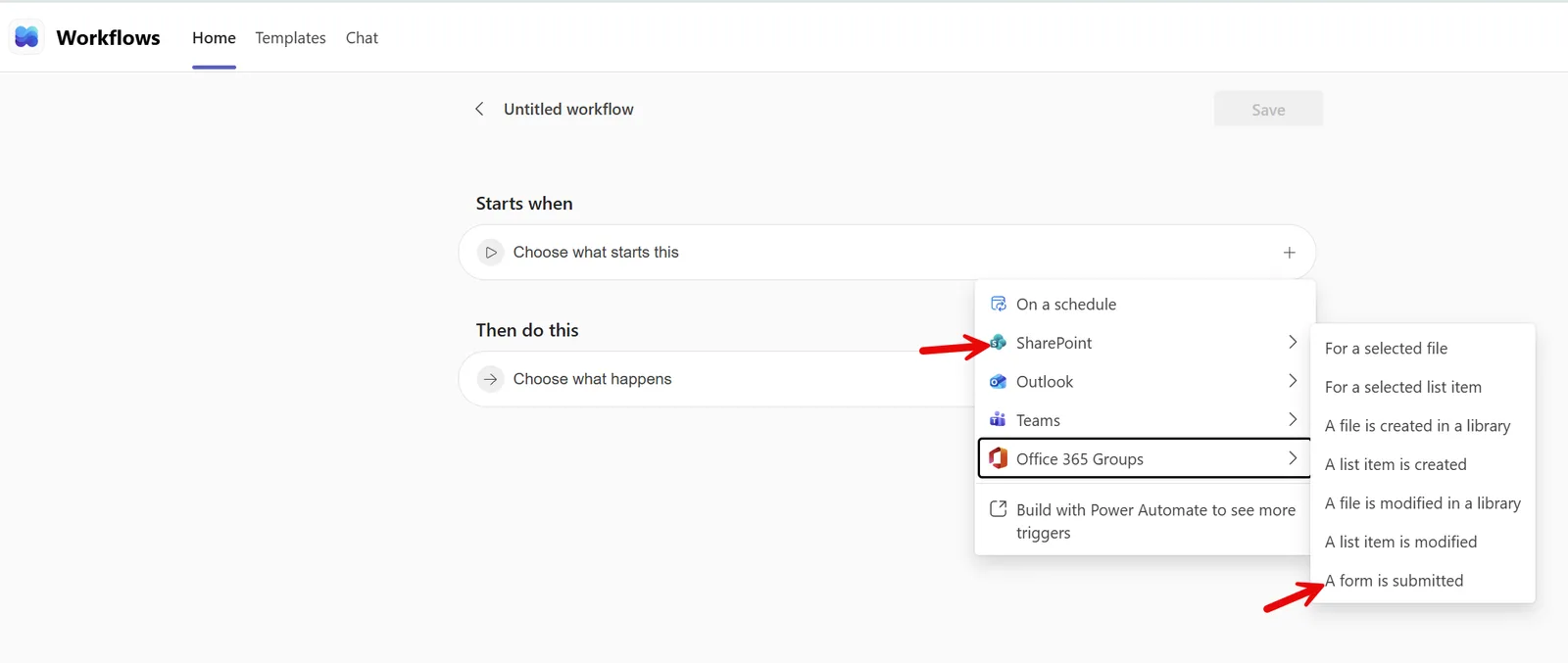
- List Form in Workflows: this new trigger allows you to automate actions on submission of a form based on a SharePoint list, with the ability to publish responses in a Teams channel as a threaded reply (late September to late October 2026).
- Lobby visibility aligned with admission permissions: lobby visibility now follows the "Who can admit from lobby" setting for a more coherent and privacy-respecting experience (early September to early October 2026, timeline advanced from mid-September originally announced).
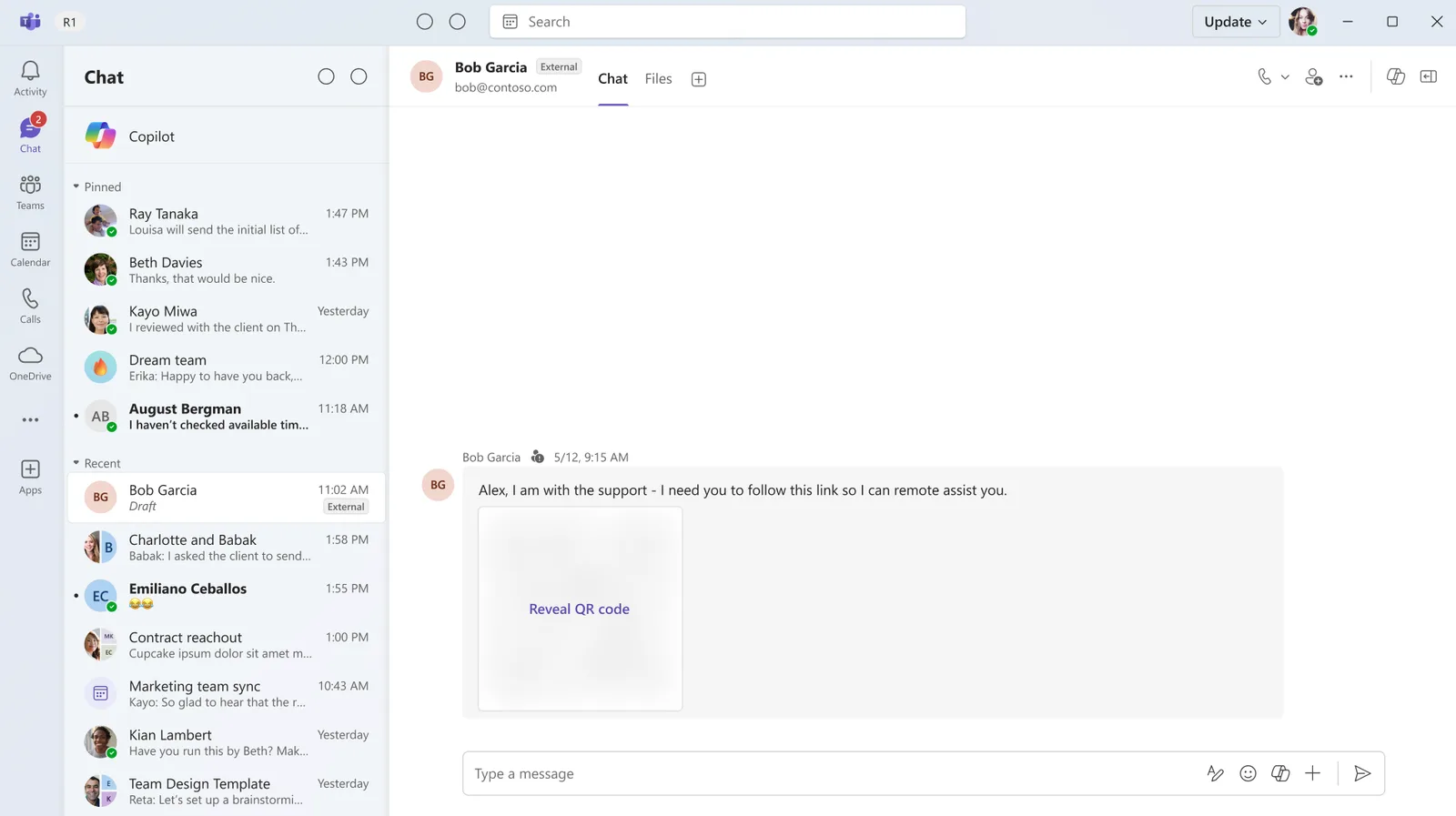
- Blurring of QR codes sent by externals: to limit phishing, images containing a QR code from an external sender will be masked by default with option for manual reveal (mid-October 2026).
- Personal reminders on messages: transform a chat or channel message into an actionable reminder to stay on top of important conversations (October 2026).
- Profanity filtering in transcripts: a new meeting policy allows administrators to control the masking of profanities in live and recorded transcripts (mid-October to late October 2026).
Point of vigilance
These policies are mainly controlled from the Teams admin center, under meeting and messaging policies. Test them on a pilot group before global rollout, especially for profanity filtering which can affect compliance of archived transcripts.
Microsoft Outlook: organizer transfer and extended archiving
The most structuring feature of the month for Outlook is organizer transfer for eligible meetings and recurring series. Rollout happens in three phases:
- Phase 1 (late September to late October 2026): eligible non-online meetings.
- Phase 2: extension to online meetings. For Teams, the transfer generates a new meeting link owned by the new organizer.
- Phase 3: transfer of associated Teams artifacts (chat, meeting options, transcripts, recordings, calendar, notes, attendance reports).
Phase 2 and 3 timelines will be communicated separately. In any case, the designated person must accept before ownership actually changes hands.
Two other changes deserve immediate attention:
- Conditional access policies now apply to Outlook attachment operations: a non-compliant user will no longer be able to download, preview or upload a regular attachment (inline images included). Available now.
- The maximum capacity of auto-expanding archive in Exchange Online increases from 1.5 TB to 3 TB for eligible mailboxes, via Microsoft Purview Data Lifecycle Management (mid-October to late October 2026).
Eligible licenses for this archiving capacity increase include:
- Office 365 E5, A5 and G5
- Microsoft 365 E5, A5 and G5
- Microsoft 365 Purview Suite (including FLW, EDU and GOV variants)
- Microsoft Defender + Purview Suite FLW
- Microsoft 365 F5 Compliance and F5 Security + Compliance
- Combination of eDiscovery & Audit and Insider Risk Management mini-suites with Information Protection & Governance
Microsoft 365 Applications: collaborative PDF, end of standalone Whiteboard and OneDrive
The PDF viewer integrated in OneDrive and SharePoint gains anchored comments: ability to attach a comment to a specific location or selected text, with replies and @ mentions — bringing PDF review to the level of Office documents (mid-October to mid-November 2026).
Planned end of life
The standalone Microsoft Whiteboard applications for Windows, iOS and Android will be retired starting October 16, 2026. They will no longer be supported for work/school accounts or personal Microsoft accounts. Move your users to Teams or supported web experiences before this date. Details in the official documentation on retirement of standalone Whiteboard applications.
Other changes to plan:
- Archiving SharePoint files under retention policy to Microsoft 365 Archive, excluding Copilot indexing to improve relevance of answers generated from active data (early October, previously mid-September, completion expected early November 2026).
- OneDrive consumption-based billing: new pay-as-you-go option for additional storage at $0.20/GB/month, allowing certain accounts to exceed their licensed quota while maintaining fine-grained administrative control (early November to early December 2026).
- OneDrive sync on macOS: limit increases from 300,000 to 1 million items per sync instance and per device (early October, completion expected early November 2026).
Microsoft Intune: health attestation migration and progressive deployments
Action required before end of Q1 2027
Microsoft Intune is migrating Windows health attestation evaluation from the Device Health Attestation (DHA) service to Microsoft Azure Attestation (MAA). Organizations that do not authorize access to the required Azure Attestation endpoints will experience interruptions in evaluating health attestation-based compliance policies once the migration completes, scheduled for end of first quarter 2027. Check your outbound firewall rules now by following the Microsoft Learn documentation on Intune endpoints and migration to Azure Attestation.
In parallel, deployment plans (Deployment plans) enter public preview: they enable progressive, controlled and predictable deployments of applications or policies via assignment rings based on date and time criteria.
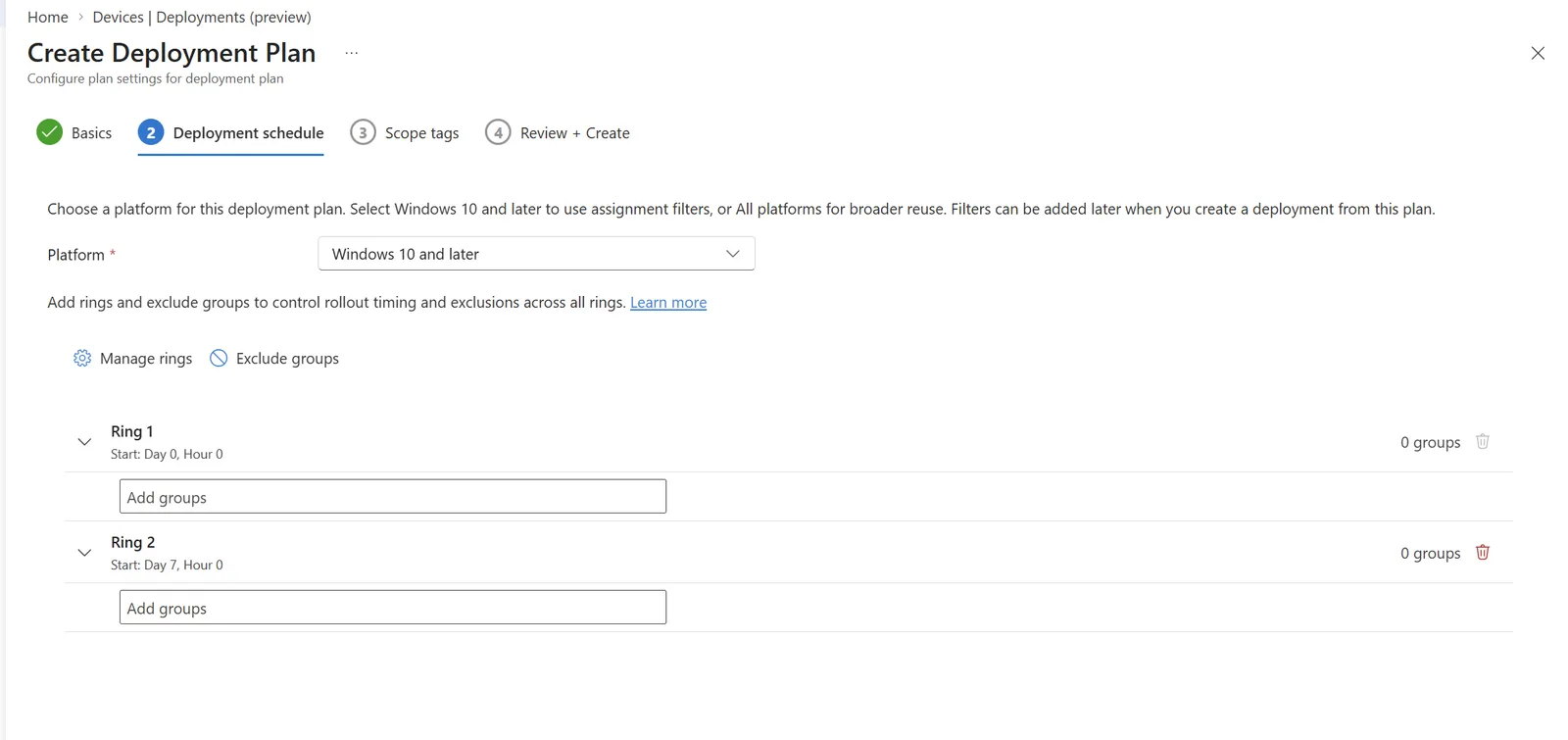
More details in the documentation on deployments and deployment plans in Microsoft Intune.
Microsoft Entra: identity governance and end of MemberOf Preview
Four structuring changes for identity teams:
- Passwordless resource accounts for Teams devices (GA): Teams Shared Space devices can now authenticate via a device-linked identity rather than a stored identifier/password. Details in the documentation on Entra passwordless resource accounts for Teams Rooms.
- Microsoft Entra Cloud Sync (public preview) can now provision users, groups and memberships from Entra ID to on-premises Active Directory Domain Services (AD DS) — useful for cloud-first organizations that need to maintain AD-dependent applications. See the walkthrough on provisioning users and groups via Cloud Sync.
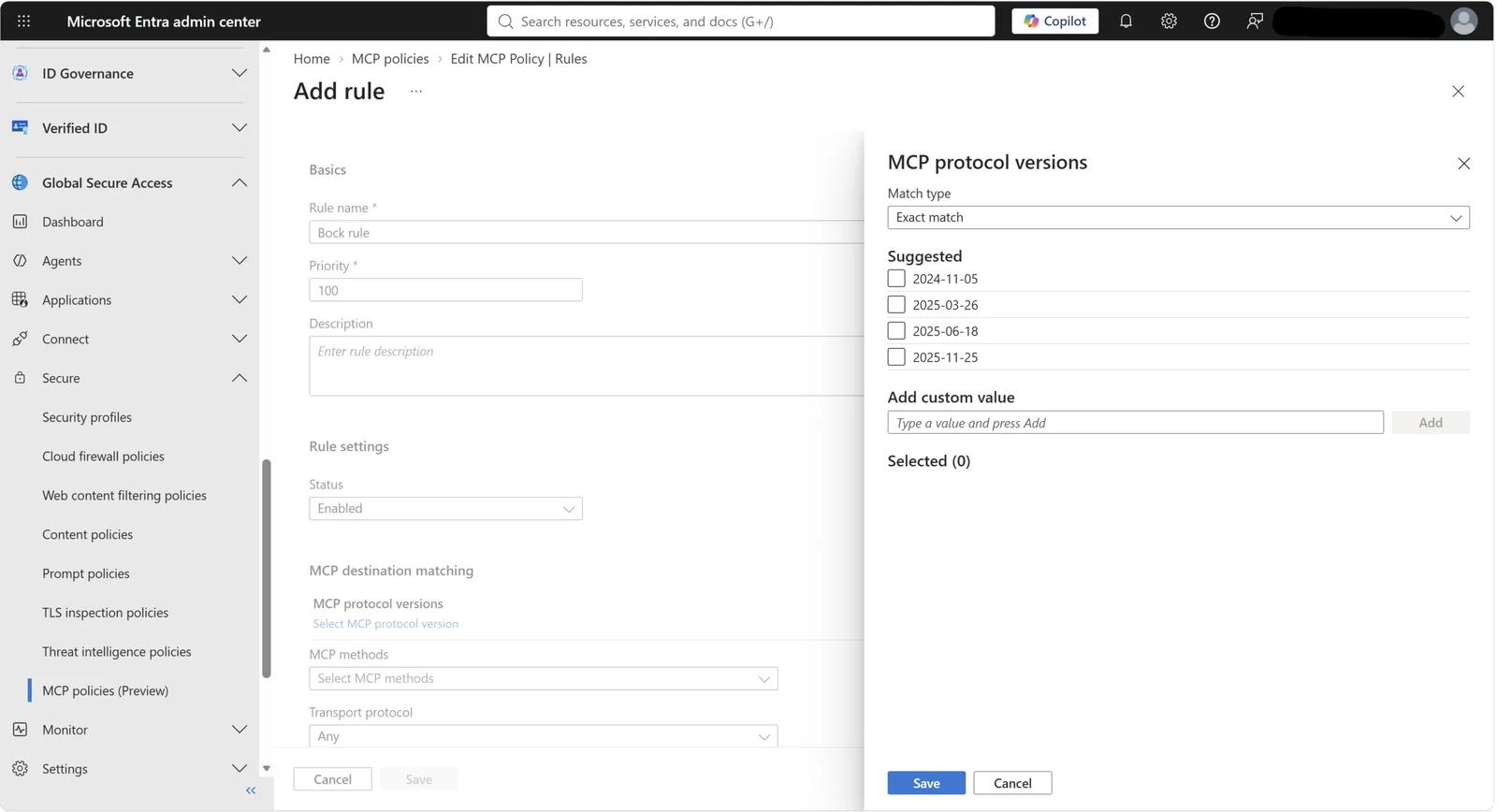
- Global Secure Access MCP Firewall (public preview): an identity-centric network security control for visibility and policy enforcement on MCP (Model Context Protocol) traffic between AI agents and remote MCP servers. Documentation: configure MCP firewall in Global Secure Access.
Deadline November 3, 2026
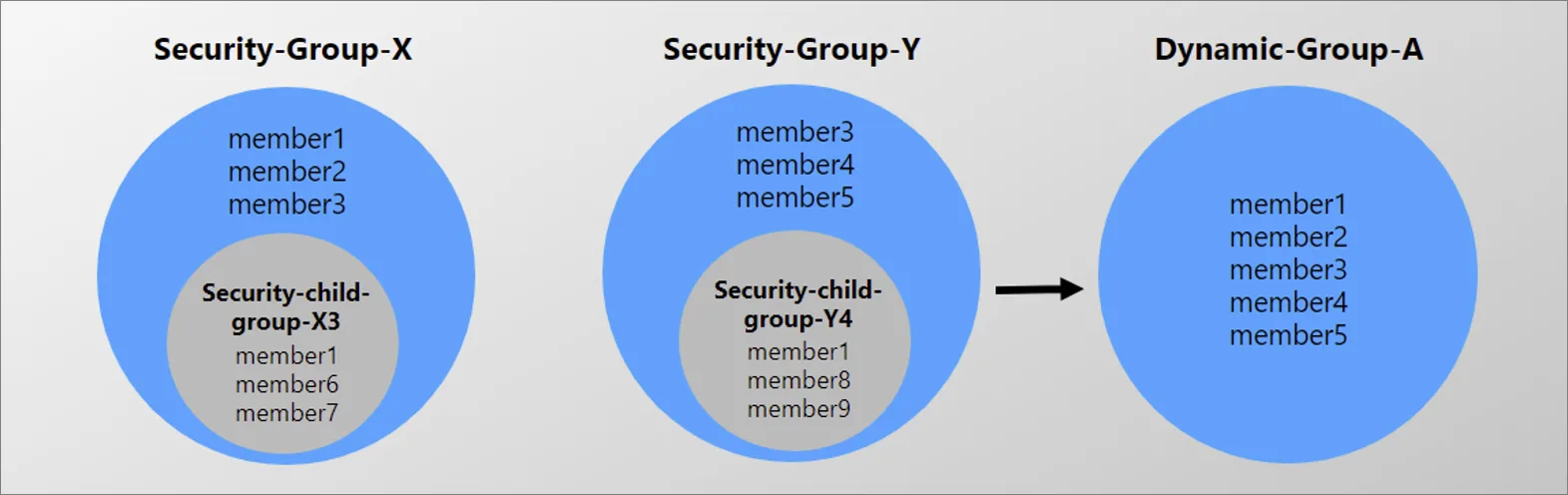
The Public Preview of the MemberOf rule operator in Entra ID ends. Any organization using this operator in dynamic groups, dynamic administrative units or entitlement management policies must replace these configurations before November 3, 2026. Microsoft clarifies that MemberOf can affect dynamic membership processing at tenant scale and advises against production use. Reference: migrate before MemberOf preview ends. An audit script is provided later in this article.
Microsoft Copilot: new models, cost governance and Cowork
On the Copilot side, September 2026 mixes model expansion, rebranding and financial governance:
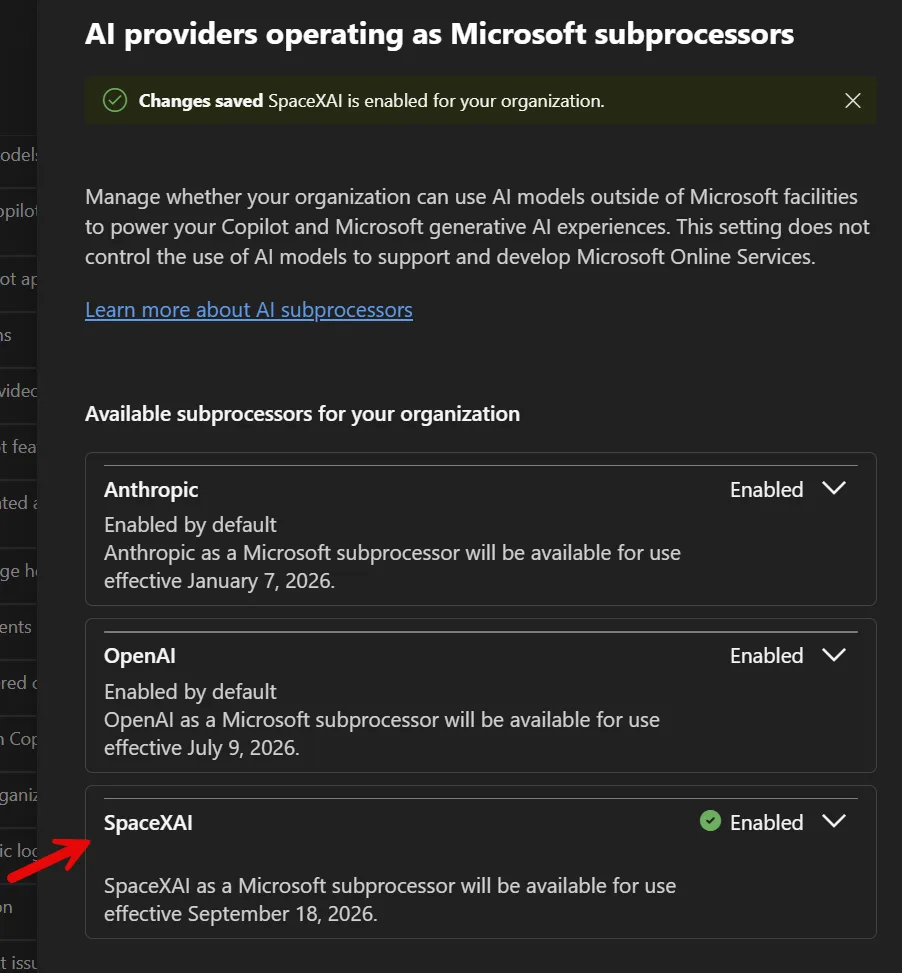
- SpaceXAI joins the Copilot subcontractor list, activating Grok models in Word, Excel and PowerPoint for eligible Frontier customers starting September 18, 2026. Details on the Microsoft Copilot blog about expanding model choice with Grok.
- A rebranding introduces "Copilot with Home, Code and Autopilot", currently deployed in the Frontier program with no general availability date announced. Full announcement on the official Microsoft blog.
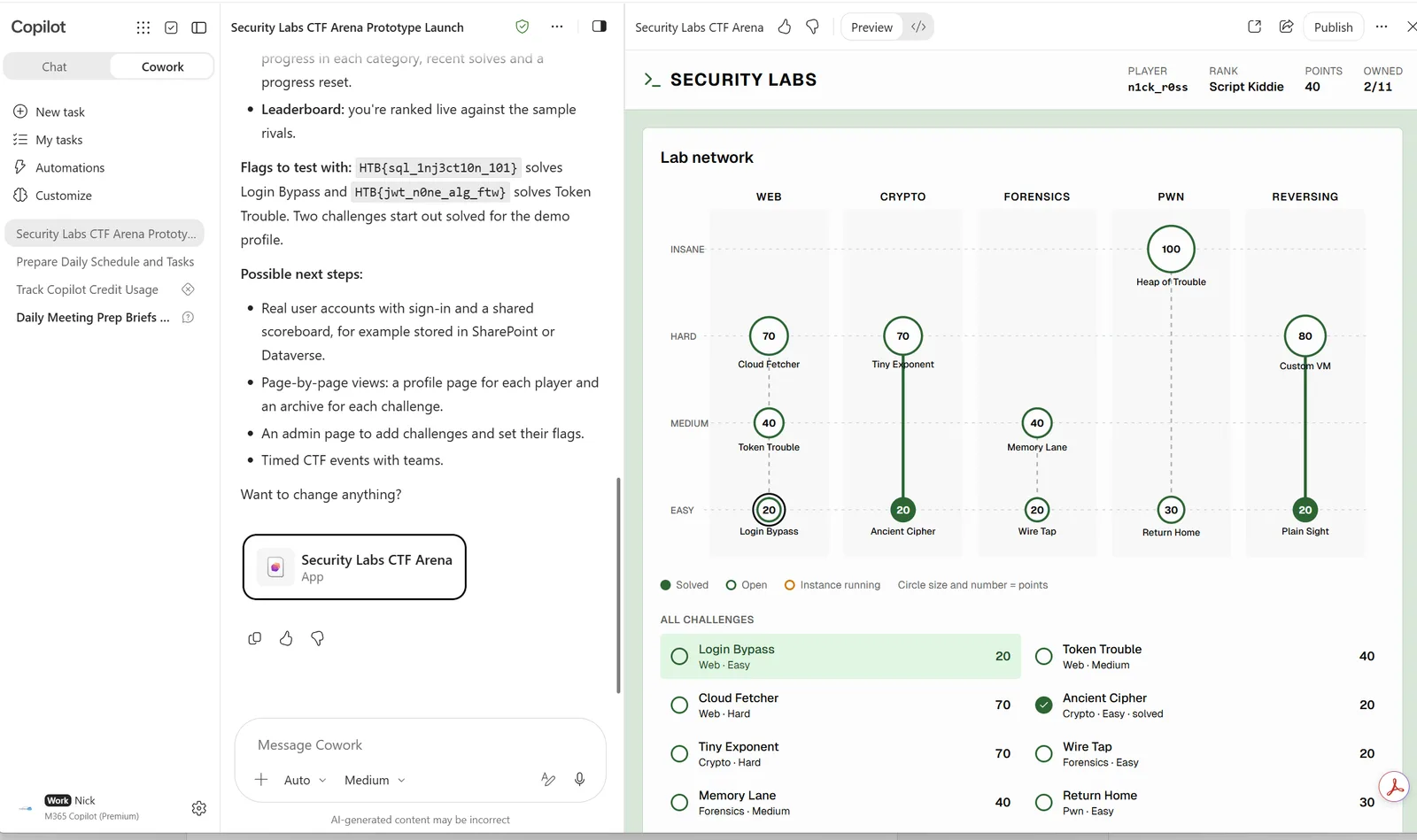
- Copilot Studio and Copilot Cowork now allow creating applications by natural language conversation, with draft, adjustment, preview, testing, publishing and sharing — applications can consume data via connectors authorized by organization policy (Cowork: September 8-14, 2026).
- PDF review from OneDrive iOS: select text in a PDF then "Ask Copilot" to explain, summarize, translate or ask a question — experience already available on desktop, now on mobile (progressive rollout).
- Federated Copilot connectors: connectors that only allowed data retrieval now support create, update and delete actions in third-party services without leaving Copilot (early to late October 2026).
Copilot financial governance also evolves with Microsoft Copilot Cost Management updates (early September 2026):
- Automatic application of new spend policies to newly published UBB (usage-based billing) services and agents, enabled by default on all policies.
- Configurable email alerts when users approach their spending limit.
- Expanded access to consumption dashboards for AI Reader, Global Reader and License Administrator roles.
- Enriched reporting distinguishing Prepaid (P3) and Pay-as-you-Go (PayG) consumption, with view by policy.
- Custom approval workflows for Copilot Cowork credit requests.
- Preservation of a user's consumption history during a policy change (no more counter reset).
- Automatic recommendations when a spend policy is deemed misconfigured.
Finally on PowerPoint, Strict mode reaches general availability to force Copilot to strictly respect brand templates, and Brand Managers can now upload custom skills in Markdown format (.md) to the Brand Kit (late September 2026).
Billing impact to anticipate
Starting November 2, 2026, new Microsoft 365 Copilot Business licenses purchased via CSP (Cloud Solution Provider) include consumption-based billing enabled by default, covering notably Copilot Cowork, Work IQ APIs and GitHub Copilot Harness. Check your spending policies before this date to avoid billing surprises.
Security and administration: AI Secure Score and integrated SOC
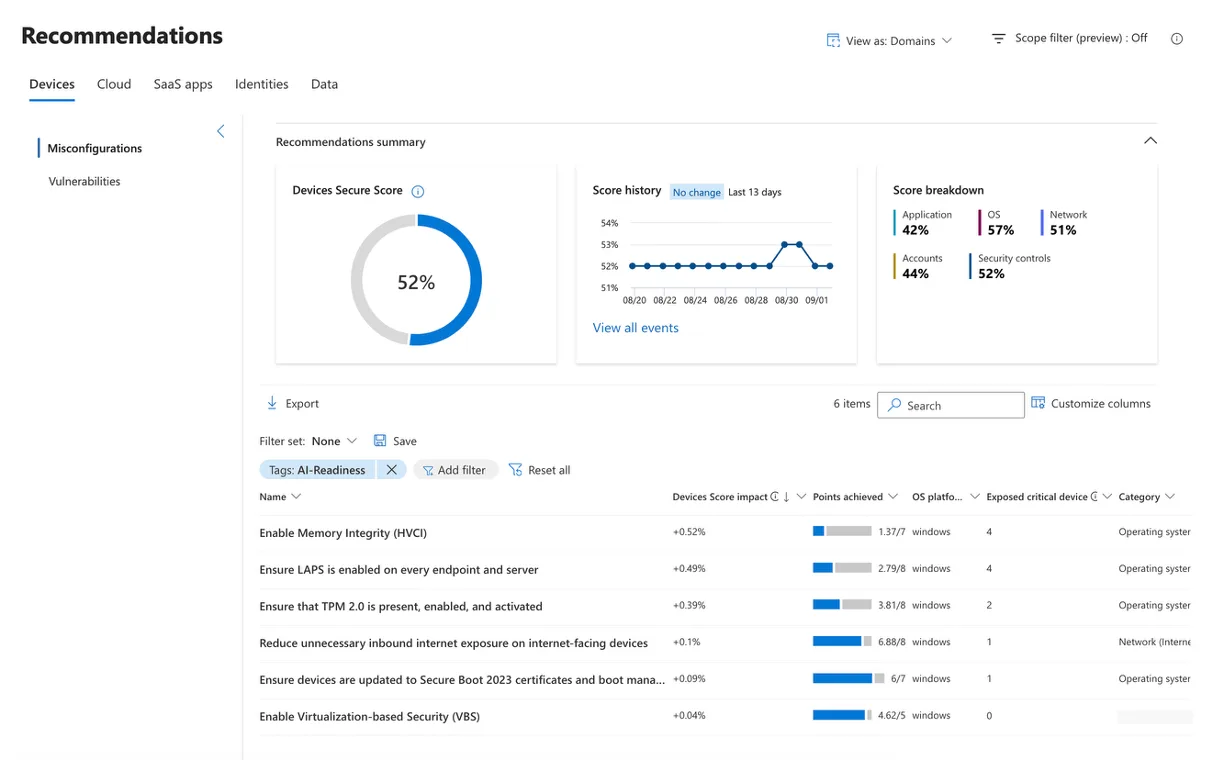
Microsoft Defender for Endpoint enriches Secure Score with four new recommendations focused on "AI-accelerated threat readiness", identifying eligible Windows devices lacking:
- TPM (Trusted Platform Module) 2.0
- Virtualization-based Security (VBS)
- Hypervisor-Protected Code Integrity (HVCI), also called Memory Integrity
- Windows LAPS (Local Administrator Password Solution)
Rollout mid-September to late September 2026.
Starting October 12, 2026, Microsoft Defender XDR will by default classify DLP (Data Loss Prevention) alerts from Microsoft Purview as "behaviors" rather than as standard alerts, reducing alert volume while keeping data accessible in Advanced Hunting and Purview. Administrators who prefer to keep current behavior can disable this rule.
Finally, the Integrated Security Operations Center (ISOC) enters public preview on September 23, 2026 for eligible customers with Microsoft Defender Suite, Microsoft 365 E5 and E7, bringing together XDR, SIEM, threat intelligence, automation and AI in a unified Defender experience.
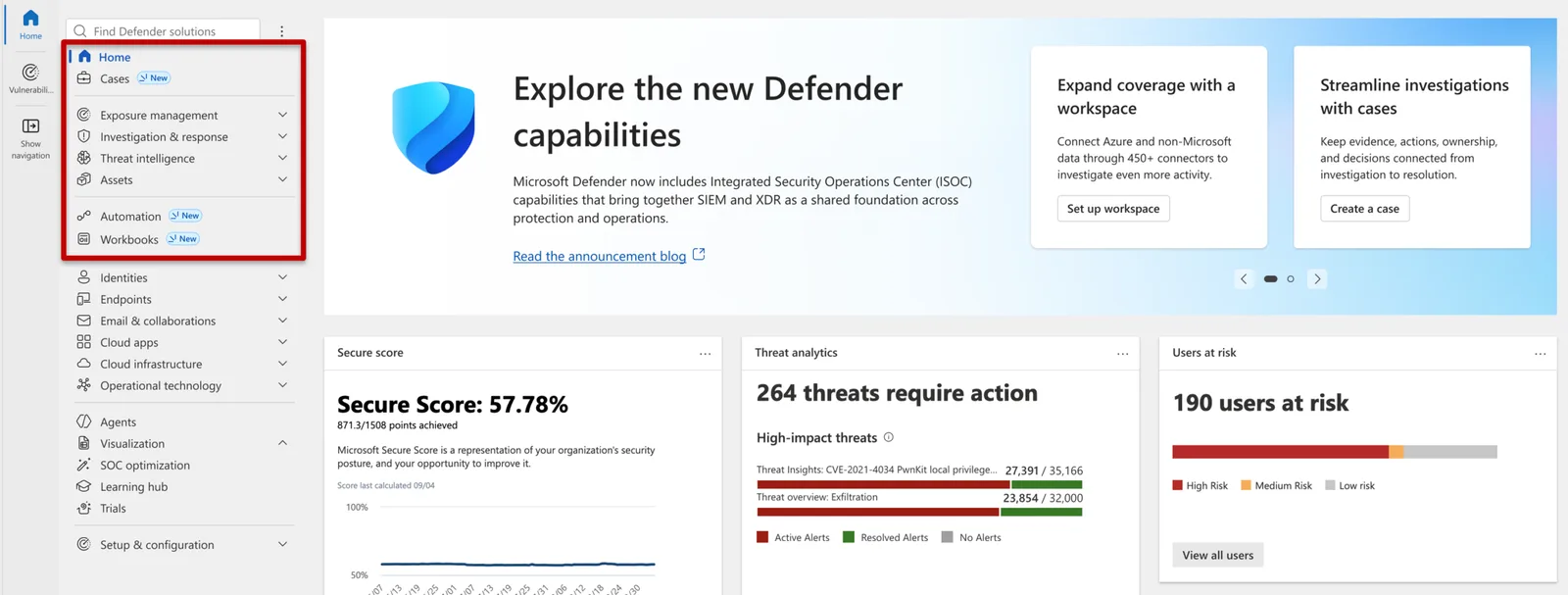
For more information: Tech Community article on ISOC in Microsoft Defender and Microsoft Security Blog post on reimagining the SOC for the agentic era.
Implementation: audit dynamic groups using MemberOf
Before November 3, 2026, each dynamic group, administrative unit or entitlement management policy using the MemberOf operator must be identified and then migrated to another rule logic. The script below lists all affected dynamic groups in your tenant.
- Required module: Microsoft.Graph (
Install-Module Microsoft.Graph -Scope CurrentUser) - Minimum permission (delegated):
Group.Read.All— read-only, no modifications are made - Output produced: a console table listing dynamic groups whose rule contains
memberOf, exportable to CSV for remediation tracking
1# Connect to Microsoft Graph with the most restrictive read-only scope possible2Connect-MgGraph -Scopes "Group.Read.All"3 4# Retrieves all dynamic membership groups in the tenant5$groupesDynamiques = Get-MgGroup -All -Filter "groupTypes/any(c:c eq 'DynamicMembership')" `6 -Property Id,DisplayName,MembershipRule,MembershipRuleProcessingState7 8# Filters groups whose membership rule uses the memberOf operator9$groupesAMigrer = $groupesDynamiques | Where-Object { $_.MembershipRule -match "memberOf" }10 11if ($groupesAMigrer) {12 Write-Host "Groups using MemberOf to migrate before November 3, 2026:" -ForegroundColor Yellow13 $groupesAMigrer | Select-Object DisplayName, Id, MembershipRuleProcessingState, MembershipRule |14 Format-Table -AutoSize15 16 # CSV export to track remediation and share with identity team17 $groupesAMigrer | Select-Object DisplayName, Id, MembershipRule |18 Export-Csv -Path ".\Audit-MemberOf-$(Get-Date -Format 'yyyyMMdd').csv" -NoTypeInformation -Encoding UTF819 20 Write-Host "CSV export generated in current directory." -ForegroundColor Cyan21} else {22 Write-Host "No dynamic groups use the MemberOf operator in this tenant." -ForegroundColor Green23}24 25Disconnect-MgGraphThis script only covers groups. Remember to repeat the check for dynamic administrative units (Get-MgDirectoryAdministrativeUnit -Property MembershipRule) and for auto-assignment rules in entitlement management catalogs, which use a distinct API model in Microsoft Graph.
Verify that the migration took effect
Once the rule is rewritten without memberOf, run the audit script again: the $groupesAMigrer list should be empty. Also check in the Entra ID > Groups > [group name] > Dynamic members portal that processing (MembershipRuleProcessingState) remains On and that the member count matches expectations after recalculation — dynamic processing can take several minutes to propagate on a large tenant.
What to remember and plan
This September 2026 wave mixes user comfort (notification pause, message reminders) and compliance deadlines that don't forgive delays. Here are the dates to enter as priority in your administration calendar:
| Deadline | Product | Action required |
|---|---|---|
| October 12, 2026 | Microsoft Defender XDR | Verify if the shift of DLP alerts to "behaviors" by default suits your SOC |
| October 16, 2026 | Microsoft 365 Apps | Migrate users from standalone Whiteboard to Teams or the web |
| November 2, 2026 | Microsoft Copilot | Control spending policies before default activation of pay-as-you-go on Business CSP licenses |
| November 3, 2026 | Microsoft Entra ID | Replace any dynamic rule using the MemberOf operator |
| End Q1 2027 | Microsoft Intune | Authorize Azure Attestation endpoints before DHA → MAA migration |
Monday morning, start by running the MemberOf audit script on your tenant: it's the closest deadline with the highest risk of silent impact on dynamic group processing. Use this opportunity to check your outbound firewall rules in preparation for Intune migration to Azure Attestation, and to notify your Whiteboard users of the imminent move to Teams. If your organization already uses Microsoft 365 Copilot in CSP mode, plan a review of your spending policies now before the automatic switch on November 2.