Introduction
Governance of Microsoft 365 tenants has become a critical priority for enterprises operating with multiple Microsoft Entra environments. Recently launched in preview, Tenant Governance aims to provide a comprehensive solution for discovering, managing and maintaining relationships between tenants.
With the general availability of Unified Tenant Configuration Management (UTCM) APIs now accessible via the /v1.0 endpoint of Microsoft Graph, Microsoft provides a robust mechanism for administering and standardizing cross-tenant configurations.
What is Microsoft Tenant Governance?
Tenant Governance solves emerging issues related to multi-tenant management such as:
- Test or development environments created virally.
- Regulatory obligations requiring multiple tenants.
- Acquisitions or mergers causing disparities in subscription management.
Tenant Governance introduces several key features:
- Tenant Discovery: Identify and audit tenants associated with your organization.
- Governance Relationships: Establish and manage unilateral connections between tenants, with defined permission levels.
- Standardization and Compliance (baselines): Through UTCM configurations, monitor deviations and automatically apply security settings.
- Secure Tenant Creation: Centralize billing and immediately establish governance relationships.
Attention
Some advanced features require a Premium subscription and specific licenses such as Microsoft Entra ID Governance or Entra Suite SKU.
Types of Governance Relationships
Connections between tenants are represented by the Governance Relationship object. These relationships are unidirectional, with a governing tenant and a governed tenant. Their implementation relies on the following steps:
- Define a governance policy or permissions template.
- Apply the principle of least privilege to minimize risks.
Steps to Create a Governance Relationship
Depending on existing links between tenants (common billing or pre-existing relationships), two flows are possible:
Step 1: Initial Invitation
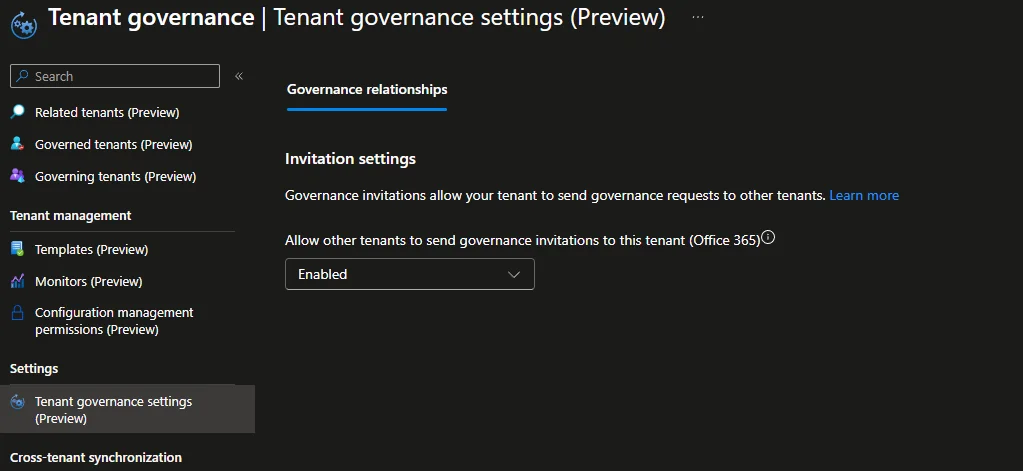
For scenarios requiring a three-step flow, the governed tenant must send an invitation via the Tenant Governance settings interface or via the Microsoft Graph API:
1POST https://graph.microsoft.com/beta/directory/tenantGovernance/governanceInvitations2 3{4 "governingTenantId": "xxxxxxxx-xxxx-xxxx-xxxx-xxxxxxxxxxxx"5}Step 2: Governance Request
The governing tenant then sends a governance request by assigning a permissions template:
1POST https://graph.microsoft.com/beta/directory/tenantGovernance/governanceRequests2 3{4 "governedTenantId": "8fbddb8a-eb45-4305-b659-9e9af5a3d501",5 "governancePolicyTemplate@odata.bind": "https://graph.microsoft.com/beta/directory/tenantGovernance/governancePolicyTemplates/default"6}Step 3: Request Validation
The governed tenant approves or rejects the request via the Graph API:
1PATCH https://graph.microsoft.com/beta/directory/tenantGovernance/governanceRequests/f84c59bf-504c-4949-9fdd-45d366ec53cd2 3{4 "status":"accepted"5}Once validated, the associated permissions are applied, allowing the governing tenant to monitor and configure the governed tenant.
Monitoring and Deviation Detection
With Unified Tenant Configuration Management (UTCM), you can configure drift monitors to detect any deviation from configured policies. Features include:
- Automatic deviation detection.
- Email notification to administrators.
- Automatic application of predefined baselines (future version).
Good to Know
Default policy templates can be used with Entra ID admin roles or via multi-tenant applications for automated scenarios.
Upcoming Features
Microsoft plans to extend Tenant Governance to:
- Secure Creation Process: Enhanced control from the creation of new tenants.
- Discovery of Linked Tenants: Automated methods to reveal connections based on billing or Azure history.
- UTCM Interface Improvement: More intuitive configurations for administrators.
For more information on detailed configurations, consult the official documentation and our next article on tenant discovery processes.
Tip
Use the "Security by Design" principle for your tenants, by enabling centralized billing and governance policies from their creation.