
The proliferation of AI agents in Microsoft 365 environments creates a real governance challenge: fragmented visibility, unpredictable spending, incomplete inventory of agents deployed across third-party platforms. The July 2026 updates to Microsoft Agent 365 bring five concrete answers to these challenges, designed for IT administrators, security teams, and decision-makers driving AI adoption at scale across the organization.
Partner risk signals in the Agent Registry
Previously, administrators had to navigate multiple portals to consolidate risk signals related to their agents: Microsoft Entra, Microsoft Defender, and Microsoft Purview covered part of them, but third-party security solutions remained outside the Agent 365 dashboard.
This update introduces the integration of risk signals from selected partners directly into the Agent Registry. The first three supported providers are Cyera, Darktrace, and Zenity. The mechanism relies on Microsoft Entra Agent ID, which serves as an identity anchor to associate each partner signal with the correct agent record in the registry.
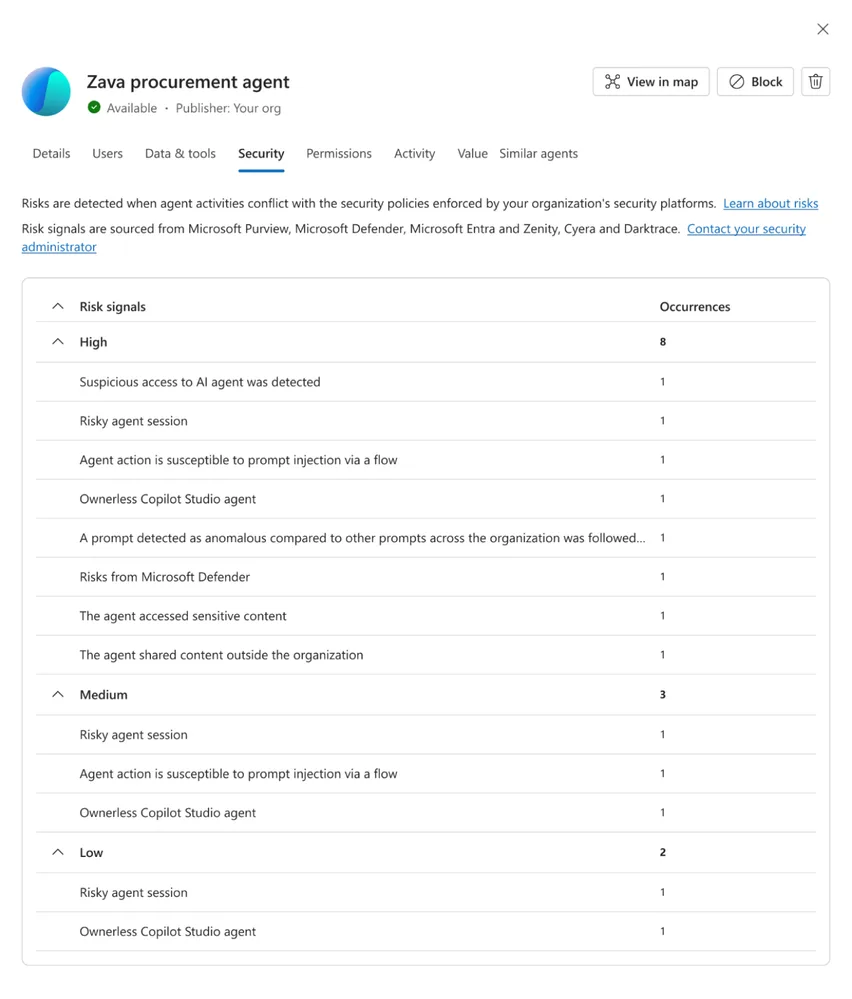
Once an integration is enabled, signals appear in the Security tab of the Agent Details view, alongside native Microsoft signals. Concretely, administrators have:
- A consolidated view: the risk signal counter aggregates Microsoft and partner detections in a single place.
- Structured prioritization: each signal is categorized as High, Medium, or Low, with an occurrence counter to identify recurring patterns.
- Explicit consent: no partner data flows until an administrator enables partner signals via Agents > Settings in the Microsoft 365 admin center. Some partners may also require configuration on their own product side.
API open to security vendors
The Agent 365 partner API is available to all vendors in the ecosystem. Microsoft indicates it anticipates a gradual expansion of the list of supported providers.
This approach reflects a clear positioning: Agent 365 does not seek to replace existing security tools, but to aggregate their signals in a single control plane.
Cost Management: predictability of usage-based AI spending
Management of Copilot Credits consumed by usage-based agentic services — particularly Cowork and Work IQ — benefits from several improvements intended to strengthen the reliability of budget controls.
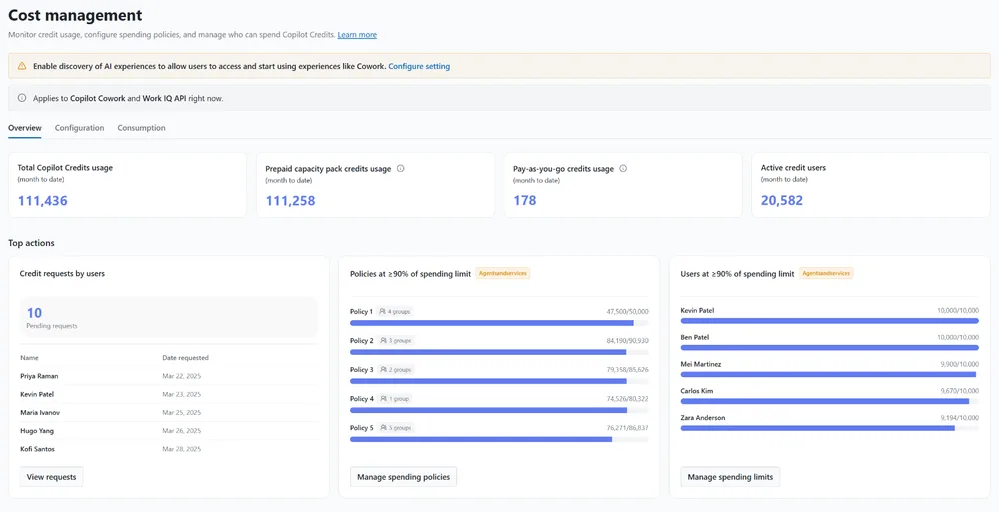
Key points of this update:
- Policy conflict resolution: when a user belongs to multiple spending policies for the same service, the applied policy is determined by explicit criteria — the highest per-user limit prevails, then the broadest global limit, then the most recently created policy. Only one policy applies, in its entirety.
- Shared capacity protection: if a task exceeds an individual user's limit while already executing, Microsoft can allow that task to complete without charging the overage to the policy's shared pool, preserving credits for other group members.
- Visibility on prepaid capacity: Cost Management now distinguishes credits already consumed or allocated through other admin centers, including capacity assigned to Power Platform environments or agents. The amount displayed when configuring a spending policy thus more accurately reflects the prepaid capacity actually available.
Check your Power Platform allocations
If your organization assigns capacity packs to Power Platform environments, the capacity displayed in Cost Management now accounts for these allocations. Review your spending policies to avoid surprises.
Agent 365 Dashboard: adoption and business impact now generally available
The Agent 365 Dashboard reaches general availability (GA). It provides business leaders and analysts with a centralized view of agent adoption, user engagement, and business impact across the organization.
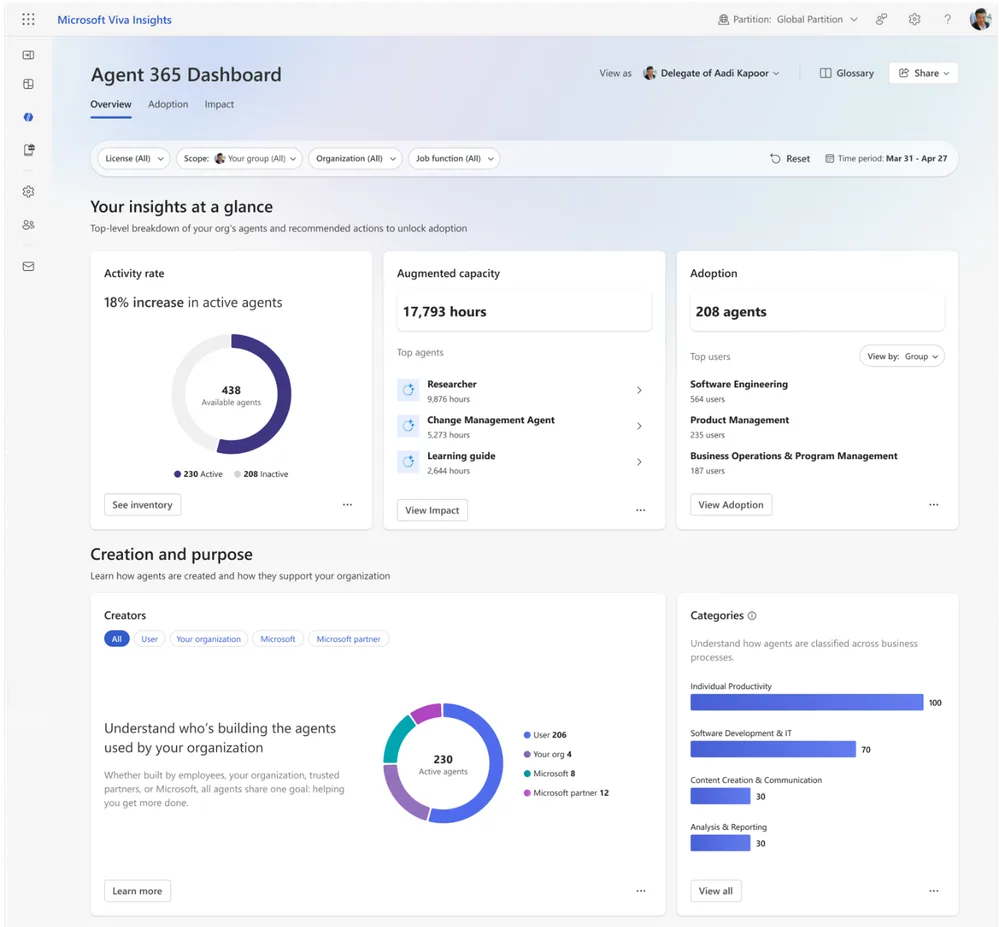
The dashboard consolidates Agent 365 telemetry into a unified reporting experience. Available features include:
- Organizational filtering by team, business unit, or geography.
- Key adoption metrics: active users, retention trends, most-used agents, engagement patterns.
- Interactive drill-down on individual agent performance to identify successful deployments and optimization opportunities.
This component serves both analysts evaluating field usage and decision-makers arbitrating AI investments and change management strategies.
Registry Sync: unified inventory of multi-platform agents (GA)
Registry Sync is now generally available. This feature allows organizations to synchronize in Agent 365's Agent Registry agents developed and deployed on third-party platforms, beyond the Microsoft ecosystem.
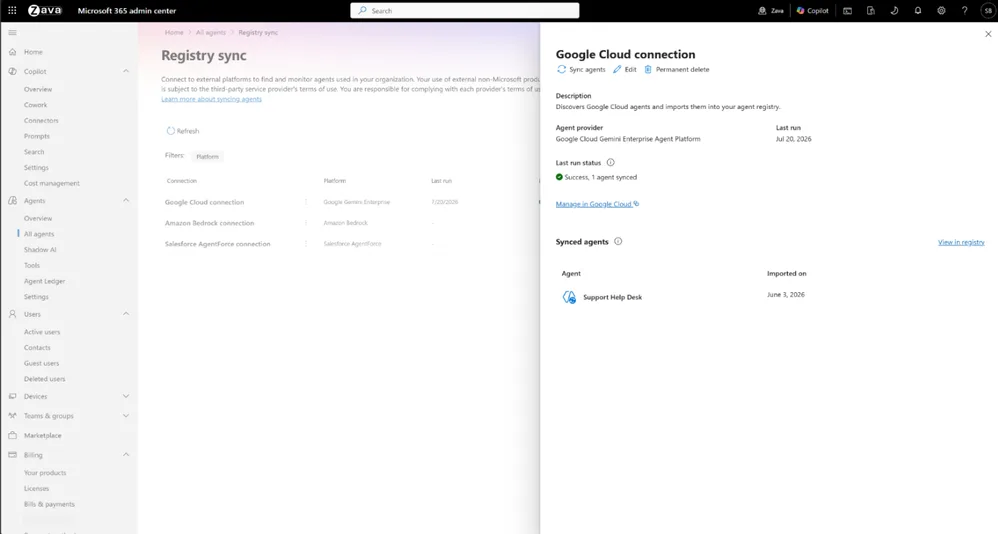
Synchronization occurs on a daily or weekly cadence, according to administrator configuration. The platforms supported at GA are:
| Platform | Status |
|---|---|
| Amazon Bedrock | Available |
| Google Cloud Gemini Enterprise Agent Platform | Available |
| Anthropic Claude | Available |
| Databricks Genie | Available |
| Salesforce Agentforce | Available |
| Snowflake | Coming soon |
| Oracle OCI | Coming soon |
| UiPath | Coming soon |
Registry Sync is not limited to visibility. Where the underlying platform's APIs allow, administrators can perform governance actions directly from Agent 365 — notably lifecycle actions such as deleting synchronized agents. This avoids multiplying admin consoles to manage a heterogeneous agent fleet.
Reduce blind spots
Agents developed on third-party platforms are often the least visible to IT teams. Registry Sync allows you to surface them in a single inventory without requiring their migration to the Microsoft ecosystem.
Multi-tenant agent management: public preview
Multi-tenant agent management is now available in public preview. It targets two main profiles: partners who administer multiple customers, and large enterprises operating complex multi-tenant environments.
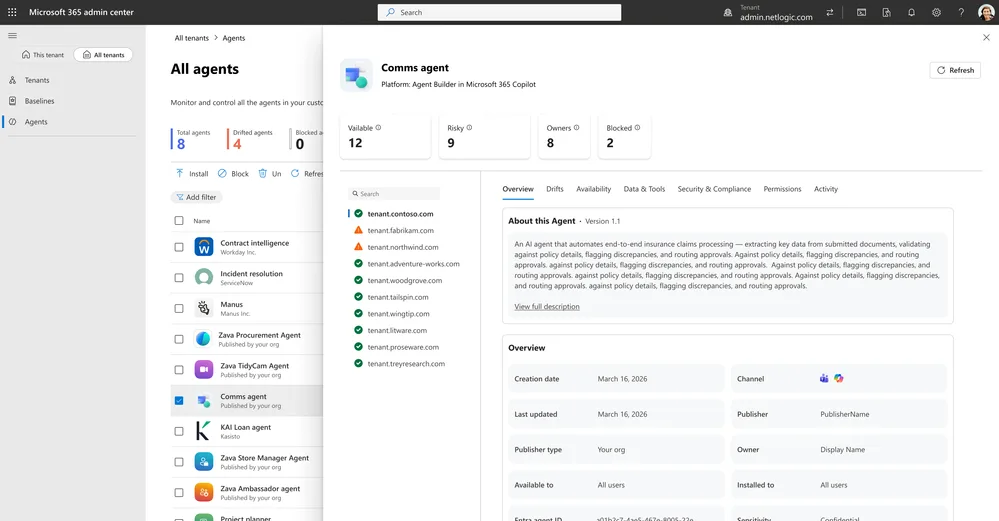
From All tenants > Agents in the Microsoft 365 admin center, an administrator can:
- View a consolidated inventory of agents across all connected tenants.
- Add custom agents and deploy them to selected tenants.
- Compare availability and permissions specific to each tenant.
- Examine risks and agent activity, subject to meeting applicable license requirements.
- Block agents or modify their availability across tenants.
- Switch to a connected tenant via delegated access, without a separate admin account in that tenant.
The experience leverages existing cross-tenant administration relationships and Granular Delegated Admin Privileges (GDAP). Partners configure these relationships in Partner Center; enterprises can do so via Microsoft Entra Tenant Governance. Available tenants and authorized actions depend on the active tenant relationship and the administrator's delegated role.
Public preview: features not finalized
Multi-tenant management is in public preview. Features, licensing prerequisites, and supported roles may change before general availability. Consult Microsoft Learn documentation before any production deployment.
To get started, Microsoft recommends verifying existing tenant relationships and delegated role assignments, then consulting the Microsoft Learn documentation on multi-tenant agent management.
What you should do now
The July 2026 updates strengthen Agent 365 on five complementary axes. Here are the priority actions based on your context:
- If you use Cyera, Darktrace, or Zenity: enable partner signals in Agents > Settings in the Microsoft 365 admin center to enrich your risk view without leaving Agent 365.
- If you manage Copilot Credits budgets: review your spending policies in light of the new conflict resolution rules, and verify that displayed capacity accounts for your Power Platform allocations.
- If you deploy agents on Amazon Bedrock, Salesforce Agentforce, or Google Gemini: configure Registry Sync to integrate these agents into your centralized inventory.
- If you operate multiple Microsoft 365 tenants: evaluate the public preview of multi-tenant management and prepare your GDAP relationships accordingly.
- For everyone: Agent 365 Dashboard is now GA — this is the time to enable it to build adoption reporting useful for your business leaders.