Introduction
The passkeys represent a major advancement in the field of secure passwordless authentication. By integrating this technology into the Microsoft Entra environment, IT professionals can offer their users a phishing-resistant login method that is easy to configure and compliant with MFA strategy.
Microsoft Entra supports two main types of passkeys: Device Bound Passkeys and Synced Passkeys. While the former are stored locally on the user's device, the latter synchronize private keys via a cloud service. Understanding their mechanisms and applications is essential for any administrator.
Why Passkeys Are the Future of Passwordless Authentication
Passkeys offer a phishing-resistant solution thanks to their direct binding to the legitimate service domain. Unlike passwords, they cannot be reused or stolen. Here are their main advantages:
- Enhanced security: Private keys are stored in secure environments such as TPM or Secure Enclave.
- Contextual authentication: Authentication relies on a mix of elements: biometrics or PIN to unlock the device.
- Standardized support: They use open protocols such as WebAuthn to ensure broad compatibility.
Good to Know
Microsoft Entra currently supports device-bound passkeys (Device Bound) in GA and synchronized passkeys (Synced Passkeys) in Public Preview.
Understanding MFA Satisfaction with Passkeys
Although passkeys appear to be a single authentication method, they meet MFA (multi-factor authentication) criteria through the following two elements:
- What you possess: The device containing the private key (e.g., smartphone, laptop).
- What you are or know: The biometrics or PIN used to unlock the operation.
Passkey Security with the WebAuthn Protocol
The WebAuthn protocol is at the heart of how passkeys work. In a few simple steps, it guarantees secure authentication:
Passkey Registration
During creation, a key pair (private/public) is generated. The private key is stored locally or synchronized via a cloud service, while the public key is associated with the user's account in Entra ID.
Challenge During Login
Entra sends a challenge (random nonce) along with the Relying Party ID.
Local Verification
The user unlocks the private key via biometrics or PIN. For external passkeys, an additional step is required: reading via QR code or Bluetooth connection.
Signature and Response
The signed challenge is transmitted to Entra for verification against the associated public key. If there is a match, an access token is issued.
1# Command to verify passkey profiles2Get-AzureADPolicy | Where-Object {$_.PolicyType -eq "Passkey"}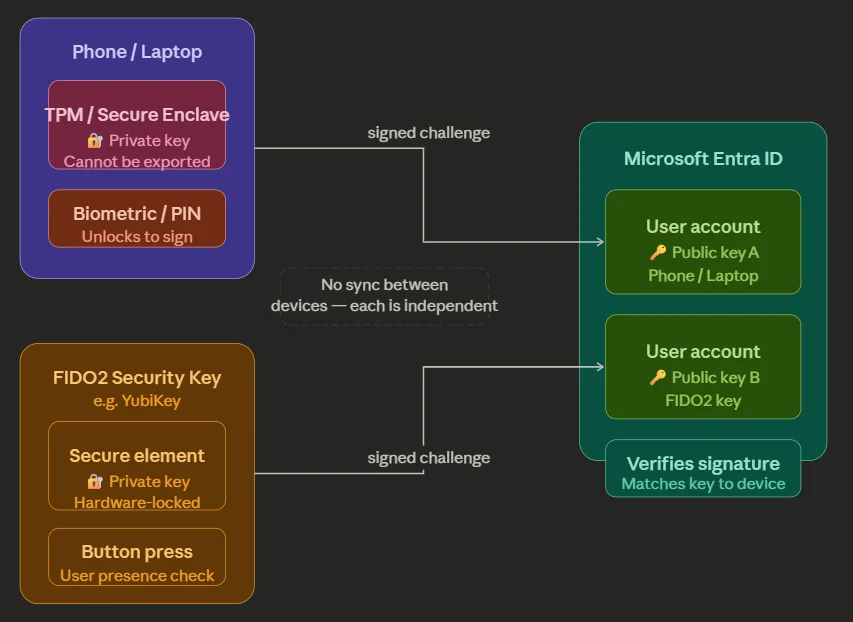
Types of Passkeys and Their Uses
Device Bound Passkeys
Device-bound passkeys are independent and require new creation in case of device loss. This guarantees strong security but can increase the complexity of use.
Synced Passkeys
Stored in the cloud, they allow synchronization across multiple devices. Here are examples of services:
- Apple Key Chain
- Android Password Manager
- 1Password Vault
Attention
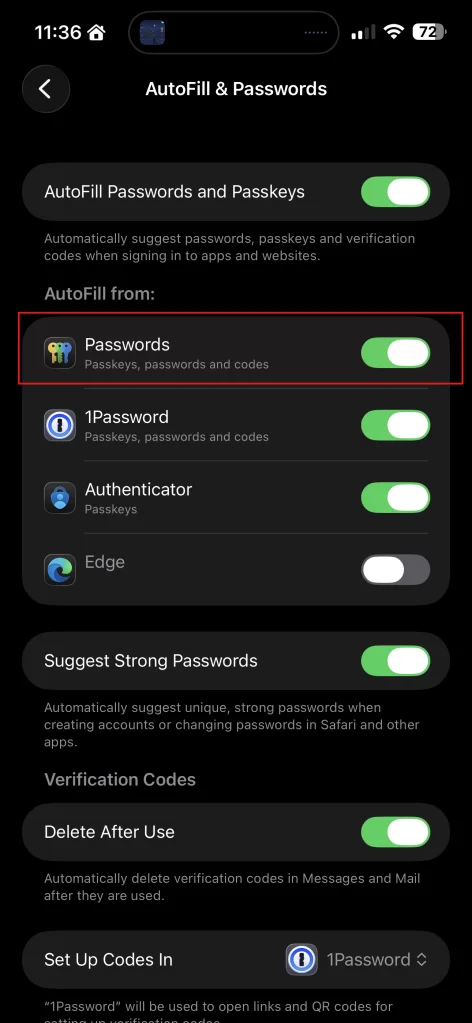
Verify that AutoFill settings are enabled on Apple devices before creating a passkey.
Configuring Passkeys in Microsoft Entra
Profile Creation and Management
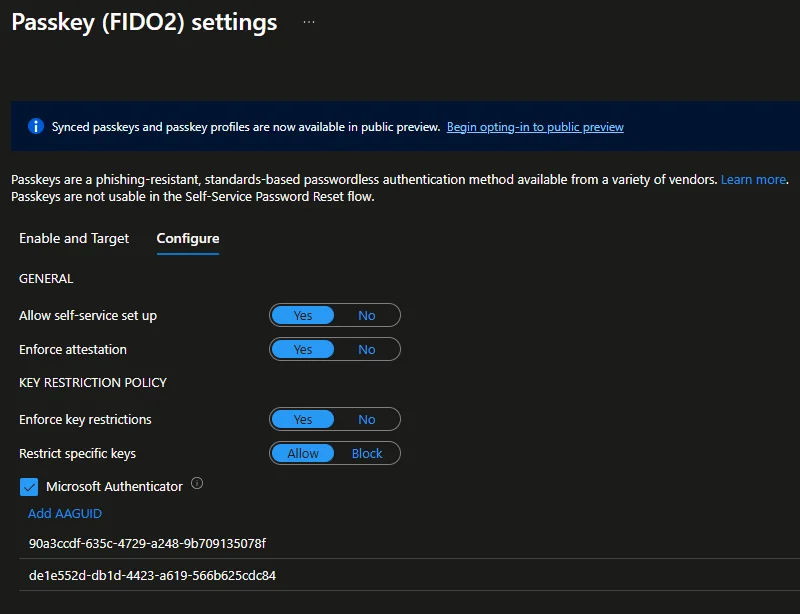
An administrator can configure profiles to support passkey authentication. These profiles can be tailored to different groups of users.
User Registration
Users can register their passkeys via My Account > Security Info. Here are the available options:
- Use an external authenticator (e.g., Microsoft Authenticator)
- Create a synchronized passkey via a mobile device and save it to Key Chain.

FIDO2 Coverage for Entra Kerberos
A notable aspect of Entra Kerberos is its compatibility with FIDO2 passkeys. This allows Entra-integrated devices to authenticate to on-premises resources using stored passkeys.
Coming Soon: Passkey Improvements
Microsoft plans to extend passkey support to Windows Hello for unmanaged devices. Here is the recommended configuration:
1# Example configuration via PowerShell2Set-MsolUserAuthenticationPolicy -UserPrincipalName "user@example.com" -Policy "PasskeyPolicy"Glossary of Terms
- WebAuthn: A standard protocol enabling secure authentication via public keys.
- FIDO2: A passwordless authentication standard based on biometrics and passkeys.
- TPM: A secure hardware enclave used to store private keys.