
A Teams call queue where each agent only sees their own calls is a customer callback that gets lost at shift change. The Queues app turns an existing queue into a shared workspace, but deploying it takes more than the announcement lets on: licenses, conference mode, per-device limits. Here is how to enable it, verify it and troubleshoot it in production.
What the Queues app adds to an existing call queue
The Microsoft Teams Queues app does not create a new queue: on an existing call queue, it enables a common view for agents and supervisors. Microsoft positions it for teams that handle customer calls on top of other tasks, whether for external customers (a bank branch) or internal ones (IT support).
45 jours
Depth of historical reports, versus 30 days previously
Microsoft
15
Maximum authorized users per call queue
Microsoft Learn
90 jours
Length of the Teams Premium trial for eligible organizations
Microsoft
Shared history: a single view of calls
Shared history, now generally available, gathers the queue's missed, incoming and outgoing calls as well as voicemails. Each agent no longer sees only their own calls. Access can be set for all queue members or only for authorized users.
Technically, this behavior goes through a template that you assign to the queue: we come back to it below.
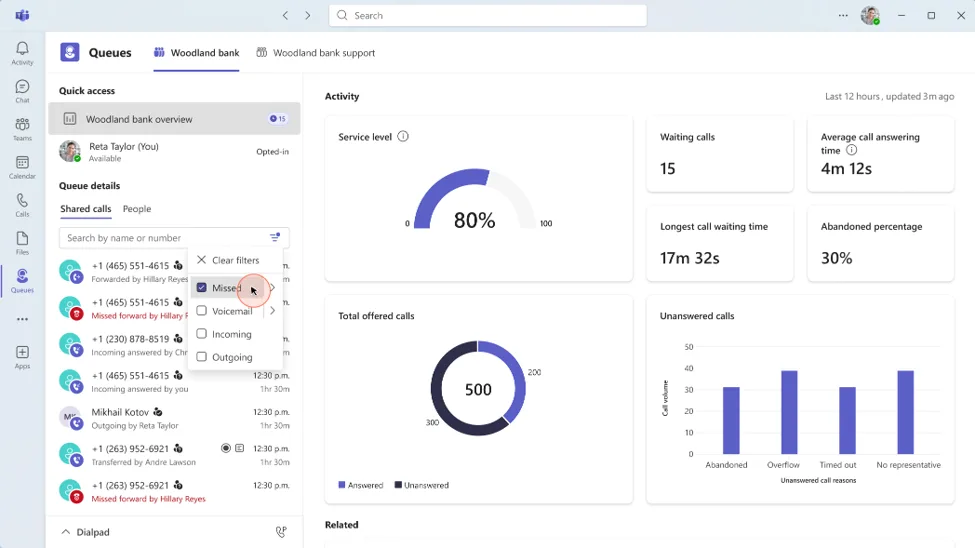
Resolution statuses: knowing who took over what
Representatives and supervisors can mark a missed call or a voicemail as Unresolved, In progress or Resolved (labels from the Microsoft announcement; the localized interface may translate them). At the start of a shift, an agent filters unresolved items and avoids calling back a customer already handled by a colleague.
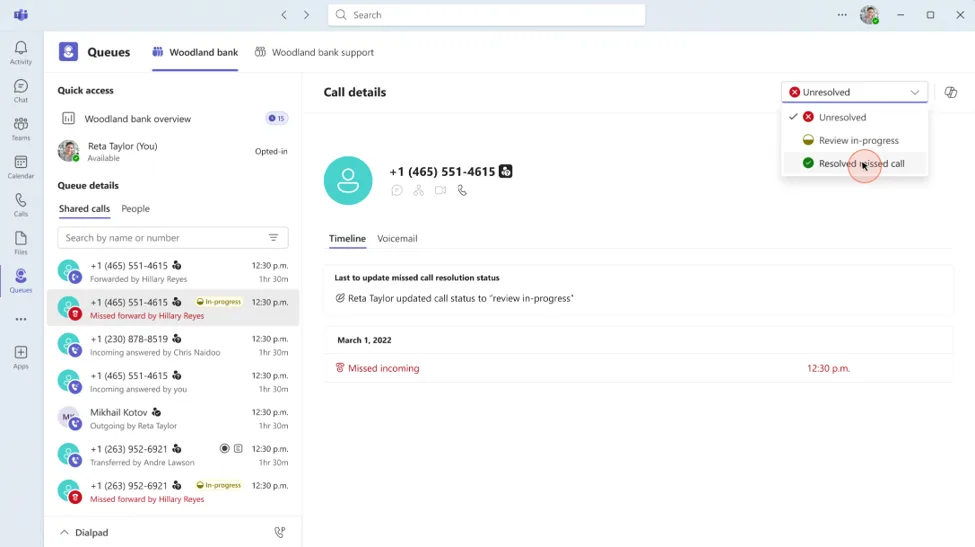
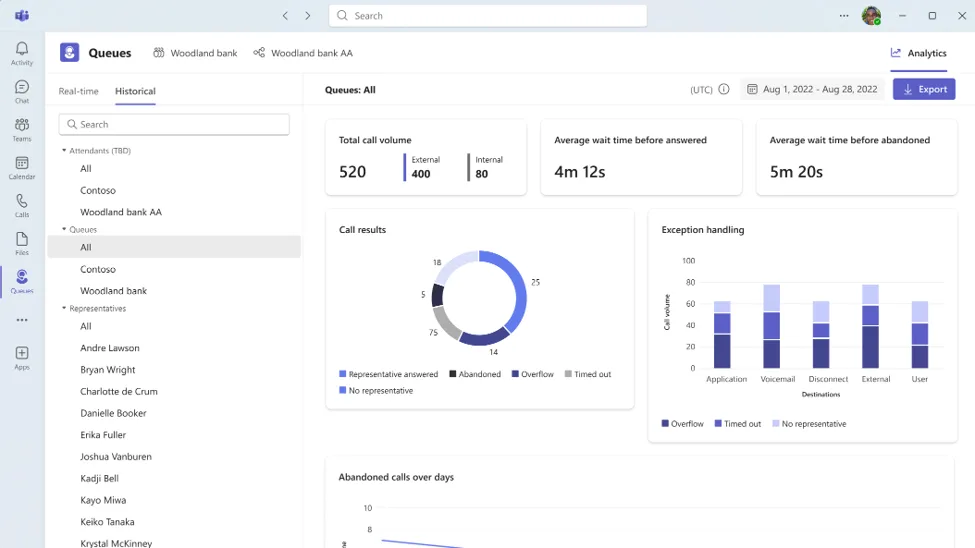
45-day reports
Supervisors and approved readers can analyze up to 45 days of data (30 days previously). Reports open by default on the last 7 days. According to the Microsoft Learn documentation on historical reports, they are expressed in UTC and organized by the resource account's user name; Power BI reports are available without an additional license for authorized users.
A typical scenario
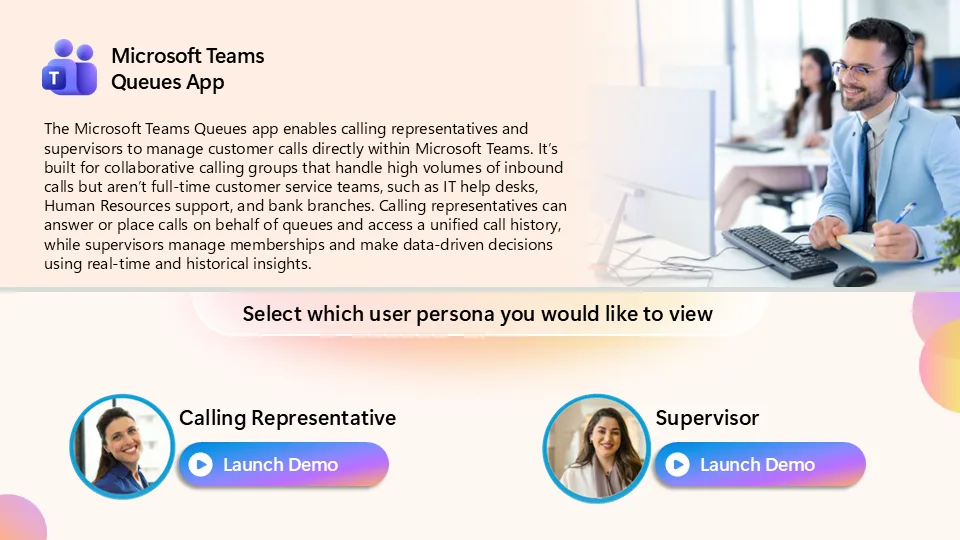
Illustration: an internal IT support desk runs in two shifts. The evening team filters calls marked Unresolved at the start, sets aside those In progress and calls back first the voicemails left without follow-up. Without a common history, this handover went through a message or a separate shared board. Microsoft also offers an interactive demo of the Queues app to show the journey to teams.
Authorized users: delegating the queue without opening up all rights
Authorized users (team leads, supervisors) manage queue settings directly in Teams, without going through IT for every adjustment. They also view reports and supervise agents' calls. The procedure is described on the Microsoft Learn page on adding authorized users.
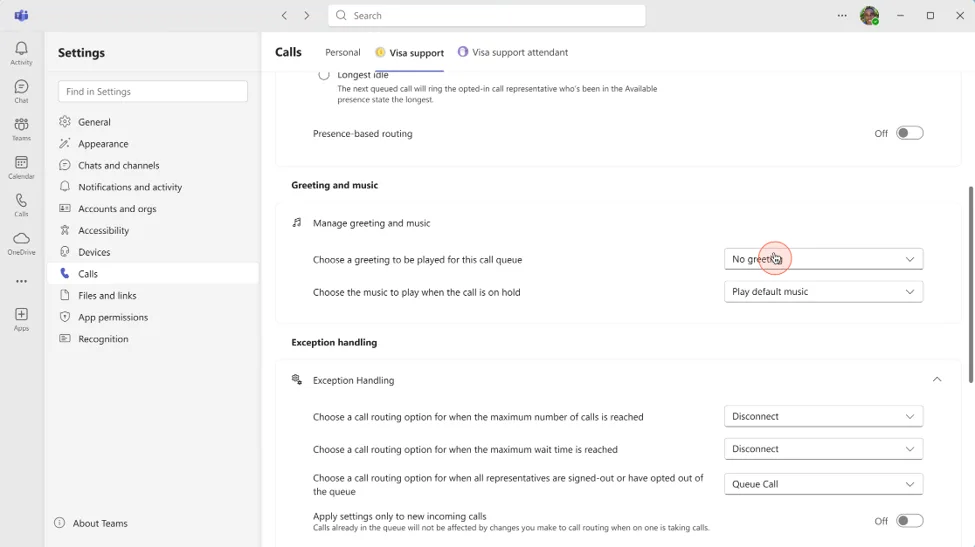
The Learn page on voice applications policies sets three rules that condition everything else:
- A maximum of 15 authorized users per call queue.
- Each user must have a voice applications policy assigned and be added as authorized to at least one queue or auto attendant. Without both, no configuration change is possible.
- Some delegated rights require Teams Premium.
| Delegated action | Teams Premium required |
|---|---|
| Edit queue membership | Yes |
| Edit routing method | Yes |
| Edit overflow handling | Yes |
| Edit greetings | No |
| Edit music on hold | No |
Expert recommendation: apply least privilege. Limit rights to the team leads who actually need them, because membership and routing directly change the service delivered to the customer.
Licenses and prerequisites: what the announcement does not detail
The announcement points to a footnote mentioning Teams and Teams Phone licenses. The Microsoft Learn documentation on prerequisites and licensing is clearer: all Queues app users need a Teams Premium license, a Teams Phone license and must be enabled for voice.
Prerequisites before enabling the Queues app on a queue
- Teams Premium, Teams Phone and voice enablement for each agent and supervisor
- Conference mode enabled on the call queue
- “Shared call history” template created and then assigned to the queue
- Voice applications policy assigned to authorized users, who are added to a queue or auto attendant (15 maximum per queue)
- Funding for outbound PSTN calls if agents call back or transfer externally
Calling Plan: no longer valid for callbacks from a queue
Since November 1, 2025, Calling Plan licenses on resource accounts are no longer supported for outbound PSTN “on behalf of” calls, callbacks and external transfers from call queues. You need a funded pay-as-you-go license or communication credits, otherwise these calls fail.
The impact is direct on the app's flagship scenario: an agent calling a customer back from the shared history triggers precisely this type of call. Check the funding before the pilot, not after the first failures. To place this change in the trajectory of the Teams contact center, see our article Microsoft Teams May 2025: AI news, Contact Center and major changes.
Enabling shared history: portal or PowerShell
According to the Learn page on configuring shared history, a template defines who sees what, separately for two categories: missed calls, and answered or outbound calls. For each, you choose “Authorized users only” or “Authorized users and agents”.
In the Teams admin center, open Voice > Templates and resources, create a “Shared call history” template and choose the visibility of each category. Then open the relevant call queue and assign this template to it. First check that conference mode is enabled on the queue.
The documentation consulted gives no propagation time: validate with a test call rather than a fixed wait. Before production, confirm the parameter names with Get-Help New-CsSharedCallQueueHistoryTemplate -Full and the Learn page above.
Implementation: auditing and assigning the template across several queues
This script assigns a shared history template to a list of queues, skipping those where conference mode is disabled. Prerequisites: the MicrosoftTeams module (Install-Module MicrosoftTeams -Scope CurrentUser) and a Teams role allowed to manage call queues, at the lowest suitable level (for example Teams Administrator, to be validated according to your delegation model). It produces a table listing, for each queue, the conference mode, the number of authorized users and the action taken. Dry-run mode is on by default.
Call visibility: compliance impact
Assigning a template in “Authorized users and agents” mode makes the queue's calls visible to all of its agents. Validate the scope with your DPO or legal department before setting -DryRun $false, particularly for voicemails containing personal data.
1#Requires -Modules MicrosoftTeams2[CmdletBinding()]3param(4 [Parameter(Mandatory)][string[]]$QueueNames,5 [string]$TemplateName = 'Historique partagé - Support',6 [bool]$DryRun = $true7)8 9Connect-MicrosoftTeams | Out-Null10 11# 1. Récupération du modèle existant, sinon création (ou simulation)12$template = Get-CsSharedCallQueueHistoryTemplate | Where-Object { $_.Name -eq $TemplateName } | Select-Object -First 113if (-not $template) {14 if ($DryRun) {15 Write-Host ('[Simulation] Création du modèle {0}' -f $TemplateName)16 }17 else {18 $template = New-CsSharedCallQueueHistoryTemplate -Name $TemplateName -Description 'Créé par script' -IncomingMissedCalls AuthorizedUsersAndAgents -AnsweredAndOutboundCalls AuthorizedUsersOnly19 }20}21 22# 2. Audit puis affectation file par file23$report = foreach ($name in $QueueNames) {24 $queue = Get-CsCallQueue -NameFilter $name | Where-Object { $_.Name -eq $name } | Select-Object -First 125 if (-not $queue) {26 [pscustomobject]@{ File = $name; ModeConference = 'n/a'; Autorises = 'n/a'; Action = 'File introuvable' }27 continue28 }29 30 $autorises = @($queue.AuthorizedUsers).Count31 32 # Le mode conférence est requis pour l'historique partagé33 if (-not $queue.ConferenceMode) {34 [pscustomobject]@{ File = $name; ModeConference = $false; Autorises = $autorises; Action = 'Ignorée : mode conférence désactivé' }35 continue36 }37 38 if ($DryRun) {39 $action = 'Simulation : modèle non affecté'40 }41 else {42 Set-CsCallQueue -Identity $queue.Identity -SharedCallQueueHistoryTemplateId $template.Id43 $action = 'Modèle affecté'44 }45 [pscustomobject]@{ File = $name; ModeConference = $true; Autorises = $autorises; Action = $action }46}47 48$report | Format-Table -AutoSizeRun the simulation first, then the real application:
1./Set-QueueSharedHistory.ps1 -QueueNames 'Support IT','Agence Nord'2./Set-QueueSharedHistory.ps1 -QueueNames 'Support IT','Agence Nord' -DryRun $falseTo confirm the assignment on a queue:
1Get-CsCallQueue -NameFilter 'Support IT' | Select-Object Name, ConferenceMode, SharedCallQueueHistoryTemplateIdPost-deployment checks
- Place a test call to the queue and let it ring unanswered
- Open the Queues app on Teams Desktop with an agent and confirm the missed call appears
- Check that an agent does not see more than the template allows
- Have an authorized user edit a greeting, then test a change subject to Teams Premium
- Check the reports, taking the UTC display into account
Troubleshooting: common symptoms and fixes
| Symptom | Likely cause | Resolution |
|---|---|---|
| No shared history in the Queues app | Conference mode disabled on the queue, or template not assigned | Enable conference mode, assign the template, retest from Teams Desktop |
| History missing on Teams Web, mobile or IP phone | Shared history is only managed on Teams Desktop | Direct agents to the Queues app on Teams Desktop |
| An authorized user cannot change anything | Voice applications policy not assigned, or user not added as authorized | Assign the policy and add the user to at least one queue or auto attendant |
| Cannot change membership, routing or overflow | Teams Premium license missing | Assign Teams Premium; greetings and music on hold do not require it |
| Callbacks, external transfers or on-behalf-of calls from the queue failing | Calling Plan on the resource account, not supported since November 1, 2025 | Funded pay-as-you-go license or communication credits |
| Agents cannot access recordings | Shared history not enabled | Enable shared history; recordings are stored in SharePoint |
| Times offset in reports | Reports expressed in UTC | Convert to local time zone; read by the resource account's user name |
Devices and recordings: the limits to know
Teams mobile: what the announcement promises, what the documentation lists
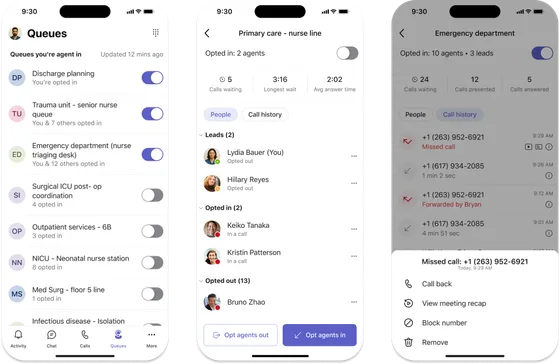
According to the Microsoft announcement, the Queues app on Teams mobile lets you stay opted in to your queue, view recent calls and return missed calls, which is useful for an agent moving between sites. However, the Learn page on supported configurations marks shared history management as supported only on Teams Desktop, and “N” for Teams Web, Teams Mobile and IP phones. So test precisely what your field agents see on mobile before promising them the full view.
Automatic recordings and transcripts
The Learn documentation on templates and resources states that automatic queue recordings and transcripts are stored in SharePoint. Shared history must be enabled for agents and authorized users to access them from the Queues app. Include this storage in your SharePoint retention and governance policy.
Teams Premium trial and 2026-2027 timeline
Microsoft offers eligible organizations a 90-day trial of Microsoft Teams Premium. Eligibility requires having received the Message center post MC1471792 and having averaged more than 10 active call queue members per month between April and June 2026. The number of trial licenses appears in that message, and activation goes only through it. Once activated, licenses stay valid for 90 days, whether assigned or not.
September 14, 2026
Trial license activation opens
Eligible organizations can activate their licenses via the Message center.
September 29, 2026
Historical reports updated
According to the Learn page on queue shared history, historical reports change on this date.
September 30, 2026
Configurable automatic recording
Automatic queue recording can be configured in the Teams admin center.
October 19, 2026
Outbound call supervision
Monitor, Whisper, Barge and Takeover support outbound calls for authorized users.
Mid-December 2026
End of the activation window
Organizations have 90 days from September 14, 2026 to activate their trial licenses.
March 2027
50% discount offer
Qualifying customers can get 50% off a one-year Teams Premium subscription, communicated by email.
The discount assumes active usage: the monthly average usage of the Queues app during the trial must reach at least 50% of trial licenses or 50% of active call queue users between April and June 2026, whichever is lower. Adoption tracking goes through the Teams Premium usage report, which the September 14, 2026 announcement describes as rolling out.
Practical consequence: assign licenses to those who actually work the queue, not to the whole department. To follow the platform's other developments, see our Microsoft 365 roadmap: Teams, Copilot and Purview news.
Frequently asked questions
Is a Teams Premium license required for all agents?
Yes. The Microsoft Learn documentation specifies that all Queues app users need Teams Premium, Teams Phone and voice enablement.
Do agents see shared history on Teams mobile or Teams Web?
The supported configurations page lists it only for Teams Desktop. Teams Web, Teams Mobile and IP phones are marked as unsupported for shared history management.
How many authorized users can be added to a queue?
A maximum of fifteen per call queue. Each user must also have a voice applications policy assigned and be added to at least one queue or auto attendant.
Why are my queue's outbound callbacks failing?
Since November 1, 2025, Calling Plan licenses on resource accounts no longer cover outbound PSTN calls on behalf of the queue, callbacks and external transfers. You need a funded pay-as-you-go license or communication credits.
Where to start
Next actions
- Check in the Microsoft 365 admin center whether your organization received message MC1471792
- List the pilot queues and verify their conference mode
- Validate the funding for outbound PSTN calls (pay-as-you-go license or credits)
- Run the script in simulation mode, then assign the template to a single queue
- Designate the authorized users (15 maximum) and assign them the voice applications policy
If your organization received the message, activate the trial before the end of the 90-day window and limit it to one or two queues, with agents who use Teams Desktop. Otherwise, the offer is not open to you: evaluate Queues with the Teams Premium and Teams Phone licenses you plan to deploy anyway.
Going further
- Setup - Shared Call History for Call Queue: steps and PowerShell examples to create and assign shared history templates.
- Reference - Voice applications prerequisites and licensing: Queues app licenses and prerequisites, including outbound PSTN calls.
- Manage - Voice applications policies: rights that can be delegated to authorized users and those that require Teams Premium.
- Reference - Supported Configurations (call queues): limits by queue type and by device.