
Managing two hundred devices and managing twenty thousand endpoints are not the same business. August's updates for Microsoft Intune directly tackle this change in scale: securing a device's identity before it even enrolls, enabling remote troubleshooting without user presence, and preparing for Apple settings management before the next macOS versions arrive.
The underlying thread: industrializing the device lifecycle
A task that takes two minutes on an isolated endpoint can represent months of work once multiplied by the size of your fleet. Hiring every time your estate grows is not a sustainable option: you need repeatable processes that give time back to IT teams rather than consuming more of it.
This logic runs through the three major announcements of the month: establishing trust from provisioning onward, reducing technical support time constraints, and replacing custom scripts with native policies in the administration console.
Windows Autopilot device association reaches general availability
Windows Autopilot device association has now reached general availability (GA). This capability is part of Autopilot device preparation and allows you to associate a device with the tenant before it even enrolls in Microsoft Intune.
In practice, the device's identity is verified through cryptographic keys and TPM (Trusted Platform Module) attestation before enrollment begins. This additional step ensures that only devices recognized as trustworthy access your organization's resources, without waiting for the entire onboarding flow to complete before performing this check.
This device association also opens the door to several capabilities:
- Device preparation policies applied per device rather than only per user.
- Customization of the Out-of-Box Experience (OOBE).
- Device renaming before even enrolling in Intune.
Phased Deployment
This feature is rolling out alongside an upcoming Windows update. It becomes fully operational only once this OS update is delivered to the relevant devices — plan your testing accordingly before a mass deployment.
For a step-by-step deployment, the associated documentation is detailed in the dedicated post on Autopilot device association.
Remote Help: troubleshooting a Windows endpoint without user presence
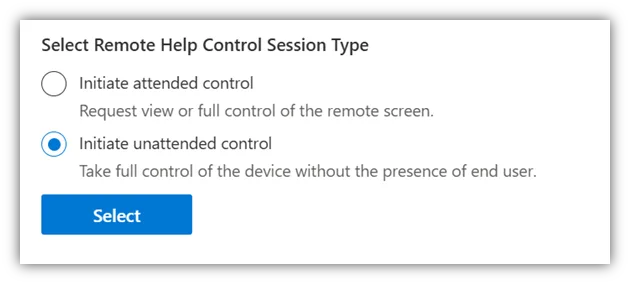
Microsoft Intune Remote Help adds an unattended access mode with remote sign-in. A technician can now connect to a physical Windows endpoint with their own credentials, even if the device is inactive and no user is logged in.
This mode addresses real-world scenarios: scheduled maintenance outside business hours, support for devices in remote offices without on-site IT personnel, or incident resolution on shared endpoints without a named user.
Access is controlled by a dedicated RBAC (Role-Based Access Control) permission, separate from classic assisted support permissions. Only administrators explicitly authorized for their device scope can initiate an unattended session, and Intune maintains access controls and auditing throughout the session.
Verify RBAC Scope
This unattended permission is more sensitive than classic assisted access, since it no longer requires user acceptance. Apply the principle of least privilege: assign it only to administrators who truly need it, and over a restricted device scope.
Detailed recommendations on implementing unattended access with remote sign-in (Remote Help unattended access with remote sign-in) are available in the Microsoft Intune documentation.
macOS 27: app control and AppleCare folder acceleration
In anticipation of Apple's upcoming macOS versions, Intune adds two capabilities for Mac devices managed on macOS 27 and later.
The first, App Settings configuration, provides a native way to manage applications and binaries — including AI applications — on managed Macs. Previously, blocking a specific application required maintaining complex open source tooling: manageable on a few hundred devices, unmanageable as your app catalog grows. With this update, a single policy in the Intune administration console lets you define allowed or denied applications and binaries.
The second capability concerns log collection for AppleCare support folders. A "enhanced logging" device action places a Mac in a reinforced logging state whose files are sent directly to the AppleCare folder. The previous manual process — asking the user to trigger collection, then transferring files by hand — disappears in favor of a simple action triggered by the admin.
Plan Ahead
These two features are tied to the release of macOS 27. Full details are in the Apple announcement about app management enhancements presented at WWDC26. Test on a pilot group before rolling out the policy to your entire Mac fleet.
Defender for Endpoint and Intune: dispelling the myth of the mandatory third-party tool
One recurring point deserves clarification: managing Microsoft Defender for Endpoint at scale does not require a dedicated third-party endpoint management tool. Native integration between Intune and Defender for Endpoint lets you maximize existing Microsoft investments and avoid managing separate security and endpoint management systems.
From the Intune administration console, an administrator can deploy Defender onboarding policies, apply Microsoft-recommended security baselines or targeted endpoint security policies, and manage security settings across the fleet.
This integration also connects threat detection to device compliance: when properly configured, risk signals from Defender for Endpoint can feed into Intune compliance, and Conditional Access can automatically block a risky device without manual intervention.
To dive deeper, Microsoft MVP Jonathan Edwards addresses common objections in his video 99% of IT Teams still get Microsoft Defender & Microsoft Intune Wrong. On the implementation side, the recommended path is described in the Technical User Manual for Defender and Intune, which provides a clear sequence from initial setup to full integration.
Overview of this month's updates
| Feature | Status | Scope | Primary Benefit |
|---|---|---|---|
| Windows Autopilot device association | General Availability (GA) | Windows, Autopilot device preparation | Trust established before enrollment, via TPM and cryptographic keys |
| Remote Help — unattended access | Available | Windows, dedicated RBAC | Troubleshooting without user presence, outside business hours or at remote sites |
| App Settings / Enhanced logging | Linked to macOS 27 and later | Managed Macs | Control of apps and binaries, accelerated AppleCare folders |
| Defender for Endpoint integration | Available natively | Windows managed by Intune | Compliance and Conditional Access driven by risk signals |
Implementation: identify RBAC roles authorized for unattended access
Before broadly enabling unattended Remote Help, it's useful to check which Intune RBAC roles already carry a permission related to remote assistance, and to whom these roles are assigned. The script below queries Microsoft Graph to produce this list.
- Required Module: Microsoft.Graph.Authentication (
Install-Module Microsoft.Graph.Authentication -Scope CurrentUser) - Minimum Permission:
DeviceManagementRBAC.Read.All(read-only, no configuration changes) - Output: the list of Intune RBAC roles whose authorized actions mention remote assistance, along with their assignments (scope and label), to verify that unattended access remains restricted to authorized administrators.
1# Connect to Microsoft Graph with the minimal required scope (read-only)2Connect-MgGraph -Scopes "DeviceManagementRBAC.Read.All"3 4# Retrieves all Intune RBAC role definitions via the Microsoft Graph API5$roleDefinitions = Invoke-MgGraphRequest -Method GET -Uri "https://graph.microsoft.com/v1.0/deviceManagement/roleDefinitions"6 7# Filter roles whose authorized actions mention remote assistance8$remoteHelpRoles = $roleDefinitions.value | Where-Object {9 ($_.rolePermissions.resourceActions.allowedResourceActions -join ";") -match "remoteAssistance"10}11 12foreach ($role in $remoteHelpRoles) {13 Write-Host "`nCandidate role for unattended access: $($role.displayName)" -ForegroundColor Cyan14 15 # Lists the assignments of this role (scope, label) to verify who can start an unattended session16 $assignments = Invoke-MgGraphRequest -Method GET -Uri "https://graph.microsoft.com/v1.0/deviceManagement/roleDefinitions/$($role.id)/roleAssignments"17 $assignments.value | Select-Object displayName, scopeType | Format-Table -AutoSize18}If the result shows an overly permissive built-in role (for example a generic Helpdesk role carrying this action across the entire tenant), create a custom role restricted to a specific device group rather than broadening an existing role.
Key takeaways
The four updates this month share a common objective: reducing repetitive manual work without adding another tool to your endpoint management stack.
- Enable Autopilot device association progressively, accounting for its dependency on the associated Windows update.
- Review RBAC assignments before opening unattended Remote Help to your support teams, particularly for remote sites.
- Plan a macOS 27 pilot to validate the App Settings policy before rolling out broadly across your Mac fleet.
- If your organization still manages Defender for Endpoint through a separate third-party tool apart from Intune, evaluate switching to native integration using the Technical User Manual: consolidation reduces the number of interfaces to monitor and strengthens the link between compliance and Conditional Access.