Introduction
With the growing integration of Microsoft 365 Copilot into daily operations, its productivity benefits are widely praised. However, it is essential to consider the potential risks it may also amplify, particularly those related to insider threats.
In this article, we explore a simulated exercise aimed at highlighting the dangers of malicious use of Copilot by an employee with legitimate access to sensitive data. You will discover how this simulation revealed significant organizational gaps and provides practical recommendations for better securing your Microsoft 365 environment.
A Security Risk Amplified by Copilot
Highlighting Existing Permissions
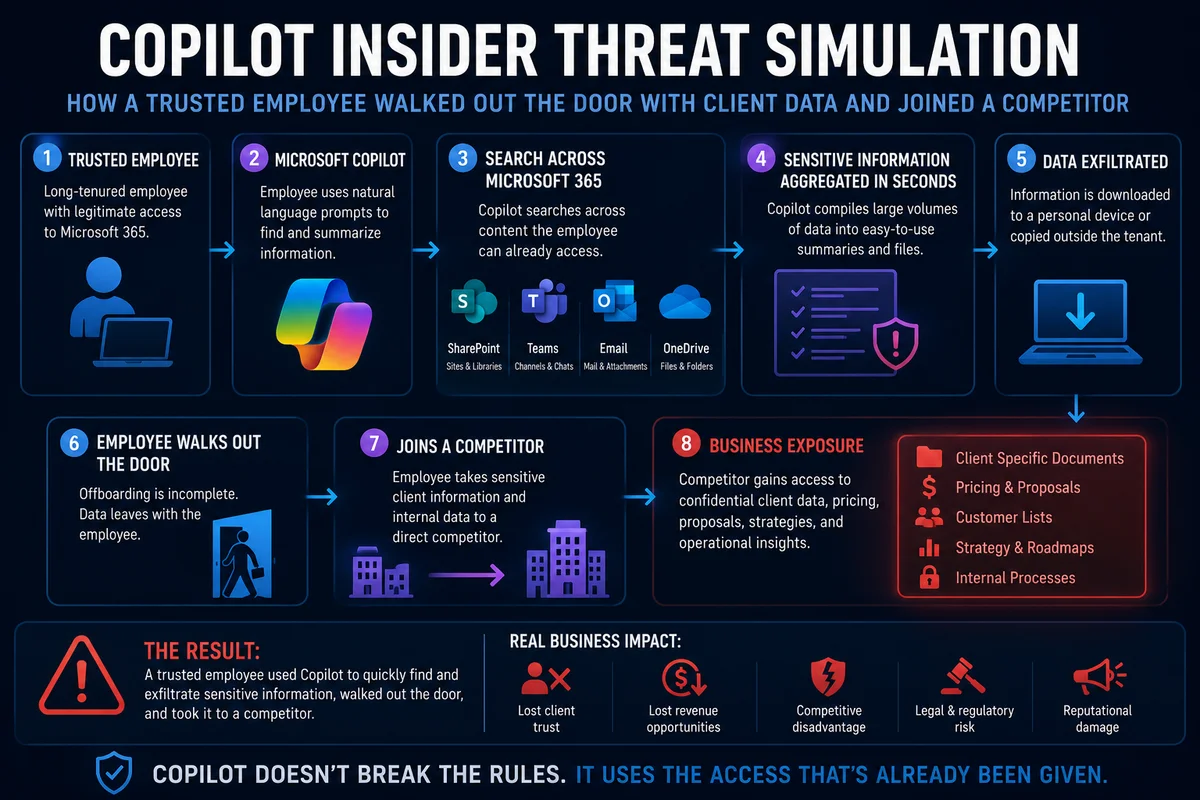
Contrary to some fears, Microsoft 365 Copilot did not bypass security measures or exploit vulnerabilities. It simply used the permissions already available to an employee, allowing them to quickly access sensitive information spread across SharePoint, Teams, OneDrive, and Exchange.
Copilot did not break the rules, but accelerated access to accessible data. This gain in speed and search capability significantly transforms the potential impact of insider threats.
Good to Know
The issue lies less in the Copilot tool itself than in permission management within your organization.
Lessons Learned from the Simulation
Lesson 1: The Problem Lies in Permissions
What Happened
During this simulation, each piece of data collected via Copilot was accessible with the employee's existing permissions. No privilege escalation or bypass was observed.
Why It Matters
Excessive or misaligned permissions relative to employee responsibilities make Copilot a risk multiplier. This issue existed before AI, but it is amplified by its ability to connect data.
Key Questions to Address
- What sensitive data is accessible to your employees?
- Are SharePoint permissions aligned with roles?
- Do non-financial teams have access to budget forecasts?
Lesson 2: Need for Cross-Functional Coordination
What Happened
Once the incident surfaced, technology was no longer at the center of discussions. The IT team, management, human resources, and legal department were involved in managing business risks—demonstrating the importance of a coordinated strategy.
Why It Matters
Mitigating insider threats is not solely a technology matter. Decisions must include all stakeholders and anticipate operational impacts.
Key Questions
- Who is responsible for resolution?
- How should roles be distributed among security, HR, and management?
- Are procedures clear for each stakeholder before an incident occurs?
Lesson 3: Situations Evolve Quickly
What Happened
The incident initially seen as unusual file access quickly escalated. The employee's resignation, followed by their move to a competitor, transformed this incident into a major intellectual property risk.
Why It Matters
Insider threats require proactive monitoring of contextual changes to quickly adjust responses and minimize impact.
Key Questions
- Are employee departures accompanied by an access review?
- What events trigger increased monitoring?
- Are IT teams informed of critical departures quickly?
Preparing Your Response to AI Threats
Integrating AI into Your Incident Response Plan
What Happened
Existing response plans target classic cyberattacks but do not account for insider threats amplified by tools like Copilot. This leaves gaps in the coordination of the response process.
Why It Matters
Incident response playbooks must include scenarios specific to AI technologies.
Recommended Steps for Organizations
Assess permissions in Microsoft 365
Identify over-accessible data and realign permissions with user roles.
Implement advanced technical configuration
Use sensitivity labels, configure DLP (Data Loss Prevention) policies, and monitor unusual activity in SharePoint and OneDrive.
Conduct practical exercises
Simulate insider threat scenarios involving AI to prepare IT, security, and executive teams.
Update incident response strategies
Include chapters specific to AI to better manage scenarios involving tools like Copilot.
Conclusion
Microsoft 365 Copilot can multiply productivity, but it also amplifies risks when permissions and internal processes are neglected. By integrating targeted measures, such as regular permission audits, simulation exercises, and incident plan updates, organizations can stay ahead of potential insider threats.
Tip
Rather than disabling Copilot, strengthen surrounding security to leverage its benefits while minimizing risks.
Related Articles
- How to Secure Claude AI for Your Enterprise
- Secure Connection of Claude to Microsoft 365
- Detection of Shadow AI in Your Organization