
A soft deletion is not enough if an administrator can immediately empty the recycle bin. Hard Deletion Protection adds a seven-day delay before certain Microsoft Entra ID objects are permanently deleted. This lab lets you test this control without exposing a production identity or application.
What Hard Deletion Protection actually blocks
Without additional protection, a deleted user, Microsoft 365 group, cloud security group, application or service principal normally remains recoverable for 30 days. An early permanent deletion ends that possibility: Microsoft Learn states that the object must then be recreated with a new identifier.
Hard Deletion Protection acts on this second stage. Once protection is enabled for an object, Microsoft Entra ID blocks its permanent deletion for the seven days following its soft deletion. The object can be restored during this period.
The protection remains attached to the object after it is restored. A new soft deletion triggers a new seven-day period. Users synchronised from an on-premises environment are, however, excluded from the announced scope.
| Control | What it enforces | Documented scope | Architecture decision |
|---|---|---|---|
| Hard Deletion Protection | Blocks permanent deletion for seven days | Compatible users, cloud-only groups, applications and service principals | Reserve for selected critical resources |
| Protected Actions | Stronger authentication before a sensitive permission is used | Users, Microsoft 365 groups, cloud security groups and applications | Use to control who performs the operation |
| Backup and Recovery | Restores objects that are still recoverable | Objects supported by the backup service | Does not recover an object that has already been permanently deleted |
The control does not protect against the first deletion. An account, group or application can therefore become unavailable before the permanent deletion attempt is blocked. Detection and restoration remain necessary.
Preparing a test tenant and an object with no dependencies
As of 8 November 2026, no general availability confirmation has been identified for Microsoft Entra Backup and Recovery. A Microsoft Q&A answer from March 2026 still describes it as a preview. Hard Deletion Protection should therefore be evaluated with the same caution until its official page confirms a different status.
The parent service requires Microsoft Entra ID P1 or P2 in a workforce tenant. The Microsoft Entra Backup and Recovery troubleshooting documentation excludes Microsoft Entra External ID and Azure AD B2C. The claim that Hard Deletion Protection involves no specific additional cost is not sufficiently established by the available documentation: check your tenant's licensing terms before any production deployment.
Lab prerequisites
- Use a test workforce tenant with Microsoft Entra ID P1 or P2
- Assign the Microsoft Entra Backup Administrator role to the lab operator
- Create a cloud-only object with no members, role assignments or application dependencies
- Record its name, type and identifier in external documentation
- Plan to complete the deletion and restoration within the same session
- Keep the timestamps needed for verification in the audit log
The Microsoft Entra Backup Administrator role allows you to start recovery operations. Global Administrator includes these permissions, but using it is not justified for this lab. Microsoft Entra Backup Reader is enough to view backups and difference reports, but not to run a recovery.
Enabling protection on a targeted resource
Configuration is done on the Hard deletion protection page of Microsoft Entra Backup and Recovery. The Microsoft configuration documentation should be checked before each new test, especially while the service remains in preview.
Enabling cannot be undone
Once Hard Deletion Protection is applied to an object, the protection is permanent. Do not use a production identity, group or application for a first validation.
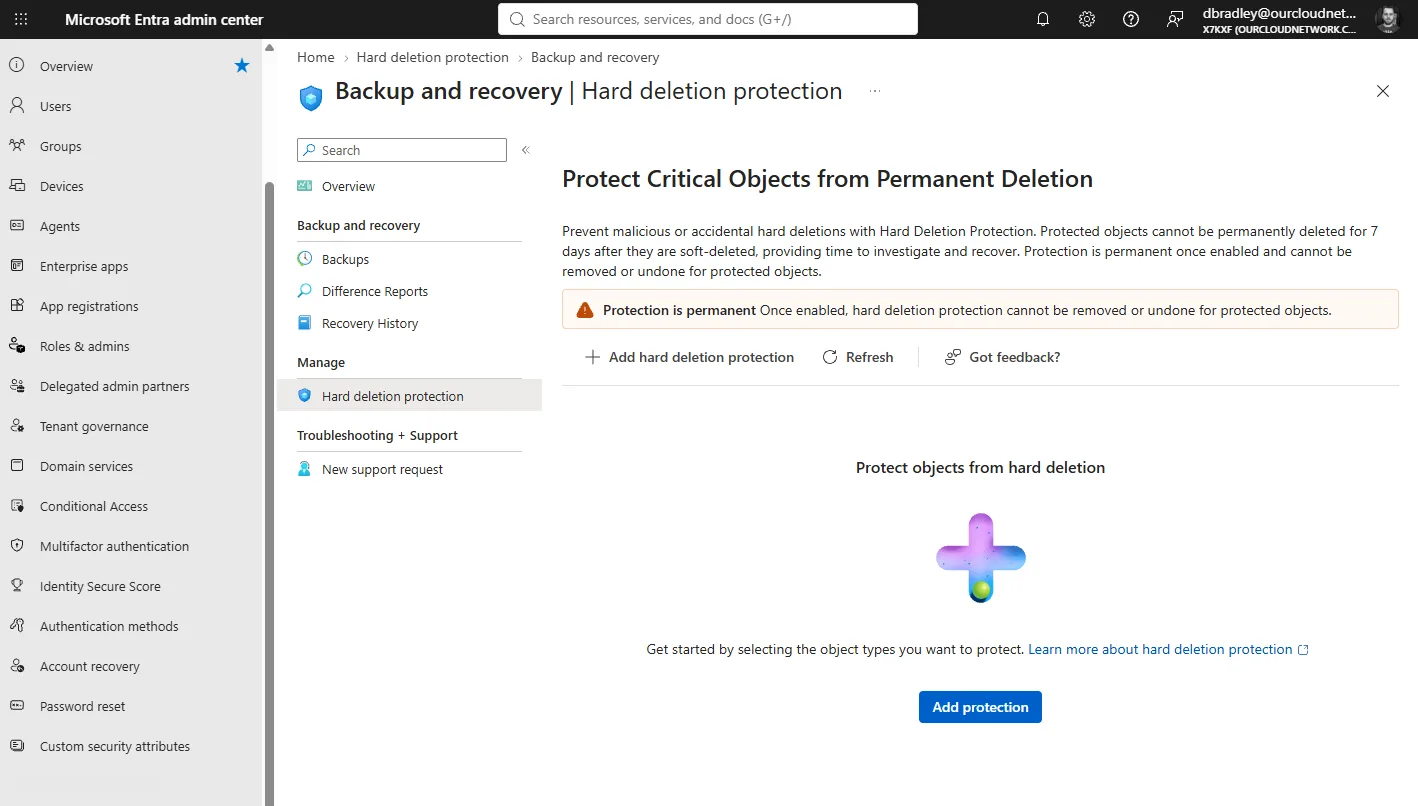
Open the protection page
Sign in with an account that has the Microsoft Entra Backup Administrator role, then open the Hard deletion protection page.
Start the addition
Select Add protection. Check that the tenant displayed is the test tenant before continuing.
Choose a single object type
Select the resource type, then the object prepared for the lab. One operation accepts up to 20 objects of the same type.
Review the selection and save
Review the object's name and identifier. Save only if the resource has no production dependencies.
Check the protection status
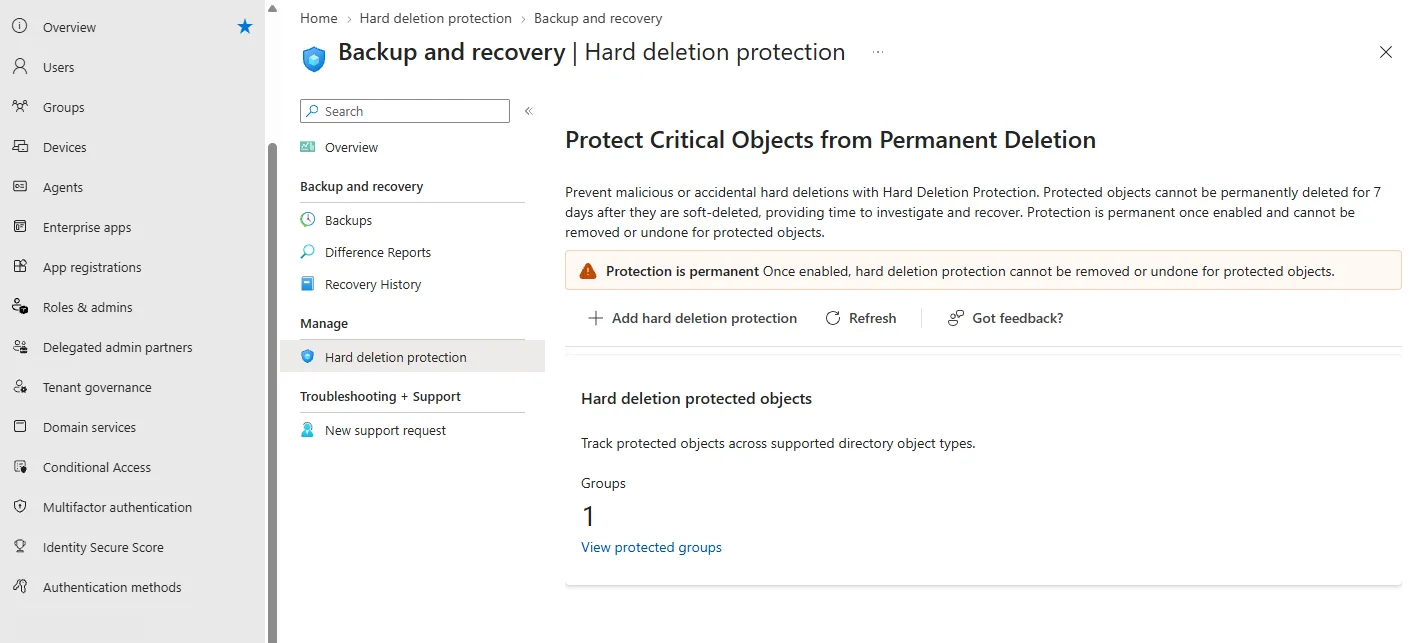
Confirm that the object appears in the protected list before attempting any deletion. If this confirmation is missing, stop the test.
The limit of 20 objects per operation should not be read as an invitation to protect the entire directory in batches. The control targets a restricted selection of resources whose permanent deletion would have a lasting impact.
Simulating a deletion without losing the test object
An organisation might, for example, want to protect a cloud security group used in an administration process. It first creates an equivalent group with no members, roles or assignments, then reproduces the full cycle in its test tenant.
Establish the baseline
Record the object's name, identifier, type and the test start time. This external reference will make it possible to tell a restoration from a possible recreation.
Perform a soft deletion
Delete the object using the usual administrative action. Check that it no longer appears among active objects and look for the corresponding Delete event in the audit log.
Attempt the permanent deletion
From the recycle bin for the object type, request its permanent deletion during the seven-day period. Microsoft Entra ID should refuse the operation. Keep the result displayed and its timestamp without assuming a specific error message.
Restore the object
Start the restoration before the end of the session. Then check that it is back among active objects and compare it with the baseline.
Validate that the protection persists
If the test plan requires it, soft-delete the object again. The protection should remain active and a new seven-day window should begin.
This test only confirms the blocking of permanent deletion. It does not measure the consequences of the initial deletion on sign-ins, permissions or application dependencies. These effects must be studied separately before protecting a real resource.
Combining the delay with Protected Actions and PIM
Protected Actions addresses a different need. This feature lets you associate the microsoft.directory/deletedItems/delete permission with a Conditional Access authentication context. The organisation can then require phishing-resistant multifactor authentication before a permanent deletion.
Hard Deletion Protection blocks the operation for seven days, even if the administrator satisfies the authentication requirement. Protected Actions therefore controls the conditions of execution, while Hard Deletion Protection imposes a delay that cannot be shortened. Our guide to Microsoft Entra Authentication Contexts details the mechanism used by Conditional Access.
The Microsoft documentation on Protected Actions recommends following the prescribed configuration order. An incorrect order can cause repeated reauthentication prompts. The official prerequisites mention Microsoft Entra ID P1 or P2.
Strengths
- Guaranteed reaction time on protected objects
- Complementary authentication control with Protected Actions
- Just-in-time elevation possible with PIM
Limitations
- No blocking of the initial soft deletion
- Protection cannot be removed once enabled
- Limited scope and parent service still presented as a preview
Microsoft also recommends a designated team for restorations, least privilege and Privileged Identity Management (PIM) for just-in-time elevation before a permanent deletion. Because the Delete and Hard delete events are distinct in the audit log, they can feed separate detection rules.
Limits to build into the recovery plan
The seven-day window is not an additional backup. According to Office 365 IT Pros' analysis published in March 2026, the preview performs a daily backup and retains five backups, i.e. five days of non-configurable history.
Three time periods must therefore be distinguished:
- 30 days of restoration for supported soft-deleted objects;
- 7 days of permanent deletion blocking for protected objects;
- 5 daily backups retained by the Backup and Recovery preview according to the available analysis.
A permanent deletion remains unrecoverable
Microsoft Entra Backup and Recovery does not restore a permanently deleted object. After the protection period, a permanent deletion requires recreating the object with a new identifier.
The feature should therefore not become the sole recoverability control. External documentation of the baseline, log monitoring, separation of roles and a tested restoration procedure remain necessary. The complete guide to Microsoft Entra Backup and Recovery can serve as a basis for this procedure.
Frequently asked questions
Is an additional licence required for Hard Deletion Protection?
The Microsoft Entra Backup and Recovery service requires Microsoft Entra ID P1 or P2 in a workforce tenant. The available documentation does not allow us to confirm that no additional entitlement specific to Hard Deletion Protection will be required. Check the tenant's official terms before production.
Can the protection be disabled after the test?
No. Protection applied to an object is permanent and cannot be undone. This is why the lab must use a disposable resource with no dependencies.
What happens after the seven days?
Permanent deletion becomes possible again, but it is not executed automatically. As long as the object remains soft-deleted and within its normal retention period, it can still be restored.
Does Hard Deletion Protection replace Protected Actions?
No. Hard Deletion Protection imposes a delay, whereas Protected Actions requires an authentication context before the sensitive operation. The two controls address different scenarios and can be combined.
Preparing a pilot before any production protection
The first objective is to prove the full cycle: enabling, soft deletion, refusal of the permanent deletion, restoration and log checking. A permanent protection should only be applied to a critical resource after this validation.
Recommended actions after the lab
- Archive the evidence of the blocking and the restoration
- Check the availability status and licences in the official documentation
- Identify the users, groups, applications and service principals that are truly critical
- Define the operators authorised to restore with Microsoft Entra Backup Administrator
- Protect
microsoft.directory/deletedItems/deletewith Protected Actions if the scope is compatible - Use PIM to limit permanent deletion privileges in time
- Create a separate detection for Delete and Hard delete events
- Test the procedure regularly without reusing a production resource
If the organisation does not yet have a documented restoration procedure, it should address this before enabling Hard Deletion Protection on its most sensitive identities.
Going further
- Soft deletion in Microsoft Entra Backup and Recovery — to distinguish soft deletion, permanent deletion and recreation.
- Recoverability best practices in Microsoft Entra ID — to structure roles, PIM, logs and the baseline.
- What are protected actions in Microsoft Entra ID? — to secure the permanent deletion permission.
- Entra ID Backup and Recovery Has a Low-Key Preview — to analyse the preview's retention limits.
- Microsoft Entra Backup and Recovery: the preview in detail — to place Hard Deletion Protection within the overall operation of the service.