
Introduction
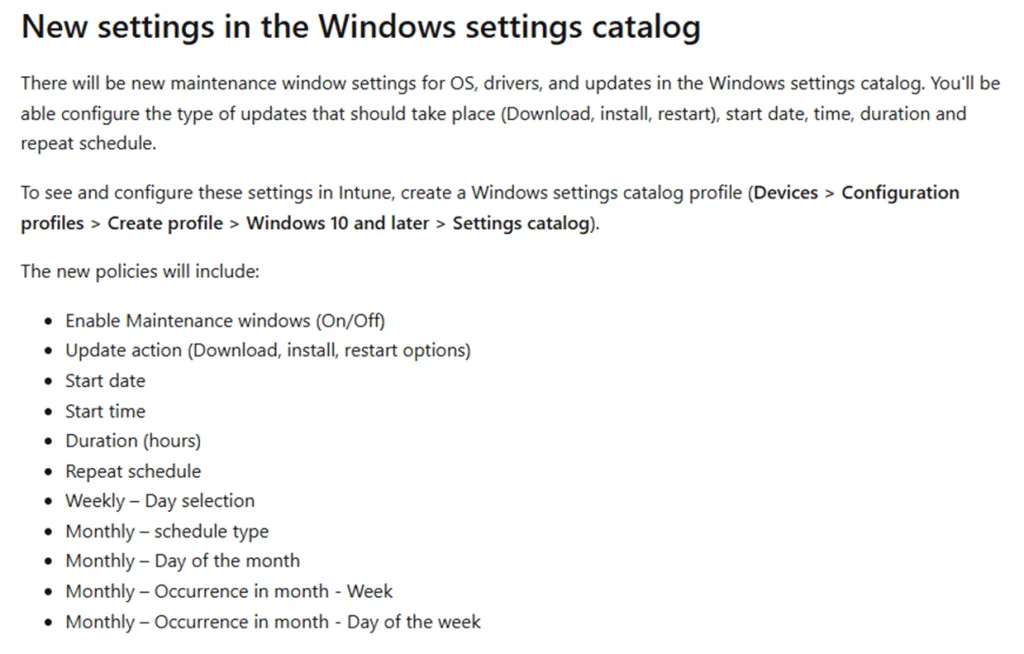
Microsoft has introduced the Maintenance Window feature in Intune, allowing you to precisely define when operating system, driver, and firmware updates are allowed to run. Unlike traditional active hours, this approach creates a precise window for update operations, improving alignment between IT administrator needs and user constraints.
Good to know
The Maintenance Window uses the Windows Update CSP to transform policies into a realistic schedule directly on devices.
Introduction to the Maintenance Window
A new option in Intune
Microsoft recently announced the arrival of the Maintenance Window feature in Intune for cloud-managed Windows devices. This new entry will be accessible through the Intune settings catalog. While the user interface for this feature is still under development, IT administrators can already manually configure the window using the Update Policy CSP to define allowed timeframes and actions.
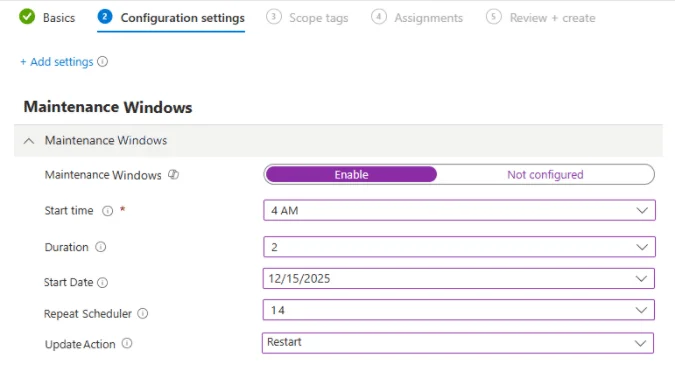
How it works behind the scenes
Even before its full exposure in the settings catalog, the underlying logic was already integrated into Windows. It could be found in:
- The MOF definitions behind the WMI bridge
- Dedicated CSP policy groups
- The Unified Update Platform (UUP)
This means Windows was ready to interpret and apply this policy even before its integration into Intune.
Why active hours are not enough
Limitations of active hours
Traditional Windows update commands, such as active hours, deferrals, and restart notifications, were primarily designed to minimize interruptions for end users. However, they do not provide a true dedicated maintenance window, where updates are explicitly allowed.

Benefits of the Maintenance Window
The Maintenance Window precisely defines when updates can occur, offering stricter control, ideal for:
- Shared devices
- Kiosks
- Frontline endpoints
- Critical environments requiring strict timing
Early clues in the ADMX file
The "Maintenance Window Enabled" policy
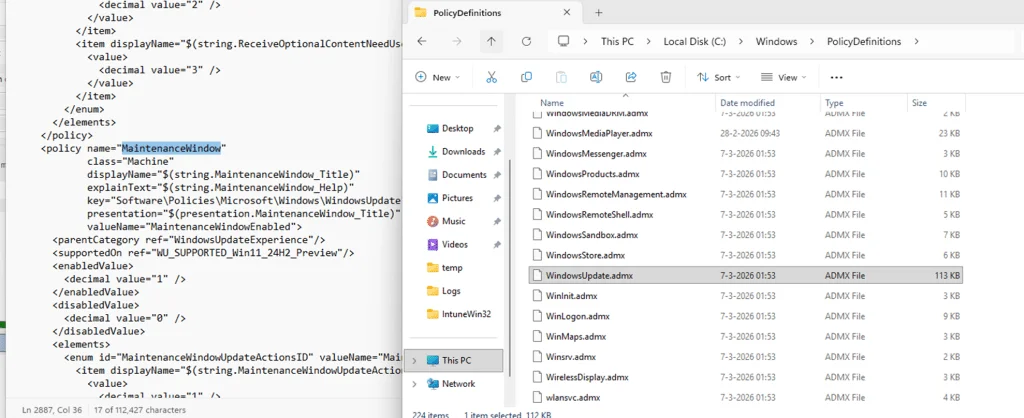
One of the first signs of this new feature appeared in WindowsUpdate.admx for Windows 11 Preview versions. The policy, named "Maintenance Window Enabled", already allowed governing actions such as downloading, installing, and restarting updates.
Tip
Insider Preview versions allow you to fully test this feature before its general deployment.
Implementation via the WMI bridge and CSP
MOF: Modern management
The MOF file confirmed that the Maintenance Window was integrated into the modern management framework via the WMI bridge. This bridge projects update-related settings into the MDM (Mobile Device Management) infrastructure.
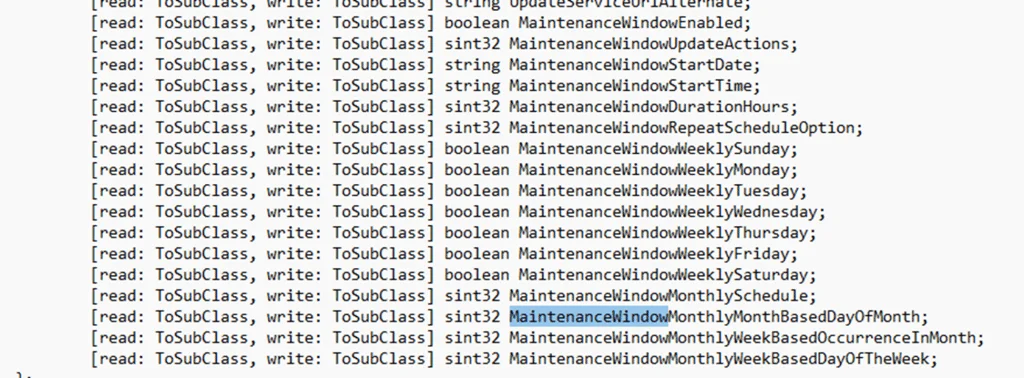
Detailed configuration via Update Policy CSP
The Update Policy CSP exposes settings allowing you to enable or disable the maintenance window, set the start time and duration, and choose the actions governed by this window. Options also include recurrence:
- Daily
- Weekly
- Monthly
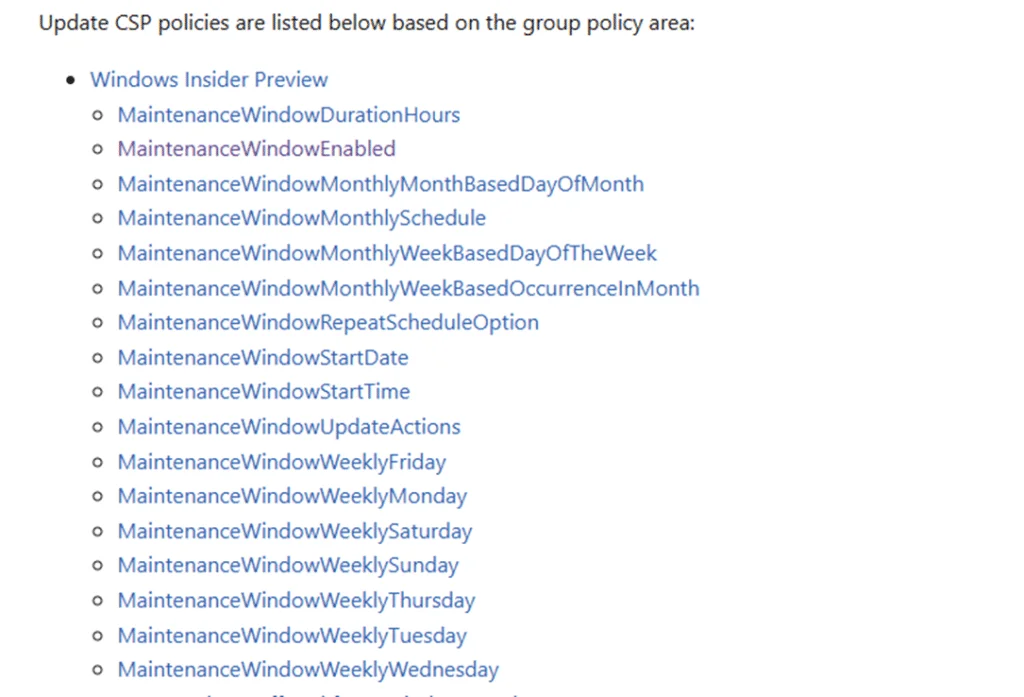
Manual configuration in Intune
Steps to apply a custom policy
Administrators can manually configure the Maintenance Window by creating a custom policy in Intune to send the necessary settings to supported devices.
Create a custom policy
Access your Intune console and create a new custom configuration policy for the Update Policy CSP.
Configure the settings
Define the following settings in the CSP:
1<UpdatePolicy xmlns="http://schemas.microsoft.com/">2 <MaintenanceWindow>3 <Enable>true</Enable>4 <StartTime>18:00</StartTime>5 <Duration>120</Duration>6 <Recurrence>Weekly</Recurrence>7 </MaintenanceWindow>8</UpdatePolicy>Apply to targeted groups
Assign the policy to specific device or user groups.
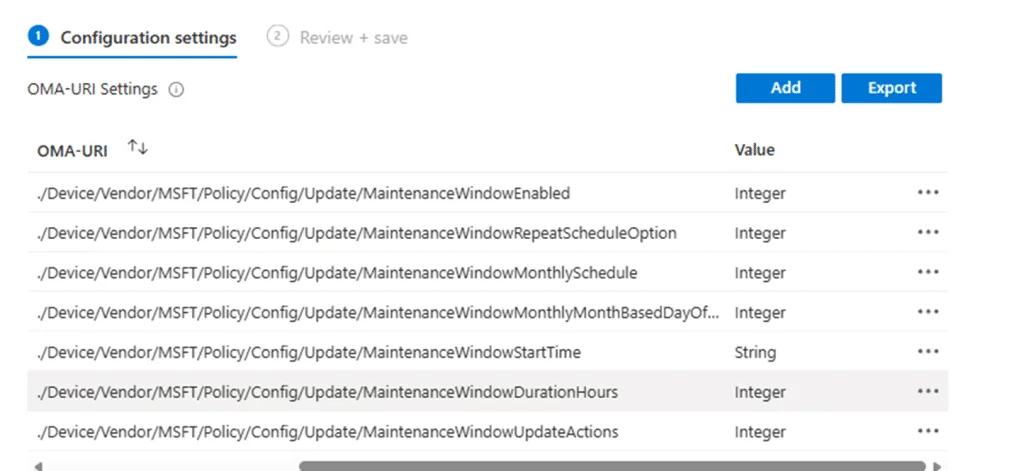
Policy validation
Once applied, the policy is accepted by devices and the settings are visible in the Windows registry.
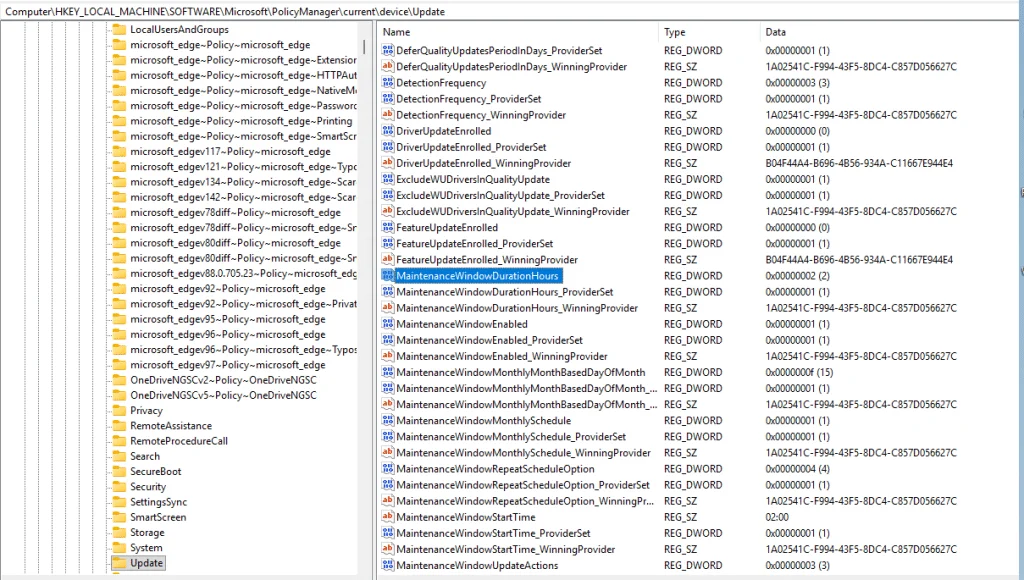
Conclusion
The Maintenance Window feature in Intune represents a significant advancement in update management, giving IT administrators better control over maintenance timing and actions. This proves particularly useful in critical environments, ensuring that updates run only during predefined periods.
Glossary
- CSP (Configuration Service Provider): Interface for configuring and managing devices via profiles.
- MOF (Managed Object Format): Files used to define WMI management classes.
- Intune: Cloud-based device and application management platform.
Useful links
Warning
Ensure that your Windows 11 devices are using a supported version for new Maintenance Window features.