Introduction
Microsoft Intune, a key element of the Microsoft 365 ecosystem, continuously evolves to provide more efficient and responsive device management. The arrival of IC3 (Intune Communication Channel) in Intune Management Extension (IME) marks a significant milestone by replacing the traditional Windows Notification Service (WNS) and introducing a real-time communication channel. This article explores the impact of this transition on device management.
Current Intune Flow
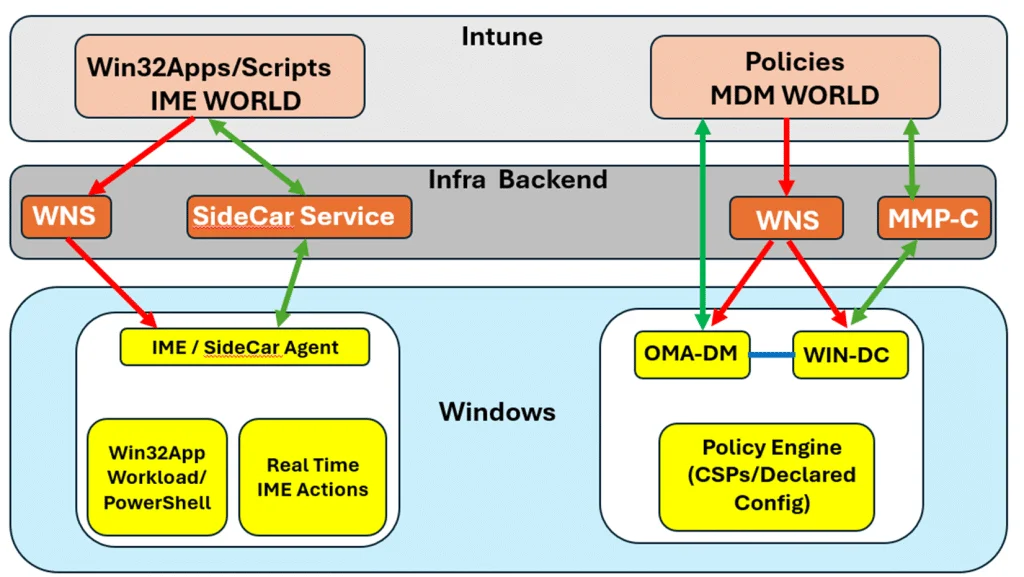
Historically, Intune relied on different communication mechanisms for its various functionalities:
- MDM (Mobile Device Management): Primarily used for policies, remote actions (synchronization, wiping), and requiring push notifications via WNS to wake up the device.
- IME (Intune Management Extension): Implementing actions such as Win32 applications, PowerShell scripts and remediations. IME operated according to internal evaluation cycles and timers, often independent of MDM notifications.
This dual model caused inconsistencies in action timing, limiting the fluidity of device management.
Good to know
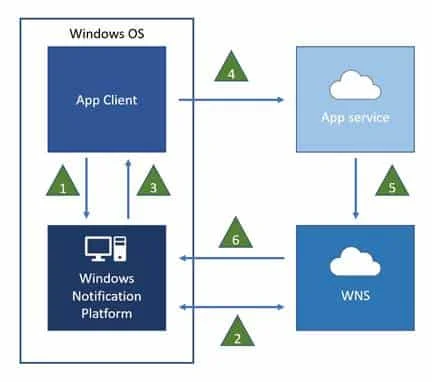
WNS was used to provide these notifications, but in case of malfunction, actions depend on system cycles or timers.
IC3: Replacing the Role of WNS
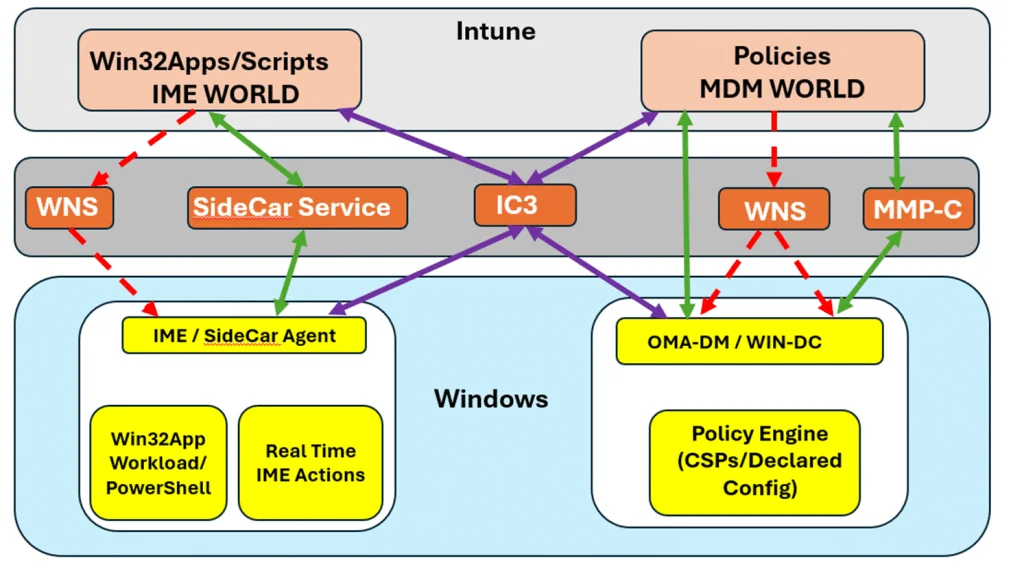
IC3 redefines the way Intune communicates with devices. It combines the roles of WNS and internal timers to unify real-time notifications and actions.
The Limitations of WNS Design
WNS suffered from two major weaknesses:
- Its dependence on a "black-box" where Intune signals became difficult to trace.
- Its inability to directly manage timed IME actions, only linking MDM notifications.
With IC3, these limitations are overcome. Now, all actions, whether MDM or IME, go through a unified and stateful channel.
Tip
IC3 enables immediate activation of critical actions such as BitLocker synchronization or application installation.
The Case of Win32 Applications and PowerShell Scripts
Historically, Win32 applications depended on an internal evaluation cycle in IME, often set at 60 minutes. Due to IME-specific timeouts, these workloads waited for their next cycle before being triggered.
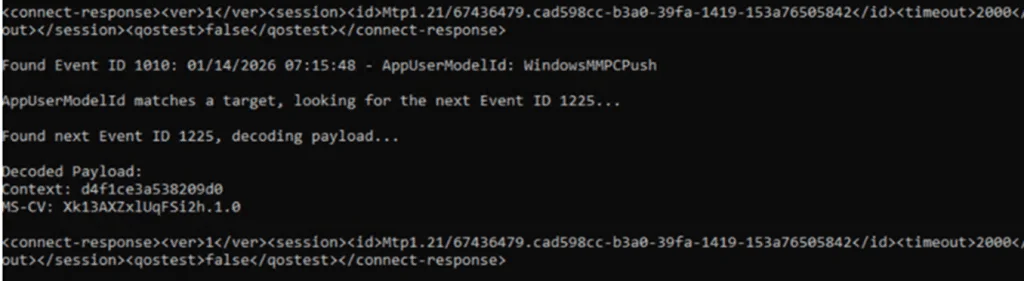
With IC3, workloads like Win32AppWorkload are executed immediately when an IC3 notification is received, accelerating their deployments and avoiding long delays.
Consequences for PowerShell Scripts
Given that IC3 simplifies communication, PowerShell scripts and remediations also follow this logic. This includes:
- Real-time script execution.
- Responsiveness in system remediations.
Important
Bypassing timeouts increases the risk of network saturation on large-scale actions. Be vigilant when deploying large deployments.
The Case of Remote Help and Beyond
The Remote Help feature, recently announced, perfectly illustrates Microsoft's intention to make IME more responsive through IC3. This solution ensures:
- Immediate assistance for users.
- Communication that no longer depends on isolated timers.
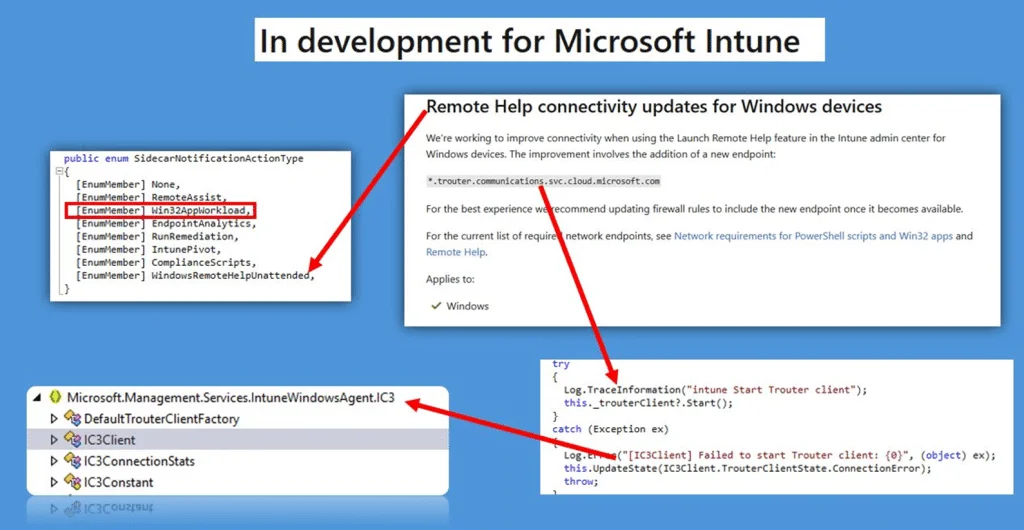
With IC3, it becomes possible to imagine expanded support for actions such as device inventory, policy-related triggers, or EPM workloads.
Summary
The incorporation of IC3 into Intune Management Extension represents a fundamental change in device management. It guarantees:
- Management of MDM actions (Sync, Wipe, etc.) without dependence on WNS.
- Improved IME workloads with instant deployments for applications and scripts.
- Unified and reliable communication.
This bringing together of MDM and IME worlds marks progress toward real-time and simplified management.
Glossary of Key Terms
- IC3: Intune Communication Channel, new real-time notification protocol.
- WNS: Windows Notification Service, former Intune notification model.
- IME: Intune Management Extension, responsible for workloads such as Win32Apps and scripts.
- MDM: Mobile Device Management, focused on policy actions and device management.
Useful Resources
1# Example of PowerShell command to trigger an Intune action2$DeviceID = "Your-Device-ID"3Invoke-RestMethod -Uri "https://graph.microsoft.com/v1.0/deviceManagement/managedDevices/$DeviceID/syncDevice" -Method Post -Headers @{Authorization = "Bearer $AccessToken"}