
An expanding protection scope
SharePoint Online has just taken a quiet but significant step: OneNote and MP4 files now officially join the list of formats fully supported by sensitivity labels. No official announcement, no message in the admin center — the news appeared in Microsoft documentation without fanfare, though hints had been dropped at events like Ignite 2025.
This extension continues the momentum from last year's addition of support for user-defined permissions labels in SharePoint Online. It now enables the platform to encrypt and decrypt these formats for accessibility to Microsoft Purview solutions: Microsoft Search indexing, eDiscovery, and Data Loss Prevention (DLP).
Enabling sensitivity label support in SharePoint Online
Before configuring anything for OneNote or MP4, global label support must be enabled at the tenant level. This is done via the SharePoint Online management module with the following command:
1Set-SPOTenant -EnableAIPIntegration $truePropagation delay
Like most tenant-wide SharePoint Online settings, this change can take several hours to become effective. The availability of labels in the browser web interface confirms that activation is properly applied.
Once enabled, SharePoint Online and OneDrive for Business can encrypt and decrypt the content of labeled files while maintaining proper functioning of associated Purview services.
Enabling support by file type
Global enablement is not sufficient: PDF, OneNote, and MP4 must each be enabled separately. By default, SharePoint Online can store these formats but cannot process their content.
PDF Files
1Set-SPOTenant -EnableSensitivityLabelforPDF $trueOnce enabled, SharePoint Online and OneDrive for Business support PDFs labeled by Adobe Acrobat (subscription), PDFs exported from Word, Excel or PowerPoint, and PDFs labeled outside Microsoft 365 via the Microsoft Information Protection (MIP) extension for Windows Explorer.
OneNote Files
1Set-SPOTenant -EnableSensitivityLabelforOneNote $trueOneNote support has an important characteristic: labels are applied at the section level, not to the entire notebook. Each section can thus have a different label. This granularity is valuable in educational or research contexts, where notebooks often contain highly confidential information.
Interface limitation
OneNote labels cannot be applied via the SharePoint web interface — it interacts with notebooks as a whole. Label application must be done through the OneNote client directly.
MP4 Files (Video)
1Set-SPOTenant -EnableSensitivityLabelforVideoFiles $trueSeveral constraints apply specifically to MP4 files:
- Automatic label application is not supported.
- Labels with user-defined permissions are not compatible.
- When a label with encryption is applied, users can no longer download the file from SharePoint Online.
- Online playback remains possible via viewers built into SharePoint Online, Teams, and Clipchamp.
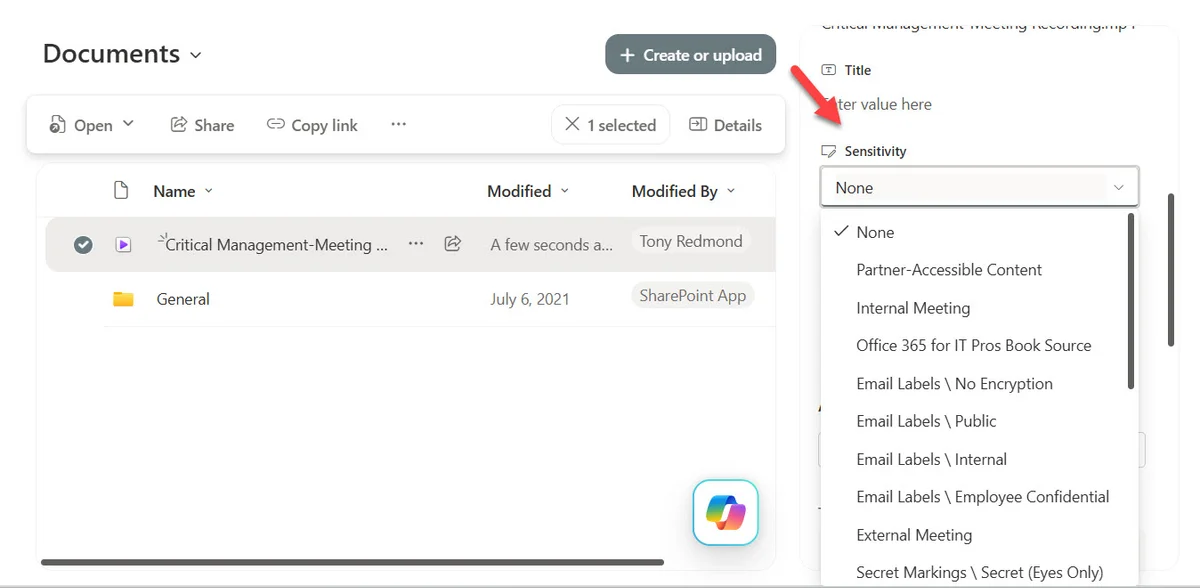
Teams meeting recordings (audio only or audio and video), stored as MP4 files in the meeting organizer's OneDrive for Business account, can inherit sensitivity labels defined in meeting settings. In fact, the documentation on protecting Teams meeting recordings was the first to reveal MP4 support.
Licensing impact: what you need to plan for
Enabling the settings does not automatically label existing files. Two approaches are available for labeling content:
| Method | License required | Scope |
|---|---|---|
| Manual assignment | Microsoft 365 E3 | All supported file types |
| Auto-labeling policies | Microsoft 365 E5 | PDF files only |
No automatic retroactivity
Enabling support for a file type does not result in any retroactive labeling of existing content. An explicit action — manual or via an auto-labeling policy — is required to cover the stock of files already present.
The Microsoft Purview Information Protection client for files outside Microsoft 365
For files stored outside Microsoft 365, the Microsoft Purview Information Protection client (successor to the Azure Information Protection client) allows labels to be applied directly from Windows Explorer. It supports many formats: JPEG, PDF, MP3, MP4, and many others.
When this client applies a label with encryption, the behavior varies by file type:
- Office and PDF files: the label is embedded in the file's metadata, just as SharePoint Online would do.
- Other formats: the client generates a Rights Management-protected file, which can only be opened by a compatible viewer — the one built into the Windows client or a dedicated application.
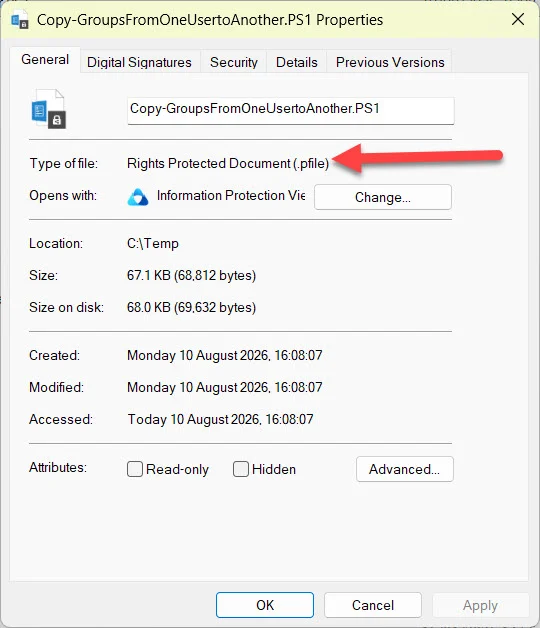
A file protected this way can be uploaded to SharePoint Online or OneDrive for Business, but its content remains inaccessible to Purview solutions — the service cannot decrypt it.
MacOS: File Labeler and File Viewer coming soon
According to message center notification MC1326509 (May 29, 2026), Microsoft plans to launch two MacOS applications — File Labeler and File Viewer — to apply labels to MacOS files and view the content of protected files. Their availability is announced as "on or around September 30, 2026".
Status
These MacOS applications are expected around September 30, 2026 according to notification MC1326509. No additional features have been announced beyond what is listed in the message center.
What this extended support changes for your Purview governance
With the addition of OneNote and MP4, SharePoint Online now covers a very large portion of common business content. Practical consequences for administrators:
- Teams recordings can be governed through the same DLP and eDiscovery policies as your Office documents.
- OneNote notebooks used in sensitive contexts (HR, R&D, training) finally enter the scope of Purview compliance.
- The reference documentation for configuring these settings is available on Microsoft Learn.
Key takeaways
- First enable
Set-SPOTenant -EnableAIPIntegration $true, then each format separately. - MP4: online playback maintained, download blocked if encrypted label, no automatic labeling.
- OneNote: granularity at section level, not notebook level, inaccessible from SharePoint web interface.
- No existing files are automatically labeled after enablement.
- MacOS File Labeler and File Viewer applications are expected late September 2026.