
Microsoft has just set a precise timeline for making classic pages read-only and disabling custom scripts in SharePoint Online. Two deadlines structure this change, between March 2027 and October 2028, with direct consequences for governance, security, and even the quality of responses from Microsoft 365 Copilot. Here's what you need to understand, evaluate, and plan right now if you manage a SharePoint tenant.
Why Microsoft is Retiring Classic Experiences
In 2016, Microsoft introduced SharePoint Modern and SharePoint Framework (SPFx) as a cloud-native foundation for content publishing and developer extensibility. The earlier features, renamed "classic" at the time, were intended to facilitate the transition from on-premises environments to the cloud.
Ten years later, Microsoft indicates that these classic experiences are used by less than 5% of the active monthly user base across tenants. The problem goes beyond simple obsolescence: classic page content does not integrate with modern security, management, and sharing mechanisms, and it is poorly represented in the content formats used by Copilot — which can reduce coverage and accuracy of responses generated from this content.
This observation justifies a gradual withdrawal, over two years, of classic pages and the ability to add or modify custom scripts in SharePoint Online.
No Data Deletion
Microsoft explicitly clarifies that no content or classic pages will be deleted as part of these two phases. Existing pages will remain accessible, but in read-only mode.
Official Timeline: Two Phases Until 2028
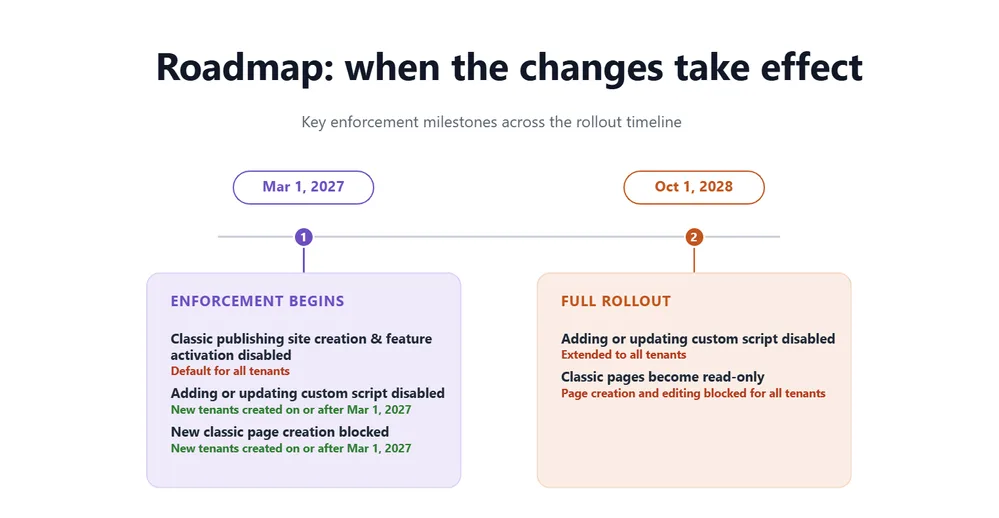
Phase 1 — Starting March 1, 2027
For all tenants, creation of new classic publishing site collections or subsites will be disabled, and activation of the classic publishing feature will no longer be possible. The tenant parameter AllowClassicPublishingSiteCreation will be forced to False and can no longer be modified.
For new tenants created on or after March 1, 2027, two additional restrictions apply:
- inability to create new classic pages (wiki, web part, blog, publishing, custom ASPX);
- custom script addition and modification disabled by default, with the site parameter DenyAddAndCustomizePages forced to True and non-modifiable.
This restriction applies only to classic pages: modern SharePoint pages are not affected, and custom solutions built on SPFx continue to function according to your current governance.
Phase 2 — Starting October 1, 2028
The changes then extend to all tenants, both existing and new:
- all classic pages created by users (wiki, web part, blog, publishing, ASPX) become read-only: no further creation or modification is possible;
- custom script addition and modification are disabled everywhere, and the
DenyAddAndCustomizePagesparameter is forced to True with no possibility of reverting.
| Element | Phase 1 – March 1, 2027 | Phase 2 – October 1, 2028 |
|---|---|---|
| Creation of classic publishing sites | Disabled for all tenants | Always disabled |
| AllowClassicPublishingSiteCreation parameter | Forced to False, non-modifiable | Unchanged |
| Creation of new classic pages | Impossible on tenants created after March 1, 2027 | Impossible for all tenants |
| Existing classic pages (wiki, web part, blog, publishing, ASPX) | Always modifiable on existing tenants | Switched to read-only, all tenants |
| Custom script addition/modification | Disabled by default on new tenants | Disabled for all tenants |
| DenyAddAndCustomizePages parameter | Forced to True on new tenants | Forced to True for all tenants |
Tenant-wide and Irreversible Impact
Starting October 2028, the DenyAddAndCustomizePages parameter will be enforced tenant-wide and irreversible. Any organization still relying on custom scripts on classic pages must complete its migration before this deadline — no exemptions will be possible after enforcement is activated.
What Is Not Affected by This Change
It is useful to clarify the exact scope, as the terms "classic" and "custom script" are sometimes confusing:
- modern SharePoint pages are not affected, regardless of the
DenyAddAndCustomizePagessetting; - SPFx solutions continue to function under your existing governance;
- no data or pages are deleted — existing data governance capabilities (retention, compliance) continue to apply normally.
How to Assess Your Exposure to Classic Pages
Before any modernization action, you must measure the actual extent of classic usage on your tenant. Microsoft recommends two complementary approaches.
The first is the "SharePoint Classic Activities" category in the Microsoft Purview audit log, included in the Audit (Standard) offering and available to all organizations. Three events are particularly useful: ClassicPageCreated, ClassicPageEdited, and ClassicPageViewed, which help identify still-active usage rather than a simple history of orphaned pages.
The second is the Microsoft 365 Assessment Tool (aka.ms/microsoft365assessmenttool), which provides an overview of the classic scope and an estimate of modernization feasibility.
Implementation: Classic Estate Audit Scripts
The two scripts below allow you to establish a concrete baseline before prioritizing your actions. The first queries tenant and site parameters via the SharePoint Online Management Shell module; the second queries the unified audit log via the ExchangeOnlineManagement module.
1# Prerequisites: Microsoft.Online.SharePoint.PowerShell module (SharePoint Online Management Shell)2# Installation: Install-Module -Name Microsoft.Online.SharePoint.PowerShell -Scope CurrentUser3# Minimum required permission: SharePoint Administrator role (read-only is sufficient for this audit)4 5# Connect to SharePoint Online tenant6Connect-SPOService -Url "https://contoso-admin.sharepoint.com"7 8# 1. Check current state of classic publishing tenant parameter9$tenantSettings = Get-SPOTenant | Select-Object AllowClassicPublishingSiteCreation10Write-Host "Current AllowClassicPublishingSiteCreation: $($tenantSettings.AllowClassicPublishingSiteCreation)"11 12# 2. Iterate through all site collections to identify those still allowing13# custom script addition/modification14$sites = Get-SPOSite -Limit All -IncludePersonalSite $false15$sitesWithScriptsAllowed = foreach ($site in $sites) {16 if ($site.DenyAddAndCustomizePages -eq "Disabled") {17 [PSCustomObject]@{18 Url = $site.Url19 Template = $site.Template20 DenyAddAndCustomizePages = $site.DenyAddAndCustomizePages21 StorageUsageCurrent = $site.StorageUsageCurrent22 }23 }24}25 26# Export for analysis and prioritization by SharePoint teams27$sitesWithScriptsAllowed | Export-Csv -Path ".\Sites_CustomScripts_Allowed.csv" -NoTypeInformation -Encoding UTF828 29Write-Host "Number of sites with custom scripts still allowed: $($sitesWithScriptsAllowed.Count)"1# Prerequisites: ExchangeOnlineManagement module (v3.4.0 or later recommended)2# Installation: Install-Module -Name ExchangeOnlineManagement -Scope CurrentUser3# Minimum required permission: View-Only Audit Logs role (or Compliance Administrator)4 5# Connect to Microsoft Purview unified audit service6Connect-ExchangeOnline -UserPrincipalName admin@contoso.com7 8# Search for classic page-related events over the last 90 days9# Adjust -StartDate according to your Purview Audit plan retention period (Standard or Premium)10$results = Search-UnifiedAuditLog -StartDate (Get-Date).AddDays(-90) `11 -EndDate (Get-Date) `12 -RecordType SharePoint `13 -Operations ClassicPageCreated, ClassicPageEdited, ClassicPageViewed `14 -ResultSize 500015 16# Group by operation type to prioritize sites to address first17$results |18 ForEach-Object { $_.AuditData | ConvertFrom-Json } |19 Group-Object Operation |20 Select-Object Name, Count |21 Sort-Object Count -Descending22 23Disconnect-ExchangeOnline -Confirm:$falseThis first pass gives you two concrete pieces of information: the exact list of sites still allowing custom scripts, and the actual volume of active usage (creation, editing, viewing) of classic pages. Cross-reference the two to build a priority list by business criticality rather than alphabetical order of sites.
Recommended Modernization Strategy
Once the scope is identified, Microsoft's recommended approach follows four steps:
- Discover and evaluate: combine the results of the scripts above with the Microsoft 365 Assessment Tool to get a complete feasibility view.
- Prioritize by business criticality: if the evaluation reveals no classic content, no action is required. Otherwise, focus effort on high-value or frequently updated sites.
- Transform before enforcement deadlines: use the SharePoint PnP Modernization tools and SharePoint Page Modernization Agent to convert classic pages to modern experiences. Microsoft continues to improve this tooling, but it does not automatically cover all complex scenarios — heavily customized pages often require manual redesign.
- Adopt wave-based migration: combine centralized IT planning with distributed execution delegated to site owners over time. Most organizations succeed better by modernizing in successive waves rather than attempting a single massive migration.
For site owners and content authors, the role involves working with the SharePoint team to identify active classic pages and decide which should be modernized, removed, or replaced.
Common Mistakes to Avoid
- Confusing classic pages with modern pages in audits: the
Get-SPOSitefilter returns all site templates; always cross-reference with the template and actual usage before launching unnecessary modernization. - Underestimating Purview audit retention: if your organization has the Audit (Standard) plan, the available history period may be shorter than with Audit (Premium) — verify this limit before concluding there is no classic usage.
- Launching PnP modernization without functional validation: conversion tools aim for "best-effort" fidelity, not a guarantee of identical rendering. Always plan a testing phase with site owners before production switchover.
- Waiting for phase 2 deadline to act: the
DenyAddAndCustomizePagesparameter becomes non-modifiable once enforced — planning after the deadline means accepting the constraint rather than controlling it.
Summary: What You Need to Do Right Now
This change does not delete any data, but it progressively locks down write access to SharePoint Online classic experiences, with two firm deadlines: March 1, 2027 and October 1, 2028. Specifically:
- start your classic estate audit now via the Purview "SharePoint Classic Activities" category and the Microsoft 365 Assessment Tool;
- identify sites still allowing custom scripts with the
Get-SPOSitescript provided above; - prioritize modernization by business criticality, not page volume;
- test PnP Modernization tools on a sample before large-scale deployment.
If your organization detects no active classic content during this evaluation, no further action is necessary — but verifying this now costs far less than discovering it in 2028, when the DenyAddAndCustomizePages parameter will be permanently locked. A message center notification has been sent to all tenants (MC1464926 and MC1464924); consult the official Microsoft Learn documentation referenced at aka.ms/ClassicUserCreatedPageDeprecation for complete FAQ details and calendar updates.