
Introduction
The management of permissions and workflows in Microsoft Intune has taken a complex turn with the introduction of the Multi Admin Approval (MAA) principle. This security mechanism, designed to prevent critical modifications made by a single compromised administrator account, now includes calls to the Microsoft Graph API using application authentication (service principal).

This functionality can, however, interfere with automation scripts and tools, manifesting in the error "Header 'x-msft-approval-justification' is required to request approval". This article will explore the reasons behind this error, its impact on automated scripts, and the available solutions to effectively bypass it.
Good to know
Multi Admin Approval applies new automation restrictions for security reasons, but proper configuration allows you to maintain the smooth operation of your processes.
Why is Microsoft Pushing the Multi Admin Approval Concept?
The primary motivation behind this effort is the prevention of abuses related to compromised administrator accounts. A notable example, the incident at Stryker, revealed how the misuse of an Intune administrator account could cause massive damage, ranging from accidental content deletion to disasters impacting thousands of devices.
Multi Admin Approval: An Additional Firewall
MAA functions as an administrative firewall, requiring that a critical modification be validated by another administrator before implementation. This process adds a layer of protection for sensitive actions, such as:
- Deletion or erasure of devices.
- RBAC (Role-Based Access Control) modifications.
- Application deployment or removal.

However, MAA is not a universal solution and requires rigorous management and documentation to avoid unnecessary workflow interruptions.
The Introduction of the x-msft-approval-justification Error
With the evolution of MAA policies, Microsoft Graph now applies these controls not only to manual admin actions in the Intune portal, but also to automated tools, scripts, and service principal operations. This includes writes to sensitive Intune data.
Example of Error Encountered
When a submission triggered via a script or automated application attempts to modify a protected resource in Intune, Microsoft Graph generates an error, as shown below:
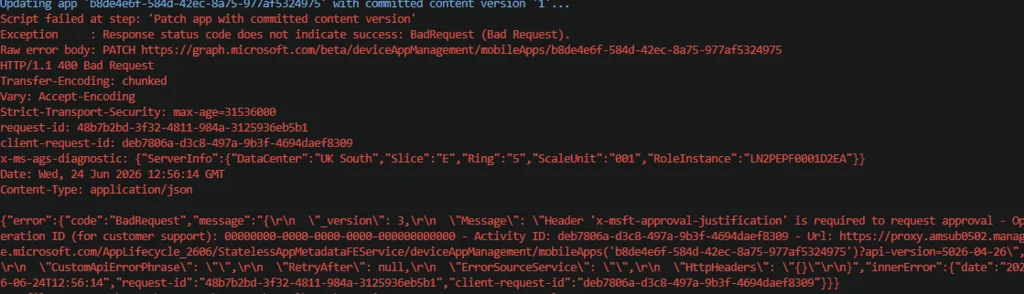
Technical Breakdown:
- The request may fail despite correct permissions in Azure AD.
- MAA mandatorily requires two request headers:
- x-msft-approval-justification: First header required to initiate a validation request.
- x-msft-approval-code: Required to submit the previously approved request.
Attention
If your script or application does not support these approval flows, the request will systematically fail with no immediate workaround available.
Script Example and Step Details
Below is an example implementation encountering the error. The script performs several actions, from Intune content generation to submitting updates via Microsoft Graph.
Authentication with Microsoft Graph
Use application authentication (service principal) with an App ID, tenant ID, and client secret.
Creation and Upload to Azure Storage
1# Example structure for creating an Intune application2$graphAuth = Connect-MSGraph -AppId "<AppID>" -TenantId "<TenantID>" -ClientSecret "<Secret>"3Create-Win32AppContent -AppContext $graphAuthGeneration of necessary content and metadata.
Submission and Final Update
Once the content is uploaded, the script uses a PATCH call to Intune to finalize the update. This is where the error may be encountered:
1{2 "error": {3 "code": "BadRequest",4 "message": "Header 'x-msft-approval-justification' is required to request approval"5 }6}Workaround via Exclusion
The best approach to avoid the error while keeping MAA active is to exclude the application or service principal in question. This allows for smooth automated updates without requiring manual approval at each step.
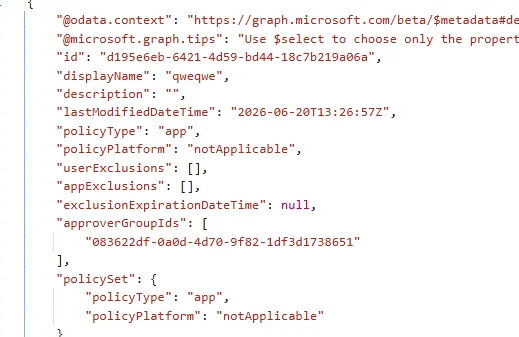
Steps to Configure MAA Exclusion
- Navigate to the Intune portal and access MAA access policies.
- Add an exception for your service principal or application used by your scripts.
- Test the changes to validate that Graph flows no longer encounter the error.
Tip
Add detailed logs in your scripts to monitor Graph responses and quickly identify any new constraints or errors.
Conclusion and Recommendations
Multi Admin Approval is a major asset for security. It protects against administrative abuse and intrusions. However, its involvement in automated workflows, while legitimate, requires adaptation. Make sure to:
- Document approved processes and exclusions.
- Properly implement approvals in your scripts if necessary.
- Regularly test your automations with new policies.
Maintain a balance between security and operational continuity for efficient and resilient Intune environments.