IAMinerva
HomeBlogAbout
m3M365 NewscoMicrosoft CopilotteMicrosoft TeamsshSharePoint & OneDriveinIntune & SecurityexExchange & OutlookpoPower PlatformazAzure & Entra IDtuTutorials & GuidesevEvents & ConferencesseSecuritywiWindows
IAMinerva

Professional blog dedicated to the Microsoft 365 ecosystem.

Quick links

HomeBlogAboutNewsletter

Stay informed

Get the latest Microsoft 365 news delivered straight to your inbox.

© 2026 IAMinerva. All rights reserved.

Built withNext.js&Tailwind
Erreur 0x87D1041C lors de l'installation de Company Portal pendant Autopilot
BlogIntune & SecurityError 0x87D1041C During Company Portal Installation in Autopilot
Intune & Security#Intune#Autopilot#Company Portal

Error 0x87D1041C During Company Portal Installation in Autopilot

Resolve error 0x87D1041C preventing Company Portal installation during Autopilot and discover the technical details behind this issue.

Houssem MAKHLOUF
June 11, 2026
3 min read

TL;DR par Minerva

généré par IA

Resolve error 0x87D1041C preventing Company Portal installation during Autopilot and discover the technical details behind this issue.

Introduction

The error 0x87D1041C related to Company Portal application installation during the Autopilot enrollment process has recently caused issues, particularly after the May Windows update. This article examines the causes, identifies changes in system context operation, and explores how a suspended flight modification enabled installation recovery.

i

Good to know

Autopilot enrollment is designed to pre-configure devices before deployment to users, which includes installation of necessary applications.

Origin of Error 0x87D1041C

The error 0x87D1041C indicates that Intune was unable to detect the application after its installation, even though the installation appeared to complete successfully. This issue manifested after the May Windows update, while the Company Portal installation configuration had not changed.
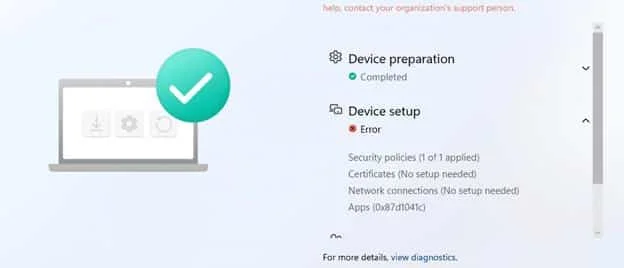
0x87D1041C during Autopilot enrollment

Impact of Changes in Windows Apps

Technical Context of Store Installation

Installing an application from the Microsoft Store involves several steps:

  • Retrieving the package from the Store.
  • Staging content on the device in C:\Program Files\WindowsApps.
  • Registering the package in the system or user context.

This process is orchestrated by several essential Windows components:

  • InstallService.dll: Responsible for the installation workflow from the Store.
  • AppXDeploymentClient.dll: Enables operations on AppX and MSIX packages.
  • AppXDeploymentServer.dll: Manages deployment and package state.

Why Does the Error Persist?

Although the package is correctly stored in WindowsApps, the final registration process was not being completed. This led Intune to report the application as missing, resulting in error 0x87D1041C.

![ FixInstallUnderSystemContext. This modification introduces installation logic that redirects system-dependent operations toward the user context.

[IMAGE:5:https://patchmypc.com/app/uploads/2026/06/image-4.jpg](https://patchmypc.com/app/uploads/2026/06/image.jpg]

!

Caution

User context installation works as expected after sign-in, but prevents detection during Autopilot pre-provisioning.

Analysis of May Update and FixInstallUnderSystemContext

Discovery of Modified Behavior

When examining the changes in InstallService.dll after the May update, a new function was identified.

Detailed Operation

When the FixInstallUnderSystemContext function is active, Windows searches for users logged into the device and attempts to finalize installation for them via UWAInstallWork::_DoInstallForAllLoggedOnUsers.

This causes problems during Autopilot pre-provisioning, where no user is yet logged in. As a result, the installation is reported as complete, but Intune cannot detect the application.

![ "1"**.

[IMAGE:12:https://patchmypc.com/app/uploads/2026/06/image-4.png:fix install under system context flight active](https://patchmypc.com/app/uploads/2026/06/image-2.png]

Feature Flight Activation

An examination of the sccinstallservice.json configuration file revealed that this new feature was enabled by default with "FIXINSTALLUNDERSYSTEMCONTEXT".

✦

Tip

To verify the state of this configuration, use tools like PowerShell with JSON file analysis on the system.

Recovery Through Feature Deactivation

Communication with Microsoft

After analyzing the situation, details of the findings were shared with Microsoft. A suspended flight of the FixInstallUnderSystemContext feature was subsequently applied via modification of the configuration JSON file.

fix install under system context flight reverted

Results Obtained

After disabling the function in InstallService.dll, Company Portal installation in system context successfully resumed during Autopilot pre-provisioning, as expected.

company portal now installing correctly

Conclusion

The FixInstallUnderSystemContext feature aimed to improve installation flows for users, but its behavior is incompatible with Autopilot pre-provisioning. This situation highlights the importance of thorough testing before deploying modifications to critical components.

Ă—

Important

Administrators should monitor Windows updates and their impacts on Intune and Autopilot flows, and perform laboratory testing before any deployment.


Share:
HM

Houssem MAKHLOUF

Microsoft 365 enthusiast & IT professional.

Previous article

AI Agents: Context at the Heart of Microsoft IQ

Jun 10, 2026
Next article

Defender for Endpoint: EDR updates move to Microsoft Update

Jun 11, 2026

Related articles

Réseau représenté par des cercles connectés et une horloge sur fond noir.intune

Intune EPM: Network Configuration and Time Synchronization

Explore the new EPM features in Microsoft Intune enabling secure management of network settings and time synchronization. Discover how to configure the rules.

Jun 26, 20264 min
Intune : Resoudre l'erreur x-msft-approval-justificationintune

Intune: Resolving the x-msft-approval-justification Error

Fix Intune Multi Admin Approval errors. Technical guide to integrate MAA exclusions and resolve x-msft-approval-justification.

Jun 24, 20264 min
Erreur IT1272653 : Intune Company Portal et fichiers configintune

Error IT1272653: Intune Company Portal and Config Files

Explore in depth the IT1272653 error that blocked apps in Intune, and see how Microsoft resolved this configuration issue.

Apr 14, 20263 min