The Ignite 2026 announcements extend Microsoft Intune to AI agent governance, vulnerability remediation and some Windows servers. Most of these capabilities are still in preview, however: the immediate challenge is less about rolling them out broadly than about building isolated, measurable and reversible pilots.
Intune new features at very different stages
As of November 21, 2026, the announced features are not all equally mature. Before changing an architecture or an operating process, you need to distinguish general availability from public, private and limited previews.
| Feature | Status in November 2026 | Main use | Recommended decision |
|---|---|---|---|
| Software compliance policy | Public preview | Mark a device as non-compliant when it runs a prohibited application | Test with a dedicated group and access policy |
| Microsoft Execution Containers policies | Rollout announced | Limit file and network access for supported agents | Check availability in the tenant before any design work |
| Vulnerability Remediation Agent | Limited public preview | Create and run application and system remediation plans | Reserve for a supervised scope |
| Windows Server management | Insider preview | Manage some persistent servers from Intune | Non-production testing only |
| Device-level app inventory | Public preview | Enrich the per-device software inventory | Assess data freshness and coverage |
| EAM automatic updates | Private preview | Keep eligible, verified Windows applications up to date | Wait for tenant eligibility |
| CIS audit | Public preview in November 2026 | Measure gaps without changing settings | Use first as an assessment tool |
| Microsoft Perception and Autopilot experience | Limited public previews | Investigate risks and improve readiness tracking | Do not make it an operational dependency |
| Agent runtime protection model | Generally available since version 2610 | Configure Defender for Endpoint protection | Can enter a validated production path |
The What's new in Microsoft Intune documentation states that the endpoint security policy model dedicated to agent runtime protection has been generally available since service release 2610, rolled out the week of October 26, 2026. This change matters: it should no longer be presented as a preview.
AI agents become a compliance object
The new software compliance policy makes it possible to identify restricted applications based on their MSI product codes. When a Windows device runs an unapproved agent matching this definition, Intune can mark it as non-compliant; Conditional Access can then block access to organizational resources.
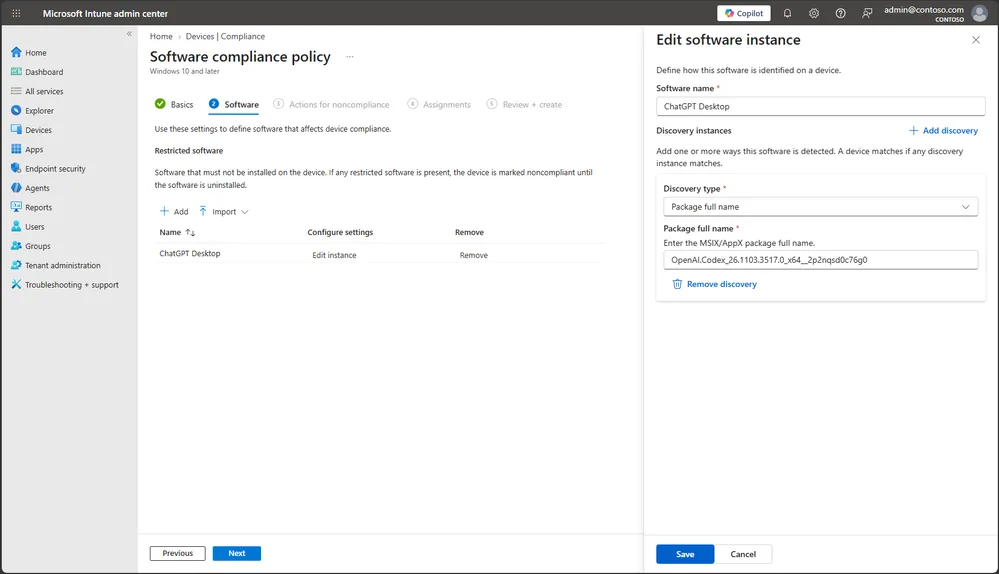
This mechanism forms a control chain: software identification, compliance change, access decision, then user remediation. Each link must therefore be tested separately. An MSI code error or an overly broad assignment can block legitimate devices without detecting every form of installation of the same product.
For approved tools, Microsoft indicates that Microsoft Copilot, GitHub Copilot, Anthropic Claude and OpenAI ChatGPT have integrated the Intune SDK. App protection policies can thus govern the business data used by these applications, provided they are actually supported on the relevant platform and in the tenant.
Microsoft Execution Containers policies, or MXC, add another layer: they define the files, directories and network destinations that supported agents can reach. Compliance answers the question “can this agent be present?”, while the container answers “what can it reach while running?”.
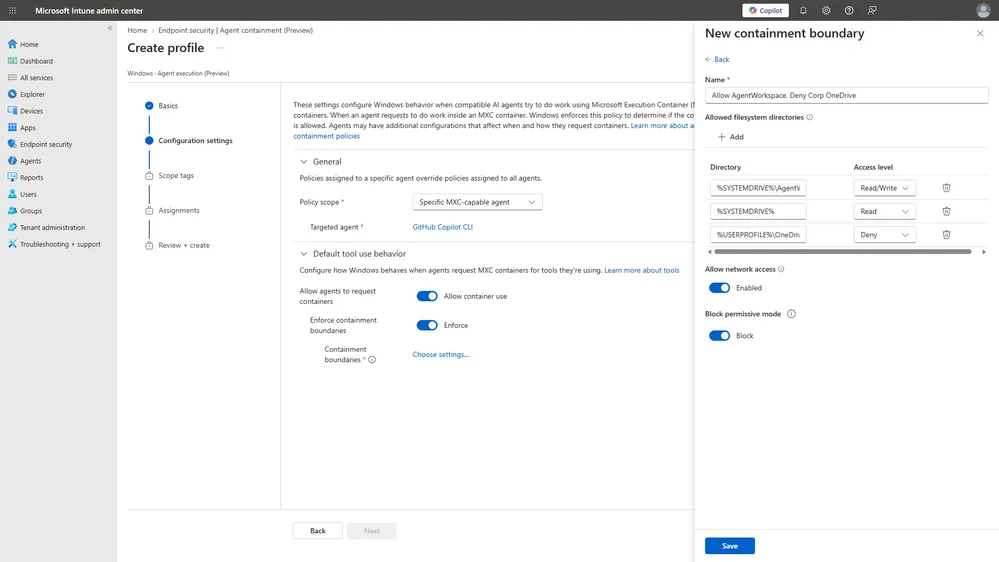
This approach complements the centralized governance described in our analysis of Agent 365 in Microsoft 365. It replaces neither agent identity nor data access controls: it reduces the agent's radius of action on the device.
Microsoft Perception links detection and remediation
Microsoft Perception introduces agents specialized in risk reduction, vulnerability remediation and compensating protection. In Intune, the Vulnerability Remediation Agent combines Microsoft Defender vulnerability intelligence with the context of managed devices and applications.
The result takes the form of remediation plans able to chain application selection, device assignment, deployment and tracking. The goal is to reduce the usual gap between discovering a weakness and the workplace team addressing it.
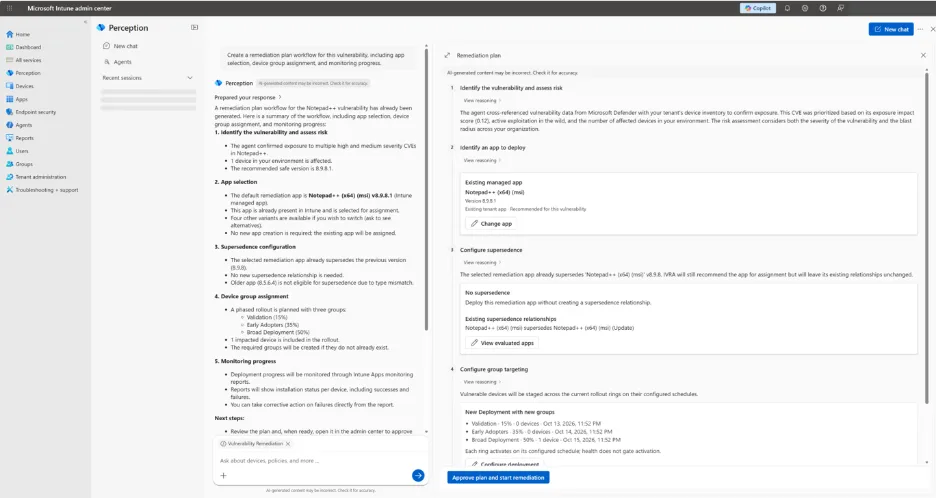
Because the preview is limited, keep existing processes as the operational reference. An AI-generated plan should in particular be checked against the actually managed scope, the targeted groups and internal maintenance windows before it is executed.
A limited preview is not a recovery plan
Keep a remediation process that is independent of Microsoft Perception until its availability, results and failure mechanisms have been validated in your tenant.
Windows Server requires an isolated test tenant
Windows Server management in Intune is an Insider preview not supported in production. According to Microsoft Learn, only Windows Server Insider Preview versions can be enrolled, and server enrollment is not supported in a production Intune tenant.
The scope covers persistent physical servers and virtual machines with Desktop Experience, including persistent single-session hosts. Server Core, multisession, ephemeral and non-persistent environments are excluded. Azure and Azure Arc are not required for this pilot, even though Azure Arc remains complementary for infrastructure governance.
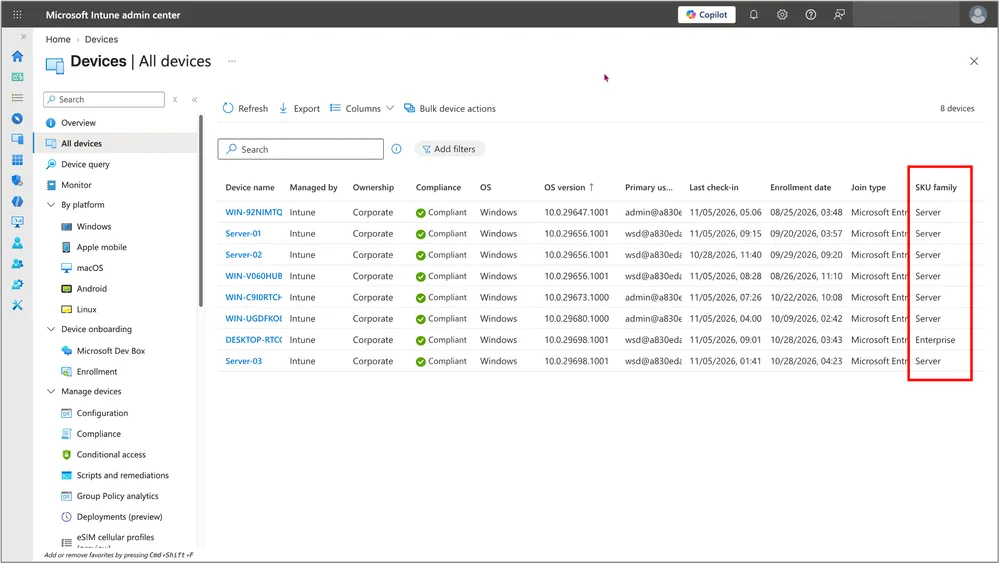
Do not enable Server devices in a production tenant
Server enrollment is blocked by default. Switching “Server devices” from Block to Allow must be reserved for a non-production Intune tenant containing only eligible test systems.
Before opening enrollment, audit assignments that broadly target “All devices”. Enrolled servers appear in this population; Microsoft therefore recommends using filters based on operatingSystemSKU to prevent a policy designed for Windows client from reaching a server.
Strengths
- Servers visible in All devices
- Intune processes familiar to the endpoint team
- No mandatory dependency on Azure or Azure Arc
- No additional subscription announced for the preview
Limitations
- No production support
- Server Core and multisession excluded
- Endpoint Privilege Management and Configuration Manager co-management absent
- Several compliance controls and Autopatch policies excluded
Firewall, Antivirus and Antispyware compliance settings are not included. Windows Autopatch policies for quality updates, feature updates and drivers are also excluded from the documented scope. The pilot should therefore not be built around a promise of full server patch management.
Inventory, audits and reports gain depth
Per-device application inventory, in public preview, provides more detail on installed software. Meanwhile, Enterprise Application Management, or EAM, is preparing automatic updates for more eligible, verified Windows applications, including when the application was not initially deployed by the IT team.
In-use application detection, in private preview, should help identify the process blocking an installation. The administrator will be able to flag the blocker or close the process, with or without notifying the user.
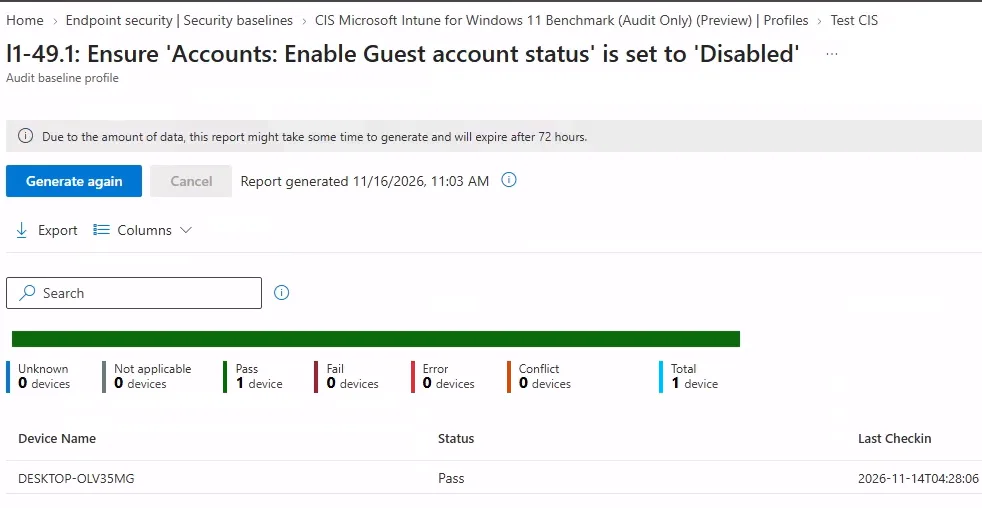
The Center for Internet Security baseline audit complements the DISA STIG assessment in Intune Advanced Analytics. These checks measure gaps by device group without changing their configuration.
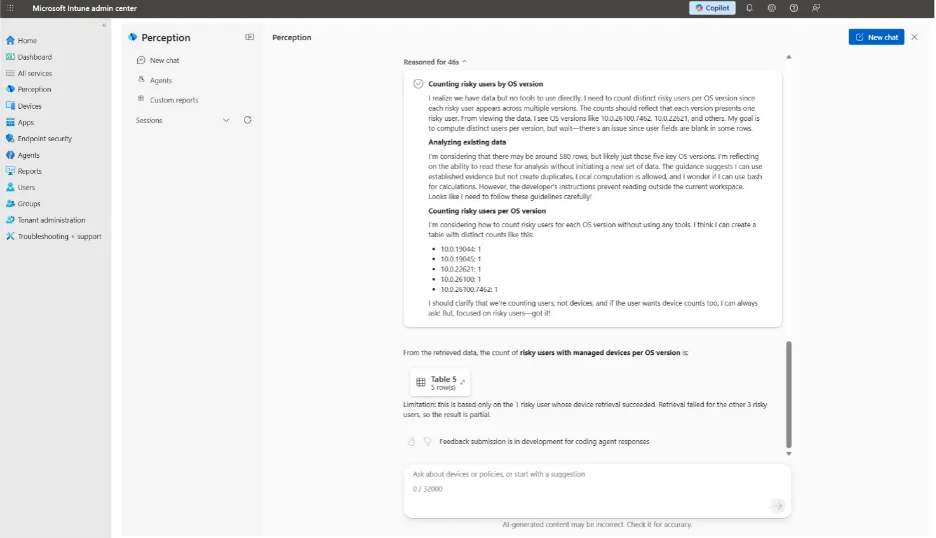
Microsoft Perception also accepts natural-language questions and builds multi-step investigations. It generates the queries, calls the necessary interfaces, correlates the results and exposes the steps with their citations.
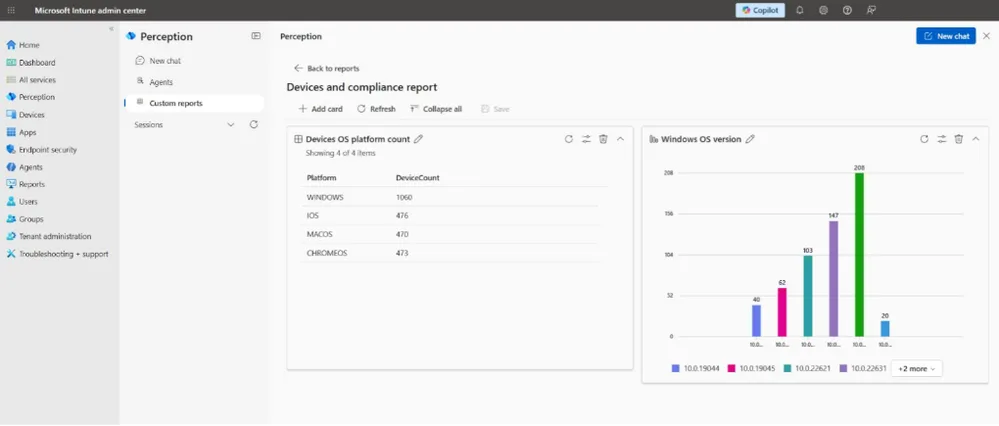
Results can be refined, enriched with columns, then saved as custom reports. These views are used to track how a risk evolves or to check whether a remediation reached the targeted devices.
Microsoft also announces data closer to real time, with timestamps to assess its freshness, as well as an inventory of files and registry keys. No guaranteed propagation delay is provided: the result's timestamp must remain the validation criterion.
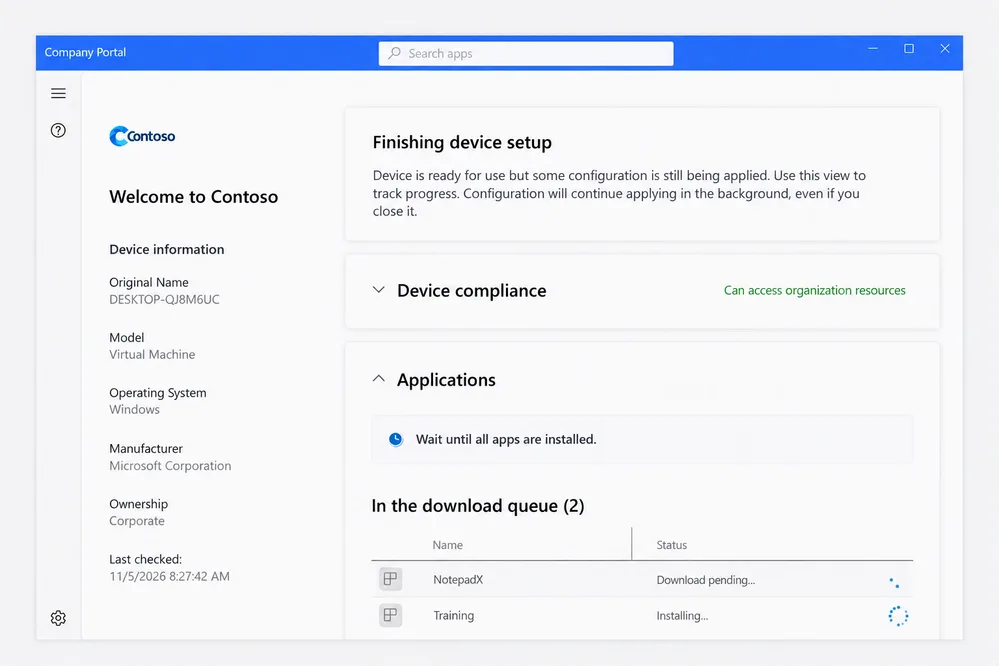
Finally, the Windows Autopilot device preparation experience, in limited preview, automatically opens the Company Portal after the supported OOBE experience. Users can track compliance status and application installation without being stuck on a preparation screen.
To frame the entitlements associated with advanced features, also see our analysis of advanced Microsoft Intune in Microsoft 365 E3 and E5.
Implementation: preparing a safe Windows Server pilot
The pilot requires a non-production Intune tenant, an eligible Windows Server Insider Preview version, and existing Intune, Microsoft Entra ID and Microsoft Defender for Endpoint entitlements depending on the features tested. No additional subscription is announced. To change enrollment restrictions, use the least-privileged Intune role that allows this action; the documentation provided does not name a specific minimum built-in role.
Isolate the tenant and the candidate server
Choose a persistent, non-production server with Desktop Experience. Manually confirm that it is not Server Core, not a multisession host and not an ephemeral instance.
Audit existing assignments
Look for applications, configurations and policies targeting “All devices”. Add operatingSystemSKU filters before enrollment to prevent unintended application to servers.
Collect local characteristics
The following script uses no external module and calls no cloud service. No Intune role is needed to run it locally; it produces a CSV report without modifying the server.
1[CmdletBinding()]2param(3 [Parameter()]4 [string]$OutputDirectory = (Join-Path $env:PUBLIC 'Documents')5)6 7$ErrorActionPreference = 'Stop'8 9# Crée le dossier de sortie s’il n’existe pas.10if (-not (Test-Path -LiteralPath $OutputDirectory)) {11 $null = New-Item -Path $OutputDirectory -ItemType Directory -Force12}13 14# Collecte les informations Windows et matérielles en lecture seule.15$OperatingSystem = Get-CimInstance -ClassName Win32_OperatingSystem16$ComputerSystem = Get-CimInstance -ClassName Win32_ComputerSystem17$CurrentVersion = Get-ItemProperty -Path 'HKLM:\SOFTWARE\Microsoft\Windows NT\CurrentVersion'18$InstallationType = [string]$CurrentVersion.InstallationType19 20# Signale Server Core, explicitement exclu de la préversion.21if ($InstallationType -match 'Core') {22 $ScopeAssessment = 'Hors périmètre détecté : Server Core'23}24else {25 $ScopeAssessment = 'Revue manuelle requise avant inscription'26}27 28$Report = [pscustomobject]@{29 ComputerName = $env:COMPUTERNAME30 ProductName = $CurrentVersion.ProductName31 EditionID = $CurrentVersion.EditionID32 DisplayVersion = $CurrentVersion.DisplayVersion33 Version = $OperatingSystem.Version34 BuildNumber = $OperatingSystem.BuildNumber35 OSArchitecture = $OperatingSystem.OSArchitecture36 InstallationType = $InstallationType37 Manufacturer = $ComputerSystem.Manufacturer38 Model = $ComputerSystem.Model39 Domain = $ComputerSystem.Domain40 ScopeAssessment = $ScopeAssessment41 ManualChecks = 'Insider Preview; persistance; session unique; tenant Intune hors production'42 CapturedAtUtc = [DateTime]::UtcNow.ToString('o')43}44 45$CsvPath = Join-Path $OutputDirectory ("Intune-Server-Pilot-{0}.csv" -f $env:COMPUTERNAME)46$Report | Export-Csv -Path $CsvPath -NoTypeInformation -Encoding UTF847$Report | Format-List48Write-Output "Rapport CSV : $CsvPath"The expected output is an object displayed in the console and a file named Intune-Server-Pilot-SERVERNAME.csv. The ScopeAssessment value explicitly flags Server Core; the other criteria remain to be confirmed manually.
Allow, then verify enrollment
In enrollment restrictions, switch “Server devices” from Block to Allow only in the test tenant, then follow the nine-phase Microsoft Learn guide. The operation is validated when the server appears in “All devices” with consistent timestamped data.
Microsoft does not publish a fixed propagation delay in the material provided. Do not conclude success from the mere absence of errors: check that the server appears, that its status refreshes and that synchronization continues.
Post-enrollment checks
- The server appears in “All devices” with the expected operating system
- No unplanned broad assignment has reached the server
- The
operatingSystemSKUfilters produce the expected scope - Synchronization remains functional with Conditional Access policies
- No excluded compliance control or Autopatch is used as proof of security
- Reports show a timestamp later than the last test
Pilot troubleshooting
| Symptom | Likely cause | Resolution |
|---|---|---|
| The server remains absent from All devices | Server devices is still set to Block, the system is not eligible or the tenant is a production tenant | Return to the pilot guide and check each prerequisite before trying again |
| Intune synchronization stops without a prompt | A Conditional Access policy requires multifactor authentication on the server | Review the policy design in the isolated tenant without weakening production controls |
| An expected policy reports no result | The setting is part of the compliance or Autopatch exclusions | Remove this control from the pilot criteria and use the existing operational mechanism |
| The server receives client PC applications | An All devices assignment has no appropriate filter | Suspend the test, fix the targeting with operatingSystemSKU, then reassess the assignments |
Frequently asked questions
Can a production Windows server be enrolled in Intune?
No. In November 2026, Windows Server management remains an Insider preview reserved for non-production testing. Microsoft does not support server enrollment in a production Intune tenant.
Is Azure Arc required for this pilot?
No. Microsoft specifies that Azure and Azure Arc are not required to enroll eligible servers in this preview. Azure Arc retains a complementary role for infrastructure operations and governance.
Do I need to buy an additional subscription?
No additional subscription is announced for the Windows Server preview. Existing Intune, Microsoft Entra ID and Microsoft Defender for Endpoint entitlements nevertheless continue to apply to the features used.
Why can multifactor authentication interrupt synchronization?
The known limitation concerns Conditional Access policies requiring multifactor authentication on servers. The server may stop synchronizing with Intune without displaying an interactive sign-in prompt.
Three decisions before opening a pilot
Start by classifying each new feature according to its actual status, then choose a single measurable scenario. If your priority is Windows Server, create an isolated tenant and audit all global assignments before changing “Server devices”; if your priority is AI agents, first test the chain of detection, compliance, Conditional Access and return to compliance on a small group.
The exit criterion must be defined before the test: inventory accuracy, absence of unexpected assignments, synchronization continuity and the ability to return to the existing process. Without this evidence, a promising preview remains an experiment, not an operable service.
Going further
- Get started with Windows Server management – Microsoft Learn — the official pilot path, its exclusions and known limitations.
- Microsoft Ignite 2026: Intune, Copilot and Agent Governance — an analysis of availability statuses and precautions before enrollment.
- What's new in Microsoft Intune – Microsoft Learn — the weekly reference for tracking moves from preview to general availability.
- Microsoft Security Copilot with Intune and Microsoft Entra — a follow-up on the use of AI in security and administration operations.