
A poorly configured assignment can either evaluate nothing or block a critical Microsoft Graph request across the whole tenant. This tutorial builds a controlled test of Microsoft Entra Resource Policy, from choosing a built-in policy to validating Enforce mode.
What Resource Policy actually controls
As of November 2026, Microsoft Entra resource policy is still in preview within Tenant Governance. Microsoft introduced it at Ignite, while the other Tenant Governance features are already generally available, as explained in our analysis of Microsoft Entra Tenant Governance.
The engine evaluates Microsoft Graph requests at the time they are executed. A rule can either simply log a violation or deny the request concerned. It does not search for non-compliant resources that already exist and does not fix them retroactively.
A policy relies on two distinct objects:
- the definition, written in Rego, which describes the conditions to check;
- the assignment, which selects a version, supplies the parameters and determines the status and the enforcement mode.
The currently supported scope is the entire tenant, with the value /. Only certain Microsoft Graph resource types and operations are compatible. Not all Rego functions are available either.
The Microsoft Learn documentation specifies that Resource Policy works without discovery of associated tenants or a governance relationship. A standalone test tenant is therefore enough to follow this procedure.
Role and licence prerequisites
Three Microsoft Entra roles govern administration of the feature: Resource Policy Administrator to manage definitions and assignments, Resource Policy Reader for read access and Resource Policy Evaluator for simulations. For this tutorial, Resource Policy Administrator is required to create the assignment.
Prepare the test tenant
- Use a tenant isolated from production and free of sensitive data
- Hold the Resource Policy Administrator role
- Check that the Entra ID Governance service plan is present
- Prepare a Guest user with no standing privileges
- Identify the scripts and service principals that perform role management operations
- Plan access to the Resource Policy evaluation logs
As of 21 November 2026, most write operations require the Entra ID Governance service plan, included in Entra Suite and Microsoft 365 E7. Microsoft Entra ID P1 or P2 alone are not enough.
| Operation | Without Entra ID Governance plan | With the required plan |
|---|---|---|
| View definitions and their Rego code | ✓ Allowed | ✓ Allowed |
| Delete an item or set an assignment to Off | ✓ Allowed | ✓ Allowed |
| Create or modify a definition or an assignment | ✗ Not allowed | ✓ Allowed |
| Enable an assignment or restore an item | ✗ Not allowed | ✓ Allowed |
An assignment that is active in Report-only mode continues to evaluate requests. It therefore consumes licensed capacity. Only the Off status stops evaluation completely.
Choosing and reviewing the built-in policy
In the Microsoft Entra admin center, open Tenant Governance > Resource Policies > Definitions. On 20 November 2026 the portal listed 17 built-in definitions, covering in particular external user invitations, privileged roles, group owners and certain Conditional Access policy changes.
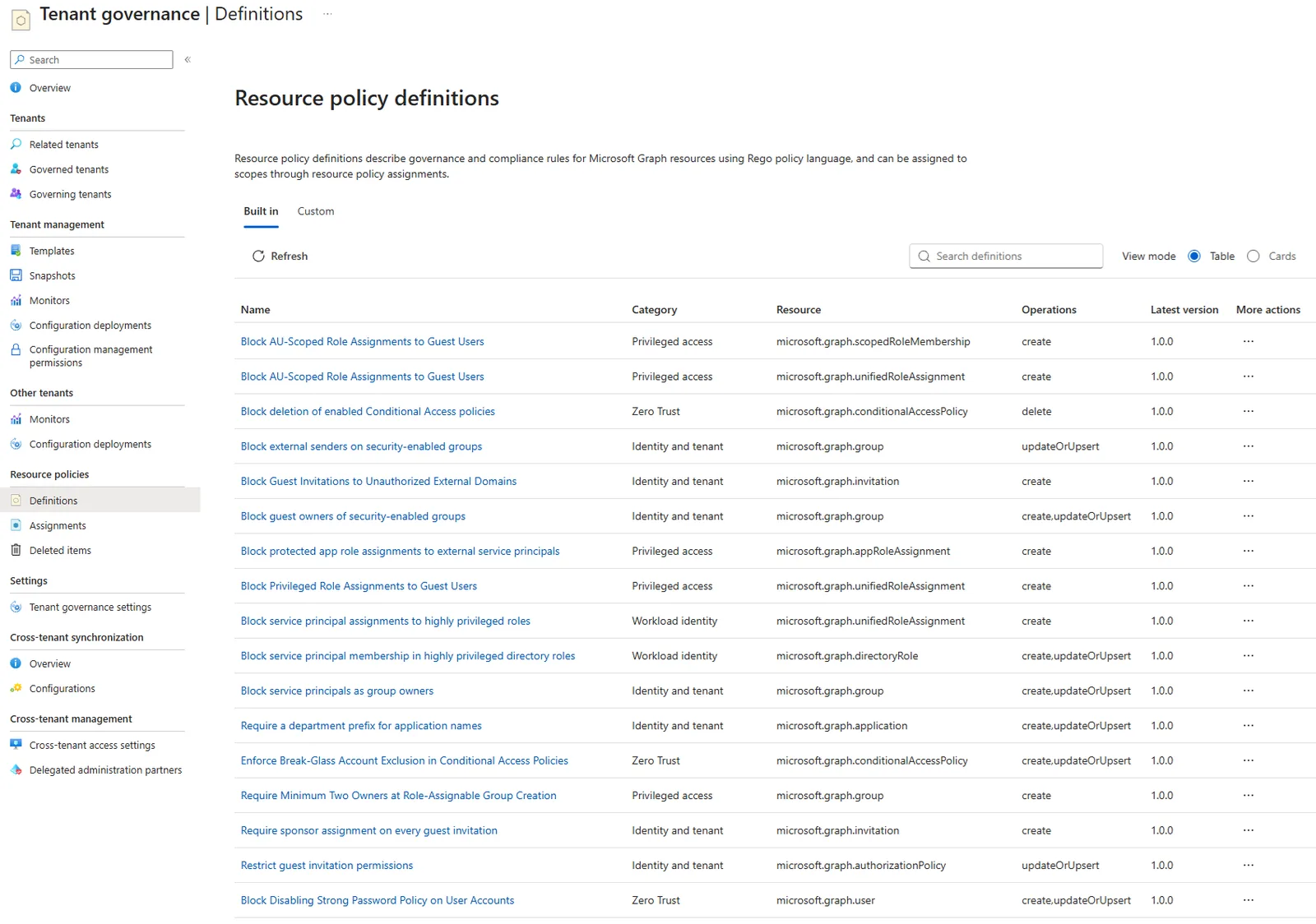
The chosen scenario uses Block Privileged Role Assignments to Guest Users. This definition denies assigning to a Guest user the Microsoft Entra roles declared as privileged in the assignment parameters.
Open the definition and examine its Properties pane. At a minimum, check its version, the target resource, the Microsoft Graph operations covered, the expected parameters and the message returned when a violation occurs.
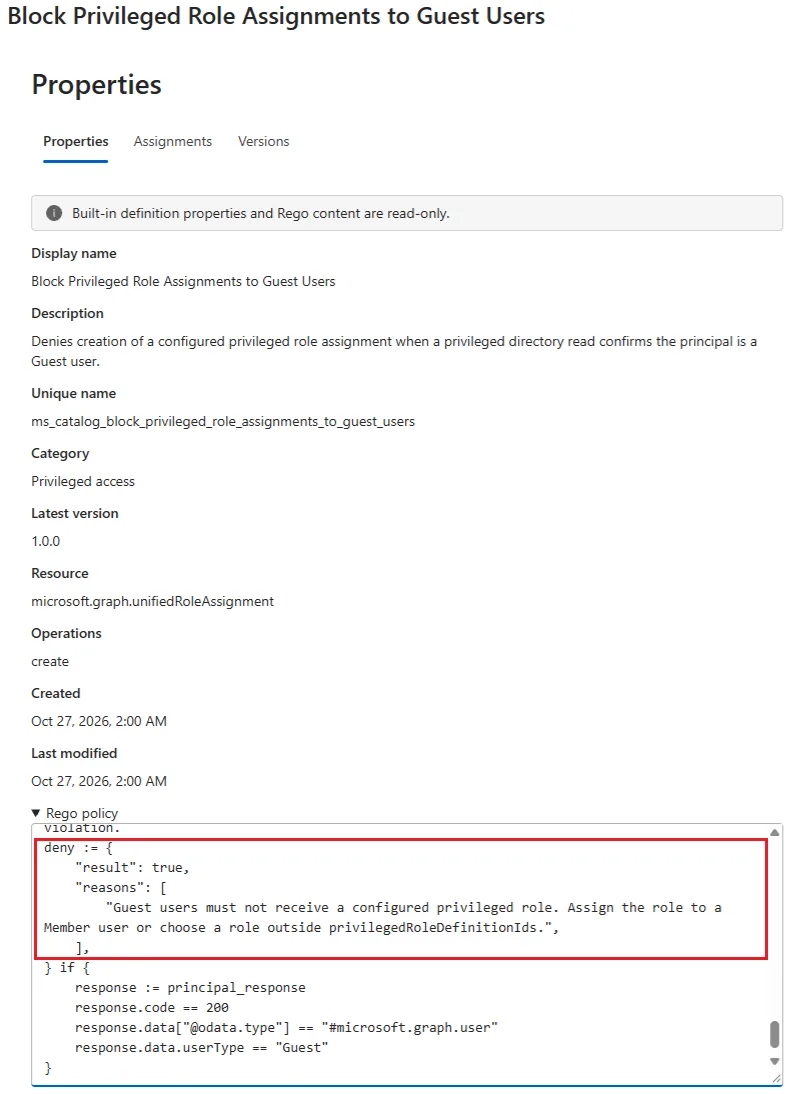
Also read the code shown under Rego policy. A built-in definition cannot be modified. However, its Rego content can be copied, adapted outside the portal, then uploaded as a new custom definition.
To inventory the built-in definitions via Microsoft Graph, the following preview endpoint requires the ResourcePolicyDefinition.Read.All permission. Both delegated and application permissions are supported.
1GET https://graph.microsoft.com/beta/admin/resourcePolicy/builtindefinitions?$select=uniqueName,displayName,descriptionCreating the assignment in Report-only mode
Status and enforcement mode are independent. This distinction determines whether the policy is evaluated and whether a violation actually blocks the request.
| Status | Enforcement | Result |
|---|---|---|
| Off | Report-only or Enforce | No evaluation |
| On | Report-only | Evaluation and logging without blocking |
| On | Enforce | Evaluation and blocking of non-compliant requests |
For a first test, use Status = On and Enforcement = Report-only. This combination lets you observe violations before any blocking decision.
Open the assignment wizard
From Block Privileged Role Assignments to Guest Users, select Add assignment. In the table view, the same command is available from the … menu.
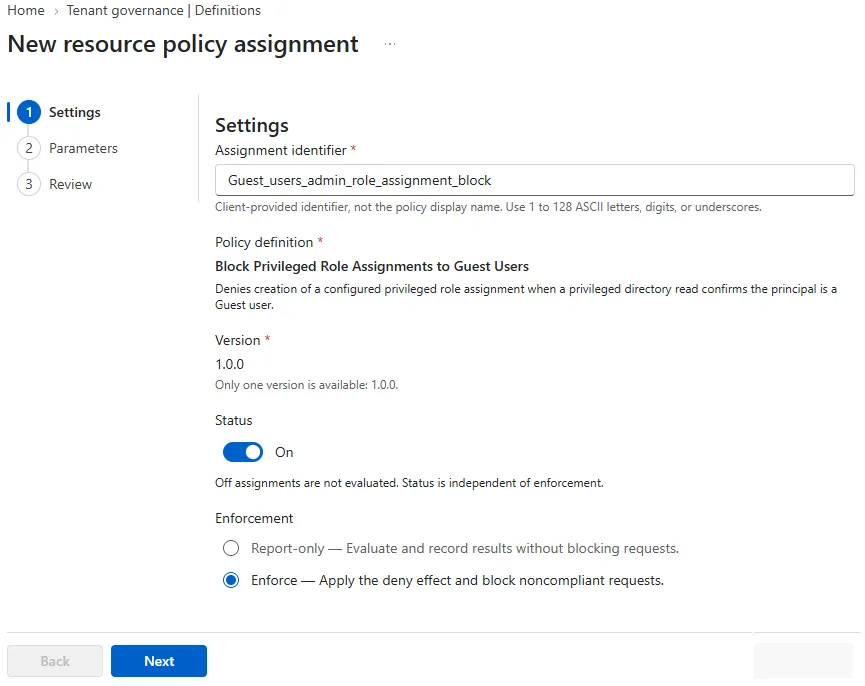
Set the identifier and the mode
Enter an Assignment identifier that starts with a letter, contains no spaces and is fewer than 128 characters long. Then choose Status = On and Enforcement = Report-only.
Only one assignment is possible for a given version of the policy. The / scope, the definition and the version are selected automatically by the portal.
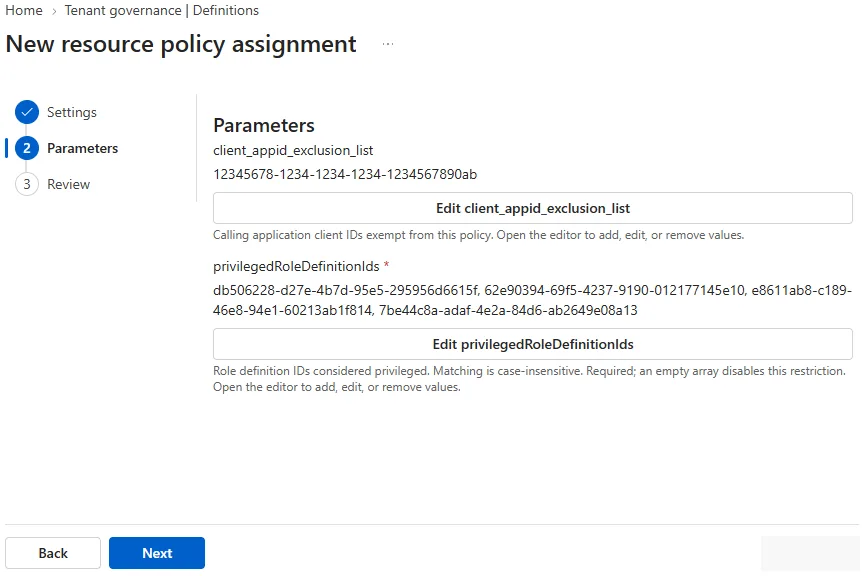
Fill in the required parameters
In privilegedRoleDefinitionIds, add the identifiers of the roles considered privileged for this test. The optional client_appid_exclusion_list parameter lets you exclude certain client applications from evaluation.
Check and create the assignment
Check the version, the parameters, the status and the mode. Then select Add assignment and allow about ten minutes before considering the policy operational.
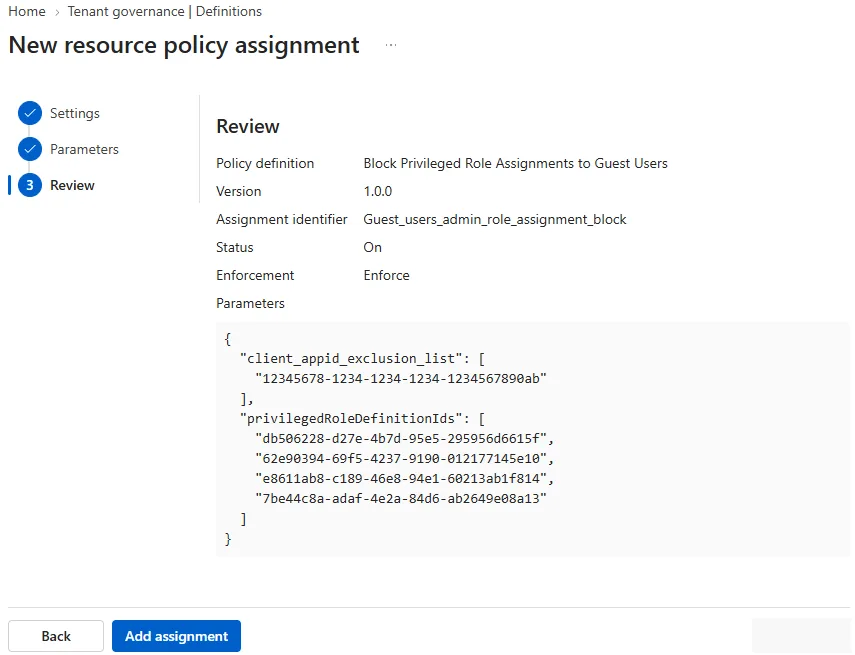
Testing Report-only, then validating blocking
Start with a simulated request using the Resource Policy Evaluator role, or let the test tenant's automations perform their usual operations. Microsoft recommends checking the results in the evaluation audit logs before enabling blocking.
A violating request remains allowed in Report-only. It must nevertheless produce an evaluation event. If no event appears, check the status, the version, the parameters, the propagation delay and any privileged-read dependencies.
For the negative test, then switch the assignment to Enforce. The following command attempts to assign the role whose identifier is supplied to a principal. Replace only PrincipalId with the identifier of the Guest user intended for the lab.
1New-MgRoleManagementDirectoryRoleAssignment -DirectoryScopeId "/" -PrincipalId "xxxxxxxx-xxxx-xxxx-xxxx-xxxxxxxxxxxx" -RoleDefinitionId "7be44c8a-adaf-4e2a-84d6-ab2649e08a13"The test is only valid if 7be44c8a-adaf-4e2a-84d6-ab2649e08a13 is listed in privilegedRoleDefinitionIds. The expected result is a 403 Forbidden response, accompanied by the message Request is denied by resource policy, the identity of the assignment and the message defined in the Rego code.
Perform this operation only in the isolated tenant. If the policy is misconfigured, the request may succeed and actually create the role assignment. It must then be removed immediately using the tenant's usual role management process.
A blocked request does not produce an entry in the standard Microsoft Entra audit log. Use the Resource Policy evaluation logs and, if necessary, the Microsoft Graph activity logs.
When several assignments evaluate the same request, a single violation from an assignment in Enforce is enough to block it. Assignments in doNotEnforce log their decision, while those whose status is Off do not take part in evaluation.
Pitfalls to address before any production use
Some policies need to read information that appears neither in the request nor in the access token. To determine whether a principal is a Guest user, for example, the engine may need to run an additional Microsoft Graph request.
Check any use of fetchAsPolicy()
If the Rego code calls fetchAsPolicy(), configure the privileged-read application first. Without this dependency, the policy may not obtain the data it needs to make its decision. The portal does not always explain this prerequisite clearly, even though the service may prevent the creation of certain assignments.
Version management is another pitfall. Publishing a new version of a custom definition does not change any existing assignment. The identifier, definition and version of an assignment are read-only; a new assignment is required to change version.
The portal has no online Rego editor. A custom definition is created or updated by uploading a complete .rego file. For a rollback, check the version recorded in the assignment rather than the Latest version label of the definition.
Deleted definitions and assignments are placed in Deleted items. They can be restored from there for 30 days or permanently deleted.
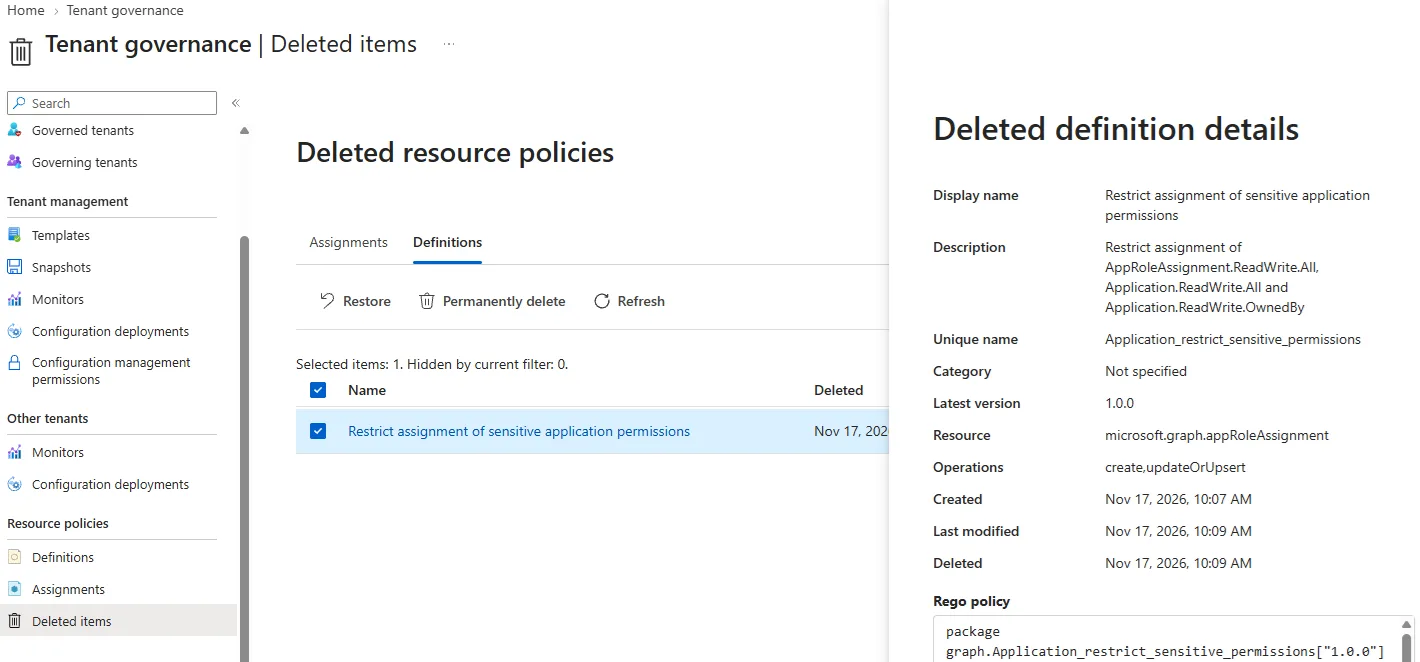
The preview does not yet provide an aggregated report on the impact of evaluation events. Rudy Ooms therefore recommends starting with a built-in policy in doNotEnforce, checking application identities and not enabling Enforce in production without sufficient visibility.
Resource Policy does not handle historical non-compliance either. To monitor what already exists, it can be combined with Tenant Governance configuration management and an approach to multi-tenant drift detection.
Frequently asked questions
Is Microsoft Entra ID P2 enough to create an assignment?
No. Microsoft Entra ID P1 or P2 alone do not cover creating, modifying or enabling a Resource Policy assignment. The Entra ID Governance service plan is required during the preview.
Is Report-only the same as disabling the policy?
No. An assignment that is active in Report-only evaluates requests and writes the corresponding events. To stop evaluation, its status must be set to Off.
Does a policy fix resources that are already non-compliant?
No. Evaluation takes place when a new supported Microsoft Graph request is made. Resource Policy does not scan or remediate objects created before it was enabled.
Does a new version automatically replace the old one?
No. Existing assignments remain tied to their original version. Changing version requires creating another assignment.
Deploy in stages rather than blocking immediately
The initial goal should remain validating the engine, the logs and the dependencies. The preview does not yet justify a generalised move to Enforce on a production tenant.
Recommended deployment order
- Select a single built-in policy and read its Rego code
- Create the assignment on On and Report-only in a test tenant
- Check the evaluation events and the application identities concerned
- Confirm the privileged-read configuration if
fetchAsPolicy()is present - Test Enforce with a principal and a role dedicated to the lab
- Document the definition version and the rollback procedure
- Reassess licences and limitations when the feature reaches general availability
If the tenant relies heavily on scripts or service principals to administer Microsoft Entra ID, extend the Report-only phase. If the events are understood, the dependencies inventoried and the risk accepted, then limit Enforce to a policy whose effects have been reproduced in the lab.
Going further
- Create and manage Microsoft Entra Resource Policy in the portal — the official procedure for definitions, assignments, versions and deletions.
- Microsoft Entra Tenant Governance licensing — the operations allowed with or without the Entra ID Governance plan.
- Microsoft Entra Tenant Governance overview — the scope of Resource Policy and how it fits with the other features.
- Hands-on feedback on the preview — the precautions suggested by Rudy Ooms before any enforcement.
- Microsoft Entra and multi-tenant drift detection — a complementary approach to checking configurations that already exist.