Introduction
The massive adoption of AI applications and agents in Microsoft 365 environments creates new security challenges. To address these issues, Microsoft has just launched in public preview the Security Dashboard for AI, a centralized solution that unifies visibility, risk assessment, and governance of artificial intelligence tools.
Availability
The Security Dashboard for AI is currently available in public preview and requires no additional license for customers already using Microsoft security solutions (Defender, Entra, Purview).
This new interface solves a critical problem: the lack of visibility into AI usage within organizations. Without an overview, security teams struggle to identify shadow AI applications, potential data leaks, or new attack vectors introduced by misconfigured agents.
Architecture and Integration of Security Dashboard for AI
The Security Dashboard for AI relies on the existing Microsoft security ecosystem to provide a consolidated view of AI-related risks. This integrated approach leverages data from three main pillars:
Integration with Microsoft Entra
- Identity management to govern application and agent identities
- Conditional access to control access to AI applications based on risk
- Privileged Identity Management (PIM) to track and control privileged access
Integration with Microsoft Defender
- Threat protection to monitor AI workloads and endpoints
- Cloud security posture management to discover vulnerabilities
- Application security to assess risks of SaaS AI applications
Integration with Microsoft Purview
- Data classification to protect data accessible by AI
- Data Loss Prevention (DLP) to reduce exposure of sensitive data
- Insider risk management to detect unusual AI activities
- Compliance protections for generative AI scenarios
Overview of Main Features
The dashboard offers several essential capabilities to secure your AI environment:
| Feature | Description | Business Benefit |
|---|---|---|
| Usage trend monitoring | Proactive tracking of AI adoption | Preventive governance |
| Identification of unmanaged applications | Shadow AI detection | Reduction of emerging risks |
| High-impact risk analysis | Contextual vulnerability assessment | Action prioritization |
| Interaction with sensitive data | Visibility on critical data access | Leak prevention |
Navigation in Security Dashboard for AI
The dashboard is accessible via the Microsoft security portal and is organized around three main tabs that cover the entire lifecycle of AI security.
Overview Page: Centralized Security Posture Supervision
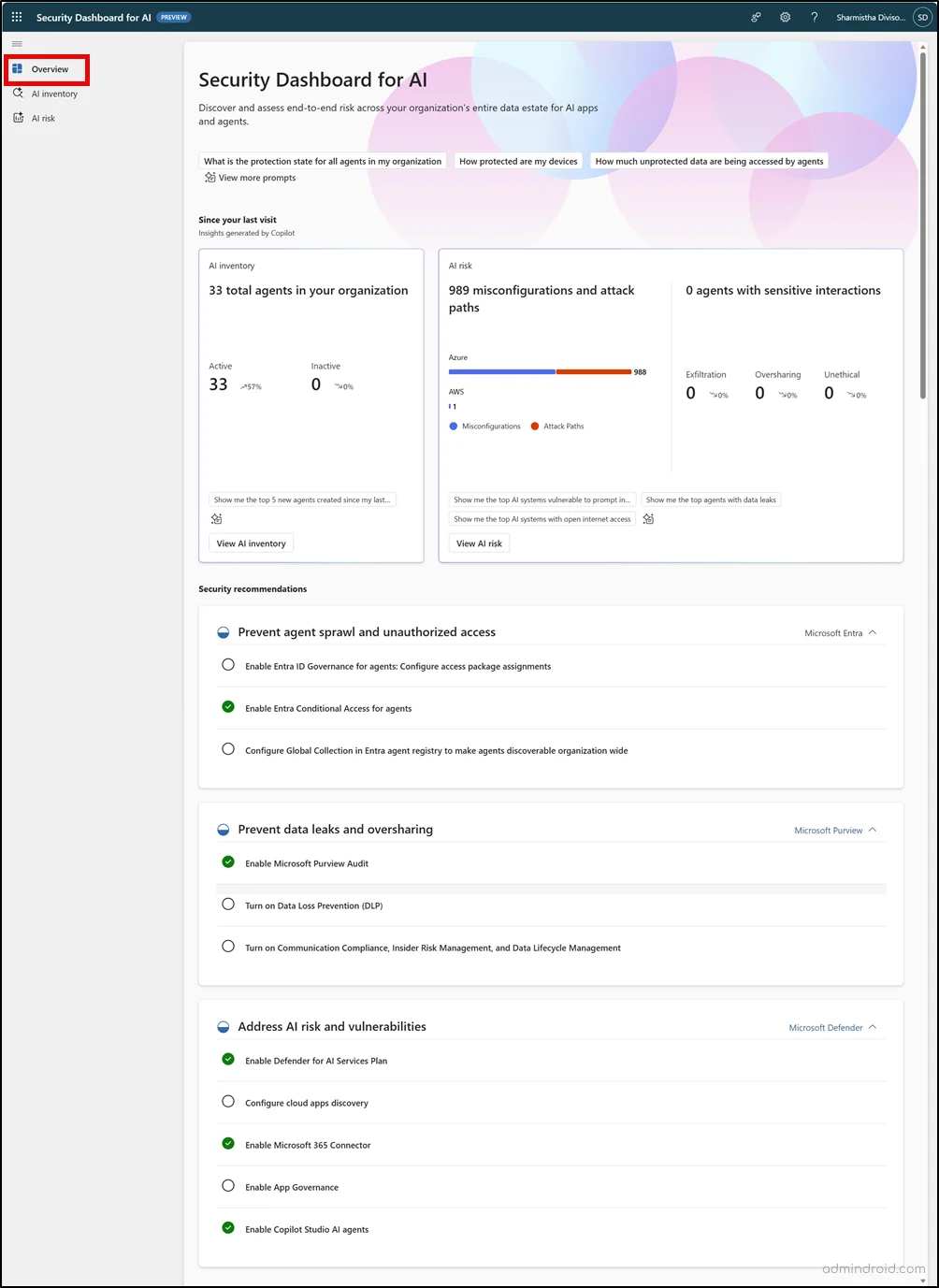
The Overview page serves as the main entry point of the dashboard and provides an instantaneous overview of your AI security posture:
Key Components of the Overview
- AI Risk Scorecard: visual dashboard displaying real-time security health status
- AI Asset Visibility: clear breakdown between managed and unmanaged AI assets
- Integrated security recommendations: priority actions from Microsoft Entra, Defender, and Purview
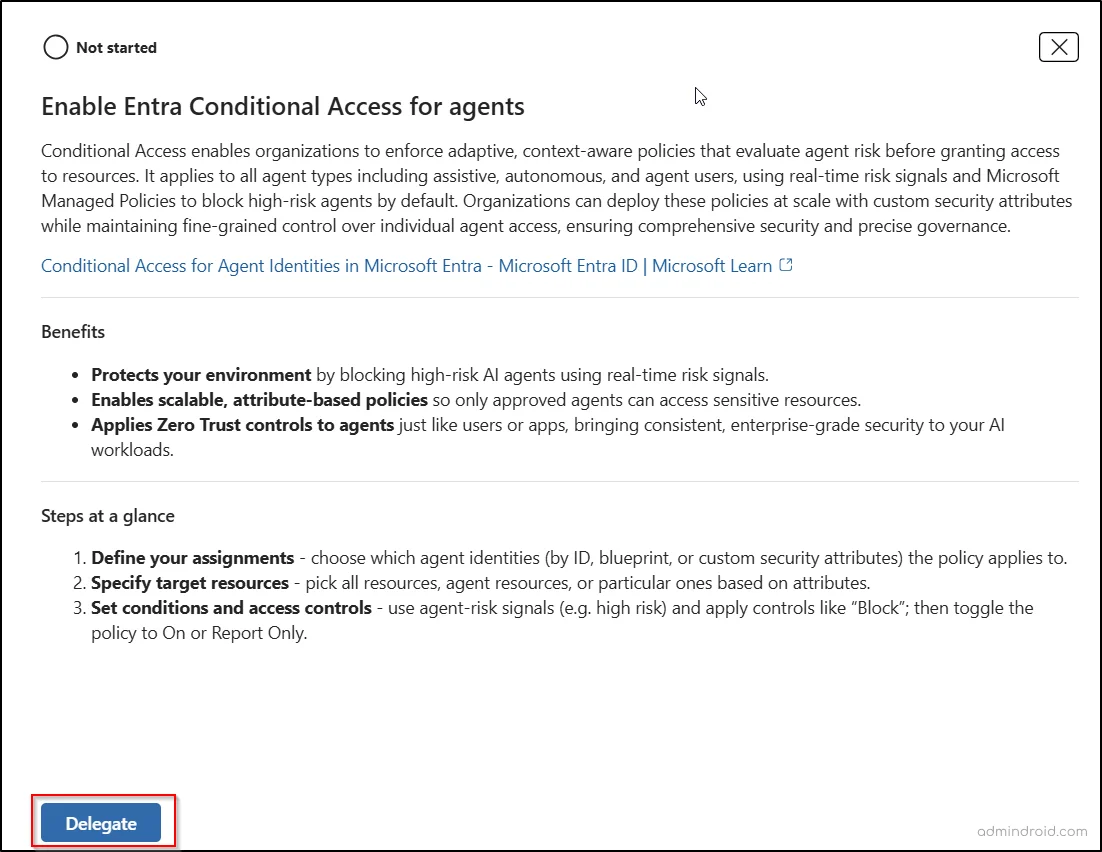
Task Delegation
You can directly delegate remediation actions to appropriate teams from the dashboard. Select a recommendation, click "Delegate", and choose the relevant users or groups.
AI Inventory Page: Complete Inventory of AI Assets
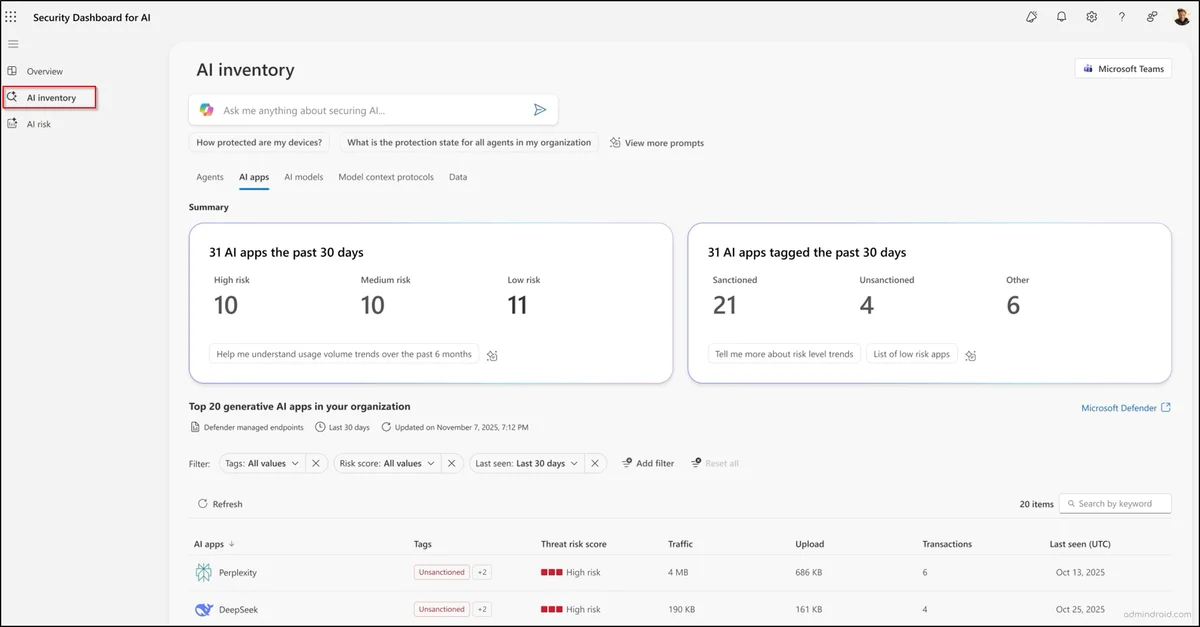
The AI Inventory tab provides security teams with a centralized view of all AI assets, facilitating discovery, risk assessment, and remediation actions.
AI Inventory Coverage
Native Microsoft Solutions
Monitoring of integrated AI solutions including Microsoft 365 Copilot, Copilot Studio, and Microsoft Foundry applications.
Third-party Platforms
Monitoring of external AI platforms such as OpenAI ChatGPT and Google Gemini for complete visibility.
MCP Servers
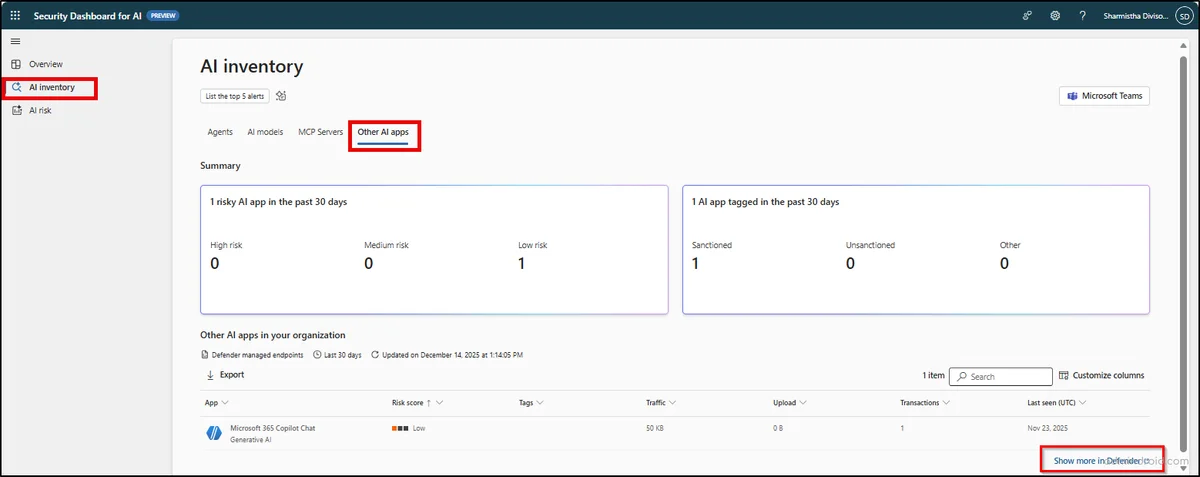
Tracking of Model Context Protocol servers to maintain security and control of AI deployments.
Advanced Investigation Features
The inventory enables in-depth investigation through:
- Custom filters to focus on specific asset types or risk levels
- Detailed review of configurations and compliance status
- Data export for external analysis
- Defender integration via the "Show more in Defender" option for detailed insights
AI Risk Page: Risk Prioritization and Investigation
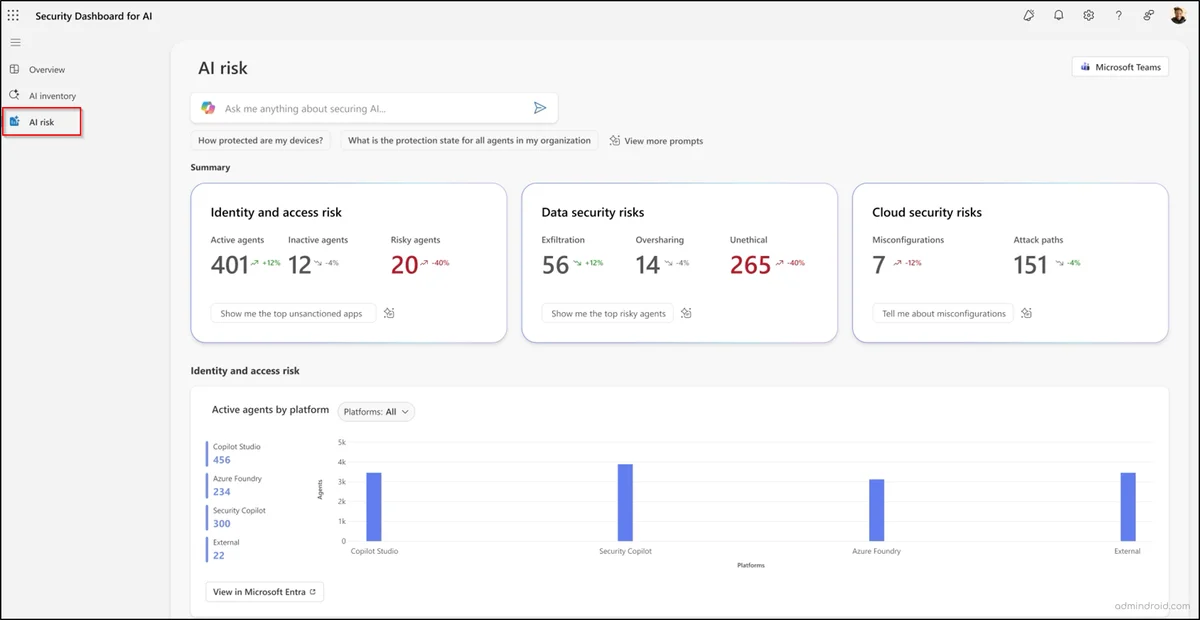
The AI Risk page helps managers identify vulnerabilities presenting the greatest business risk. This interface offers:
Risk Analysis Tools
- Real-time summary cards for immediate threat overview
- Trend graphs to identify emerging patterns
- Direct links to Microsoft Defender or Purview for in-depth analysis
- Security Copilot integration for AI-powered insights
Proactive Investigation
Microsoft Security Copilot enables exploration of complex risk scenarios through natural language queries, facilitating Shadow AI discovery and detection of unmanaged agents.
Permission Management and Dashboard Access
Access to the Security Dashboard for AI requires appropriate permissions based on the principle of least privilege. The authorization matrix follows a granular approach:
Administrative Permissions
- Global administrators: full access to all features
- Global readers: read-only access to all dashboard data
Permissions by Specialized Roles
Built-in roles access specific data according to their assignments:
| Element | Security admin | Compliance admin | AI admin |
|---|---|---|---|
| Overview summary cards | ✅ | ✅ | ✅ |
| AI inventory | ✅ | ✅ | ✅ |
| Risks: Configurations and attack vectors | ✅ | ❌ | ❌ |
| Risks: Agents with sensitive interactions | ✅ | ✅ | ✅ |
Security Copilot Prompt Gallery
A Security Copilot prompt gallery is available in all tabs to help you explore insights more efficiently.
PowerShell Scripts for Advanced Administration
To automate certain AI risk management tasks, here are useful PowerShell script examples:
Script for Checking Access Permissions
1# Checking user roles for Security Dashboard AI2Connect-MgGraph -Scopes "Directory.Read.All", "RoleManagement.Read.All"3 4$userId = "user@domain.com"5$user = Get-MgUser -UserId $userId6$roleAssignments = Get-MgRoleManagementDirectoryRoleAssignment -Filter "principalId eq '$($user.Id)'"7 8foreach ($assignment in $roleAssignments) {9 $roleDefinition = Get-MgRoleManagementDirectoryRoleDefinition -UnifiedRoleDefinitionId $assignment.RoleDefinitionId10 Write-Output "User: $($user.DisplayName) - Role: $($roleDefinition.DisplayName)"11}Script for Exporting AI Inventory Data
1# Export discovered AI applications2Connect-MgGraph -Scopes "Application.Read.All", "Directory.Read.All"3 4$aiApps = Get-MgApplication | Where-Object {5 $_.DisplayName -like "*AI*" -or 6 $_.DisplayName -like "*Copilot*" -or7 $_.Description -like "*artificial intelligence*"8}9 10$aiApps | Select-Object DisplayName, AppId, CreatedDateTime, PublisherDomain | 11 Export-Csv -Path "AI_Applications_Inventory.csv" -NoTypeInformation12 13Write-Output "Export completed: $(($aiApps | Measure-Object).Count) AI applications discovered"Useful Links and Official Resources
Official Microsoft Documentation
- Microsoft Security Dashboard for AI - Official Documentation
- Microsoft Defender for Cloud Apps Deployment Guide
- Configuring Microsoft Purview Policies
- Identity Management with Microsoft Entra
Additional Resources
Glossary of Technical Terms
Shadow AI: Artificial intelligence applications deployed without official IT supervision, creating uncontrolled security and compliance risks.
Model Context Protocol (MCP): Standardized protocol allowing servers to provide context to AI models securely and in a controlled manner.
AI Risk Scorecard: Visual dashboard synthesizing real-time AI risk indicators to facilitate secure decision-making.
AI Agent: Automated program using artificial intelligence to perform specific tasks within the Microsoft 365 environment.
DLP (Data Loss Prevention): Set of technologies and processes designed to detect and prevent leakage or unauthorized use of sensitive data.
Conclusion: Towards Centralized AI Governance
The Security Dashboard for AI represents a major evolution in Microsoft's approach to securing AI environments. By consolidating visibility, risk assessment, and actionable recommendations in a unified interface, this solution enables CISOs and security teams to remain proactive against emerging AI threats.
The long-term effectiveness of this solution will depend on its ability to adapt to the expanding ecosystem of third-party AI applications. If Microsoft succeeds in this scaling, the Security Dashboard for AI will become an essential tool for securing the modern AI environment of enterprises.