
A warning that doesn't go unnoticed
For several weeks, a message has appeared on the overview page of Conditional Access in many Microsoft 365 tenants: "Licensing overage. Some Conditional Access policies are protecting more users than your current licensing entitlements allow." The wording is unusually direct for Microsoft Entra. It mentions neither policy disablement, automatic billing, nor impending license audit. It simply indicates that Microsoft is capable of comparing actual Conditional Access usage with held licenses — and presenting the gap directly to the administrator.
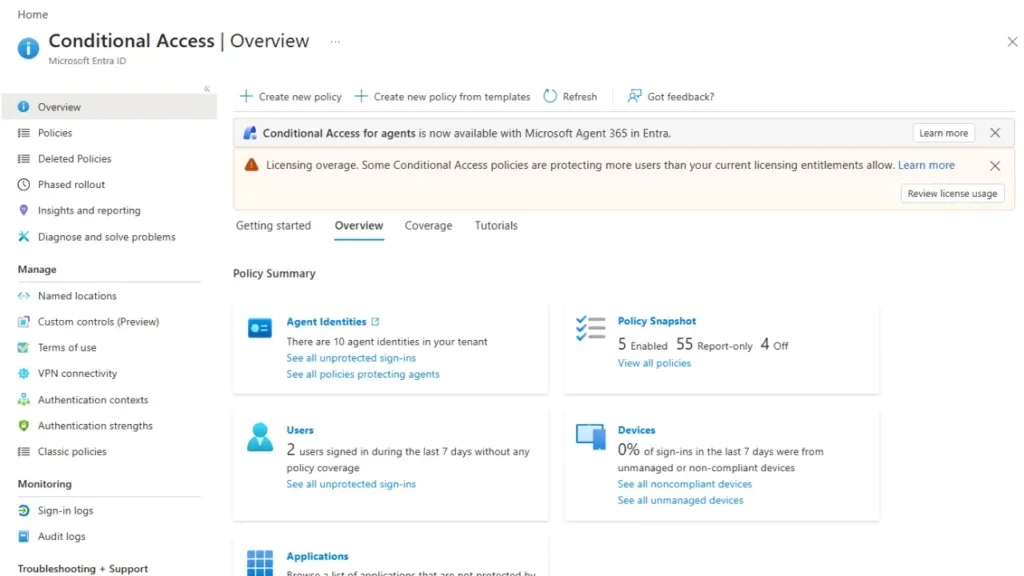
Warning, not enforcement — for now
It is important not to confuse visibility with sanction. Microsoft's official documentation specifies that an expired license does not cause automatic disablement or deletion of existing Conditional Access policies. The banner therefore does not constitute a technical block.
Precedent to know
Microsoft has already sent unexpected invoices to organizations that deliberately under-licensed their Entra usage. This is not a hypothetical scenario; it is a documented precedent for large organizations.
The novelty lies in the location of the information. Until now, license consumption data was accessible from Billing > Licenses > License usage — a section frequented by purchasing teams, rarely by technical teams. Displaying the overage directly on the Conditional Access page places it in front of administrators who actively manage the environment. The message becomes difficult to ignore.
What Entra License Usage Insights actually measure
The Entra License Usage Insights dashboard counts unique users who had at least one Conditional Access policy evaluated during the reporting period. Microsoft then compares this figure with the Microsoft Entra ID P1 and Microsoft Entra ID P2 entitlements of the tenant, then identifies any overage.
The blade now exposes:
- Consumption related to Conditional Access (requires Entra ID P1)
- Consumption related to risk-based Conditional Access (requires Entra ID P2)
- Active users and guests views
- Trends over six months
- Overage indicators
Reminder on licensing prerequisites
Basic Conditional Access requires Microsoft Entra ID P1. Conditional policies based on user or sign-in risk require Microsoft Entra ID P2.
Why counting Entra licenses remains complicated
Counting Entra ID licenses is not a simple inventory of user objects. Microsoft has clarified its "One Person, One License" philosophy: an employee with multiple internal identities — for example an administration account and a standard account in the same cloud — does not need multiple distinct Entra ID licenses.
This clarification is useful, but it is informational and does not replace the terms of the applicable contract. A usage report may count two identities where your license position sees only one. Organizations must therefore have a documented and defensible method to link each secondary account (administrator, service, guest) to the corresponding licensed employee.
Best practice
A centralized provisioning tool — whether it's Microsoft Entra ID Governance, Microsoft Identity Manager or a third-party solution — should normally ensure this traceability automatically. If this is not yet in place, now is the time to prioritize it.
What interpretation to make of the general context?
No official announcement confirms the imminent activation of an automatic Entra ID license compliance mechanism. Yet several signals converge:
- Considerably enriched consumption reports in recent months
- A warning banner positioned where administrators work
- Microsoft's massive investments in Microsoft 365 Copilot and increasing commercial pressure toward annual billing
- Precedents of retroactive billing for proven under-licensing
These elements, taken together, draw a clear direction: Microsoft is building the data and visibility infrastructure necessary to trigger formal compliance if it deems it opportune.
What you must do right now
The appearance of the banner does not justify an immediate license purchase. A preliminary analysis is required.
Access the consumption report
Navigate to Billing > Licenses > License usage in the Microsoft 365 portal. Compare the number of Conditional Access users reported with your P1 and P2 entitlements.
Identify identities inflating the counter
Analyze whether guest accounts, administration accounts, or identity duplicates explain all or part of the identified gap. The Entra License Usage Insights blade offers dedicated views for active users and guests.
Document the identity-person correspondence
For each secondary account identified, create documentation explicitly linking the identity to the concerned licensed employee. This traceability is your best defense in case of audit.
Evaluate the real need for additional licenses
If after deducting identities legitimately attributable to people already licensed, a real overage remains, engage a conversation with your purchasing manager and your Microsoft contact. Do not wait for a sales follow-up.
Key points to remember
- The "Licensing overage" banner on the Conditional Access page is a visibility signal, not a technical block.
- Microsoft does not automatically disable Conditional Access policies in case of insufficient licenses — at least according to current documentation.
- Entra License Usage Insights measure unique users evaluated by at least one policy, and now expose trends over six months and overage indicators.
- The complexity of Entra ID licensing stems from multiple identities per person: rigorous documentation of account-to-employee correspondence is essential.
- No date or method of automatic enforcement is officially announced, but the technical foundations to achieve it are in place.