Why standard MCP authorization doesn't scale in the enterprise
In a classic OAuth scenario, each MCP client submits the user to the authorization flow specific to each MCP server: discovery, redirection, consent, token. This model is perfectly suited to consumer applications where the user explicitly chooses what data to share with which application.
In an enterprise context, this same mechanism generates an authorization debt proportional to the number of MCP servers deployed:
- Each team member must individually authorize each MCP server approved by the organization.
- Account selection and consent popups create an inconsistent experience prone to errors.
- Security teams lack a unified control plane to audit or revoke access.
- A team member's departure requires action on multiple distinct authorization relationships.
- Personal and professional identities can mix precisely where it's most risky: in the tool acting on behalf of the user.
Enterprise-Managed Authorization (EMA) is the stable MCP extension that addresses these issues by making the enterprise's IdP the access policy decision point.
Specification reference
The EMA extension is published as a stable version on the official MCP protocol website: Enterprise-Managed Authorization. The complete specification is available on GitHub.
What the EMA protocol changes at the wire level
The user always authenticates with the enterprise's IdP via the MCP host. The difference occurs when the client needs to obtain an access token for a specific MCP server.
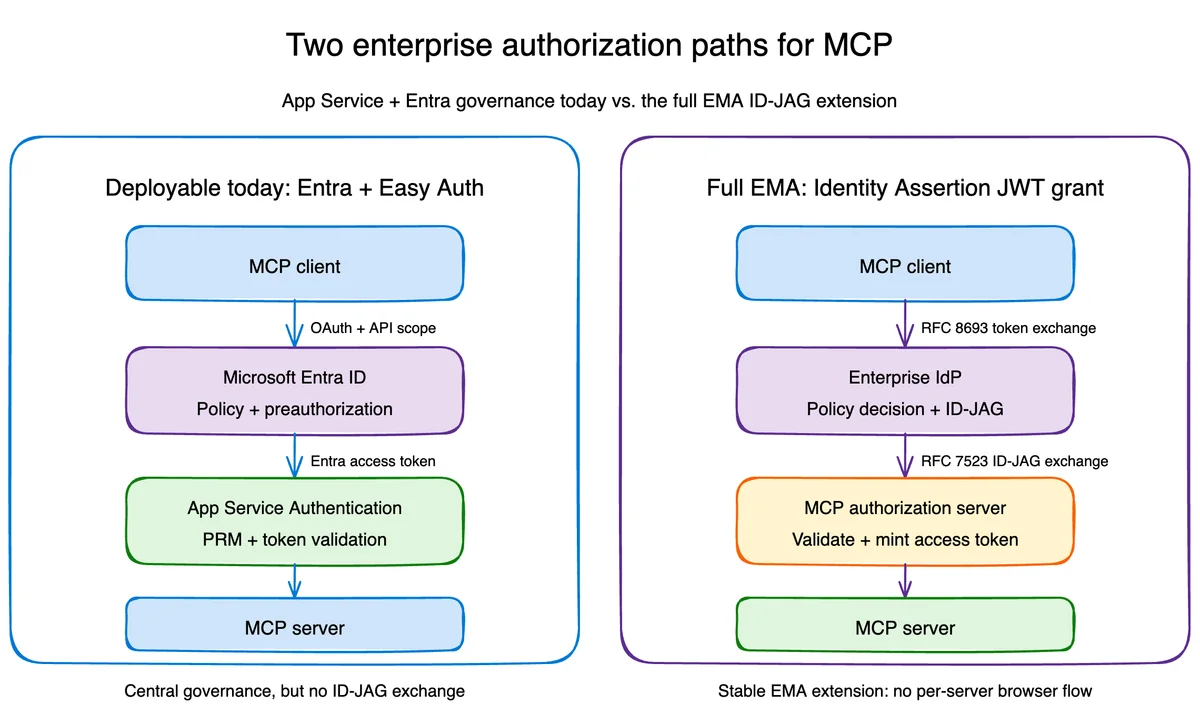
The EMA flow unfolds in five precise steps:
- The MCP client exchanges the user's identity assertion with the enterprise IdP for an ID-JAG (Identity Assertion JWT Authorization Grant), using OAuth token exchange semantics defined by RFC 8693.
- The IdP evaluates the enterprise policy for the client, the MCP resource, the user, and the requested scopes.
- If the policy allows access, the IdP issues a short-lived ID-JAG bound to a specific audience.
- The client presents this JWT to the MCP authorization server via the JWT bearer grant defined by RFC 7523.
- The authorization server validates the assertion and returns the access token for the resource that the client uses for its MCP calls.
The user never traverses a second browser flow with the MCP server. The decision has already been made by the enterprise IdP, which confers three structural properties:
- Single authorization, automatic propagation. Administrators enable trusted servers; users receive access based on their existing groups and roles.
- Centralized policy and revocation. Conditional access, employment status, device requirements remain in the IdP.
- Clear identity boundary. Enterprise login is the sole source of authority, with no account selector at each MCP server.
What Entra ID and App Service provide today
Azure App Service already provides a solid foundation for an enterprise MCP resource server. The App Service Authentication feature sits in front of the application and validates Microsoft Entra access tokens before the request even reaches the application process.
Preview feature
App Service Authentication's MCP integration and protected resource metadata publishing are currently in preview. Do not use them in a production environment without validating the general availability roadmap.
In the Entra + App Service model, the platform automatically ensures:
- Publishing of OAuth protected resource metadata for MCP discovery.
- Authentication requirement on
/mcpwith401response for any unauthenticated request. - Validation of signature, issuer, audience, and token lifetime.
- Restriction to configured application
client_id. - Injection of the validated principal into platform-controlled request headers.
- Public exposure of only
/and/healthendpoints. - Sending OpenTelemetry data to Application Insights via a managed identity.
The Entra application exposes the user_impersonation scope and pre-authorizes Visual Studio Code and Azure CLI. Tenant administrators can apply conditional access to the enterprise application and view Entra sign-in logs.
Centrally governed OAuth ≠ EMA protocol
This path provides centrally governed OAuth. It removes consent prompts for known clients and places token validation at the platform edge. It does not implement the native EMA protocol, because Entra does not issue ID-JAG via RFC 8693 in this path, and there is no RFC 7523 exchange with a separate MCP authorization server.
Comparison of the two authorization paths
| Capability | Entra + App Service | EMA with ID-JAG |
|---|---|---|
| Centralized policy at tenant level | Yes | Yes |
| Protected resource metadata | Yes | Yes |
| Pre-authorization of known clients | Yes, via Entra pre-authorization | Often required on both IdP and authorization server |
| Browser flow per server | Avoided for pre-authorized clients | Avoided by protocol design |
| Enterprise IdP issues an ID-JAG | No | Yes |
| MCP authorization server exchanges ID-JAG | No | Yes |
| Availability in the sample | Deployable Azure App | Local interoperability lab |
This distinction is fundamental: "no consent prompt" describes a user experience, not proof of protocol compliance.
Can you implement full EMA on App Service?
Yes. App Service does not prevent you from deploying the complete EMA flow. If your enterprise IdP knows how to issue ID-JAG, you can implement the resource authorization server and MCP token validation in application code, or point the MCP server to a separate authorization service. App Service then remains the compute platform rather than the authorization boundary.
This approach replaces Easy Auth's managed token validation with application responsibilities: token issuance, signature key management, ID-JAG validation, replay protection, scope enforcement, and audit logging.
Deploying the Entra-governed MCP server
Prerequisites
- Azure CLI >= 2.60 installed and logged in (
az login). - Azure Developer CLI (azd) >= 1.9 installed.
- Owner or Contributor + User Access Administrator role on the target subscription.
- Application Administrator or Cloud Application Administrator role in Entra ID for application creation.
- Python module >= 3.12 for local development.
The reference repository is seligj95/app-service-ema-mcp.
Clone the repository and prepare the environment
1git clone https://github.com/seligj95/app-service-ema-mcp2cd app-service-ema-mcp3python3 -m venv .venv4source .venv/bin/activate5python -m pip install -e ".[dev]"Configure azd environment variables
1azd auth login2azd env new ema-mcp3azd env set AZURE_SUBSCRIPTION_ID <subscription-id>4azd env set AZURE_LOCATION eastusReplace <subscription-id> with your Azure subscription identifier (az account show --query id -o tsv).
Bootstrap the Entra application
The Entra configuration script must be run before azd up. This is because azd resolves required Bicep parameters before the pre-provisioning hook.
1./scripts/configure-entra-app.shThis script is idempotent: it can be safely re-executed at each provisioning.
Deploy infrastructure and application
1azd upThe deployment installs: a Linux Basic B1 App Service Plan, Python 3.14, App Service Authentication, protected resource metadata, Log Analytics, Application Insights, and telemetry via managed identity.
Verify the authorization boundary
1./scripts/verify-deployment.shThis script sequentially verifies that:
- Protected resource metadata is anonymously accessible.
- An unauthenticated MCP request is properly rejected as
401. - Azure CLI obtains a valid delegated API token.
- The same MCP request succeeds with this token.
Expected verification result
When invoking the whoami tool against the deployed application with the Azure CLI token, App Service returns:
1{2 "authentication_type": "aad",3 "client_id": "04b07795-8ddb-461a-bbee-02f9e1bf7b46",4 "scopes": ["user_impersonation"]5}The complete result also includes name, subject, tenant_id, and roles. The corresponding telemetry trace arrives in Application Insights via the App Service managed identity, with no local telemetry authentication.
Running the EMA flow locally
The local lab runs four components in the same process: a simulated enterprise IdP, an MCP authorization server, an MCP resource server, and an MCP client using the identity assertion APIs from the official Python SDK.
Components not intended for production
The simulated IdP and in-memory token store are deliberately laboratory components. They make the protocol visible and testable without claiming that Entra today exposes the exact issuance flow used by the lab.
1python -m examples.ema_lab.clientThe final result is the identity and authorization context returned by the MCP server:
1{'subject': 'alice@example.com', 'client_id': 'finance-agent',2 'scopes': ['mcp:whoami'], 'resource': 'http://localhost/mcp'}To run the test suite, which covers both successful exchanges and rejection cases:
1python -m ruff check .2python -m pytestThe lab validates ID-JAG signature, typ claims, issuer, audience, client_id, resource, scopes, expiration, and single use via jti. It also tests rejections: wrong issuer, wrong audience, wrong resource, scope escalation, expiration, and replay.
SDK dependency not yet published
At time of writing, the PyPI package mcp version 1.28.1 does not yet contain the identity assertion APIs used by the stable extension. The sample points to an exact commit of the official Python SDK. Replace this pin as soon as the APIs are available in a published release.
Three integration gotchas to know before production
1. Authorize the audience that Entra actually issues
The client requests api://<client-id>/user_impersonation, but a v2 delegated token may carry the bare application client_id in the aud claim. The sample authorizes both the bare form and the api:// form, while rejecting tokens for any other resource. Verify this behavior in your own validation code.
2. Preserve the SDK's anti-DNS-rebinding protection
The MCP Python SDK uses localhost by default when the server does not declare its deployment hostname. This is a safe default locally, but a deployed request correctly fails with 421 Invalid Host header. The sample reads WEBSITE_HOSTNAME and allows only that exact App Service hostname and its form with port. Never disable this protection.
3. Manage App Service claim mapping
App Service remaps certain JWT claim names before constructing X-MS-CLIENT-PRINCIPAL. For example, the delegated scp value may arrive under the mapped scope claim URI. The application must accept both representations, while only trusting the principal header injected by App Service. A principal header supplied by the caller never constitutes proof of authentication, because the platform strips and replaces these headers at the edge.
Production readiness checklist
This sample delimits the authorization boundary, not all production controls
The following items are your responsibility before exposing an MCP server to production.
- Apply Entra conditional access deliberately, starting in report-only mode.
- Add scope or role checks at each MCP tool level when tools have different sensitivities.
- Use a managed identity or explicit on-behalf-of flow for downstream APIs; never forward the MCP resource token.
- Add a private network or API gateway if the workload requires network isolation.
- Keep access tokens and ID-JAG short-lived.
- Validate ID-JAG signatures with the JWKS published by the enterprise IdP, discovered from its authorization server metadata. The shared HMAC key from the lab exists only for local flow autonomy.
- Apply ID-JAG replay protection via
jtiat the authorization server level. - Log authorization decisions without logging bearer tokens or assertion contents.
- Replace the SDK Git pin as soon as identity assertion APIs are available in a tested release.
Reference resources
- Stable EMA Specification (GitHub)
- Enterprise-Managed Authorization Announcement
- Identity assertion guide — MCP Python SDK
- Configure MCP authorization on App Service (Microsoft Learn)
- Secure MCP calls from Visual Studio Code (Microsoft Learn)
- RFC 8693 — OAuth 2.0 Token Exchange
- RFC 7523 — JWT Bearer Grant
- Reference sample repository