
A Copilot budget can trigger an email without interrupting usage. That distinction changes how you prepare a pilot: before setting an amount, you need to know which service consumes credits, which control applies, and who decides what to do if the threshold is exceeded.
Identify the service before setting a Copilot budget
Copilot does not refer to a single billing experience. Microsoft distinguishes between conventional pay-as-you-go billing for Copilot Chat and SharePoint agents, cost management for certain Microsoft 365 services, and capacity managed in Microsoft Copilot Studio. The Microsoft overview of pay-as-you-go billing helps identify the applicable arrangement before you choose a threshold.
Start by recording the service, the agent involved, its environment, and its funding source. For a Copilot Studio agent, also record the harness shown in the inventory. Two agents designed for the same need can use different harnesses; their name or purpose alone is not enough to determine their consumption.
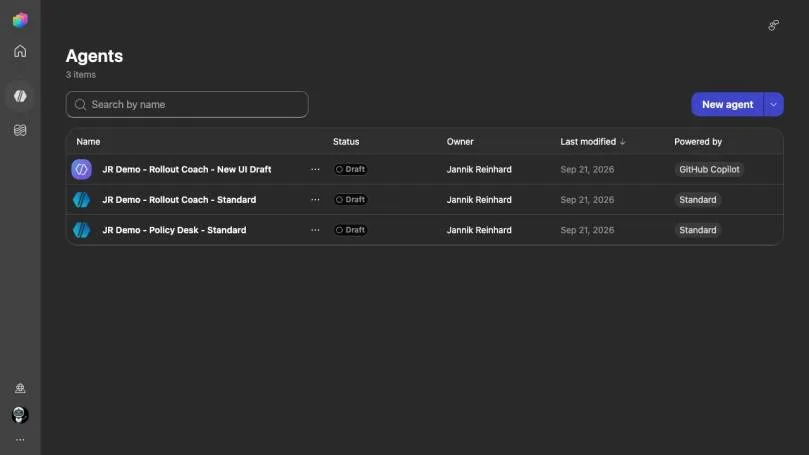
This distinction matters before publication. According to Microsoft's guidance on governing credit consumption, creating, previewing, testing, and evaluating an agent that uses the GitHub Copilot harness can already consume Copilot Credits. These activities are not covered by the user's Microsoft 365 Copilot license. Budget for the creation phase, even if the agent remains a draft.
Four controls answer four different questions
An alert threshold, a credit allocation, and a usage limit do not have the same effect. An approval process complements these settings: no portal decides on behalf of the business owner whether the pilot should continue.
| Control | Decision covered | Mistake to avoid |
|---|---|---|
| Budget alert | Who receives a notification at the defined threshold? | Assuming the notification stops billing |
| Credit allocation | How much capacity is assigned to an environment? | Overlooking other sources of capacity or billing |
| Usage limit | Which access or agent is stopped at the applicable threshold? | Assuming this limit applies to every Copilot service |
| Approval | Who authorizes an increase or resumption? | Confusing dashboard access with decision-making authority |
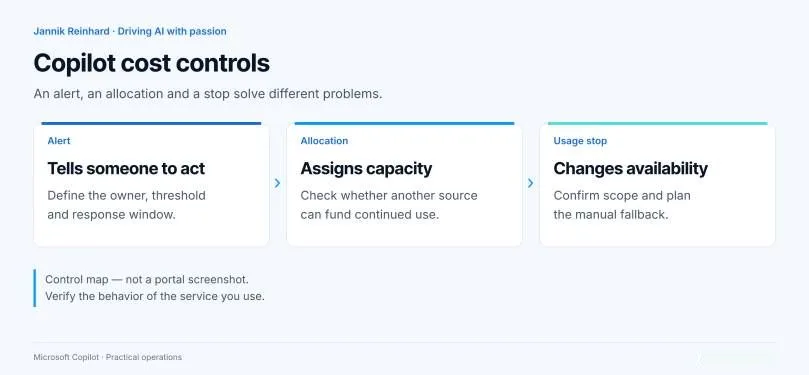
An alert budget is not a spending cap
Before announcing a maximum cost, check the service documentation to confirm that the chosen setting actually cuts off access or usage. A notification, even one sent at 100% of the budget, is not proof of that.
A conventional Copilot budget warns you without stopping billing
In the conventional approach, the budget is configured at the billing-policy level: Copilot → Billing & usage → Billing policies → your policy → Budget. It is not an individual allowance reserved for each user or agent. Microsoft's documentation on these budgets states that reaching 100% stops neither the service nor its billing.
The notification is not instantaneous, either. Microsoft says usage can take four hours to appear and email alerts can arrive up to 24 hours later. An owner who waits for the notification before responding is therefore accepting delayed visibility, not a real-time stop mechanism.
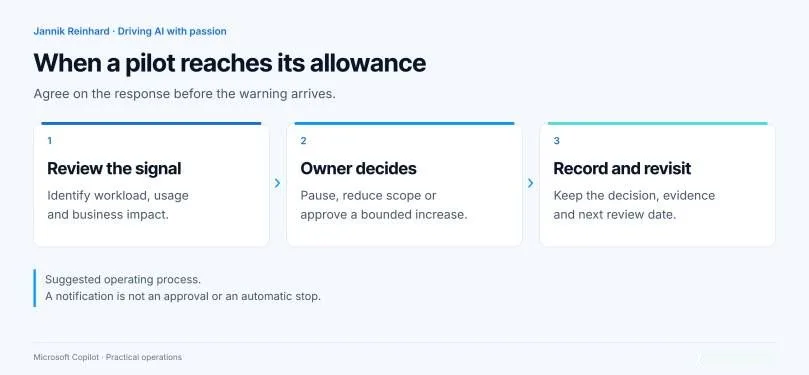
Name a cost owner, their deputy, and the person authorized to restrict the service. Set their response time and the expected decision: investigate the variance, temporarily limit access, or request additional funding. If the pilot supports a business process, also plan how users will work during a possible interruption.
Cost Management can limit access, depending on the policy
For supported services, Copilot → Cost Management offers monthly credit limits at the policy and user levels. Microsoft's documentation on spending policies describes a loss of access when the applicable limit is reached. That is a crucial difference from a conventional budget, which only sends an alert.
This limit is not, however, a universal cap for the organization. An additional policy has its own limits; it does not automatically inherit a shared cap from the default policy. These policies govern access to and consumption of the covered services. They do not reserve a private pool of credits for each team.
Before approving the arrangement with finance, check the covered services, assigned users, and any existing additional policies. Then document what someone whose access is interrupted will see and who can authorize an increase. For an approved pilot, verify the actual assignments and expected behavior at the threshold; the mere presence of a limit in the portal does not prove that the right people are subject to it.
Copilot Studio requires controls at the environment and agent levels
In Microsoft Copilot Studio, an environment's allocation tells only part of the story. Check whether it can then use unallocated tenant capacity or a pay-as-you-go billing plan. Power Platform documentation on agent capacity and limits also describes monthly per-agent limits, notifications, and the Stop usage option.
Microsoft recommends identifying other agents, workflows, and features that consume capacity before changing an environment's allocation or overage settings. Increasing its capacity for one agent may also fund other activities in the same environment. To separate responsibilities, record the environment's funding path and the intended behavior of each agent separately.
The admin dashboard groups the Copilot Chat, Standard, and GitHub Copilot harnesses. According to the Power Platform capacity documentation, it lets you track consumption by agent and environment, with daily data for the current month and the preceding two full months, as well as monthly data for twelve months. Use these views to identify where to investigate; do not confuse consumption of prepaid capacity with a new pay-as-you-go charge. Microsoft's comparison of dashboards and the Azure invoice explains the difference.
Exhausted capacity does not necessarily mean a clean stop
Microsoft says that running out of capacity can block responses to users as well as natural-language creation, previewing, testing, and evaluations. Its credit enforcement policy also allows some tolerated overage: do not present allocation alone as a strict spending cap.
Build a pilot around the work you actually expect
Consider this pilot example: a team wants to evaluate an assistant that retrieves the rule applicable to a deployment. The agent must explain the rule and link to the approved document, without changing devices. Its cost plan covers preparing sources, testing and corrections, and then participants' questions. It is not limited to the number of people authorized to use it.
This approach avoids another misconception: not all agents consume the same credits. Lewis Baybutt at Practical 365 distinguishes declarative agents based on instructions and public websites, which do not consume Copilot Credits, from agents that access tenant data or use certain Copilot Studio features, which may consume them. Examine the enabled capabilities before estimating the pilot's cost. Our guide to Copilot costs, licenses, and agents explores how to define that scope.
Define an acceptable result
Specify the authorized documents and a set of questions. An accepted answer must rely on the approved rule, point to the correct section, and not invent permission to act.
Set boundaries for testing
Define the participants, planned tests, and a review date. Also record rejected answers, retries, and time spent on human verification.
Verify the control and its owner
Record the policy, environment, agent, and any overage path. Identify who receives the alert and who decides whether to increase the limit or stop usage.
Decide based on cost per accepted result
Compare consumption with the number of accepted answers, the failure rate, and review time. Keep the same acceptance criteria across agent versions.
To define creation rights and responsibilities, our three-zone Copilot agent governance model can complement this decision log. A low-cost answer that requires manual correction is still a poor result for the pilot.
Frequently asked questions
Does a Microsoft 365 Copilot license cover all agent testing?
No. Microsoft states that creating, previewing, testing, and evaluating a Copilot Studio agent using the GitHub Copilot harness can consume Copilot Credits. This consumption is not included in the user's Microsoft 365 Copilot license.
Does a Copilot budget at 100% automatically stop billing?
No, not with conventional budgets linked to billing policies: Microsoft states that the service and billing continue. Check the service involved and look for an applicable usage limit if you need to interrupt access.
Does an exhausted Copilot Studio allocation guarantee a strict cap?
No. Other sources of capacity or billing may come into play depending on the configuration, and Microsoft describes some tolerated overage. Exhaustion can also block creators' work, not just responses to users.
Three decisions to make before deployment
If your pilot requires an amount that must not be exceeded, do not approve a simple alert budget as a guarantee that usage will stop. Choose the control that matches the service, have its assignments verified, and agree on a fallback before expanding access.
Pilot approval checklist
- Identify the service, harness, agent, and environment.
- Document every possible source of capacity or billing.
- Classify the setting: alert, allocation, or usage limit.
- Name the cost owner, decision-maker, and their response time.
- Plan the message to users and the fallback if usage stops.
- Keep a record of verified settings and compare consumption with accepted results.
If the agent supports an operational deadline, have its business owner approve the fallback. For an experimental assistant, an interruption may instead be the desired behavior.
Further reading
- Govern GitHub Copilot agent consumption in Copilot Studio — to include creation and testing in the cost plan.
- Copilot Credits enforcement policy — to understand blocked activities and tolerated overage.
- Manage Copilot Credits and Copilot Studio capacity — to track agents, environments, and allocations.
- Licensing Copilot Agents in Microsoft 365 Copilot Chat — to distinguish agent capabilities that may consume credits.