Creating code with AI is becoming trivial. Running it in production in a Microsoft 365 tenant, with identity, security policies and a controlled application lifecycle, is much less so. That is the challenge Microsoft is tackling with Copilot Managed Runtime, now in public preview: a direct response to administrators seeing business teams produce apps faster than IT can govern them.
A managed runtime foundation, not another standalone tool
The problem is not code generation: apps created in Copilot Cowork and the new Copilot Code experience already produce working code. The problem comes afterward—provisioning and securing cloud resources, configuring identity models, complying with organizational policies and establishing a deployment process. Each creation platform ends up imposing its own governance model, leaving IT with as many playbooks as there are tools.
Copilot Managed Runtime offers the opposite: a single runtime platform hosted inside the Microsoft 365 tenant boundary. It supports the capabilities users expect—sharing, live data connections and straightforward access to apps—while remaining under IT control. It already powers apps built in Copilot Cowork, Copilot Code and Microsoft Copilot Studio, and is also opening up to professional developers and third-party tools.
What changes in practice
Instead of rebuilding a security, identity and deployment foundation for every AI-created app, teams can rely on a shared foundation operated by Microsoft, within boundaries set by your organization.
Architecture: what Microsoft manages and what your organization manages
The division of responsibilities can be summed up in one sentence: Microsoft operates the platform, your organization sets the boundaries, and you retain control. In practice, Copilot Managed Runtime brings together several components:
- Identity through Microsoft Entra for authorized access to hosted apps.
- Organizational policies governing the connectors, data and endpoints that apps can reach.
- Automatic version control through Git, enabling a genuine collaborative development (co-dev) workflow rather than a static export.
- Built-in connectors and Work IQ to simplify access to, and authorization for, the necessary data and products.
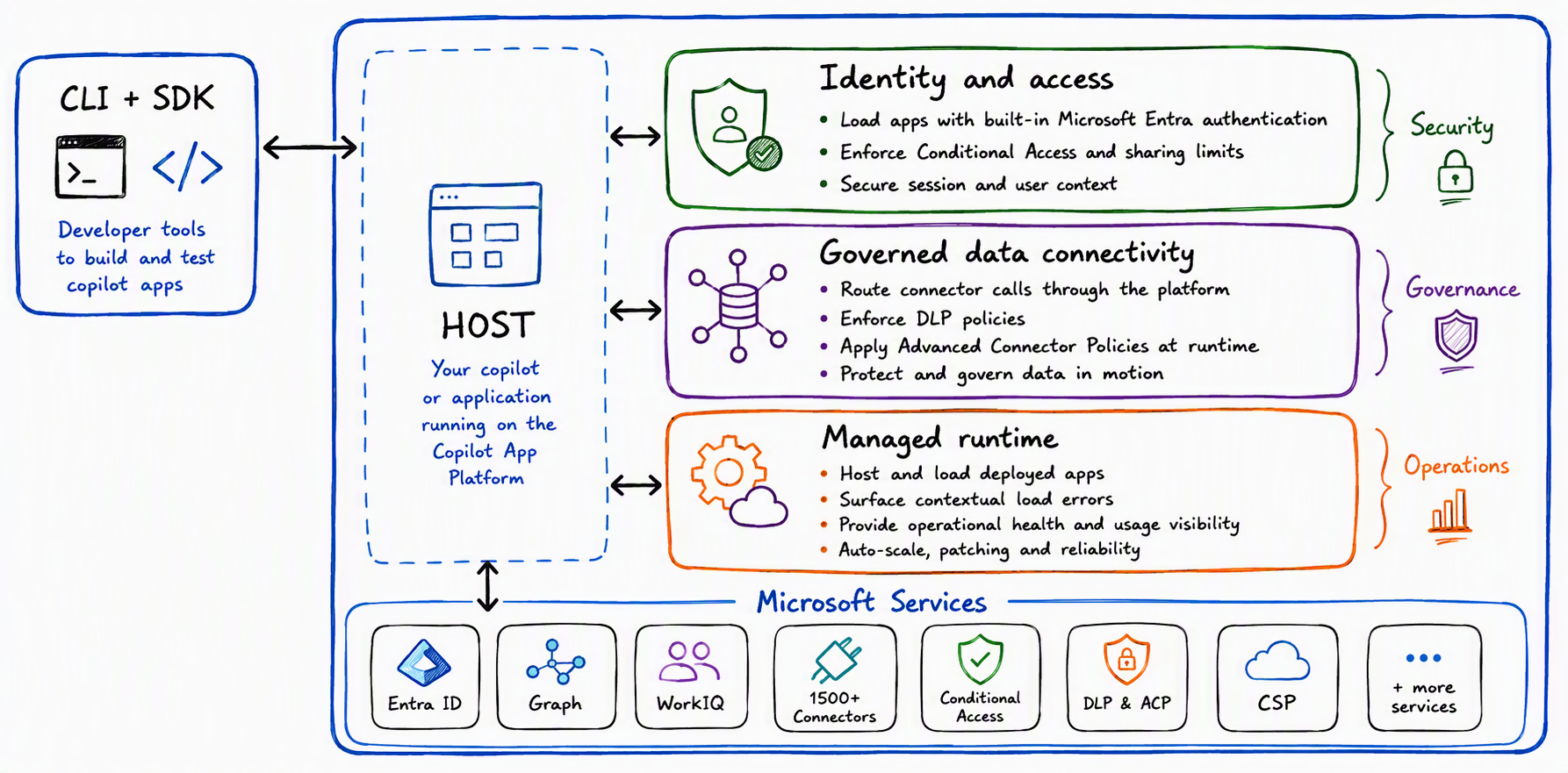
This consistency applies equally to apps built in Microsoft experiences (Copilot Cowork, Copilot Code and Copilot Studio) and third-party tools compatible with the SDK. A centralized inventory in the Microsoft 365 admin center provides visibility into access, usage, health and policy compliance.
The SDK and CLI: code elsewhere, run in the Microsoft 365 tenant
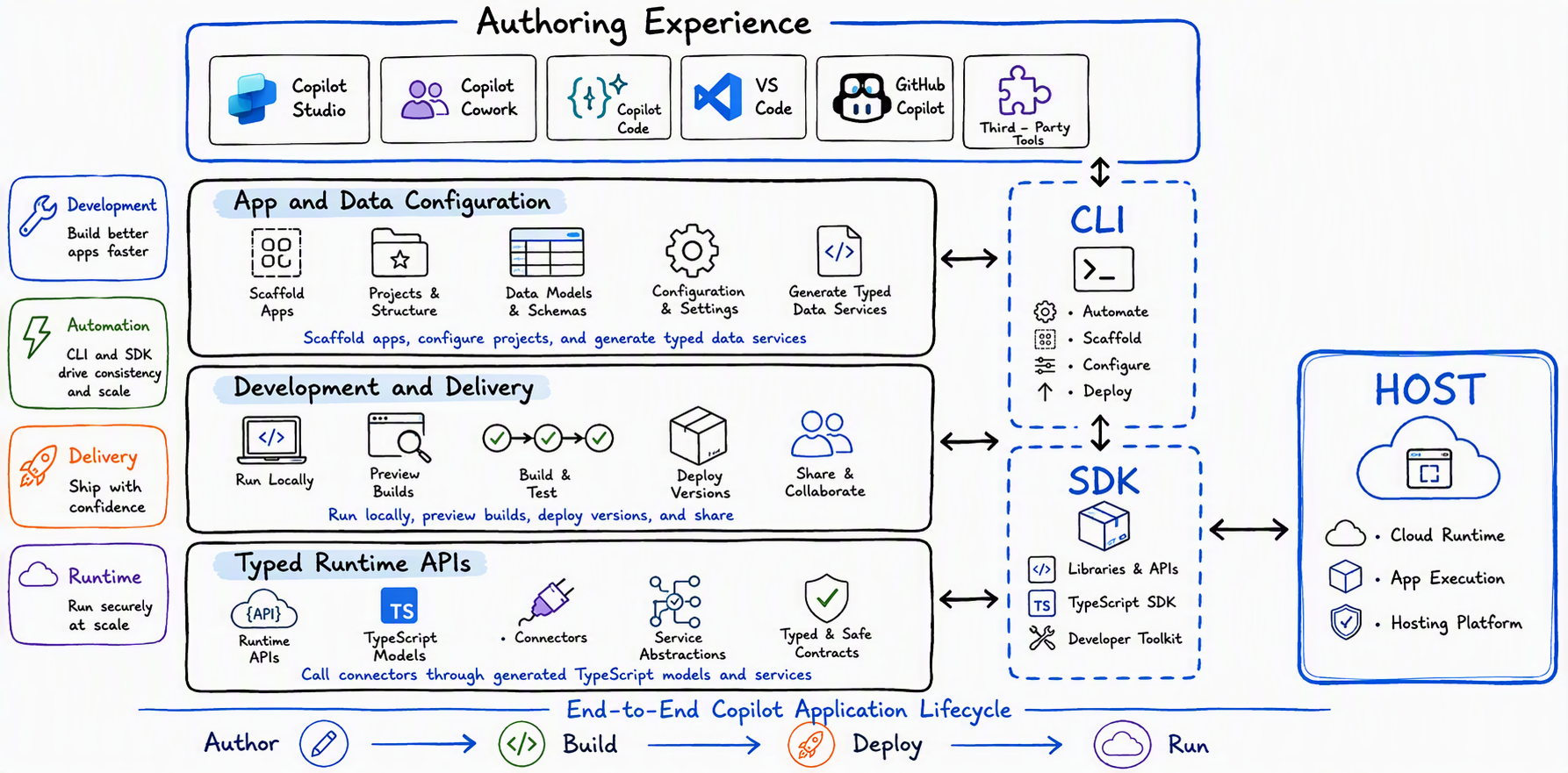
The Copilot Managed Runtime SDK connects the resulting code to the managed runtime host. It lets both Microsoft and third-party development experiences build against Microsoft services using a common model, then move an app from a developer's workstation to a company-managed runtime environment.
The SDK and its command-line interface (CLI) cover the full development lifecycle, not just final packaging:
- Project scaffolding and configuration.
- Defining the data connections the app needs.
- Generating typed services for working with connectors from TypeScript.
- Running and previewing the app during development.
- Deployment and versioning through the same toolchain.
At runtime, the SDK APIs provide a secure bridge between the app and services exposed by the host: governed access to enterprise data, identity and Copilot work context. Developers continue working with editable, Git-versioned code using the web technologies they already know—the app simply gains a consistent path into Microsoft 365 for deployment and operation.
With the Copilot Managed Runtime SDK, an app created with Lovable can now run inside your Microsoft tenant, just like everything else: same sign-in, same policies, same app inventory. — Lan Roche, Head of Global Partnerships at Lovable
What apps deployed on the managed runtime gain
Moving from a working app to one ready for production usually requires substantial platform work. Copilot Managed Runtime builds that foundation into the deployment model itself, rather than making it a separate task at the end of a project. Apps deployed on the host benefit from:
- Identity and sharing through Microsoft Entra.
- Microsoft-hosted runtime environments.
- Organizational policies for connectors, data access, approved endpoints and auditing.
- Deployment, versioning and lifecycle controls.
- A centralized inventory, monitoring and usage visibility.
Teams can preview and improve a new version while the production version remains available to users—a staged deployment model that limits the impact of regressions. Identity and policies are enforced at the host level, not app by app.
| Creation experience | Intended users | Runtime access status |
|---|---|---|
| Copilot Cowork | Business users / makers | Entry point already active |
| Copilot Code | Copilot users | Entry point already active |
| Microsoft Copilot Studio | Low-code makers | Entry point already active |
| SDK-compatible third-party tools (e.g., Lovable) | Professional developers | Available through the Copilot Managed Runtime SDK |
Centralized governance in the Microsoft 365 admin center
As more people gain the ability to create apps, every organization faces a practical question: what exactly is running, who has access, what data and services can it reach, and does it still comply with current policy?
Apps hosted with Copilot Managed Runtime appear in the new Apps experience in the Microsoft 365 admin center. It provides a centralized inventory and a single place to review access, usage, health and policy compliance. The model applies regardless of the creation tool used—IT does not need a different governance playbook for each platform.
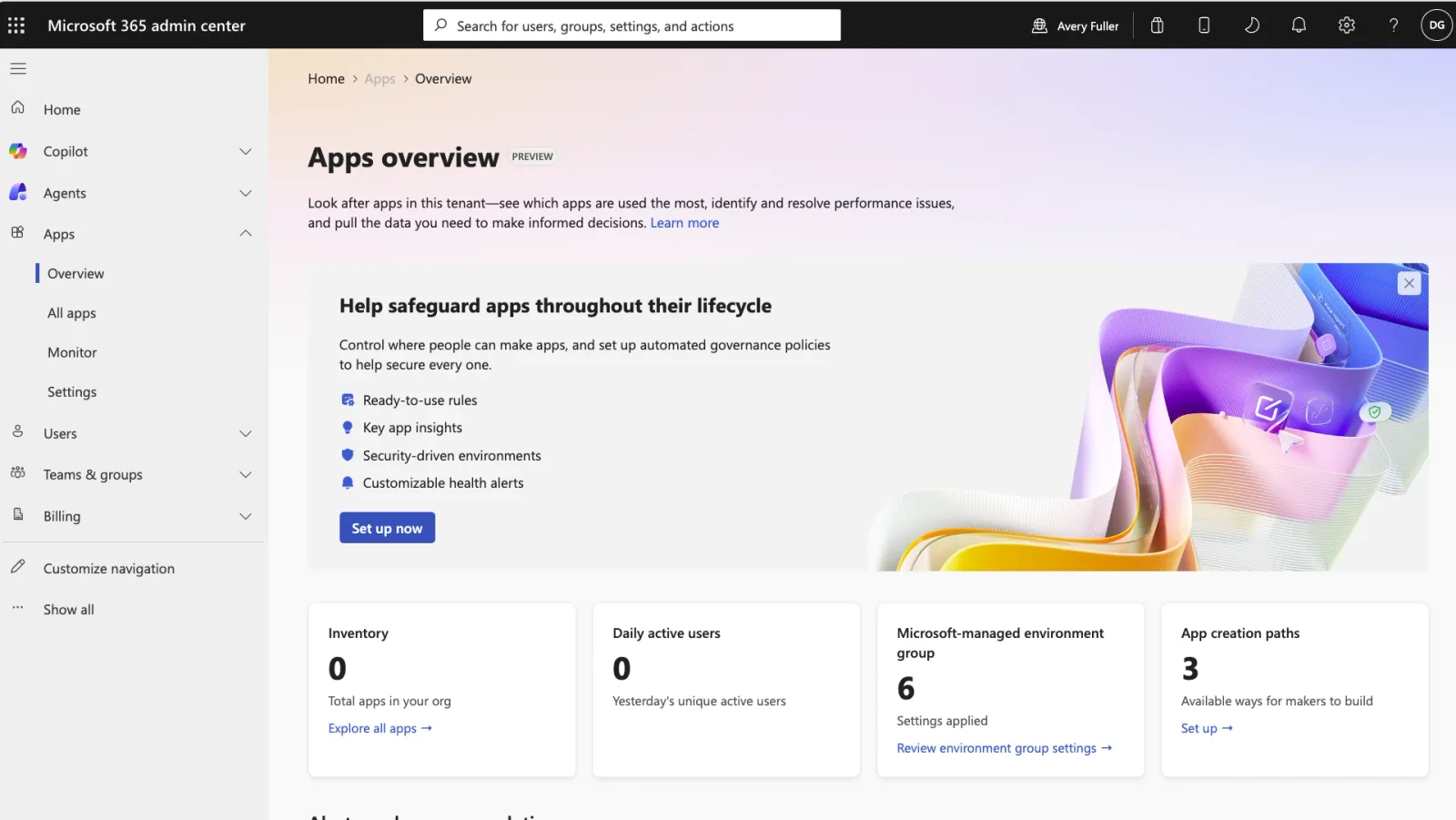
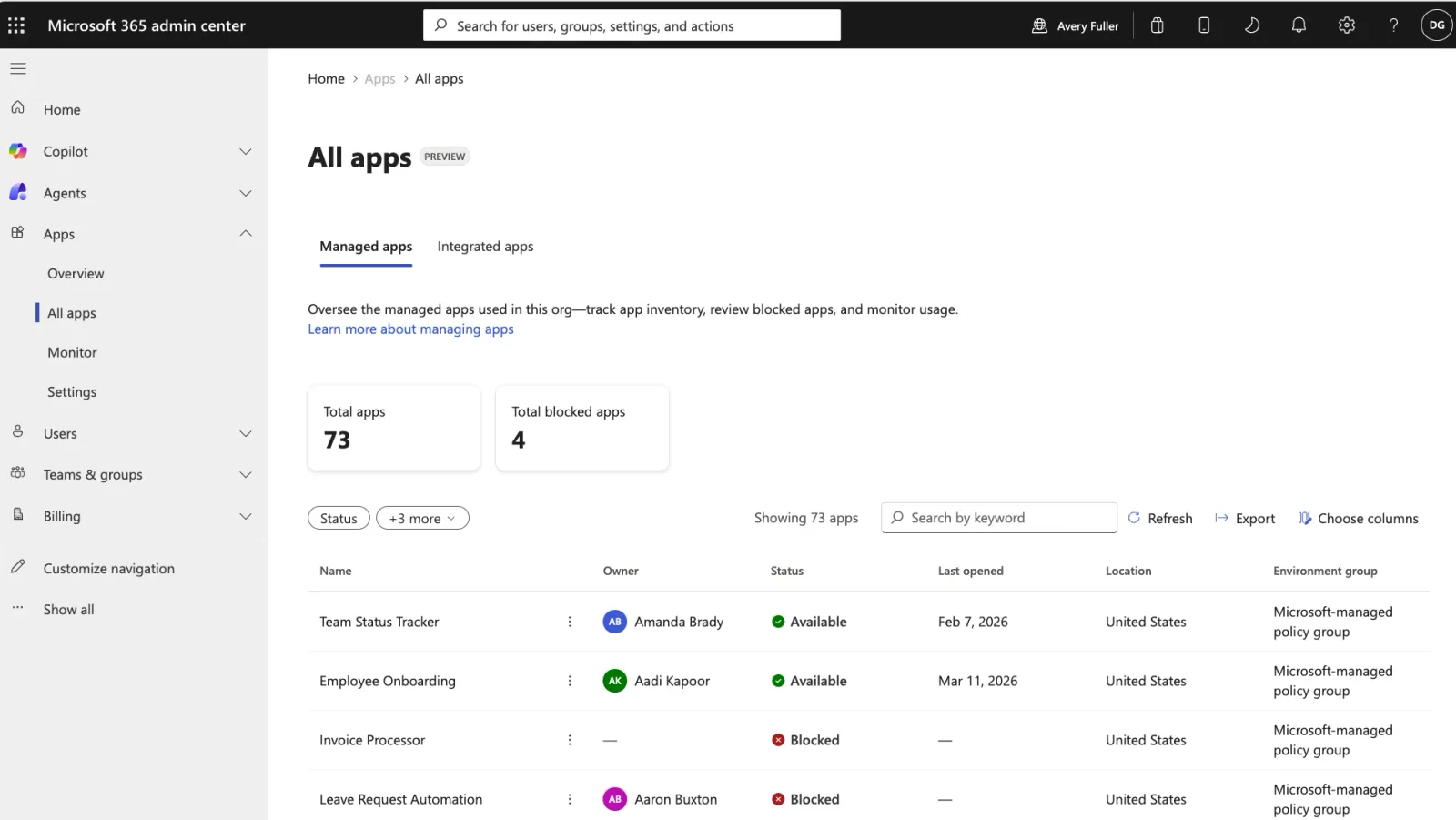
Centralized governance does not require centralized creation. Makers and developers can keep working in the experience that suits their role; IT gets a common operational layer for deployment, security, monitoring and lifecycle management. This separation between “open creation” and “managed execution” lets organizations scale app innovation without increasing operational risk at the same rate.
Governance consideration
A centralized inventory does not replace regular reviews of default policies. Before broadly enabling access to an SDK-compatible third-party tool, check which connectors and endpoints are allowed by default in your tenant.
Practical enterprise use cases
The Copilot Managed Runtime model covers a wide range of internal business apps:
- A team creates a product launch management app in Copilot Cowork, connects it to approved planning data and deploys it through a governed path.
- A developer picks up the code and continues building with familiar web technologies, without forking the project or setting up a separate runtime, platform resources and governance stack.
- An administrator finds the app in the inventory, monitors its usage in the same place and applies consistent controls to apps created with different tools.
In each case, the enterprise operating model stays the same regardless of the authoring tool. Makers and developers gain freedom to iterate throughout the lifecycle, while IT gains confidence once the app reaches users.
Getting started in public preview and limitations to know
Microsoft entry points are already active through Copilot Cowork, Copilot Code and Copilot Studio, and developers can use the SDK and its plugins to build apps for the host. For administrators, the process is, for now, entirely portal-based:
Open the Apps area in the Microsoft 365 admin center
Go to the new Apps experience in the Microsoft 365 business admin center to view the inventory of apps hosted on Copilot Managed Runtime, regardless of their origin (Cowork, Code, Studio or third-party SDK).
Review default policies
Examine the organizational policies applied by default to connectors, data access and approved endpoints before extending access to more creators.
Enable or disable apps
Administrators can enable or disable apps directly from the Apps experience. Test with a limited group before making a tenant-wide change.
Monitor health and usage over time
Use the monitoring and usage indicators in the inventory to identify inactive, heavily used or noncompliant apps, and adjust governance accordingly.
Tenant-wide impact
Disabling an app or tightening a connector policy in the Apps area immediately affects all users who depend on it. During preview, document every policy change and communicate before making broad changes.
Several limitations are worth tracking before a large-scale rollout:
- No dedicated PowerShell cmdlet or Microsoft Graph module has been documented yet for administering Copilot Managed Runtime through scripts; management is available only through the portal during preview.
- The SDK currently targets web technologies and TypeScript; Microsoft does not announce support for additional languages here.
- No general availability (GA) date or pricing information has been published yet—this is a public preview.
- The precise scope of organizational policies for connectors and endpoints needs more detailed documentation as the preview progresses.
To follow developments, see the Copilot announcements on Microsoft's official blog.
Key takeaways
Copilot Managed Runtime does not change how teams create apps with AI—it changes what happens afterward. For an administrator, the immediate priority on Monday morning is not to deploy anything, but to prepare:
- Identify who in your organization already uses Copilot Cowork or Copilot Code to produce business apps.
- Watch for the new Apps experience in your Microsoft 365 admin center and decide who will own its governance.
- If your organization is evaluating third-party tools such as Lovable for nontechnical makers, watch for Copilot Managed Runtime SDK compatibility: that is what allows those apps to fall under the same governance model as the rest of your Copilot app estate.
The public preview still leaves several open questions—no native scripting, the exact scope of policies and the general availability timeline. Microsoft's future updates will likely clarify them, and are worth following closely if your tenant already hosts Copilot apps in production.