
Microsoft Copilot Studio reaches a new milestone by making the GitHub Copilot Harness available in production—an orchestration foundation designed for agents capable of multi-step reasoning. This August 2026 update also brings new capabilities in skills, memory, enriched context, and governance that administrators and Microsoft 365 solution architects need to understand before deploying their first complex agents.
GitHub Copilot Harness reaches general availability: a new foundation for reasoning agents
The GitHub Copilot Harness is now available in general availability in Microsoft Copilot Studio. It represents the most significant orchestration component of this release and complements the existing standard harness without replacing it.
Concretely, a harness sits between the AI model and the agent or workflow you design. It determines when to call the model, what context to pass to it, and which tools, MCP servers (Model Context Protocol), or connected agents to use at each step. The GitHub Copilot Harness introduces a recursive execution mode: rather than following a predefined path, the agent reassesses its plan of action at each iteration based on the stated objective and available data.
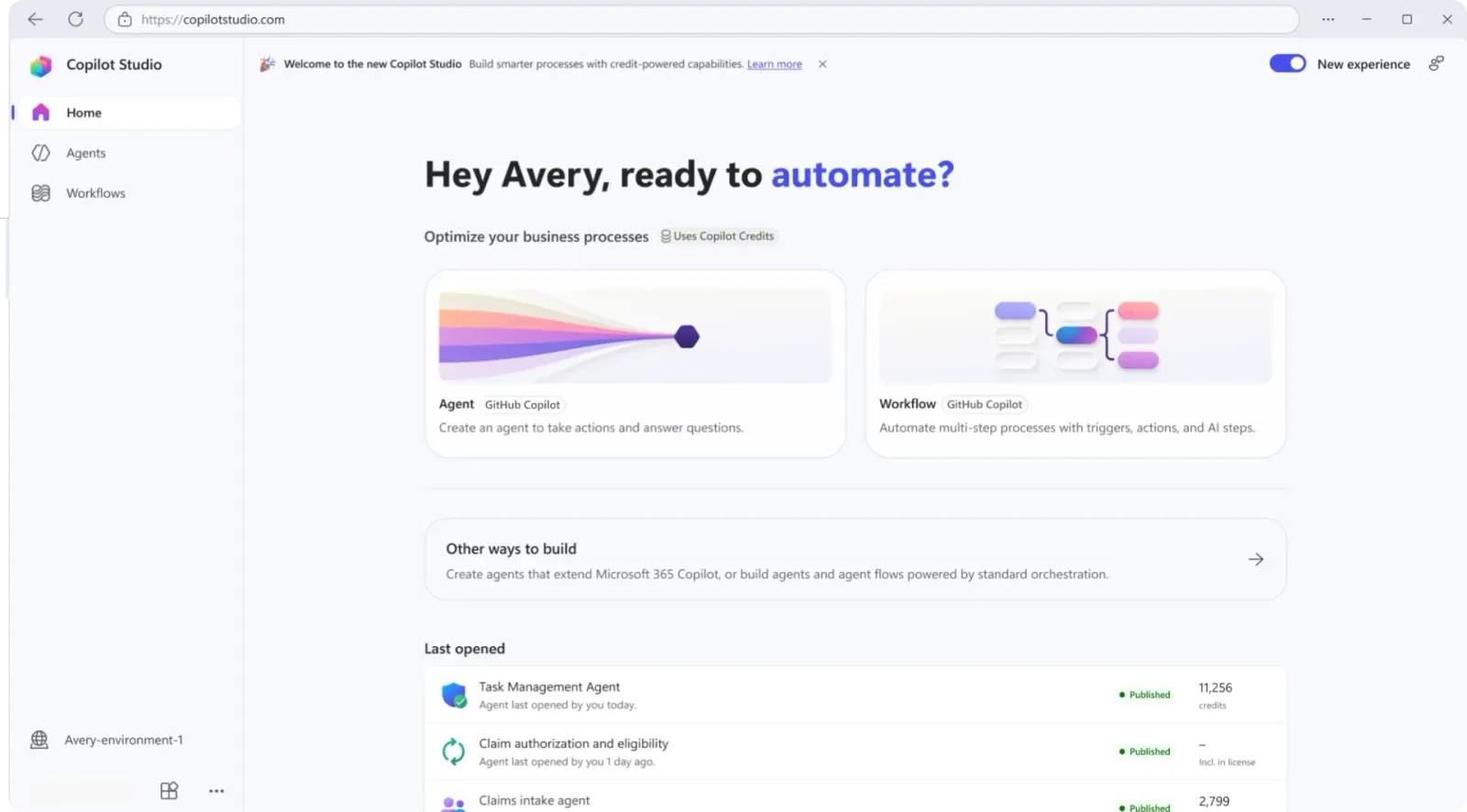
This harness also natively supports skills and memory, as well as creating and directly editing Word, Excel, PowerPoint, and PDF files. Each task runs in a secure, isolated sandbox governed by Copilot Studio.
This type of orchestration is particularly suited for processes combining reasoning and action across multiple steps—for example, an accounts payable agent capable of reading an invoice, reconciling it with a purchase order, requesting missing information, then routing exceptions to an approver. To choose between the two foundations, consult the white paper on choosing between GitHub Copilot and standard harnesses.
| Criterion | Standard Harness | GitHub Copilot Harness |
|---|---|---|
| Status | Available | General Availability (GA) |
| Scenario Type | Structured and predictable processes | Multi-step reasoning, complex processes |
| Execution Mode | Predefined path | Recursive and adaptive planning |
| Skills and Memory | Not native | Natively supported |
| Office/PDF File Creation | Limited | Native (Word, Excel, PowerPoint, PDF) |
| Execution Isolation | Standard | Dedicated secure sandbox per task |
Extending agent capabilities with skills, tools, and connected agents
Agents powered by the GitHub Copilot Harness benefit from new building blocks to go beyond simple conversational responders:
- Skills: package instructions into modular and reusable capabilities. You can write a skill or import an existing one, assign it to multiple agents, and share it with your team—useful for capitalizing on proven methods rather than recoding them for each agent.
- Connected agents (preview): a primary agent can now delegate requests to specialized agents, opening the way to modular architectures where a "gateway" agent directs to subject matter experts.
- Workflows and MCP servers as tools (general availability): an agent can invoke a workflow for multi-step deterministic automation, or an MCP server to connect to external services.
- Windows 365 for Agents MCP Server (general availability): agents can drive a Windows 365 Cloud PC to interact with desktop applications, browsers, and traditional user interfaces.
The stated goal is to help teams move from building isolated agents to reusable and extensible agent solutions. By relying on proven components and specialized capabilities, complex agents become easier to develop, maintain, and scale across the organization.
Preview vs General Availability
Connected agents, Work IQ, and memory are still in preview at the time of writing: their behavior, quotas, and regional coverage may change before general availability. Avoid deploying them to critical processes without prior validation in a test environment.
Richer context: Work IQ, memory, and files
With Work IQ in Copilot Studio (preview), agents powered by the GitHub Copilot Harness can connect to organizational context: emails, calendar events, files, Microsoft Teams messages, and colleague information. It is also possible to connect an agent to Foundry IQ to reuse a knowledge base already built and tuned in Microsoft Foundry.
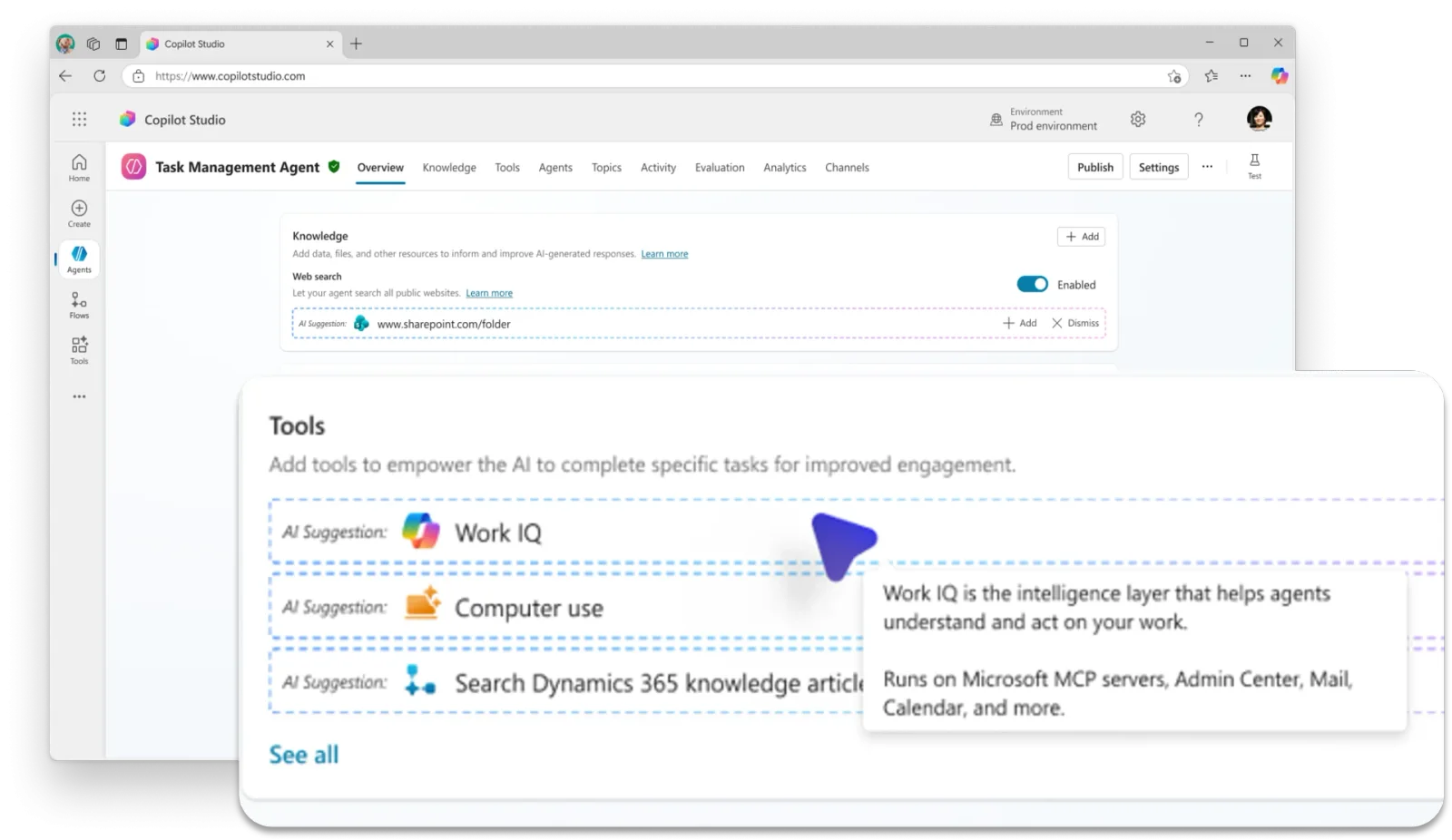
Memory (also in preview) adds another source of context: it allows an agent to retain relevant information from prior interactions with a given user. Once enabled, it captures preferences and habits to reapply them in future conversations—a step toward experiences that become more relevant over time.
Agents can also process larger document volumes. In preview, a user can now submit files for analysis directly to the agent, which leverages them to complete a larger task. Files produced by the agent during the conversation also remain available.
This accumulation of context sources reduces rekeying burden for the user and enables agents to handle more complex requests spread over time without losing track.
Governance and oversight: identity, MCP certification, and telemetry
On the administration side, three changes strengthen control over the agent lifecycle.
Since July 2026, Copilot Studio automatically creates a Microsoft Entra Agent ID for each new agent. Each agent now has its own identity in Microsoft Entra, enabling identity and access controls to be applied at the agent level itself—not just at the Power Platform environment level hosting it.
For agents using MCP servers, it is now possible to submit an MCP server for Microsoft certification. This certification informs customers and administrators that a server has been evaluated against Microsoft requirements for reliability, security, compliance, and responsible operation.
Finally, agent telemetry at the environment level (preview) allows administrators to export Copilot Studio telemetry to Application Insights via the Power Platform admin center. This enables validation of agent executions, monitoring tool execution, creating alerts, and building operational analytics dashboards.
Together, these changes position agents as governed enterprise assets, with clear identity, trusted connections, and sufficient operational visibility to run them with confidence at scale.
Impact on Existing Agent Identities
Automatic Entra Agent ID creation changes the identity model for Copilot Studio agents across the tenant. Before building conditional access policies or governance based on these identities, check with your Identity team how they appear in your Entra directory and how they align with your existing access reviews.
Real-time agents: expanding voice and digital reach
Real-time agents gain channel coverage and customization options.

Previously limited to voice experiences, these agents can now also be deployed on digital messaging channels (preview). A single agent configuration can therefore serve both voice and chat, for a consistent customer experience without duplicating agents per channel.
For voice, a new GPT-5 Chat model (preview) relies on a text-based architecture: speech is converted to text, the response is generated, then resynthesized to speech. This opens the door to advanced voice personalization via neural text-to-speech and greater deployment flexibility.
Finally, it is now possible to monitor real-time agents with Application Insights in Azure Monitor, for better visibility into performance and faster incident diagnosis. For more on large-scale deployment, consult the in-depth guide to managing real-time voice agents at scale.
Other updates for agent builders
Two adjustments complete the August 2026 release:
- Expanded model choice: Claude Sonnet 5 and GPT-5.5 Chat are now available in general availability as primary models, to align model capabilities with the intended scenario.
- Appropriate harness selection: with multiple harness options available, you can choose between multi-step experiences with heavy reasoning components and more structured, predictable agent scenarios, based on actual business need.
Implementation: audit the Entra Agent IDs of your Copilot Studio agents
With automatic Entra Agent ID creation for each agent since July 2026, a first governance reflex is to inventory these identities and verify their recent activity. The script below relies on the Microsoft Graph PowerShell module in read-only mode.
- Required modules:
Microsoft.Graph.Applications,Microsoft.Graph.Reports - Minimum permission:
Application.Read.All(reading service principals) andAuditLog.Read.All(reading sign-in logs), delegated - Output produced: a table and CSV export of identities created since a given date, with their last known sign-in activity
1# Module installation (run once per machine)2Install-Module Microsoft.Graph.Applications -Scope CurrentUser -Force3Install-Module Microsoft.Graph.Reports -Scope CurrentUser -Force4 5# Connection following least privilege principle: read-only6Connect-MgGraph -Scopes "Application.Read.All", "AuditLog.Read.All"7 8# Automatic Entra Agent ID creation cutover date (July 2026)9# Adjust this date according to your tenant's documentation or message center10$dateBascule = "2026-07-01T00:00:00Z"11 12# Retrieve service principals created since the cutover13# ConsistencyLevel eventual + CountVariable are required by Microsoft Graph14# for advanced filters on createdDateTime15$agents = Get-MgServicePrincipal -Filter "createdDateTime ge $dateBascule" `16 -ConsistencyLevel eventual -CountVariable count -All17 18# For each candidate identity, check recent sign-in history19# to distinguish active agents from orphaned identities20$rapport = foreach ($sp in $agents) {21 $signIns = Get-MgAuditLogSignIn -Filter "appId eq '$($sp.AppId)'" -Top 522 23 [PSCustomObject]@{24 AgentName = $sp.DisplayName25 AppId = $sp.AppId26 CreationDate = $sp.CreatedDateTime27 LastSignIn = ($signIns | Select-Object -First 1).CreatedDateTime28 SignInCount = $signIns.Count29 }30}31 32# Display sorted by creation date, newest first33$rapport | Sort-Object CreationDate -Descending | Format-Table -AutoSize34 35# CSV export for sharing with security/governance team36$rapport | Export-Csv -Path ".\audit-agents-entra-id.csv" -NoTypeInformation -Encoding UTF8Run this script in a test environment before scheduling it as a recurring task, and verify that the user account used has a minimal Microsoft Entra role (such as a Reader role) rather than Global Administrator.
Common pitfalls and troubleshooting
A few friction points commonly arise when adopting these new features:
- Harness selection error: an agent designed for a simple deterministic process will rarely benefit from switching to the GitHub Copilot Harness—latency and token consumption increase with recursive planning. Reserve it for truly multi-step scenarios.
- Preview features unavailable by region or tenant: Work IQ, memory, connected agents, and digital deployment of real-time agents are in preview; verify their availability in your region and license level before promising them to business teams.
createdDateTimefilter returns no results: ifGet-MgServicePrincipal -Filter "createdDateTime ge ..."returns nothing, verify that the-ConsistencyLevel eventualparameter is present—Microsoft Graph requires it for queries with advanced operators ($count,$search, filters on certain properties).- Uncertified MCP server rejected by a security policy: if your organization restricts usage to certified MCP servers, an agent using an uncertified server may be blocked by governance policies. Verify certification status before production deployment.
- Insufficient permissions for telemetry export: exporting to Application Insights from the Power Platform admin center requires administrative rights on the concerned environment, plus an Application Insights resource already provisioned on the Azure side.
Key takeaways
This August 2026 release shifts the needle from "what a Copilot Studio agent can technically do" to "what work an organization is ready to trust it with." The GitHub Copilot Harness, now generally available, brings multi-step reasoning; skills, connected agents, workflows, and MCP servers bring modularity; Work IQ, memory, and files bring context; and Entra Agent ID, MCP certification, and environment telemetry bring governance.

Concretely, starting next week:
- Identify a multi-step business process candidate to test the GitHub Copilot Harness in a non-production environment.
- Run the Entra Agent ID audit script to map agents already deployed in your tenant.
- Enable telemetry at the environment level on a pilot environment before rolling it out.
If your organization already runs multiple Copilot Studio agents in production, the immediate priority remains identity governance rather than adding new capabilities: consolidate visibility on what's already running before expanding functional scope. To track upcoming releases, the What's New in Microsoft Copilot Studio page lists already-published features and those planned for the coming months.