Introduction
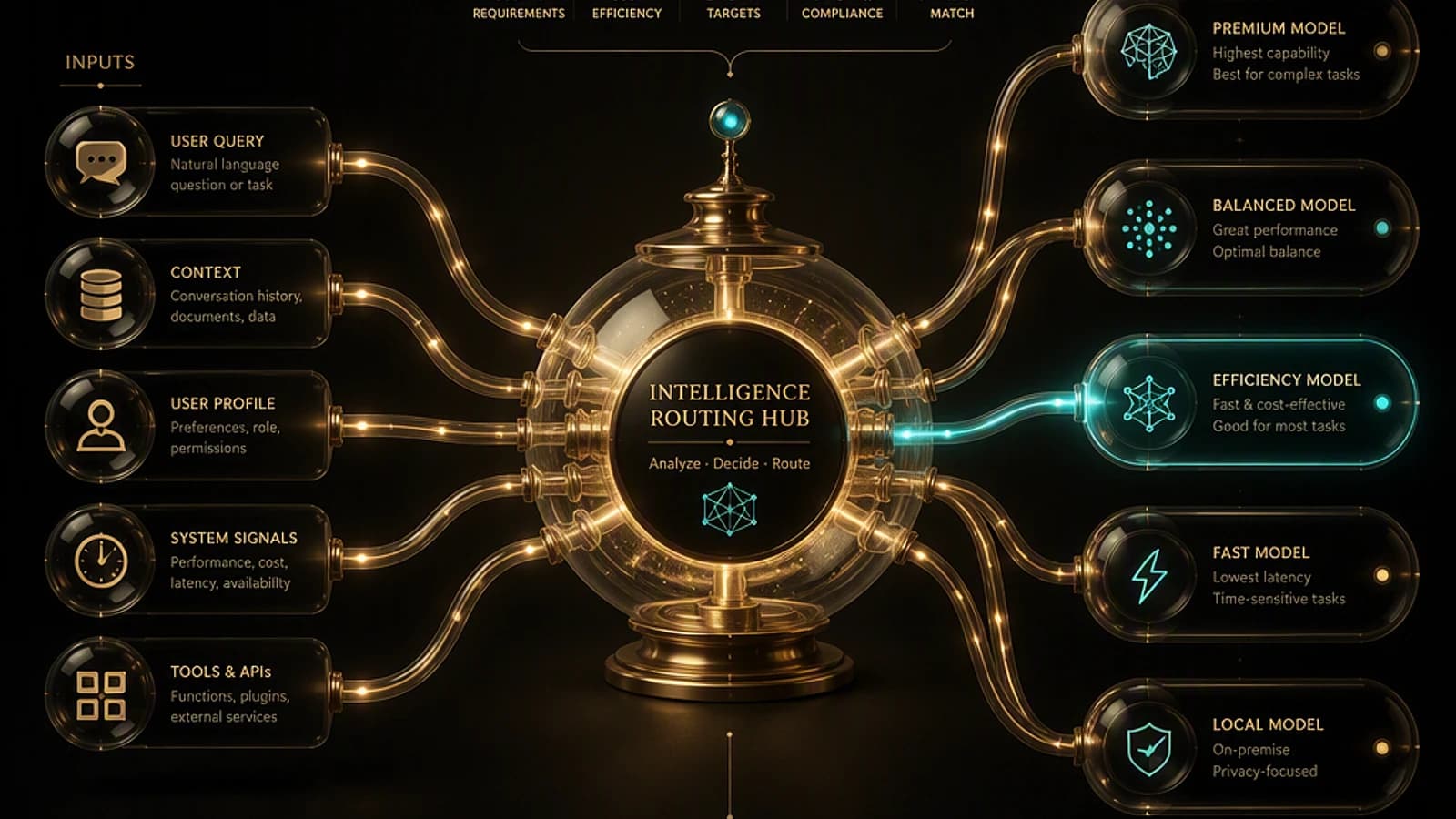
July 2026 confirms a fundamental trend: the landscape of generative AI models is becoming quasi-permanent, with releases occurring almost monthly. For Microsoft 365 and Azure administrators, the challenge is no longer to follow every new development but to know how and where to intelligently route requests to the right model, based on complexity, expected latency, and cost. This update covers new models available on Microsoft platforms, developments in Microsoft Foundry, Copilot Studio, Microsoft 365 Copilot, and GitHub Copilot.
Good to know
Model selection should no longer be limited to the most powerful available. Most business scenarios require a moderate level of reasoning: think multi-model routing rather than single selection.
New Models Available on Microsoft Platforms
GPT-5.6 from OpenAI arrives on most Microsoft platforms, available in three levels:
- Sol: advanced reasoning, complex problem-solving.
- Terra: balance between intelligence, speed, and cost.
- Luna: real-time interactions, high-volume experiences.
These three variants are available in Microsoft 365 Copilot Chat, Cowork, as well as Copilot for Word, Excel, and PowerPoint, with automatic selection of the most suitable model. On the GitHub Copilot side, access is conditional based on plan: Sol requires Copilot Pro Plus or higher, while Terra and Luna are accessible from Copilot Pro. GPT-5.6 is also exposed in Microsoft Foundry, with the security, governance, and evaluation components specific to the platform.
Foundry also welcomes GPT transcribe and GPT live transcribe, two high-precision automatic speech recognition (ASR) models:
- GPT transcribe processes complete audio files (meeting recordings, voicemail, media).
- GPT live transcribe works in low-latency streaming mode, for typical use cases like voice assistants or live captioning.
Both handle background noise, whispers, low-volume speech, language changes, and alphanumeric sequences better.
Microsoft AI publishes two new proprietary models:
- MAI Image 2.5 Pro: maximum visual fidelity, better creative control, strong object consistency across generated images.
- MAI Voice 2 Flash: designed for very low-latency voice applications, available in 15 languages, tailored for call centers and voice assistants.
The Anthropic side evolves with Claude Opus 5, which succeeds Opus 4.8 with a significant capacity jump, for approximately half the cost of Fable 5 (last month's premium model). Opus 5 targets deep reasoning and long-running tasks, and is deployed in Foundry, Microsoft 365 Copilot (Chat, Cowork), Copilot Studio, GitHub Copilot, and Azure Databricks.
On the open-weight side, Kimi K3 from Moonshot arrives in Foundry via the Fireworks AI inference engine, with 2.8 billion parameters and a context window of 1 million tokens, in data zone deployment type.
Finally, GitHub Copilot adds Grok 4.5 (fast agentic coding, multi-step workflows, context window up to 500,000 tokens, text and image inputs, configurable reasoning effort low/medium/high) and Gemini 3.6 Flash (web development and code, long tasks, parallel tool usage). Both are reserved for Pro and higher plans.
| Model | Primary usage | Key availability |
|---|---|---|
| GPT-5.6 Sol | Advanced reasoning | Copilot Pro Plus and Foundry |
| Claude Opus 5 | Deep reasoning, long tasks | Foundry, M365 Copilot, GitHub Copilot, Azure Databricks |
| Kimi K3 | Extended context (1M tokens) | Foundry via Fireworks AI |
| Grok 4.5 | Complex agentic coding | GitHub Copilot Pro and higher |
| MAI Voice 2 Flash | Real-time voice, 15 languages | Native Microsoft AI |
Microsoft Foundry: Governance, ROI, and New Portal
The Microsoft Foundry platform receives several structural improvements for teams responsible for agent production.
Measuring Agent Return on Investment
In private preview, tracking ROI for agents addresses a recurring question: does the agent deliver business value proportionate to its cost? The mechanism relies on App Insights trace data, passed through a business value evaluator (customer satisfaction, task completion rate, or custom evaluators). Each interaction that satisfies this evaluator is mapped to a business value defined by the organization, then viewable in dashboards.
Data Residency and New Portal
The APAC data zone moves to general availability (GA), joining the US and Europe zones already in place. This allows deploying models beyond a single region while respecting a regional residency constraint, complementing the global options already available.
The new Foundry portal, project-oriented, also reaches GA. It covers the complete lifecycle: discovery, building, operation, with full management of model deployments, evaluations, fine-tuning, guardrails, memory, tooling, and experimentation sandboxes.
Enhanced Sensitive Data Traceability
The sensitive trace content handling feature (preview) isolates data generated by AI — prompts, responses, system prompt, tool calls — in a dedicated table in the Log Analytics Workspace, used by App Insights. This table applies distinct role-based access control (RBAC), with access denied by default.
Caution
If your organization already uses App Insights for agent monitoring, verify RBAC role assignment on this new dedicated table: without explicit configuration, no one has access to it, including teams that previously managed standard traces.
Copilot Studio: Foundry IQ and GitHub Copilot Harness
Foundry IQ enters preview in Copilot Studio. The principle: build a curated institutional knowledge base from one or more sources (storage accounts, SharePoint sites, etc.). Upon receiving a request, the engine determines which sources to query and formulates a specific request per source, rather than sending the raw question to all sources. This capability complements the existing Work IQ (how you work) and Fabric IQ (your activity state).
Another notable development: the GitHub Copilot harness becomes available as an option in Copilot Studio. Reminder: a harness defines how an agent interacts with skills, tools, knowledge, and guardrails — it notably enables long agentic loops. This harness provides access to GitHub Copilot's coding capabilities, with models like Opus 5, GPT-5.6 Sol, or Fable 5.
Copilot Studio now offers three harness choices:
| Harness | Use cases | Billing |
|---|---|---|
| Copilot Chat | Customization of Copilot Chat experience | Standard |
| Standard | Rule-based conversational agents (majority of cases) | Standard |
| GitHub Copilot | Autonomous and complex business processes | Consumption-based billing |
The design flow combines an intuitive agent designer and visual workflow designer, with pre-evaluation integration.
Microsoft 365 Copilot: Increased Productivity
In Copilot Chat, it becomes possible to directly mention Word, Excel, and PowerPoint agents via @Word, @Excel, or @PowerPoint, to create a document, spreadsheet, or presentation without leaving the conversation.
Copilot in Word gains support for track changes, which facilitates collaborative review, as well as assisted writing capabilities: table of contents generation, header and footer modification. Excel and PowerPoint can now leverage brand kits from the M365 Brand Center, for results aligned with your organization's visual identity.
On the Teams side, meeting recaps move to GA and are accessible via direct search in the app bar. The Microsoft 365 Copilot application on mobile (iOS and Android) gains support for push notifications, directing the user directly to the relevant item.
Another notable advancement: event-triggered tasks. Previously, a Copilot task was scheduled on a time basis. It is now possible to trigger it on an event: receipt of an email, Teams message from a specific person, or mention in a Teams channel.
Finally, Cowork moves to GA with its support for enriched skills: import of a skill.md file, or guided creation of a new skill to enrich the work environment.
Tip
If your organization already uses scheduled Copilot tasks, test event triggers on a simple scenario (Teams mention) before generalizing: behavior differs from standard Power Automate automations.
GitHub Copilot: Skill Capture and Web Navigation
The skill-recorder repository (github.com/microsoft/skill-recorder) introduces a skill recorder for GitHub Copilot. It captures the screen and activity during task execution (clicks, window changes, application interactions), with the ability for voice narration via a dedicated audio control bar. The tool then relies on the GitHub Copilot CLI to analyze intent and step sequence, then generates, after validation, a skill.md file or programmable automation, reusable in different agent ecosystems.
Copilot Vision moves to GA: images and PDFs can be attached directly to chat prompts, for reasoning combining visual context and code. The browser tools for Copilot in VS Code also reach GA: an agent can control a real browser, navigate a live web application, click, input, inspect, capture errors, and take screenshots.
API Management: A Tier Dedicated to AI
Azure API Management introduces an AI Gateway tier, specific to AI scenarios: models, MCP servers (Model Context Protocol), tools. It allows transforming a set of REST operations into an MCP server, or aggregating multiple MCP servers to expose them as a single entry point. This tier is not limited to models hosted in Microsoft Foundry: it works with models hosted on AWS, Google, OpenAI, or Anthropic, and reports complete token usage metrics via OpenTelemetry.
Key Takeaways
- GPT-5.6 (Sol, Terra, Luna) deploys across M365 Copilot, GitHub Copilot, and Foundry, with differentiated license thresholds by level.
- Claude Opus 5 offers improved performance/cost ratio compared to Fable 5, for deep reasoning.
- The APAC data zone and new Foundry portal move to GA, while agent ROI remains in private preview.
- Copilot Studio gains a GitHub Copilot harness with consumption-based billing, in addition to Chat and Standard harnesses.
- Microsoft 365 Copilot simplifies content creation via direct mention of Office agents and introduces event-triggered tasks.
- The new API Management AI Gateway tier centralizes governance of MCP servers, multi-cloud included.
To deepen understanding of the multiple model governance discussed in the introduction, the official documentation for Microsoft Foundry and Copilot Studio provides a reference base to consult before any production deployment.