
Copilot Cowork: The Copilot feature that finally changes the game
After two years of mixed promises, Microsoft Copilot reaches a decisive turning point with Copilot Cowork. This is the conclusion reached after thirty days of daily use, including time in Microsoft's early access program. The feature no longer simply answers questions: it plans, executes, and delivers concrete results by leveraging the entire Microsoft 365 ecosystem.
But this technological advance comes with a significant obstacle: a consumption-based pricing model based on Copilot Credits, whose unpredictability could slow mass adoption, particularly among small and medium-sized businesses.
Context
Copilot Cowork is available for organizations with a Microsoft 365 Copilot license. It relies on a credit system consumed with each workflow execution, independent of the monthly subscription.
Why Copilot Cowork stands out from typical AI assistants
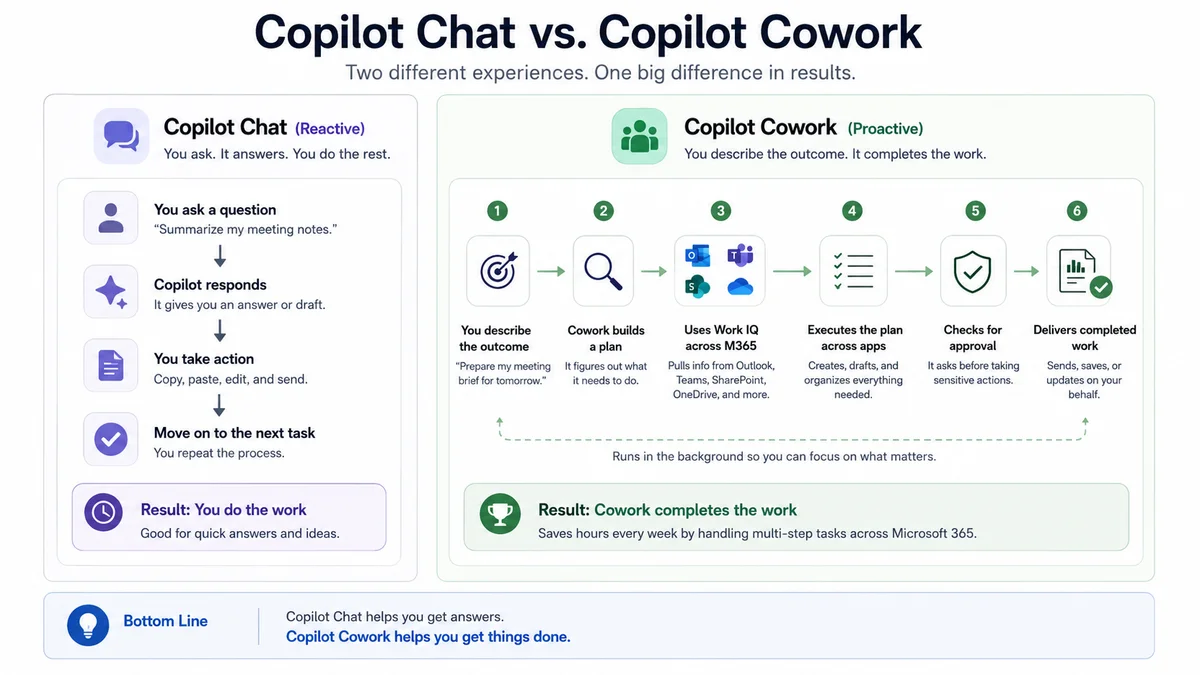
Most AI assistants — ChatGPT, Claude, or even earlier versions of Copilot — operate using the same pattern: the user asks a question, the tool generates an answer, then the ball is back in the human's court. This "augmented search engine" model creates permanent friction between intention and execution.
Copilot Cowork breaks from this logic. Rather than answering a request, it orchestrates a complete process oriented toward a result. The user describes an objective, and Cowork handles planning, information gathering, and execution across multiple Microsoft 365 applications simultaneously.
"Copilot Chat helps you think. Copilot Cowork helps you finish your work."
This semantic distinction reflects a real functional break. It is no longer a passive assistant, but an active agent capable of acting on your digital environment.
How Copilot Cowork works: the execution cycle
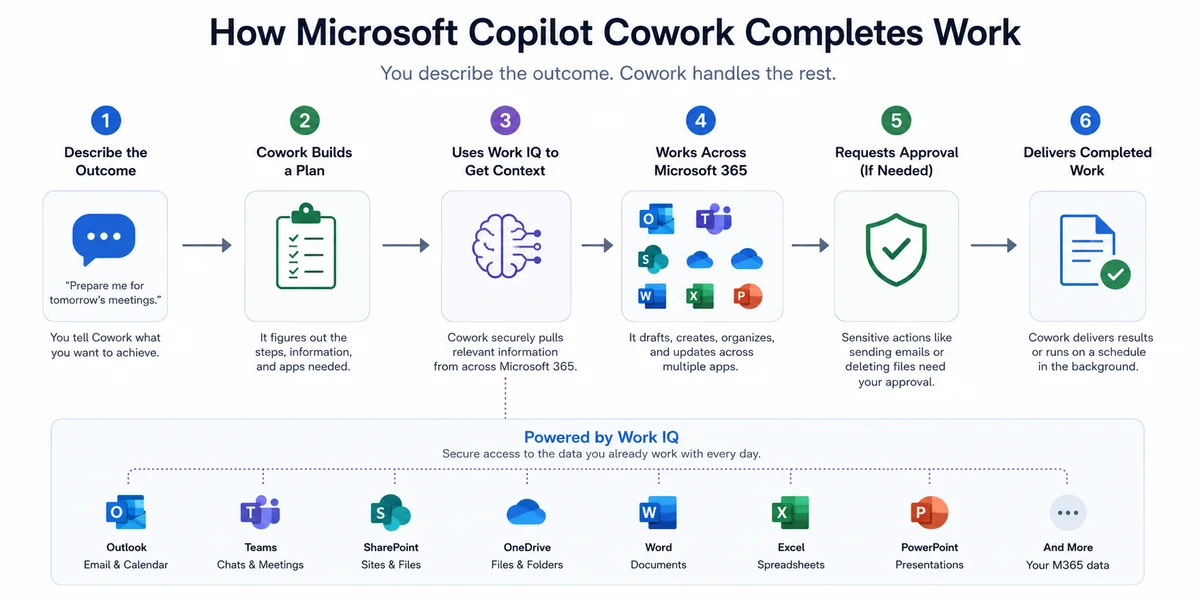
Each request made to Copilot Cowork follows a structured five-step process:
Describe the objective
The user states an expected result, not a question. Concrete examples:
- "Prepare me for my meetings tomorrow"
- "Organize my inbox"
- "Create competitor cards from today's sales calls"
Automatic planning
Rather than immediately generating text, Cowork evaluates what information is needed and which Microsoft 365 applications must be accessed. This reasoning step is what differentiates Cowork from a simple content generator.
Context gathering via Work IQ
Cowork draws from the user's Microsoft 365 environment thanks to Work IQ, the solution's contextual engine. Consulted sources can include:
- Outlook emails and calendars
- Microsoft Teams conversations and transcriptions
- SharePoint files and OneDrive
- Word documents, Excel sheets, PowerPoint presentations
Task execution
Cowork does not produce text to copy and paste. It accomplishes actions directly, including:
- Draft and save emails
- Create Word documents or PowerPoint presentations
- Schedule meetings in the calendar
- Organize and classify files
- Execute scheduled tasks in the background
Human validation for sensitive actions
High-impact actions — sending emails, deleting files — require explicit approval before execution. This control mechanism keeps humans in the decision loop while automating low-risk tasks.
Work IQ: the contextual engine that makes Cowork truly useful
One of the historical criticisms of Copilot was the lack of business context. Without access to real organizational data, responses remained generic and poorly actionable.
Work IQ solves this problem by providing Cowork with a deep understanding of the user's work environment. Concretely, Cowork knows who you work with, what projects are underway, which files are relevant, and can cross-reference this information to produce directly usable deliverables.
This is precisely why, after a month of use, reliance on third-party tools like Claude or ChatGPT has decreased significantly: there is no longer a need to upload documents or re-explain context at each session.
Practical tip
To get the most out of Work IQ, ensure your Teams meetings are recorded and transcriptions are enabled. Cowork leverages this data to produce reports and follow-ups without additional manual intervention.
Four high-impact Copilot Cowork workflows for productivity
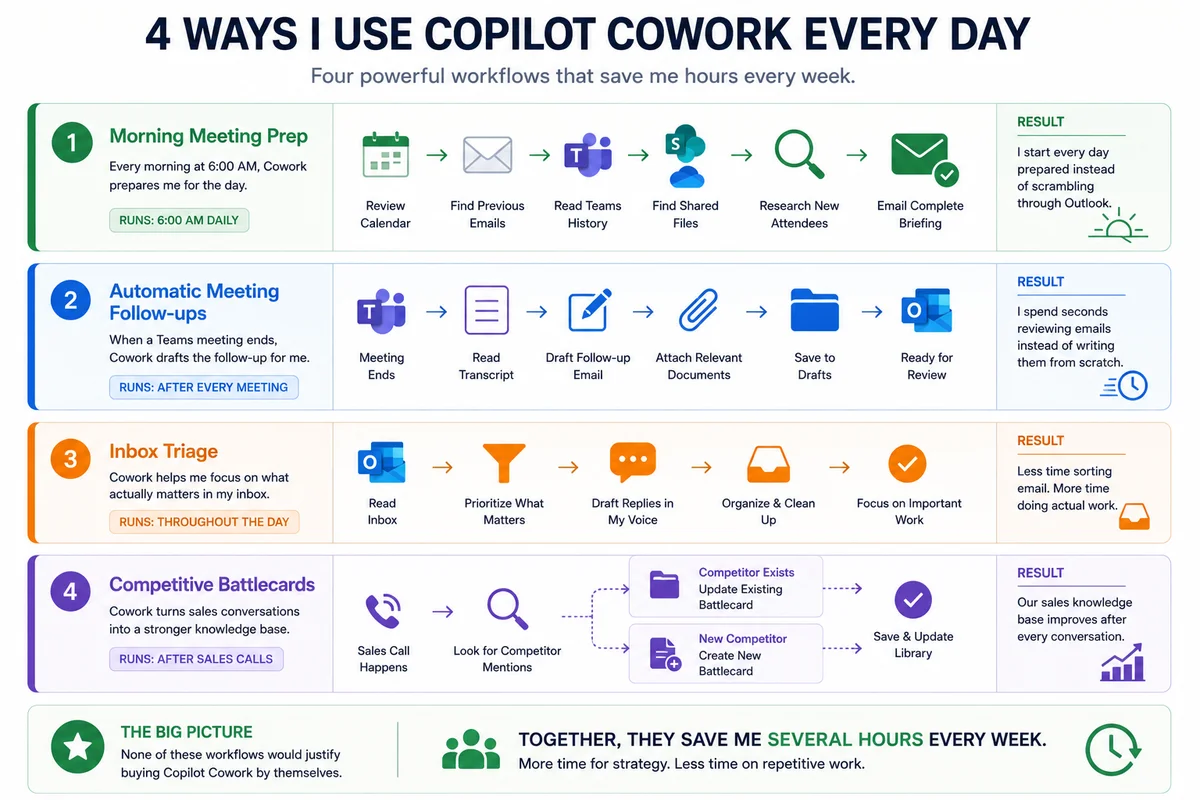
After thirty days of intensive use, here are the four automations that generated the most significant time savings.
1. Automated morning briefing
Every morning at 6:00 AM, Cowork analyzes the day's calendar, recent emails, Teams meeting transcriptions, shared files, and profiles of new contacts. It then generates a complete briefing sent via email before the workday begins.
Impact: Arrive prepared for every meeting without spending twenty minutes digging through Outlook.
2. Automatic post-meeting follow-up
As soon as a Teams meeting ends, Cowork reads the transcript, identifies action items, drafts a follow-up email in the user's writing style, attaches documents typically shared after such meetings, and saves everything to drafts for review.
Impact: A few seconds of validation replaces twenty minutes of writing.
3. Intelligent inbox triage
Rather than processing emails in order of arrival, Cowork identifies those requiring immediate attention, prepares response drafts respecting usual communication tone, and suggests prioritization based on business context.
Impact: Less time sorting, more time on high-value tasks.
4. Real-time competitor cards
A custom skill monitors sales call transcriptions to detect competitor mentions. If a card already exists in the library, Cowork updates it. Otherwise, it automatically creates a new one.
Impact: The commercial knowledge base enriches itself after each customer conversation, without manual effort.
Supplementary resource
Microsoft provides official documentation on creating custom skills for Copilot Cowork in the Microsoft Learn portal. These Markdown configuration files allow defining custom workflows tailored to specific business needs.
Copilot Cowork pricing: the main barrier to adoption
This is where enthusiasm meets economic reality.
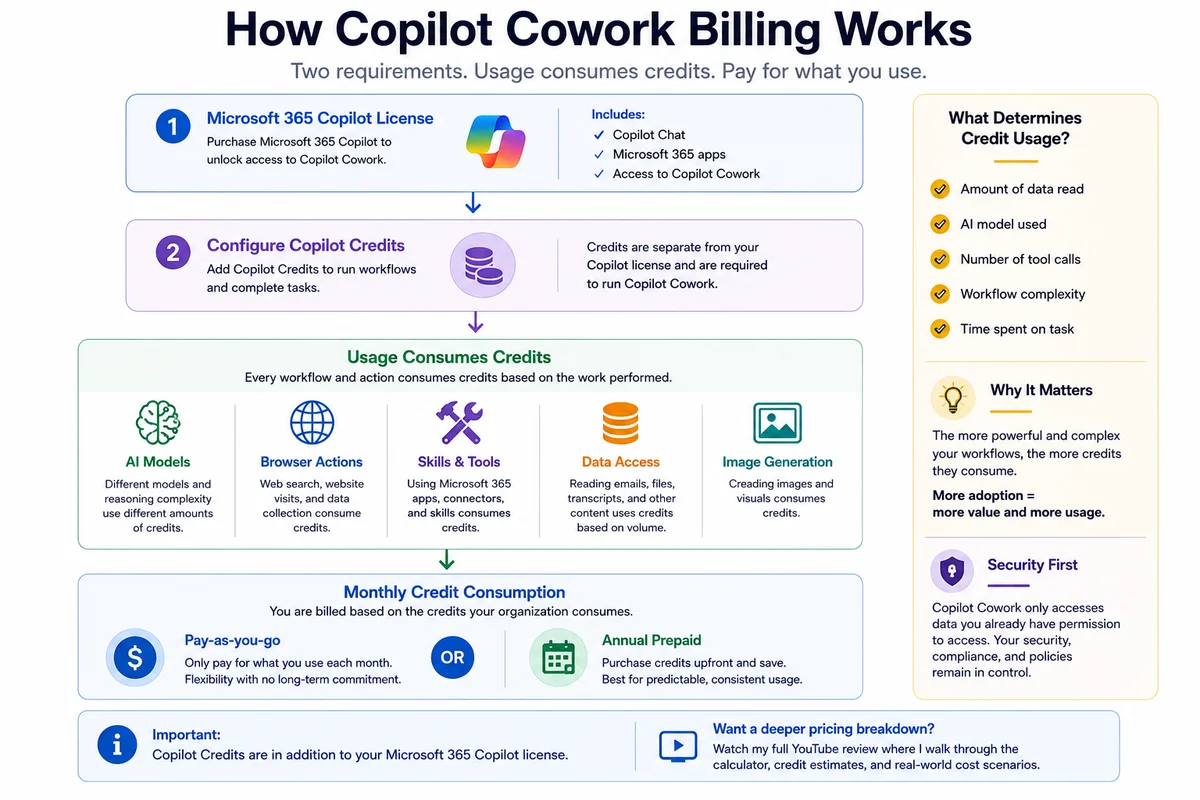
Unlike standard Microsoft 365 Copilot licenses, Copilot Cowork relies on a hybrid billing model: the monthly license grants access to the feature, but each executed workflow consumes Copilot Credits billed separately.
| Component | Nature | Financial impact |
|---|---|---|
| Microsoft 365 Copilot license | Fixed monthly subscription | Predictable |
| Copilot Credits | Variable consumption per workflow | Unpredictable |
| Simple task | Low credit consumption | ~0.01 $ per credit |
| Complex multi-source workflow | High credit consumption | Variable by complexity |
What determines credit consumption
A workflow's cost depends on several cumulative factors:
- Data volume processed: number of emails, transcriptions, and files analyzed
- AI model used: more powerful models consume more credits
- Number of M365 applications queried: each API call represents a cost unit
- Reasoning complexity: tasks requiring multiple inference steps are more expensive
- Browser actions and image generation: these advanced features have additional costs
The unit price of a credit is 0.01 dollars. But a simple task may consume only a handful, while a complete workflow — reading emails, analyzing transcriptions, consulting SharePoint, web search — may require several hundred.
Financial risk for SMBs
The paradox of the Cowork model is that the more successful the adoption, the higher the bill. For MSPs managing dozens of clients, this model introduces budget unpredictability that complicates defining fixed-price offerings.
Example PowerShell configuration for credit tracking
To monitor Copilot credit consumption at the tenant level, administrators can use Microsoft Graph APIs combined with PowerShell. Here's a basic example to retrieve usage data:
1# Connect to Microsoft Graph2Connect-MgGraph -Scopes "Reports.Read.All"3 4# Retrieve Copilot usage report (last 30 days)5$report = Invoke-MgGraphRequest -Uri "https://graph.microsoft.com/v1.0/reports/getMicrosoft365CopilotUsageUserDetail(period='D30')" -OutputFilePath ".\copilot-usage-report.csv"6 7Write-Host "Report successfully exported: copilot-usage-report.csv"Official documentation
Consult the Microsoft Graph Reports API reference for the complete list of available endpoints for monitoring Copilot usage.
Should you adopt Copilot Cowork today?
The answer depends on the organization's profile:
| Profile | Recommendation | Suggested approach |
|---|---|---|
| Large enterprise with dedicated AI budget | Immediate adoption recommended | Broad deployment with monitoring |
| SMB with constrained budget | Limited pilot first | Restricted group, ROI measurement |
| Multi-client MSP | Caution on pricing | Test on 1-2 clients before rollout |
| Sales teams | Strong ROI potential | Prioritize battlecard and follow-up workflows |
For SMBs and MSPs, the recommended approach is as follows:
- Start with a pilot group of 5 to 10 users
- Define 2 or 3 priority workflows to automate
- Measure weekly time savings in hours
- Monitor credit consumption over 30 days
- Calculate ROI before any large-scale rollout
Critical point for MSPs
Before proposing Copilot Cowork to your clients, establish alert thresholds on credit consumption via the Microsoft 365 admin center. Intensive uncontrolled automation can generate monthly costs significantly exceeding initial estimates.
Final verdict: major innovation, economic model to refine
Microsoft has accomplished with Copilot Cowork what it failed to achieve with previous Copilot versions: creating an AI assistant that truly resembles a collaborator rather than a sophisticated search engine.
The strengths are undeniable:
- Native and deep integration into the Microsoft 365 ecosystem
- Multi-application execution capacity without friction
- Real business context thanks to Work IQ
- Scheduled automations that run in the background
- Human control maintained over sensitive actions
The main obstacle remains the pricing model:
- Hybrid licensing + credits billing difficult to budget
- Growing costs with adoption level
- Complexity in forecasting multi-user deployments
If Microsoft can simplify or standardize its credit model — or offer more transparent capping options — Copilot Cowork has the technical characteristics to become the most transformative productivity tool in the Microsoft 365 ecosystem.
As it stands, it is a remarkable technology coupled with pricing that still deserves refinement.
References and supplementary resources: