A Copilot Studio agent that receives its own email address, its own directory profile and its place in the org chart is no longer just a maker's object: it is an actor whose access, data and cost must be audited. Its governance is spread across four portals, each with its own roles and, since 2026, its own licensing requirements. This guide sets the audit order, the points to check at each step, and provides two read-only scripts to get started.
Who governs what: five outcomes, five owners, four portals
Microsoft reports that 29% of employees have already used unsanctioned AI agents for work, and that 32% of data security incidents at the organizations surveyed involve generative AI tools. The goal of the audit: let makers keep moving while retaining visibility into what exists, what it touches and who is accountable for it.
29 %
of employees have used unsanctioned AI agents
Microsoft
32 %
of data incidents at surveyed organizations involve generative AI
Microsoft
50 000
default directory objects in the Microsoft Entra tenant
Microsoft Learn
Governance breaks down into five outcomes to achieve. Each has an owner, but none stops where the next begins: a serious audit therefore follows the handoffs.
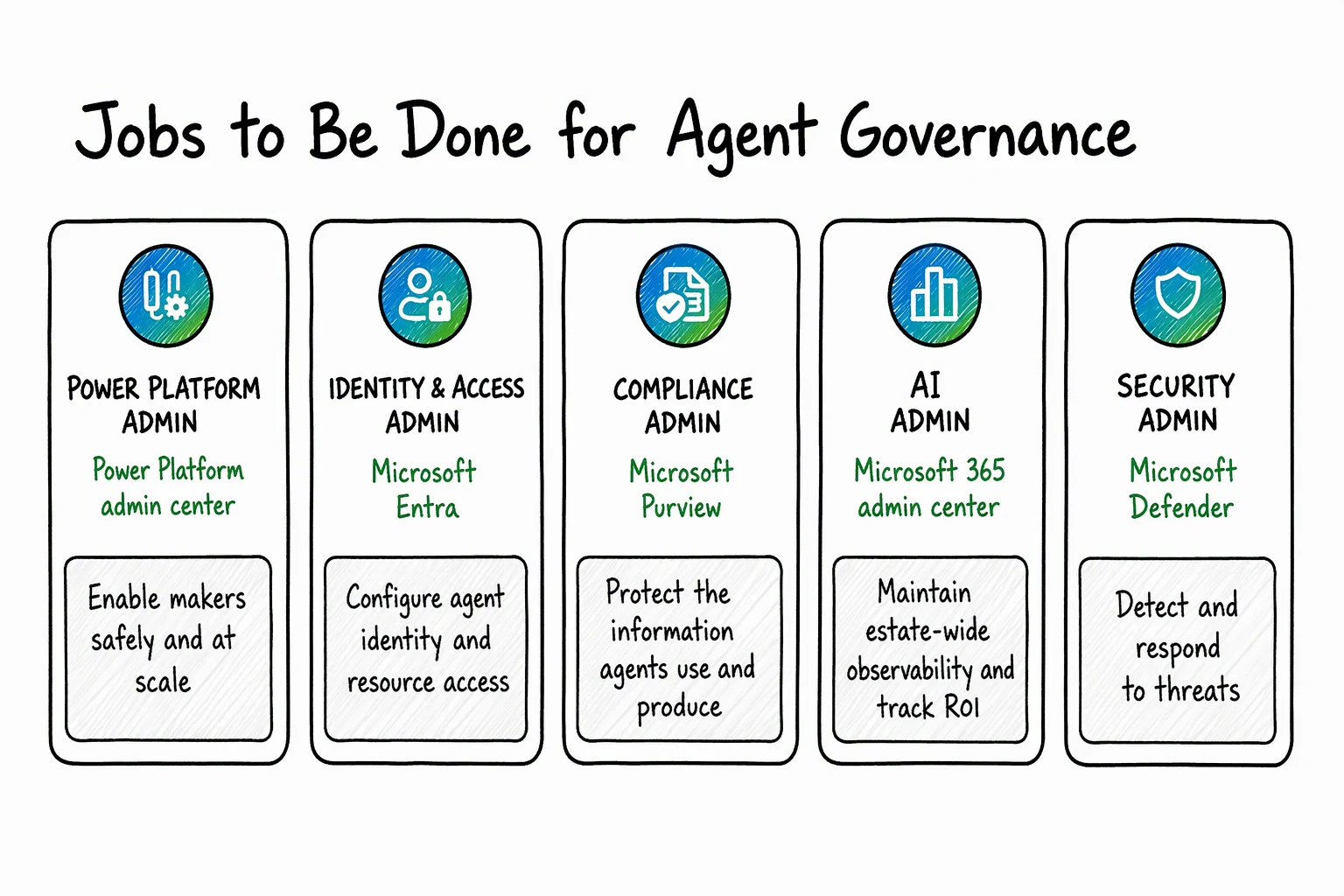
| Target outcome | Owner | Where to audit |
|---|---|---|
| Empower makers without sprawl | Power Platform admin | Power Platform admin center |
| Identify agents and bound their access | Identity and access admin | Microsoft Entra |
| Protect the data read and produced | Compliance and data security | Microsoft Purview |
| Observe the estate and prove value | AI admin | Agent 365 and Microsoft 365 admin center |
| Detect and respond to threats | Security admin and SOC | Microsoft Defender |
Three 2026 dates change how you audit:
May 1, 2026
Agent 365 generally available
According to the Microsoft licensing FAQ, Agent 365 is included in Microsoft 365 E7 or sold standalone, with one license per user.
July 1, 2026
Agent security tied to Agent 365
Discovery, threat detection and investigation of Copilot Studio and Foundry agents require an Agent 365 license.
July 2026
Automatic Entra Agent ID
Copilot Studio creates a Microsoft Entra Agent ID for every new agent, with no way to opt out at the environment level.
Audit 1: environments, connectors and sharing in Power Platform
The starting point is the Power Platform admin center, run by the Power Platform admin. The goal: a managed place to build, with consistent rules and clear criteria for moving from a personal prototype to team or production use. A single shared environment cannot be governed coherently; a per-idea approval slows adoption.
To check, in order:
- environment routing, which steers makers to personal developer environments rather than the default environment;
- environment groups and their rules, which apply the same settings to a whole set of environments;
- advanced connector policies, which allow only approved connectors and actions and block the rest by default;
- sharing controls, which limit how widely agents are distributed.
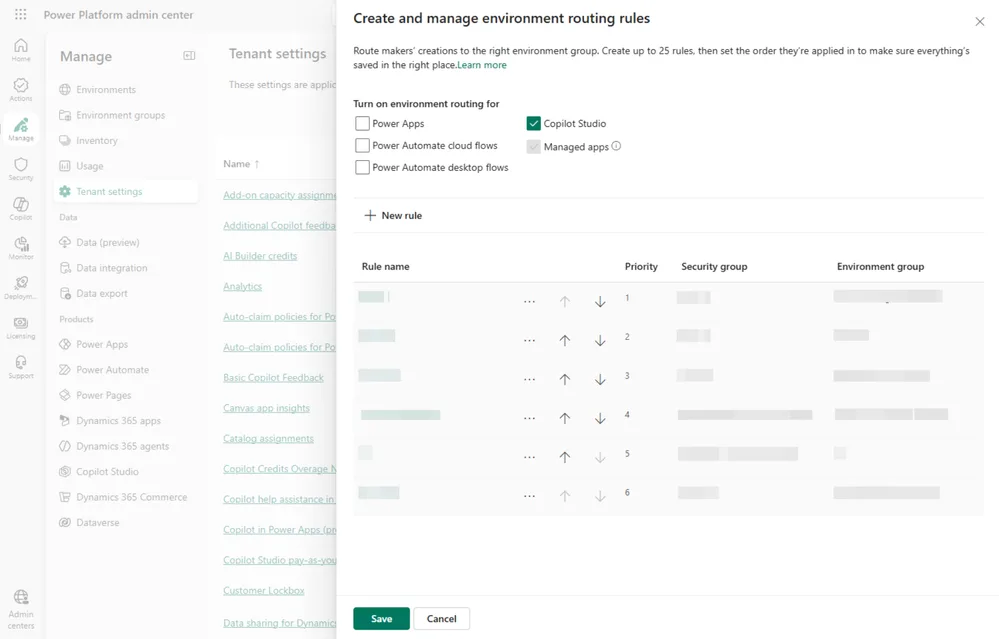
The underlying reasoning: an agent acts only through what its environment allows. A least-privilege allow list therefore bounds its reach even if its permissions grow, which also limits the risk tied to agent accounts. For connectors in particular, see also our analysis of Copilot Studio connector governance and risks.
The environment inventory can be done through the portal or by script:
In the Power Platform admin center, open the environment list and identify the default environment, developer environments, sandboxes and production. For each one, note the environment group it belongs to and the rules that apply.
Audit 2: agent identities in Microsoft Entra
As agents connect to systems and take action, you need to know which identity is used and what it reaches. Permissions suited to the first use case become excessive as the agent gains capabilities. This is the territory of the identity and access admin, in Microsoft Entra.
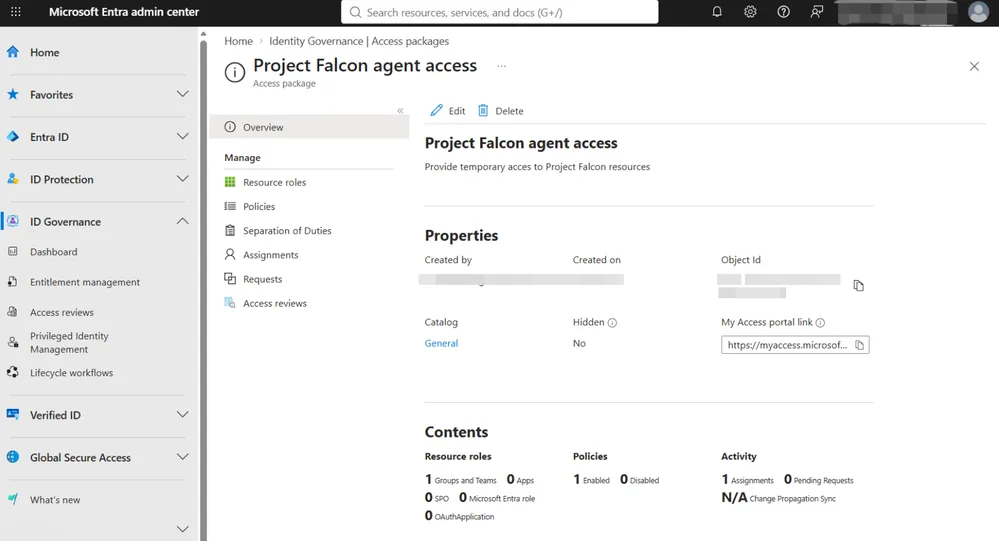
Three models need to be told apart, because they do not govern access the same way: the agent identity, the agent acting on behalf of a user, and the agent user account. Microsoft Entra Agent ID manages agent identities, and Conditional Access for agents applies conditions to the supported access patterns.
What the documentation says about Agent ID
According to the Microsoft Learn documentation on Copilot Studio agent identities:
- agents created before May 2026 remain on app registrations and will be migrated later, with no change to the GUID;
- scopes describe only access to Power Platform connectors; custom connectors, MCP servers and REST tools add no permission to the Agent ID;
- each Agent ID is a directory object that counts toward the tenant quota: 50,000 objects by default, 300,000 with a verified domain, with a 95% usage cap. When the quota is reached, agent creation fails.
Conditional Access: only Teams enforces the controls
Today, runtime enforcement of scopes and Conditional Access on the Agent ID applies only when the agent runs in Teams, the only channel that authenticates end to end with the Agent ID token. An agent published on another channel falls outside this guarantee: do not assume it in your audit.
Agent accounts: a preview to audit separately
Copilot Studio agent user accounts are still in preview (Frontier). Enabling them follows three steps described in the dedicated documentation:
Environment on the Early cycle
Check that the target environment is on the “Early” release cycle.
Frontier agent model
Enable the Copilot Studio agent model (Frontier) in the Microsoft 365 admin center.
Agent accounts
Enable “Agent accounts” in the Power Platform admin center.
During the preview, the alias prefix and the hierarchical relationship cannot be changed, and the email address is locked after publication. Record these values at creation: a poorly chosen alias cannot be fixed.
Audit 3: data read and produced, on the Microsoft Purview side
An agent can have legitimate access to information without every use or sharing of it being appropriate. Compliance and data security drive this area in Microsoft Purview: spot risks, apply protections, keep visibility into the use of sensitive data, then reassess when the agent's sources, audience or capabilities change.
Purview Data Security Posture Management (DSPM) helps identify AI-related risks. Classification, sensitivity labels, data loss prevention (DLP) and auditing complete the setup for the supported scenarios. Coverage varies by agent and interaction type: check which controls apply and include agent instances in the relevant policies.
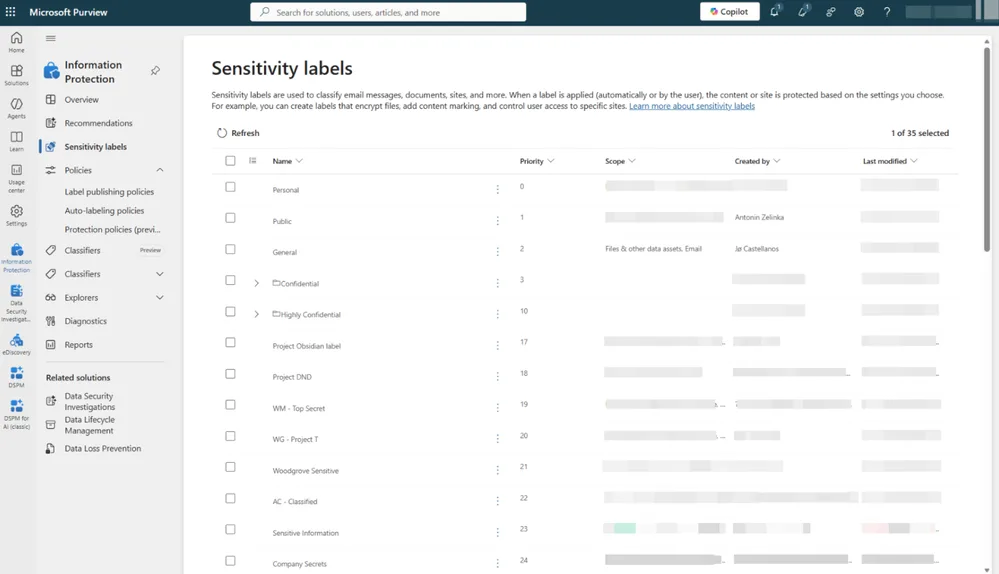
Copilot Studio data policies remain a complementary control over connections and capabilities; they do not replace information protection. The risk is highest for agents with an account: they have their own access and their own knowledge, hence a potential for oversharing and exfiltration that an agent simply delegating a user's rights does not have.
Audit 4: inventory, Agent 365 licenses and detection with Defender
The AI admin coordinates the overall view in Microsoft Agent 365. Copilot Studio agents appear in the agent registry of the Microsoft 365 admin center, alongside Microsoft and third-party agents. The Agent Map shows how each agent connects to users and tools; the details page provides owner, usage and security signals.
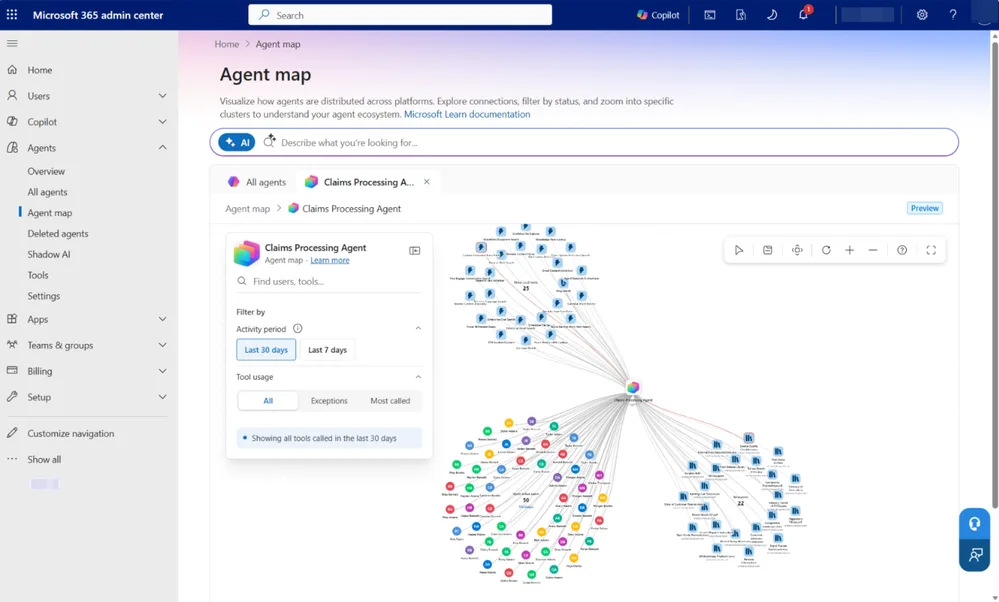
Tool governance controls which plugins, skills and connectors are available, and cost management tracks Copilot Credits consumption with spending policies and alerts. Each administrator then acts in their own portal, with their existing permissions.
Watch out: not everything is included everywhere
The details below come from the Agent 365 licensing FAQ and a Microsoft Q&A answer from an independent advisor, which points to Microsoft documentation. Confirm them with your reseller before budgeting. Agent 365 costs $15 per user per month on its own, or is included in Microsoft 365 E7 ($99 per user per month). The license is per user, not per agent: agents, blueprints and instances are not licensed separately. It is not included in E3, E5, or with the Copilot add-on.
| Capability | Microsoft 365 Enterprise plans | E7 or Agent 365 |
|---|---|---|
| Agent registry (inventory) | Included | Included |
| Basic governance | Included | Included |
| Agent Map | Not included | Included |
| Telemetry and policy templates | Not included | Included |
| Entra, Purview, Defender and Intune protections for agents | Not included | Included |
| Copilot Studio and Foundry agent security (since July 1, 2026) | Not included | Included |
Detection and response on the Defender side
An agent in production faces its own threats: jailbreak, prompt injection hidden in an email or web page, a compromised connected tool, an abnormal activity spike. SOC analysts see the alert, the AI admin knows the agent: they link the signal to the agent and its owner so the team knows what it is for and what it reaches. Defender provides agent security posture and real-time protection for supported and configured scenarios.
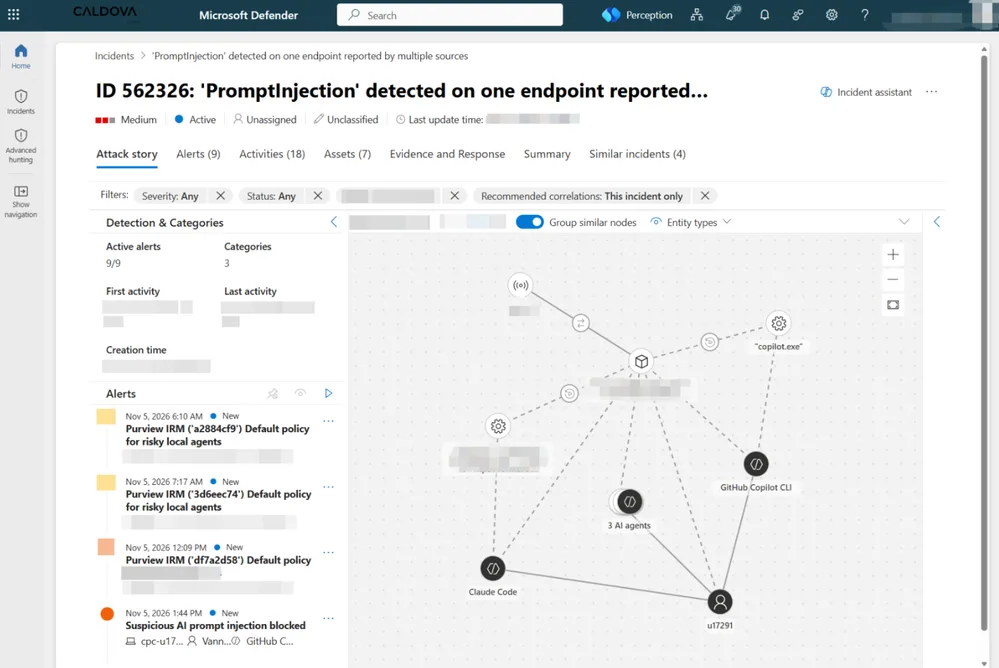
Since July 1, 2026: Agent 365 license required
According to Microsoft's transition page, discovery, posture, threat detection and Advanced Hunting investigation for Copilot Studio and Foundry agents are no longer covered by Defender for Cloud Apps or Defender for Cloud. Tenants without an eligible license lose these capabilities, and the “AI Agents” tab of Cloud Assets is removed from the Defender portal.
For the division of roles and the zone model, see our article on the three-zone model and our guide to protecting Copilot Studio with Defender.
Implementation: two read-only audit scripts
These scripts write nothing to the tenant. The first exports the Power Platform environment inventory; the second estimates the directory object quota that Agent IDs consume.
Script 1: environment inventory
- Module:
Install-Module -Name Microsoft.PowerApps.Administration.PowerShell -Scope CurrentUser - Minimum role: Power Platform administrator
- Output: a CSV file and a summary by environment type
1# Chemin de sortie du rapport CSV2param(3 [string]$OutputPath = ('./audit-environnements-{0}.csv' -f (Get-Date -Format 'yyyyMMdd'))4)5 6# Connexion interactive au service d'administration Power Platform7Add-PowerAppsAccount8 9# Récupération de tous les environnements du tenant10$environnements = Get-AdminPowerAppEnvironment11 12# Mise en forme d'une ligne par environnement13$rapport = foreach ($env in $environnements) {14 [pscustomobject]@{15 Nom = $env.DisplayName16 Identifiant = $env.EnvironmentName17 Type = $env.EnvironmentType18 ParDefaut = $env.IsDefault19 Region = $env.Location20 }21}22 23# Export et récapitulatif par type24$rapport | Export-Csv -Path $OutputPath -NoTypeInformation -Encoding UTF825$rapport | Group-Object -Property Type | Select-Object Name, Count | Format-Table -AutoSize26Write-Host ('Rapport écrit dans {0}' -f $OutputPath)Script 2: directory object quota
- Module:
Install-Module -Name Microsoft.Graph.Identity.DirectoryManagement -Scope CurrentUser - Minimum permission: delegated scope
Organization.Read.All - Output: the theoretical quota (50,000 or 300,000) and the threshold matching the 95% cap
1# Connexion à Microsoft Graph avec l'étendue minimale2Connect-MgGraph -Scopes 'Organization.Read.All' -NoWelcome3 4# Lecture des domaines vérifiés du tenant5$org = Get-MgOrganization6$domainesPersonnalises = $org.VerifiedDomains | Where-Object { -not $_.IsInitial }7 8# Quota selon la documentation : 50 000 par défaut, 300 000 avec un domaine vérifié9$quota = if ($domainesPersonnalises) { 300000 } else { 50000 }10$seuil = [math]::Floor($quota * 0.95)11 12[pscustomobject]@{13 Tenant = $org.DisplayName14 DomainesPersonnalises = @($domainesPersonnalises).Count15 QuotaObjets = $quota16 SeuilPlafond95Pourcent = $seuil17}Then compare this threshold with the number of directory objects you already track, counting upcoming agents. Verify the first script's result by re-reading the CSV:
1Import-Csv -Path ./audit-environnements-*.csv | Where-Object { $_.ParDefaut -eq 'True' }The command should return a single row, the default environment: a production agent living there is a first audit finding.
Troubleshooting
| Symptom | Likely cause | Resolution |
|---|---|---|
| Agent creation fails | Tenant directory object quota reached | Run script 2, clean up unused objects or verify the domain |
| The Agent accounts option is missing | Environment not on the Early cycle or Frontier model not enabled | Repeat the three activation steps |
| Conditional Access does not block an agent | Agent running outside Teams | Restrict publication to Teams or compensate with other controls |
| Agent Map or telemetry not found | E7 or Agent 365 license missing | Check license assignment |
| Cloud Assets AI Agents tab gone | Removed from the Defender portal | Use the capabilities tied to Agent 365 |
| An older agent has no Agent ID | Created before May 2026, still on app registration | Plan the migration, the GUID will not change |
Where to start: three decisions to make
First set one owner per outcome, then agree on the moments that require a cross-team decision: going to production, access to a new resource, widening the audience. For a first pass, start from the outcome you want, not from the portal you know.
First-pass audit checks
- Export the environment inventory and identify those hosting agents outside environment groups
- Check advanced connector policies and sharing controls
- List agents on app registration and those with an Agent ID
- Confirm which channels the agents subject to Conditional Access are published on
- Check that agent instances are covered by Purview policies
- Verify E7 or Agent 365 licenses against the expected capabilities
If your organization has neither Microsoft 365 E7 nor Agent 365, prioritize auditing environments, connectors and identities, which does not depend on this license, and budget separately for the security coverage required since July 1, 2026. To build on this, see our article on governance with Agent 365 and Entra Agent ID and the Copilot Studio agent lifecycle.
Further reading
- Agent identities and authentication for Copilot Studio: Agent ID provisioning, scopes, migration and quotas.
- Give your agent an account (Frontier): prerequisites, activation and preview limits.
- Transition Copilot Studio and Foundry agent security to Agent 365: what requires Agent 365 since July 1, 2026.
- Microsoft Agent 365 licensing FAQ: pricing, per-user license and included capabilities.
- What's new in Copilot Studio: tracking changes to Agent ID and agent accounts.