Introduction: the jungle of Exchange identifiers
If you manage Exchange Online on a daily basis, you've inevitably encountered this frustrating problem: each component of the Microsoft ecosystem uses its own identifier format to designate the same mailbox or folder. PowerShell, MAPI, EWS, Microsoft Graph and OWA all manipulate different IDs, often incompatible with each other and rarely properly documented.
With the scheduled deprecation of EWS (Exchange Web Services), this issue becomes critical. Many administration scripts and third-party tools relied on EWS to convert or consume these identifiers. Today, you must switch to Microsoft Graph and its translateExchangeIds method, but it doesn't cover all scenarios, notably the direct conversion of storeId obtained via PowerShell.
This article focuses on folder identifiers from an IT Pro administration perspective, where PowerShell remains the central tool. We'll detail the complete conversion chain and provide ready-to-use scripts.
Good to know
Although this article covers folders, the same conversion logic applies to individual items. The conversion mechanisms from storeId to entryId and from entryId to restId remain identical.
Understanding the identifier conversion chain
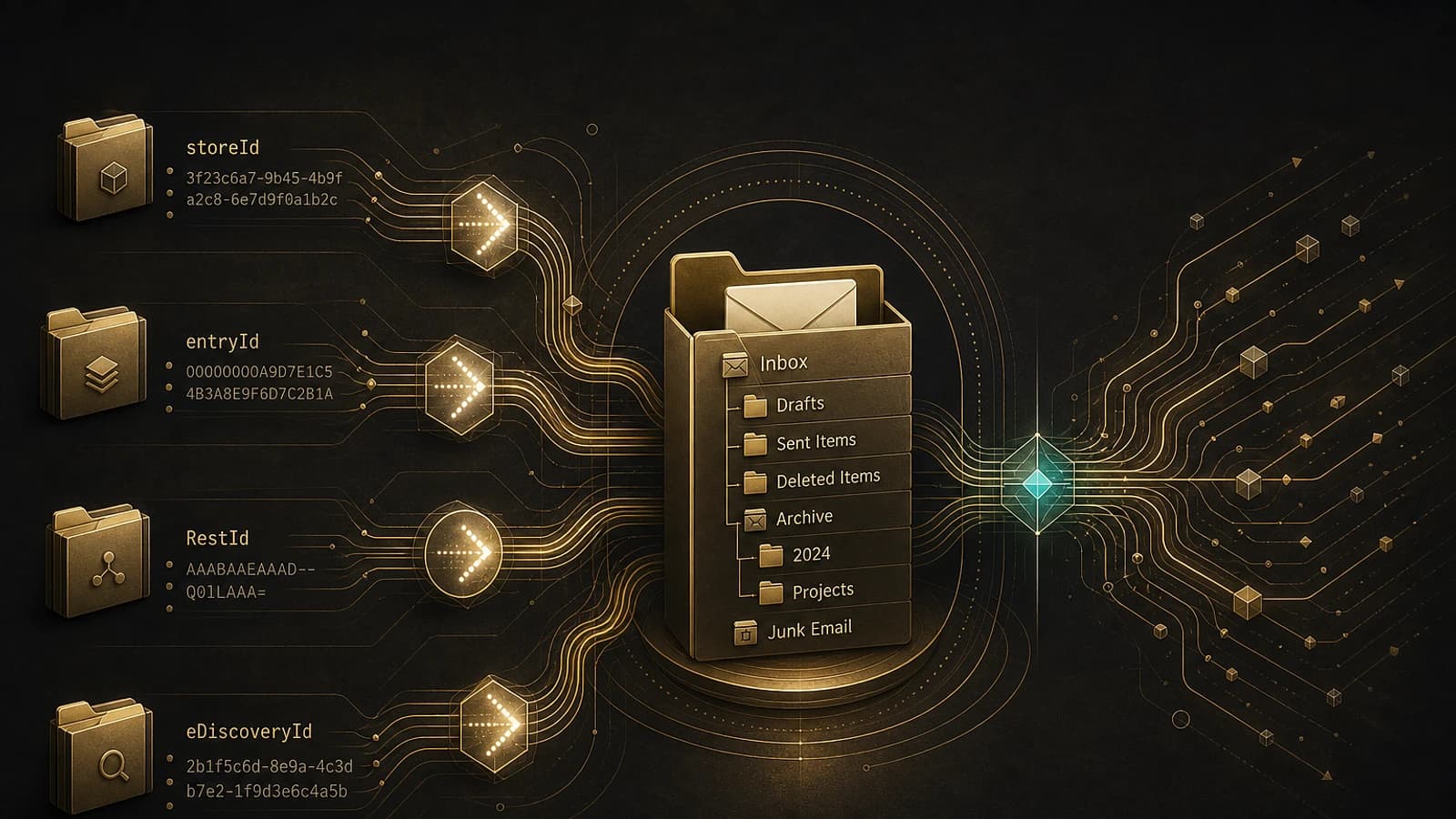
Before diving into the code, it's essential to visualize the journey of an identifier through the different layers of the Exchange ecosystem. Here's the typical sequence:
| Identifier | Source / Consumer | Main usage |
|---|---|---|
| storeId (FolderId) | Get-ExOMailboxFolderStatistics | Starting point in PowerShell |
| eDiscoveryId | Content Search / targeted collections | Targeted KeyQL search |
| entryId | MAPI clients | Intermediate step to Graph |
| RestId | Graph Outlook APIs | Operations via Graph SDK |
| OWAId | Outlook Web Access | Direct navigation in OWA |
The logical flow is therefore as follows: we start with the storeId provided by PowerShell, convert it to entryId (MAPI format), then the Graph translateExchangeIds method takes over to produce the RestId, which can itself be transformed into OWAId.
Caution
The immutableEntryId and restImmutableEntryId identifiers are not supported for folders by the translateExchangeIds method. Don't rely on them in your folder management scripts.
Retrieving a folder's storeId with PowerShell
The starting point of the entire chain is the FolderId property returned by the Get-ExOMailboxFolderStatistics cmdlet. Let's take the example of a folder named "Xbox" in a mailbox.
1Get-ExOMailboxFolderStatistics vasil | ? {$_.Name -eq "Xbox"} | select Name,FolderId2 3Name FolderId4---- --------5Xbox LgAAAAChKSJAhlnUTIHtKSso30ThAQBIPfDMxyP/RYhY8M8xmAPVAAS8XYoAAAABThis Base64-encoded value is our storeId. It's the raw material for all the conversions that follow. You can get the same result via Get-MailboxFolderStatistics or Get-MailboxFolder depending on your context.
Convert storeId for eDiscovery (targeted collections)
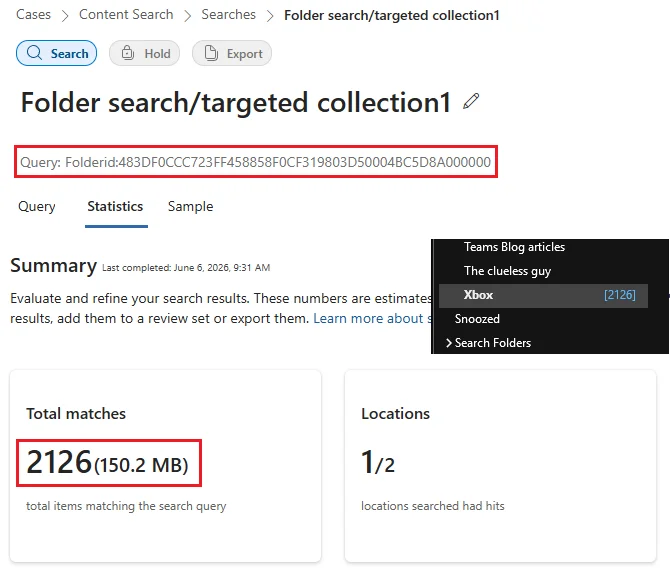
A very concrete use case for storeId concerns eDiscovery searches and Content Search via the targeted collections feature. This approach allows you to restrict a search to a specific folder using the folderId keyword in the KeyQL query language.
Unfortunately, Microsoft removed part of the official documentation on this subject. To scope a search on a single folder, you must first transform the storeId to the format expected by eDiscovery. Here's the conversion script:
1$folderId = [Convert]::FromBase64String($folderId)2 3$encoding = [System.Text.Encoding]::GetEncoding("us-ascii")4$nibbler = $encoding.GetBytes("0123456789ABCDEF")5 6$indexIdBytes = New-Object byte[] 48; $indexIdIdx = 07$folderId | select -skip 23 -first 24 | % { $indexIdBytes[$indexIdIdx++] = $nibbler[$_ -shr 4]; $indexIdBytes[$indexIdIdx++] = $nibbler[$_ -band 0x0F] }8 9return $encoding.GetString($indexIdBytes)Detail of the transformation
This script performs several low-level operations:
- Base64 decoding of the
storeIdto a byte array. - Extraction of 24 bytes starting from position 23 (the heart of the identifier).
- Hexadecimal conversion of each byte to two ASCII characters via the
-shr 4operation (high nibble) and-band 0x0Foperation (low nibble).
In our example, the transformation yields:
1#storeId2LgAAAAChKSJAhlnUTIHtKSso30ThAQBIPfDMxyP/RYhY8M8xmAPVAAS8XYoAAAAB3 4#eDiscovery folderId5483DF0CCC723FF458858F0CF319803D50004BC5D8A000000This folderId value can then be injected into a KeyQL query to scope the eDiscovery search to the Xbox folder only. The number of elements returned corresponds exactly to the folder content as displayed in Outlook.
Tip
The KeyQL folderId keyword also supports exclusions, which allows you to cover a set of folders while excluding certain subfolders. Useful for complex targeted collections in investigations.
Convert storeId to entryId (MAPI format)
To leverage the Graph SDK for PowerShell cmdlets or directly call Graph API methods, you need the RestId. However, the translateExchangeIds method doesn't know how to directly convert a PowerShell storeId. You must therefore go through an intermediate step: generating an entryId.
While default folders (Inbox, RecoverableItemsDeletions, etc.) can be addressed via their well-known names, user-created folders require a RestId.
The function below transforms a storeId to an entryId:
1function FolderIdToEntryId {2 3 param([Parameter(Mandatory=$true)]$folderId)4 5 # convert from base64 to bytes6 $folderIdBytes = [Convert]::FromBase64String($folderId)7 8 # convert byte array to string, remove '-' and ignore first byte9 $folderIdHexString = [System.BitConverter]::ToString($folderIdBytes).Replace('-','')10 $folderIdHexStringLength = $folderIdHexString.Length11 12 # get hex entry id string by removing first and last byte13 $entryIdHexString = $folderIdHexString.SubString(2,($folderIdHexStringLength-4))14 15 # convert to byte array - two chars represents one byte16 $entryIdBytes = [byte[]]::new($entryIdHexString.Length / 2)17 18 For($i=0; $i -lt $entryIdHexString.Length; $i+=2){19 $entryIdTwoChars = $entryIdHexString.Substring($i, 2)20 $entryIdBytes[$i/2] = [convert]::ToByte($entryIdTwoChars, 16)21 }22 23 # convert bytes to base64 string24 $entryIdBase64 = [Convert]::ToBase64String($entryIdBytes)25 26 # count how many '=' contains base64 entry id27 $equalCharCount = $entryIdBase64.Length - $entryIdBase64.Replace('=','').Length28 29 # trim '=', replace '/' with '-', replace '+' with '_' and add number of '=' at the end30 $entryId = $entryIdBase64.TrimEnd('=').Replace('/','_').Replace('+','-')+$equalCharCount31 32 return $entryId33}Key points of the function
- We remove the first and last byte from the hexadecimal representation of the
storeId, as they contain metadata not relevant for theentryId. - The result is re-encoded in URL-safe Base64:
/becomes-,+becomes_, and the number of padding=characters is added at the end.
This URL-safe normalization is essential because the Graph API doesn't accept standard Base64 characters in URL parameters.
Get the RestId via translateExchangeIds
Once the entryId is generated, the Graph translateExchangeIds method can produce the RestId (as well as other supported formats). This is the identifier that feeds the Outlook APIs of Graph, for example to list or manipulate folder contents.
One final transformation is then necessary to derive the OWAId from the RestId, if you want to open the folder directly in Outlook Web Access.
Good to know
The translateExchangeIds method accepts batches containing up to 1000 identifiers per call. Leverage this capacity to minimize the number of Graph requests and avoid throttling on large mailboxes.
Complete script: report of folder IDs from a mailbox
By combining all these conversions, it's possible to generate an exhaustive report of all folders in a mailbox accompanied by their different identifiers. The script requires the Exchange Online and Graph modules installed, and works with delegated permissions.
Prerequisites and permissions
- PowerShell Exchange Online Management module.
- Microsoft Graph PowerShell module.
- Graph permission
User.ReadBasic.Allto resolve mailboxes. Mail.ReadBasic.Sharedpermission for delegated scenarios with the "Open in Graph" button.- On the Exchange side, only the
Get-ExOMailboxFolderStatisticscmdlet is required.
Script execution
Target a mailbox via its SMTP address
The mandatory -Mailbox parameter accepts the primary SMTP address (provided it matches the UPN, a constraint imposed by Graph's design).
1.\Mailbox_Folder_IDs.ps1 -Mailbox user@domain.comTarget a mailbox via its GUID
You can also provide the ExternalDirectoryObjectId (GUID) of the user.
1.\Mailbox_Folder_IDs.ps1 -Mailbox 4ebd5057-4d61-4ca0-beb7-df3f1ebd1aa7Include non-IPM folders
The -IncludeNonIPM switch also processes folders in the non-IPM tree (system folders not accessible to the user).
1.\Mailbox_Folder_IDs.ps1 -Mailbox user@domain.com -IncludeNonIPMImportant
In Exchange Online, a mailbox can contain thousands of non-IPM folders not accessible to the user. Only use the -IncludeNonIPM switch if you really need it, lest you generate gigantic reports and multiply Graph calls.
Internal operation
The script relies on a basic connectivity function (lines 11-42) that verifies the presence of the User.ReadBasic.All permission. Since error checking is minimal, feel free to replace this portion with your own connection method to the services.
Once connected, the workflow is as follows:
- Retrieval of all folders in the targeted mailbox (with or without non-IPM tree).
- Local enrichment with
eDiscoveryIdandEntryIdvalues, calculated without additional calls. - Call to
translateExchangeIdsin batches of 1000entryIdto obtainRestId. - Storage of
RestIdin a hashtable to enrich the final output.

CSV report columns
The CSV file generated in the working directory contains the following columns:
- Name: the folder name.
- FolderType: the folder type.
- Identity: the folder path (the mailbox is designated by the identifier provided as input, so expect to see GUIDs if you provided one).
- FolderId: the
storeIdvalue. - eDiscoveryId: the value usable for eDiscovery targeted collections.
- EntryId: the MAPI identifier.
- RestId: the identifier used by the Graph API.
- OWAId: the identifier used by OWA.
Interactive HTML report and action buttons
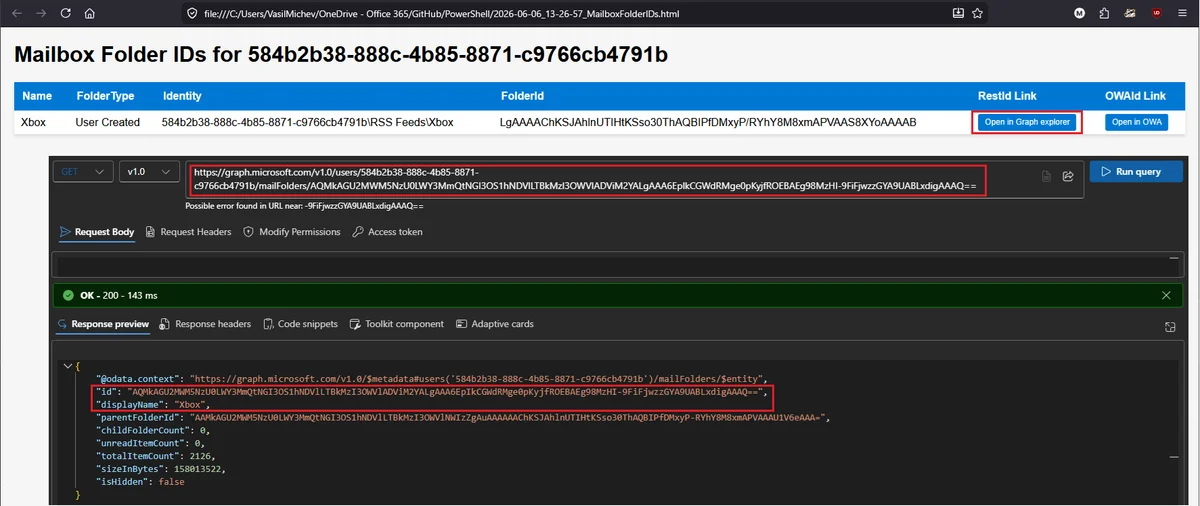
In addition to the CSV, the script produces an HTML file presenting the same data in a sortable table. Two action buttons are integrated:
- Open in Graph: opens Graph Explorer with a pre-filled query to retrieve the folder in question.
- Open in OWA: navigates directly to the folder in Outlook Web Access.
Caution
The Open in OWA button only works for mail folders accessible to the user (not calendars, contacts or system folders) and only if you used the UPN or primary SMTP address as the identifier. If you provided an ExternalDirectoryObjectId, this button will fail.
Support for shared mailboxes
Interesting bonus: the Open in OWA link also works for any mailbox on which you have Full Access permission, provided you select an accessible folder. For the Open in Graph button, delegated scenarios require the Mail.ReadBasic.Shared permission.
Conclusion: preparing for the end of EWS
The depreciation of EWS makes mastery of these identifier conversions essential for any administrator or cloud engineer manipulating Exchange Online. By understanding the storeId to entryId to RestId to OWAId chain, you retain the ability to script advanced operations via PowerShell and Microsoft Graph without relying on an end-of-life API.
Tip
To go further, consider adapting these scripts to application permissions to process an entire tenant without interactive authentication. Combine this with dedicated Azure AD app registrations and certificates for robust automation.
The current version of the script only supports delegated permissions, which is sufficient to cover all mailboxes accessible to the authenticated user. Adding support for application permissions is a natural evolution for large-scale management scenarios.