Introduction: the maze of Exchange identifiers
Exchange Online administrators and developers working with Microsoft Graph regularly encounter the same obstacle: the multiplicity of mailbox folder identifier formats. Each component of the Exchange ecosystem uses its own internal representation, and navigating between these formats without clear documentation is often challenging.
This article examines concretely the conversions needed to move from the storeId, returned by Exchange Online PowerShell cmdlets, to the RestId usable by Microsoft Graph API methods. We also cover conversion to the format expected by targeted eDiscovery searches (targeted collections).
Article scope
The conversions described here concern exclusively folder identifiers in Exchange Online mailboxes. The steps are similar for items, but the primary use case here remains folder management via PowerShell and the Graph API.
The different types of Exchange Online identifiers
Before diving into the subject, it is useful to review the identifiers involved in the conversion chain:
- storeId: native identifier returned by
Get-ExOMailboxFolderStatistics,Get-MailboxFolderStatisticsorGet-MailboxFolder. This is the systematic starting point for an administrator profile. - eDiscoveryId: hexadecimal format expected by the targeted collection feature in content searches (Content Search / eDiscovery).
- entryId: identifier used by MAPI clients. Serves as a mandatory intermediary to reach the RestId.
- RestId: identifier consumed by Outlook/Graph APIs (
/me/mailFolders/{id}). - OWAId: variant of RestId adapted for direct navigation in Outlook Web App.
| Identifier | Source | Primary usage |
|---|---|---|
| storeId | Get-ExOMailboxFolderStatistics | PowerShell starting point |
| eDiscoveryId | Conversion from storeId | eDiscovery targeted collections |
| entryId | Conversion from storeId | MAPI clients, Graph intermediary |
| RestId | translateExchangeIds API | Microsoft Graph API calls |
| OWAId | Derived from RestId | Direct navigation in OWA |
Step 1: retrieve the storeId via PowerShell
The first step is to identify the target folder and retrieve its storeId via the FolderId property:
1Get-ExOMailboxFolderStatistics vasil | Where-Object { $_.Name -eq "Xbox" } | Select-Object Name, FolderIdExpected result:
1Name FolderId2---- --------3Xbox LgAAAAChKSJAhlnUTIHtKSso30ThAQBIPfDMxyP/RYhY8M8xmAPVAAS8XYoAAAABThis Base64-encoded storeId is the raw material for all subsequent conversions.
Step 2: convert storeId to eDiscoveryId
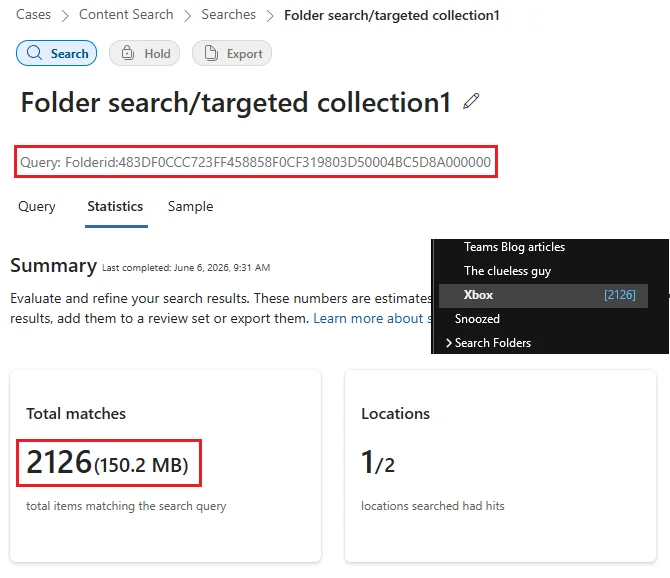
The targeted collection feature in Microsoft Purview eDiscovery allows you to restrict a content search to a specific folder via the KQL keyword folderId. This approach is particularly effective during targeted investigations.
eDiscovery targeted collections
The targeted collection allows you to limit an eDiscovery search to a specific folder, including with exclusions. The KQL keyword folderId expects a specific hexadecimal format, different from the raw storeId.
Here is the PowerShell block allowing this conversion:
1$folderId = [Convert]::FromBase64String($folderId)2 3$encoding = [System.Text.Encoding]::GetEncoding("us-ascii")4$nibbler = $encoding.GetBytes("0123456789ABCDEF")5 6$indexIdBytes = New-Object byte[] 48; $indexIdIdx = 07$folderId | Select-Object -Skip 23 -First 24 | ForEach-Object {8 $indexIdBytes[$indexIdIdx++] = $nibbler[$_ -shr 4]9 $indexIdBytes[$indexIdIdx++] = $nibbler[$_ -band 0x0F]10}11 12return $encoding.GetString($indexIdBytes)For the Xbox folder used in the example, the transformation produces:
1# storeId (Base64)2LgAAAAChKSJAhlnUTIHtKSso30ThAQBIPfDMxyP/RYhY8M8xmAPVAAS8XYoAAAAB3 4# eDiscoveryId (hexadecimal)5483DF0CCC723FF458858F0CF319803D50004BC5D8A000000This hexadecimal format can now be used directly in a KQL query targeting this folder.
Step 3: convert storeId to entryId (MAPI intermediary)
The Graph API exposes the translateExchangeIds method to convert Exchange identifiers to other formats. However, it does not support storeId as direct input. It is therefore necessary to first go through entryId, an intermediate MAPI format.
translateExchangeIds limitation
The translateExchangeIds method of the Graph API does not support storeId as direct input. Intermediate conversion to entryId is mandatory. Furthermore, the immutableEntryId and restImmutableEntryId identifiers are not supported for folders.
The following PowerShell function performs the storeId → entryId conversion:
1function FolderIdToEntryId {2 3 param([Parameter(Mandatory=$true)]$folderId)4 5 # Base64 decoding to byte array6 $folderIdBytes = [Convert]::FromBase64String($folderId)7 8 # Conversion to hexadecimal string, removing dashes, first byte ignored9 $folderIdHexString = [System.BitConverter]::ToString($folderIdBytes).Replace('-','')10 $folderIdHexStringLength = $folderIdHexString.Length11 12 # Removing first and last byte13 $entryIdHexString = $folderIdHexString.SubString(2, ($folderIdHexStringLength - 4))14 15 # Reconstructing byte array (2 characters = 1 byte)16 $entryIdBytes = [byte[]]::new($entryIdHexString.Length / 2)17 For ($i = 0; $i -lt $entryIdHexString.Length; $i += 2) {18 $entryIdTwoChars = $entryIdHexString.Substring($i, 2)19 $entryIdBytes[$i / 2] = [convert]::ToByte($entryIdTwoChars, 16)20 }21 22 # URL-safe Base64 encoding23 $entryIdBase64 = [Convert]::ToBase64String($entryIdBytes)24 $equalCharCount = $entryIdBase64.Length - $entryIdBase64.Replace('=','').Length25 $entryId = $entryIdBase64.TrimEnd('=').Replace('/','-').Replace('+','_') + $equalCharCount26 27 return $entryId28}Step 4: obtain the RestId via translateExchangeIds
Once the entryId is obtained, it is possible to call the translateExchangeIds method of Microsoft Graph to obtain the RestId. This latter is the identifier expected by all folder operations via Graph APIs (endpoints /me/mailFolders, /users/{id}/mailFolders, etc.).
Predefined system folders (Inbox, SentItems, RecoverableItemsDeletions, etc.) have so-called well-known values that can be used directly without conversion. Conversion is only necessary for user-created folders.
Complete script: generate all identifiers for a mailbox
By combining the conversions described above, it is possible to produce a complete inventory of a mailbox's folders with all their identifiers.
Prerequisites
- Exchange Online Management module (for
Get-ExOMailboxFolderStatistics) - Microsoft Graph SDK for PowerShell module
- Delegated permission:
User.ReadBasic.All(Graph side) and appropriate Exchange rights
Script parameters
The script exposes the following parameters:
-Mailbox(required): primary SMTP address orExternalDirectoryObjectIdGUID of the target mailbox.-IncludeNonIPM(optional): includes folders outside the IPM tree (not visible to the user).
Warning about -IncludeNonIPM parameter
Exchange Online mailboxes potentially contain thousands of system folders outside IPM. Only use the -IncludeNonIPM parameter knowingly, as this can significantly increase execution time and data volume produced.
Usage examples
1# Execution on a mailbox identified by its SMTP address2.\Mailbox_Folder_IDs.ps1 -Mailbox user@domain.com3 4# Execution with the ExternalDirectoryObjectId (GUID)5.\Mailbox_Folder_IDs.ps1 -Mailbox 4ebd5057-4d61-4ca0-beb7-df3f1ebd1aa76 7# Include folders outside the IPM tree8.\Mailbox_Folder_IDs.ps1 -Mailbox user@domain.com -IncludeNonIPMIdentifier and Open in OWA button
If you plan to use the Open in OWA button generated in the HTML report, prioritize the primary SMTP address (UPN) as the value of the -Mailbox parameter. This button does not work correctly if an ExternalDirectoryObjectId GUID is provided as input.
Script internal processing
The script follows the following logical sequence:
Connection and permission verification
A built-in connectivity function establishes the Exchange Online and Graph session, then verifies the presence of the User.ReadBasic.All permission. It can be replaced by your own authentication mechanism.
Retrieving mailbox folders
Call to Get-ExOMailboxFolderStatistics to retrieve all folders. The -IncludeNonIPM switch conditions the inclusion of system folders.
Computing eDiscoveryId and EntryId identifiers
For each folder, the storeId is converted locally to eDiscoveryId and entryId without additional network calls.
Batch call to translateExchangeIds
Generated entryId values are submitted to the translateExchangeIds method of the Graph API in batches of 1,000. Returned RestId values are stored in a hash table.
Results export
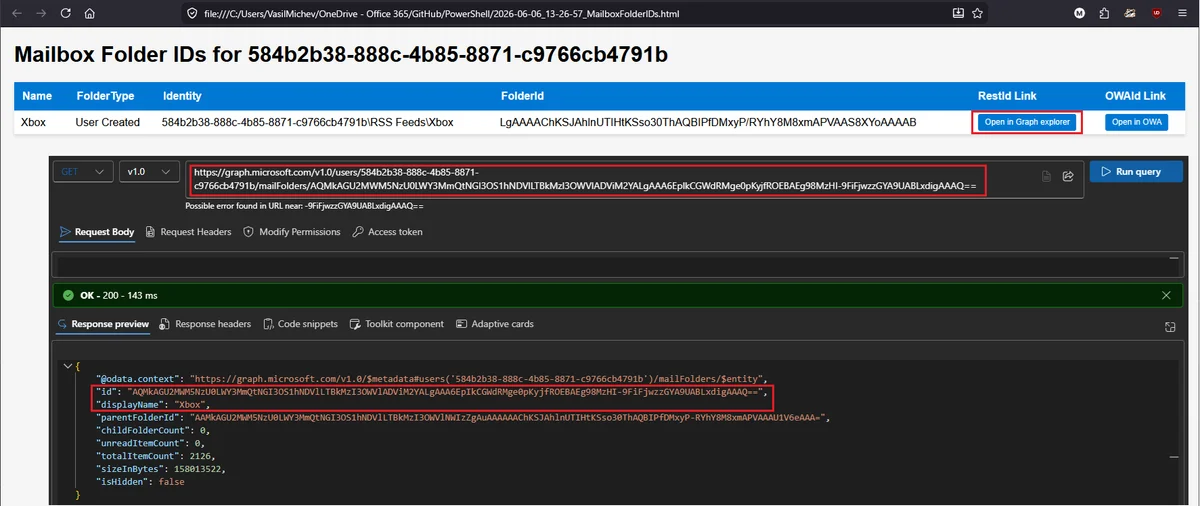
Two files are generated in the current directory: a CSV file and an HTML file with sortable table. The HTML report includes two buttons per row: Open in Graph Explorer and Open in OWA.
CSV report columns
- Name: folder name
- FolderType: Exchange folder type
- Identity: complete folder path in the mailbox
- FolderId: storeId (Base64 format)
- eDiscoveryId: identifier for targeted collections
- EntryId: MAPI identifier
- RestId: identifier for Microsoft Graph API
- OWAId: identifier for OWA navigation

Button behavior in HTML report
- Open in Graph Explorer: works in delegated mode only if the
Mail.ReadBasic.Sharedpermission is granted. - Open in OWA: works exclusively for mail folders accessible to users (not Calendar, Contacts or system folders). Requires the UPN/SMTP address as mailbox identifier.
Operational considerations
The use of application permissions is not yet implemented in the current version of the script. For environments requiring automation without user interaction, an adaptation of the connection block will be necessary.
From an M365 identity management perspective, these conversions illustrate well the inherent complexity of the coexistence of MAPI, EWS (being deprecated) and Graph layers in Exchange Online. The gradual migration to Graph APIs requires mastering these transformations to maintain functional parity of administration tools.
EWS deprecation
With the announced deprecation of Exchange Web Services (EWS), mastering the conversion to Graph identifiers (RestId) becomes an essential prerequisite for modernizing Exchange Online scripts and administration tools.