Introduction: The 0x800705b4 Error During Autopilot Enrollment
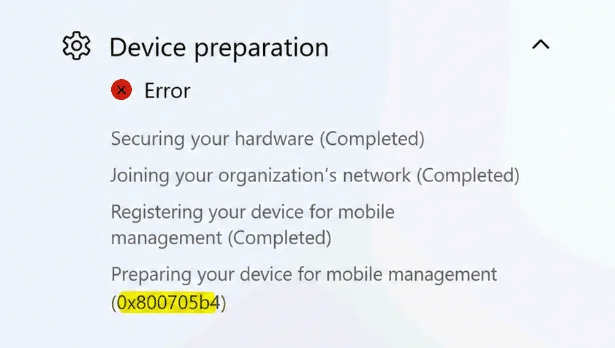
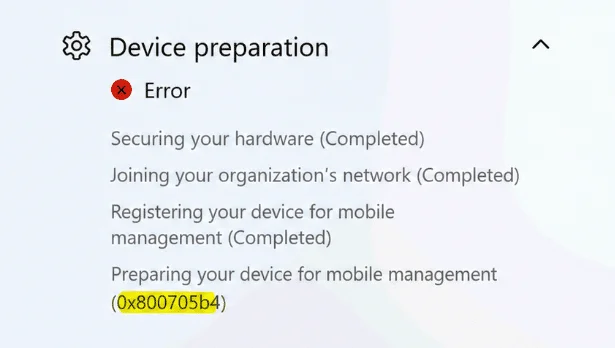
The 0x800705b4 error is one of the most frustrating errors during a Windows Autopilot deployment: the device freezes at the Preparing your device for mobile management step without providing a clear explanation. In the case analyzed here, the initial enrollment phases proceeded without incident — hardware security, organization join, mobile management registration — before the process stopped precisely at this critical step.
The root cause is not a network issue, nor an Autopilot bug per se. It's App Control for Business (formerly WDAC) that blocked a DLL dependency introduced in recent versions of the Intune Management Extension (IME).
Context
The Intune Management Extension is an essential component for the proper execution of Autopilot Enrollment Status Page (ESP). Without a successful installation and initialization of the IME, the ESP remains blocked indefinitely until timeout expiration, signaled by code 0x800705b4.
Log Analysis: Code Integrity Event ID 3033
Absence of IME Logs
The first natural reaction is to check the Intune Management Extension logs. However, since the IME failed to install, these logs are simply absent. We must look elsewhere.
The Code Integrity Log Reveals the Cause
Examining the Code Integrity event log immediately highlights the Event ID 3033.
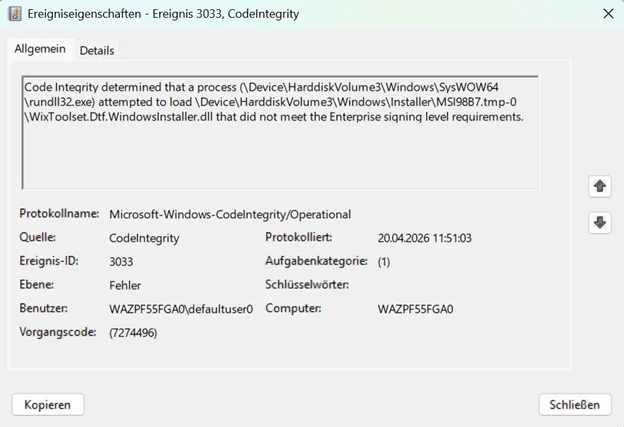
This event indicates that Code Integrity blocked the loading of a DLL because it did not meet Enterprise signing level requirements. Two files are involved:
- A DLL loaded directly by the Intune Management Extension process
- A DLL loaded from a Windows Installer temporary path during an MSI custom action:
C:\Windows\Installer\MSI*.tmp
The offending file is: WixToolset.Dtf.WindowsInstaller.dll
The causal chain is therefore as follows:
- The Autopilot ESP waits for the IME to complete its installation
- The IME MSI installation extracts its support files into a temporary directory
- App Control for Business blocks the loading of
WixToolset.Dtf.WindowsInstaller.dll - The MSI custom action cannot execute
- The IME installation fails silently
- The ESP expires and reports the 0x800705b4 error
The App Control for Business Policy in Question
Policy Configuration
The App Control for Business policy deployed via Intune on the device was configured as follows:
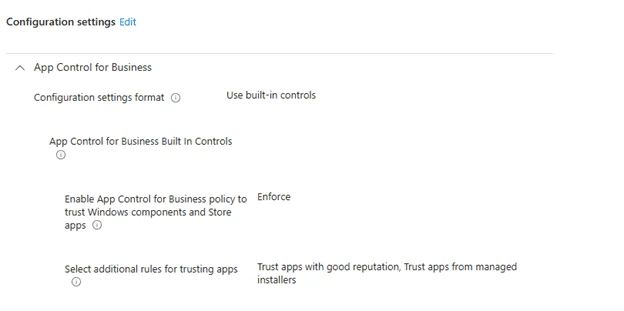
- Enable App Control for Business policy to trust Windows components and Store apps = Enforce
- Trust apps with good reputation: enabled
- Trust apps from managed installers: enabled
On the surface, this configuration should be compatible with IME installation: Microsoft signs its own components, and the IME is Microsoft software. Yet, App Control does not operate on this principle of implicit trust through inheritance.
Why WDAC Blocks Anyway
App Control for Business evaluates each file individually at the moment of loading. The fact that the parent process is signed by Microsoft confers no automatic trust to the DLLs it loads.
In this specific case, WixToolset.Dtf.WindowsInstaller.dll is indeed signed — but only with the WiX Toolset / .NET Foundation signature chain. This signature does not satisfy the Enterprise level required by the policy.
Warning
Do not confuse the presence of an Authenticode signature with compliance with WDAC's Enterprise signing level. A file can be signed while still being blocked by App Control for Business if its certification chain does not match the level of trust expected by the active policy.
Evolution of Dependencies in the IME MSI
DTF Dependency Change Between Versions
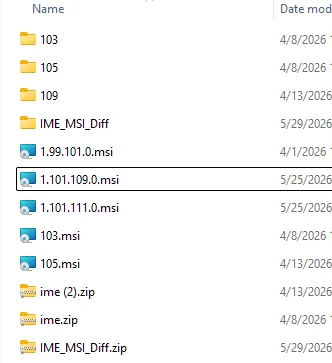
Comparing the IME MSI package versions, a significant dependency change is evident:
| IME Version | Custom Action DLL | Microsoft Catalog Signature |
|---|---|---|
| 1.99.101.0 and earlier | Microsoft.Deployment.WindowsInstaller.dll | Yes (IntuneWindowsAgent.cat) |
| 1.101.103.0 and later | WixToolset.Dtf.WindowsInstaller.dll | No (WiX signature only) |
The new dependency WixToolset.Dtf.WindowsInstaller.dll is present in versions 1.101.103.0, 1.101.105.0, 1.101.109.0, and 1.101.111.0. Version 1.101.103.0 is the first to include this new DLL.
A Toolchain Migration, Not a New Feature
Comparative analysis of SideCarSetupCustomActions.dll between versions 1.99.101.0 and 1.101.103.0 reveals that the entry points of custom actions are identical. Only the reference to the DTF DLL has changed:
- Old version: references
Microsoft.Deployment.WindowsInstaller - New version: references
WixToolset.Dtf.WindowsInstaller
Both versions target .NET Framework 4.7.2. This is therefore a migration of the WiX build chain (from WiX v3 to the modern WiX Toolset), not the introduction of a new feature.

Why the Old DLL Did Not Pose a Problem
The old Microsoft.Deployment.WindowsInstaller.dll also had an embedded WiX Toolset / .NET Foundation signature. What differentiated it is a crucial detail: it was also covered by a Microsoft catalog signature via IntuneWindowsAgent.cat.
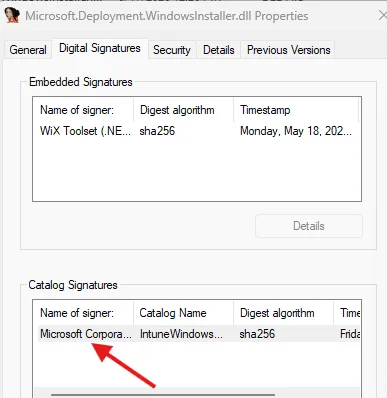
This catalog signature allowed Code Integrity to validate the file in the context of Microsoft Enterprise trust, thus satisfying the WDAC policy requirements.
The new WixToolset.Dtf.WindowsInstaller.dll did not benefit from this catalog coverage:
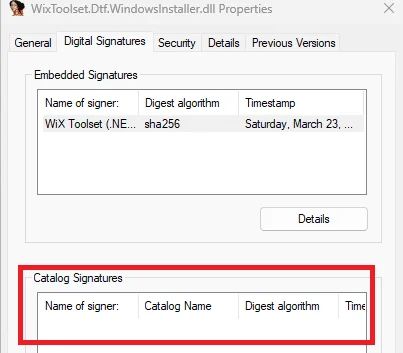
The breaking change is therefore not simply the renaming of the DLL — it's the disappearance of the Microsoft catalog signature on the new dependency.
Critical Point
The Authenticode hash of WixToolset.Dtf.WindowsInstaller.dll was absent from the IntuneWindowsAgent.cat file in IME versions 1.101.x. Code Integrity could therefore not build a Microsoft trust path for this DLL, even though it was signed by WiX Toolset.
Temporary Workaround for the 0x800705b4 Error
Pending an official fix, the workaround consists of adding an App Control path rule authorizing the Windows Installer temporary directory:
1%WINDIR%\Installer\*This rule allows the MSI custom action to extract and load its support files, including WixToolset.Dtf.WindowsInstaller.dll, which unblocks IME installation and allows Autopilot ESP to continue.
Warning
This path rule is a temporary solution, not a best practice. A path-based rule grants trust to a location, not a specific signer. This weakens the WDAC security posture. Use only while deploying the corrected IME version.
Permanent Fix: IME 1.103.101.0
What Microsoft Fixed
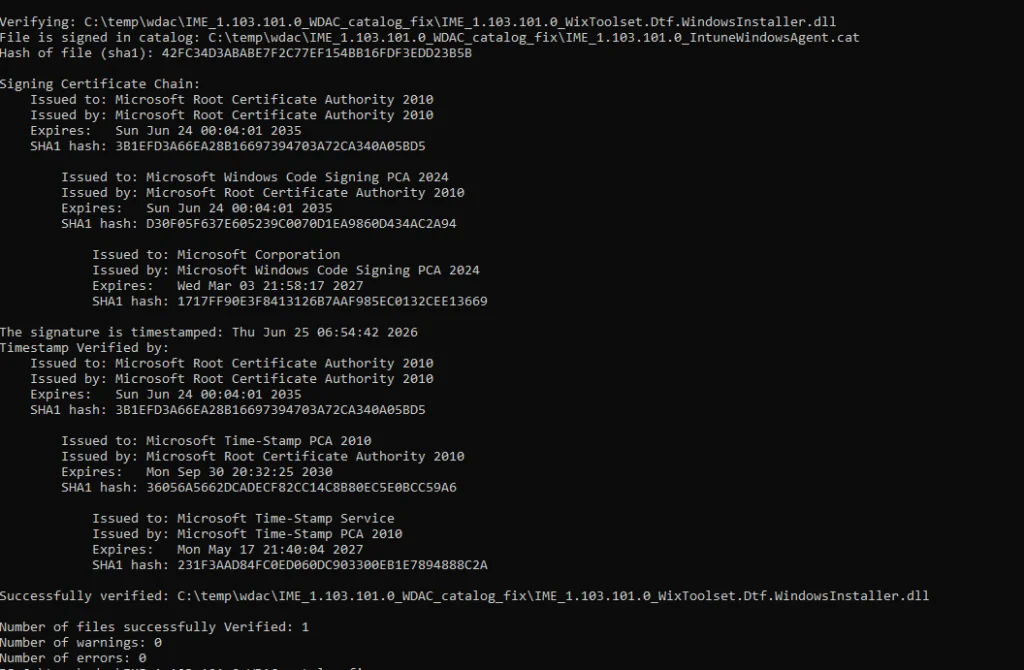
Microsoft resolved the issue in Intune Management Extension version 1.103.101.0. The fix is elegant in its simplicity: Microsoft did not modify or re-sign WixToolset.Dtf.WindowsInstaller.dll. The DLL is byte-for-byte identical to the one present in version 1.101.111.0.
The fix consists of having added the Authenticode hash of WixToolset.Dtf.WindowsInstaller.dll to the signed IntuneWindowsAgent.cat catalog.
Before and After the Fix

| IME Version | WixToolset.Dtf Hash in IntuneWindowsAgent.cat | WDAC Result |
|---|---|---|
| 1.101.111.0 | Absent | Event ID 3033 — DLL Blocked |
| 1.103.101.0 | Present | Microsoft Trust Path Validated |
With this hash present in the catalog, when Code Integrity evaluates WixToolset.Dtf.WindowsInstaller.dll extracted under C:\Windows\Installer\MSI*.tmp, it can now validate the Microsoft catalog signature instead of being limited to the embedded WiX Toolset signature.
Recommendation
Before removing the %WINDIR%\Installer\* workaround rule, validate Autopilot enrollment behavior on a test device equipped with IME 1.103.101.0 and the App Control policy in Enforce mode. Confirm the absence of Event ID 3033 in the Code Integrity log before deploying rule removal at scale.
Diagnostic Procedure for the 0x800705b4 Error
Check the Code Integrity Log
Open Event Viewer and navigate to Applications and Services Logs > Microsoft > Windows > CodeIntegrity > Operational. Filter on Event ID 3033 to identify files blocked during enrollment.
Identify the Blocked DLL
In the 3033 events, note the full path of the blocked DLL. Check if the path contains C:\Windows\Installer\MSI*.tmp, which indicates a block during an MSI custom action.
Check the IME Version
In the Intune portal, check the Intune Management Extension version deployed on the affected devices. If the version is earlier than 1.103.101.0, the catalog fix is not applied.
Apply Temporary Workaround If Necessary
If you cannot update the IME immediately, add an App Control path rule for %WINDIR%\Installer\* to unblock enrollment. Document this exception and plan its removal after IME update.
Deploy IME 1.103.101.0 or Later
Update the Intune Management Extension to version 1.103.101.0 or higher. Verify that the hash of WixToolset.Dtf.WindowsInstaller.dll is present in IntuneWindowsAgent.cat by inspecting the catalog signature properties on a test device.
Validate and Remove Workaround
On a test device, perform a full Autopilot enrollment with the App Control policy in Enforce mode and the new IME version. Confirm the absence of Event ID 3033 and ESP success before removing the temporary path rule from your policies.
Summary
The Autopilot 0x800705b4 error analyzed here is the result of a fragile dependency chain between three components:
- App Control for Business in Enforce mode with Enterprise trust level
- The Intune Management Extension and its MSI installation process
- WixToolset.Dtf.WindowsInstaller.dll, a custom action dependency whose Authenticode hash was absent from the Microsoft-signed catalog
The migration of the WiX build chain on the Microsoft side introduced a new technically signed DLL, but not covered by the IntuneWindowsAgent.cat catalog. Code Integrity correctly blocked this DLL according to the policy rules, causing the IME installation to fail silently and the ESP to timeout.
The fix provided in IME version 1.103.101.0 — adding the missing hash to the Microsoft catalog — illustrates the importance of maintaining consistency between an MSI package's dependencies and the signature catalog that covers them, particularly in environments where App Control for Business is actively enforced.