
An agent with no identified owner, connected to business data and able to act in a production system is a security debt that is hard to measure. The goal is therefore to turn the technical inventory into an audit queue: each agent gets an owner, a risk level and a verifiable decision before any automation.
Why the inventory must now measure risk
Since 1 May 2026, Microsoft Agent 365 has been generally available for the commercial segment, according to Microsoft's official announcement. The product adds a shared governance layer, but it does not replace the qualification work: knowing that an agent exists does not yet tell you which data it reads, which actions it performs or who answers for its behaviour.
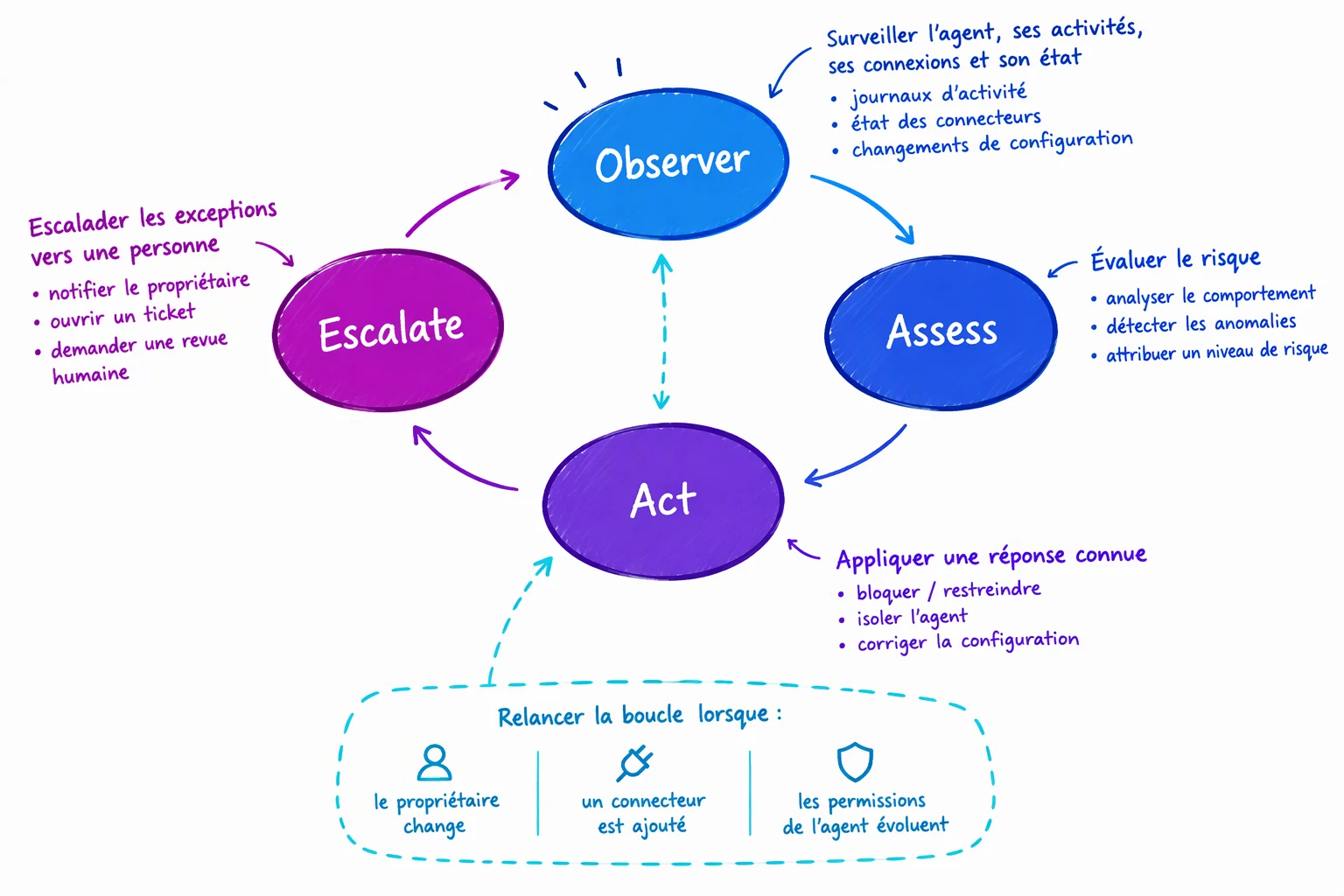
The useful operating model follows a continuous loop: observe the agent, assess its risk, apply a known response, then escalate exceptions to a person. This loop must be rerun when an owner changes, a connector is added or the agent's permissions evolve.
The agent registry, the basic governance actions and the lifecycle rules are included with Microsoft 365 subscriptions, without an Agent 365 licence. However, the Microsoft Agent 365 service description specifies that Microsoft Graph access to the registry, telemetry and certain tenant-wide controls require Microsoft 365 E7 or Agent 365.
15 $ US
Standalone Agent 365 per user per month
Microsoft licensing FAQ
99 $ US
Microsoft 365 E7 per user per month
Microsoft licensing FAQ
The licence is assigned per user, not per agent. The Microsoft licensing FAQ also states that Agent 365 is included in neither Microsoft 365 E3 nor E5. For a small or medium-sized business, Microsoft 365 Business Premium is the stated prerequisite for the standalone licence.
A three-level grid based on five criteria
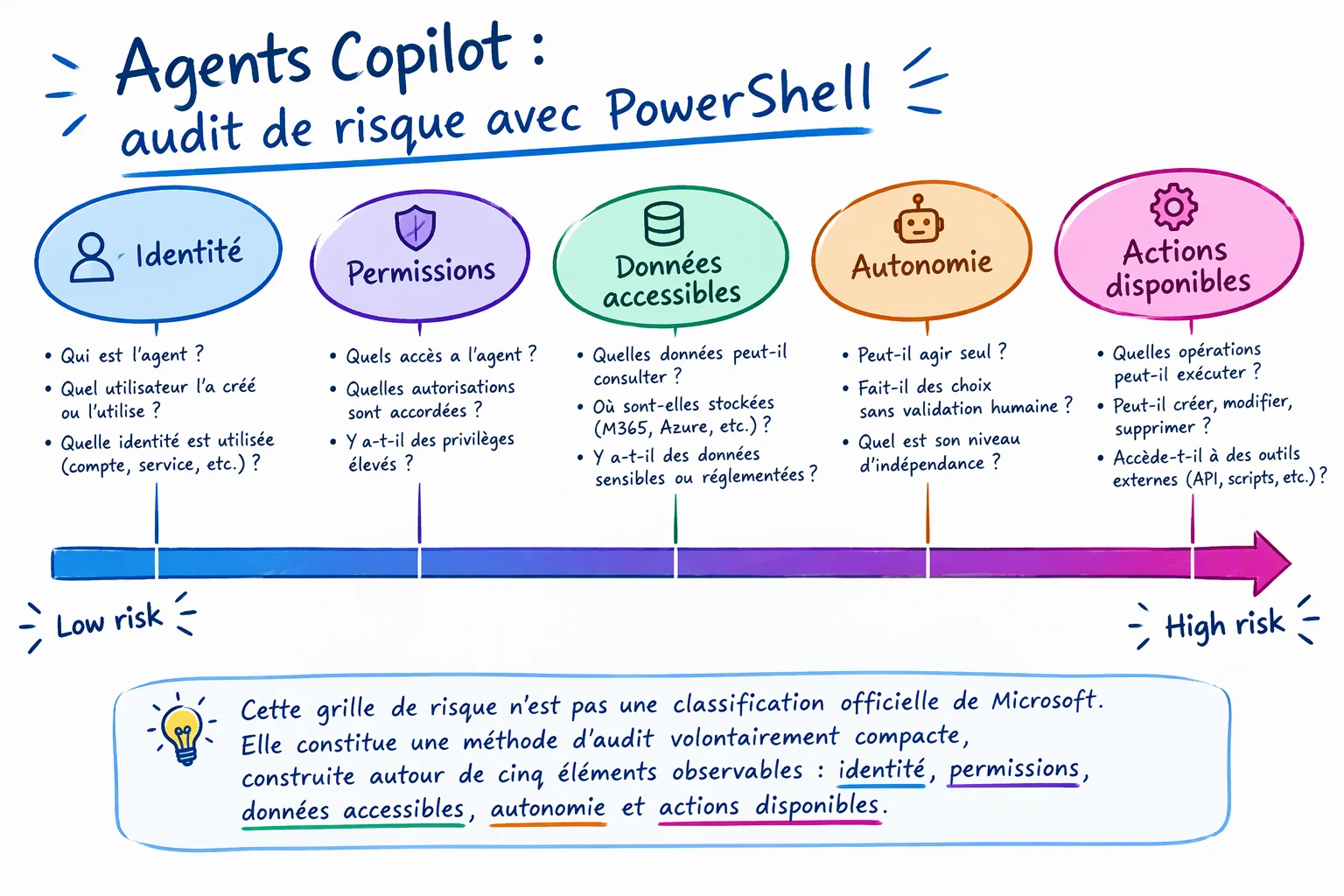
This risk grid is not an official Microsoft classification. It is a deliberately compact audit method built around five observable elements: identity, permissions, accessible data, autonomy and available actions.
| Level | Agent profile | Expected control |
|---|---|---|
| Level 1 — limited | Answers from approved internal content and triggers no external action | Named owner and compliance with publishing rules |
| Level 2 — supervised | Reads business data or SharePoint spaces that require validation | Review of sources, permissions and usage before going live |
| Level 3 — controlled | Writes, sends, modifies or accesses sensitive data | Explicit approval, backup owner and periodic reviews |
To prevent an average from hiding a danger, keep the highest level reached by any one criterion. An agent that only reads an approved document base can stay at level 1; if it is then given a tool able to modify the CRM, it moves to level 3 even if its other characteristics remain unchanged.
The Microsoft white paper on agent governance also proposes three zones: personal productivity, team collaboration and centralised management by IT. These zones organise environments and responsibilities; the grid above instead qualifies technical risk. The two models are therefore complementary, but must not be confused.
A missing owner is treated as a governance exception, not as a fourth level. The Microsoft admin guide recommends filtering the registry on Missing an owner and considering the removal of orphaned agents after verification.
Check the prerequisites before calling Microsoft Graph
The inventory combines two sources: agent identities from Microsoft Entra ID, formerly Azure AD, and the packages of the Agent 365 registry. The records may overlap; the script does not merge them automatically, because the properties that would allow a reliable correlation are not documented in the material provided.
Audit prerequisites
Microsoft.Graph.Authenticationmodule, with no minimum version imposed by the references used- Delegated permission
AgentIdentity.Read.Allfor agent identities - Delegated permission
CopilotPackages.Read.Allfor the registry AI Administratorrole to read the agent registry- Microsoft 365 E7 or Agent 365 to access the registry through Microsoft Graph
- Authorised local directory to store the CSV and JSON files
The registry in the Microsoft 365 admin center lets you inventory agents and filter those without an owner. Basic operations, notably publishing, blocking, deleting or reassigning the owner, do not require Agent 365.
The Graph registry is not universally accessible
Without E7 or Agent 365, the second call may fail even if the registry remains visible in the admin center. In GCC, plan an inventory from the administration and Power Platform interfaces rather than this endpoint.
Implementation
The script is strictly read-only. It produces a CSV ready for qualification, two JSON files that keep the raw responses and, if needed, a separate file containing call errors.
First install the required module:
1Install-Module Microsoft.Graph.Authentication -Scope CurrentUserThen save the script as Export-CopilotAgentRiskInventory.ps1.
1param(2 [Parameter(Mandatory = $false)]3 [string]$OutputDirectory = ".\audit-agents"4)5 6$ErrorActionPreference = "Stop"7$RequiredScopes = @(8 "AgentIdentity.Read.All",9 "CopilotPackages.Read.All"10)11 12# Charge le module d’authentification Microsoft Graph.13Import-Module Microsoft.Graph.Authentication14 15# Crée le répertoire de sortie sans modifier le locataire.16New-Item -Path $OutputDirectory -ItemType Directory -Force | Out-Null17 18# Demande uniquement les permissions de lecture nécessaires à l’inventaire.19Connect-MgGraph -Scopes $RequiredScopes20 21function Get-GraphCollection {22 param(23 [Parameter(Mandatory = $true)]24 [string]$Uri25 )26 27 $Items = @()28 $NextUri = $Uri29 30 # Suit la pagination Microsoft Graph jusqu’à la dernière page.31 while ($NextUri) {32 $Page = Invoke-MgGraphRequest -Method GET -Uri $NextUri33 if ($null -ne $Page.value) {34 $Items += @($Page.value)35 }36 $NextUri = $Page.'@odata.nextLink'37 }38 39 return $Items40}41 42function Get-ObjectPropertyValue {43 param(44 [Parameter(Mandatory = $true)]45 [object]$InputObject,46 47 [Parameter(Mandatory = $true)]48 [string]$PropertyName49 )50 51 if ($InputObject -is [System.Collections.IDictionary]) {52 if ($InputObject.Contains($PropertyName)) {53 return $InputObject[$PropertyName]54 }55 }56 57 $Property = $InputObject.PSObject.Properties[$PropertyName]58 if ($null -ne $Property) {59 return $Property.Value60 }61 62 return $null63}64 65function Get-ObjectLabel {66 param(67 [Parameter(Mandatory = $true)]68 [object]$InputObject69 )70 71 foreach ($PropertyName in @("displayName", "name", "id")) {72 $Value = Get-ObjectPropertyValue -InputObject $InputObject -PropertyName $PropertyName73 if (-not [string]::IsNullOrWhiteSpace([string]$Value)) {74 return [string]$Value75 }76 }77 78 return "À identifier dans la réponse brute"79}80 81$Errors = @()82$AgentIdentities = @()83$Packages = @()84 85# Inventorie les identités d’agents Microsoft Entra Agent ID.86try {87 $AgentIdentities = @(Get-GraphCollection -Uri "https://graph.microsoft.com/v1.0/servicePrincipals/microsoft.graph.agentIdentity")88}89catch {90 $Errors += [pscustomobject]@{91 Source = "Microsoft Entra Agent ID"92 Message = $_.Exception.Message93 }94}95 96# Inventorie le registre Agent 365. Cet appel dépend de la licence et du cloud.97try {98 $Packages = @(Get-GraphCollection -Uri "https://graph.microsoft.com/v1.0/copilot/admin/catalog/packages")99}100catch {101 $Errors += [pscustomobject]@{102 Source = "Registre Agent 365"103 Message = $_.Exception.Message104 }105}106 107# Conserve les réponses complètes pour les contrôles techniques ultérieurs.108ConvertTo-Json -InputObject $AgentIdentities -Depth 20 |109 Set-Content -Path (Join-Path $OutputDirectory "identites-agents-entra.json") -Encoding UTF8110 111ConvertTo-Json -InputObject $Packages -Depth 20 |112 Set-Content -Path (Join-Path $OutputDirectory "registre-agents.json") -Encoding UTF8113 114# Construit une file d’audit commune sans prétendre dédupliquer les sources.115$AuditRows = @(116 foreach ($Item in $AgentIdentities) {117 [pscustomobject]@{118 Source = "Microsoft Entra Agent ID"119 AgentName = Get-ObjectLabel -InputObject $Item120 ObjectId = Get-ObjectPropertyValue -InputObject $Item -PropertyName "id"121 Owner = ""122 BackupOwner = ""123 RiskLevel = ""124 RiskRationale = ""125 ReviewDecision = ""126 ReviewDate = ""127 RawPayload = ConvertTo-Json -InputObject $Item -Depth 20 -Compress128 }129 }130 131 foreach ($Item in $Packages) {132 [pscustomobject]@{133 Source = "Registre Agent 365"134 AgentName = Get-ObjectLabel -InputObject $Item135 ObjectId = Get-ObjectPropertyValue -InputObject $Item -PropertyName "id"136 Owner = ""137 BackupOwner = ""138 RiskLevel = ""139 RiskRationale = ""140 ReviewDecision = ""141 ReviewDate = ""142 RawPayload = ConvertTo-Json -InputObject $Item -Depth 20 -Compress143 }144 }145)146 147$CsvPath = Join-Path $OutputDirectory "inventaire-agents-auditer.csv"148 149if ($AuditRows.Count -gt 0) {150 $AuditRows |151 Sort-Object Source, AgentName |152 Export-Csv -Path $CsvPath -NoTypeInformation -Encoding UTF8153}154else {155 '"Source","AgentName","ObjectId","Owner","BackupOwner","RiskLevel","RiskRationale","ReviewDecision","ReviewDate","RawPayload"' |156 Set-Content -Path $CsvPath -Encoding UTF8157}158 159if ($Errors.Count -gt 0) {160 $Errors |161 Export-Csv -Path (Join-Path $OutputDirectory "erreurs-inventaire.csv") -NoTypeInformation -Encoding UTF8162}163 164Write-Host "Identités Entra Agent ID : $($AgentIdentities.Count)"165Write-Host "Packages du registre Agent 365 : $($Packages.Count)"166Write-Host "Lignes à auditer : $($AuditRows.Count)"167Write-Host "Inventaire produit : $CsvPath"Run it with an explicit output directory:
1.\Export-CopilotAgentRiskInventory.ps1 -OutputDirectory ".\audit-agents"The terminal should display the two totals and the number of rows to audit. Then check that each expected source appears in the CSV and list the entries that still have no owner:
1$Inventory = Import-Csv -Path ".\audit-agents\inventaire-agents-auditer.csv"2 3$Inventory |4 Group-Object -Property Source |5 Select-Object Name, Count6 7$Inventory |8 Where-Object { [string]::IsNullOrWhiteSpace($_.Owner) } |9 Select-Object Source, AgentName, ObjectIdClassify each agent without automating the judgement
The CSV prepares the decision, but it cannot determine the risk level on its own. Effective permissions, knowledge sources and available tools must be confirmed in the consoles that administer the agent.
Identify the operational owner
Fill in Owner and BackupOwner. If nobody accepts responsibility, put the agent under review before any decision to publish or extend it.
Collect the five pieces of technical evidence
Document the identity, permissions, accessible data, degree of autonomy and actions. Keep the reasoning in RiskRationale rather than a level without justification.
Apply the maximum observed level
Enter 1, 2 or 3 in RiskLevel. A write capability or a piece of sensitive data is enough to impose level 3, even if the agent looks limited on the other axes.
Record the review decision
Use ReviewDecision to log an approval, a request to reduce permissions or an escalation. The validation date goes in ReviewDate.
Take the example of an internal support agent. Fed only by approved documentation, it is level 1. Adding read access to sales data moves it to level 2; a tool able to modify a record or send a message puts it at level 3.
No guaranteed propagation delay is given in the references used here. After a change of owner, permission or tool, wait until it is visible in the relevant admin console, rerun the inventory, then compare the identifiers and the JSON responses.
Troubleshoot inventory discrepancies
| Symptom | Likely cause | Resolution |
|---|---|---|
| The registry call is denied | E7 or Agent 365 licence missing, GCC environment, missing role or permission | Check the licence, the AI Administrator role and the CopilotPackages.Read.All scope; use the portal if the API is not available |
| Copilot Studio agents are missing in Entra | The migration to Microsoft Entra Agent ID is still in preview | Cross-check with the Agent 365 registry and the Power Platform inventory |
| The CSV contains a JSON payload that is hard to read | Nested properties were kept without an assumed schema | Analyse the raw JSON files and copy only the useful evidence into the CSV |
| All Owner columns are empty | The script deliberately creates a qualification queue independent of the registry schema | Use the Missing an owner filter, identify the owners, then complete the CSV |
| An expected third-party agent is absent | The two endpoints do not necessarily cover agents outside the Microsoft ecosystem | Add an inventory source specific to the third-party platform and keep the same risk grid |
Because the migration of Copilot Studio agents to Microsoft Entra Agent ID is still in preview, an empty or incomplete list does not prove that there are no agents. The registry and the Power Platform inventories remain essential cross-checking sources.
Frequently asked questions
Do you need Agent 365 to view the agent inventory?
No, not for the registry and the basic governance actions available in Microsoft 365. However, access to the registry through the Microsoft Graph API used in this guide requires Microsoft 365 E7 or Agent 365.
Does the script work in a GCC environment?
The Microsoft Graph API for the Agent 365 registry is not available in GCC. The identities call must be assessed separately, while the registry must be consulted through the administration interfaces available in that environment.
Can the risk level be assigned automatically?
Not until the criteria, the evidence and the escalation thresholds are formalised. The script automates collection and prepares the review; it does not replace the validation of permissions, data and actions.
What should you do with an agent that has no owner?
Start by confirming that it is still in use and identify its access scope. The Microsoft guide recommends searching for agents marked Missing an owner and considering their removal when no legitimate owner can be reassigned.
Three decisions to make before automation
Do not delete an agent solely because it has no owner
A deletion or a block can interrupt a business process. Keep the inventory, validate usage with the teams concerned and obtain explicit approval before any action that affects the tenant.
Moving from audit to governance
- Appoint an owner and a deputy for every active agent
- Have the risk grid and the conditions for moving between levels validated
- Prioritise orphaned agents, elevated permissions and write capabilities
- Define which decisions can be automated and which require human review
- Rerun the inventory after any change of identity, data, tool or owner
If your organisation is just starting out, first keep a human review of the three levels. Once the same decisions become repeatable and demonstrable, you can then automate change detection without prematurely automating the sanction.
Going further
- Microsoft Agent 365 – Service Descriptions — to compare the included features with those subject to licensing.
- Microsoft Agent 365 Licensing FAQs — to check prices, prerequisites and assignment rules.
- Agents admin guide for Microsoft 365 — to spot agents without an owner and manage their deployment.
- AI agent governance with Agent 365 and Entra Agent ID — to dig deeper into agent identity and centralised control.
- AI agent: autonomy, action cycle and security — to link the degree of autonomy to operational risks.