A SharePoint list can power an interactive dashboard without building a Power BI report. With Copilot in SharePoint, the HTML file is generated from a natural-language instruction; what remains is checking what it displays, where it is saved and who can view it. Here is a procedure for creating and checking it before publication.
When to choose a connected HTML dashboard
The HTML dashboard meets an operational viewing need centred on a SharePoint list: indicators, charts, filters and a detailed table in a single file. The page can reflect changes in the list after a refresh; it is not a historical snapshot. For more advanced analyses or data from several systems, consider Power BI instead, without assuming that the two approaches offer the same capabilities.
The principle matters for security: the list provides the data, the HTML provides the interface and a link makes the file accessible. These three elements must be checked separately. A navigation entry fixes neither an overly broad permission on the list nor any sensitive content present in the generated file.
Microsoft announced the general availability of Copilot in SharePoint on 30 September 2026, with a progressive worldwide rollout. If the interface does not yet appear in your environment, check actual availability before changing your configuration. To place this feature among the other changes, see also what's new in Copilot in SharePoint.
Prepare the licence, the site and a usable list
Creating an HTML file is one of the common uses covered by a Microsoft 365 Copilot licence. The Microsoft Learn documentation on Copilot in SharePoint distinguishes these uses from advanced or large-scale operations billed in Copilot Credits: creating entire sites, images, advanced autofill or site analytics. The /cost command lets you check credit consumption.
To create the dashboard, use an account that holds the licence and is at least a member of the site, with access to the required data and to the save location. The site owner can manage the Site AI settings. Do not reuse an old procedure based on KnowledgeAgentScope, KnowledgeAgentSelectedSitesList or KnowledgeAgentSelectedSitesListOperation: these preview cmdlets have been retired. According to Microsoft Learn, their settings are honoured until 1 November 2026; management then moves to Site AI and Restricted Content Discovery.
Before launching Copilot
- Confirm the Microsoft 365 Copilot licence of the creator account and the presence of Copilot Chat on the site.
- Choose a list whose columns and values meet the business need; check a few rows and reference totals.
- Identify the library intended for the HTML and the people allowed to read the list and the file.
- Prepare a non-sensitive test set if the planned dashboard contains privileged roles, MFA statuses or other identity data.
An existing list works; an Excel file can also serve as a starting point, notably to build the list. The SharePoint Maven write-up also shows a dashboard created from an Excel file stored in a library. In every case, check the source actually used by the result you get.
Create and refine the dashboard step by step
Here is an illustration: an administration team tracks its accounts in the M365_User_Report list. It wants a dashboard restricted to authorised people, rather than a page visible to all site visitors. Before using the Privileged or MFA Status fields, it decides which recipients genuinely need those details.
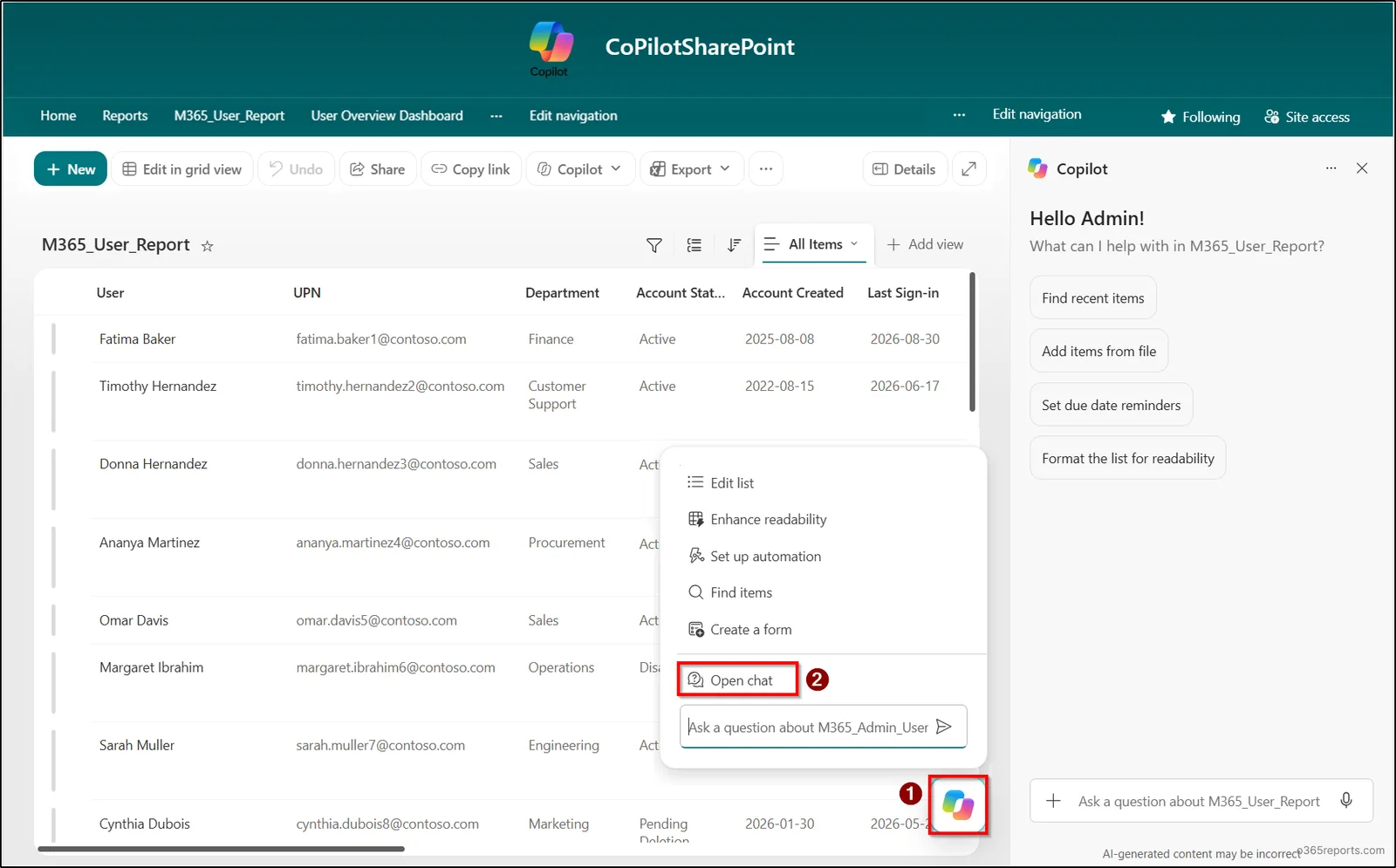
Open Copilot Chat on the site
From the SharePoint site, open Copilot Chat, not a Copilot agent. An agent can use configured sources without necessarily having the actions needed to create and save an HTML file.
Describe the data and enforce the destination
Adapt the following prompt to the column names in your list. Replace the library description with a location you have access to: explicitly asking where to save the file avoids assuming its destination.
1Crée un tableau de bord HTML interactif à partir de la liste SharePoint M365_User_Report. Utilise cette liste comme source de données actualisable. Affiche huit indicateurs pertinents calculés à partir des colonnes disponibles, quatre graphiques pour License, Experience Years, Department et Job Title, puis un tableau détaillé. Ajoute des filtres pour Department, Account Status, License et Location ; tous les éléments doivent réagir aux filtres. Place un bouton Refresh et la date de dernière actualisation dans l’en-tête. Enregistre le fichier sous le nom M365_User_Dashboard.html dans la bibliothèque de documents que je t’indique : [nom de la bibliothèque]. Signale toute colonne demandée mais absente au lieu d’inventer des données.If you reuse this prompt, replace [nom de la bibliothèque] with your actual destination. Then confirm in the interface that the file was really created there: the requested location is not proof that it was saved.
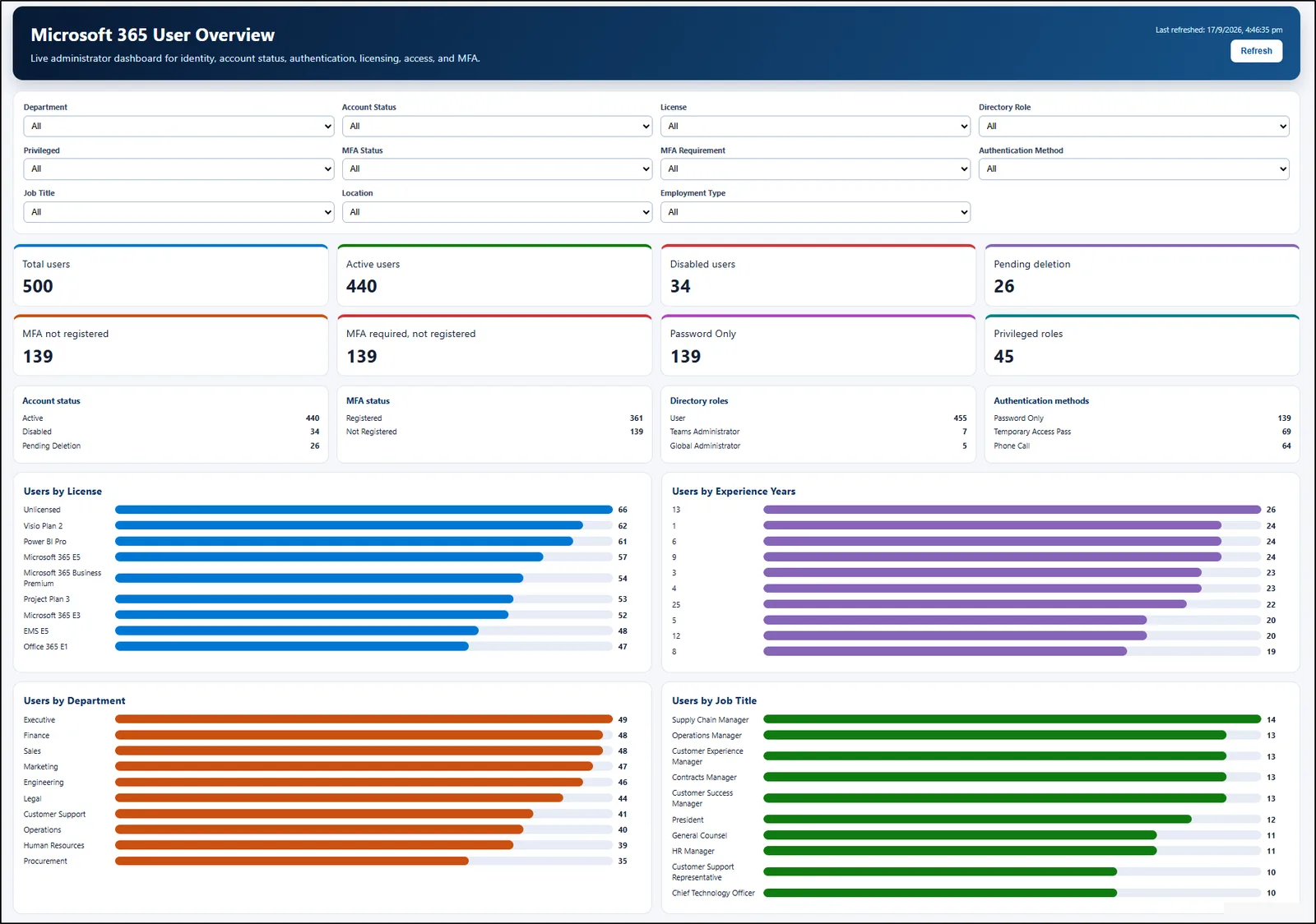
Fix the rendering, then test the interactions
Make targeted changes so you can compare the previous and next versions. For example:
1Dans M365_User_Dashboard.html, remplace les graphiques Department et Job Title par des diagrammes circulaires. Conserve les filtres et la connexion à la liste M365_User_Report, puis enregistre le fichier modifié au même emplacement.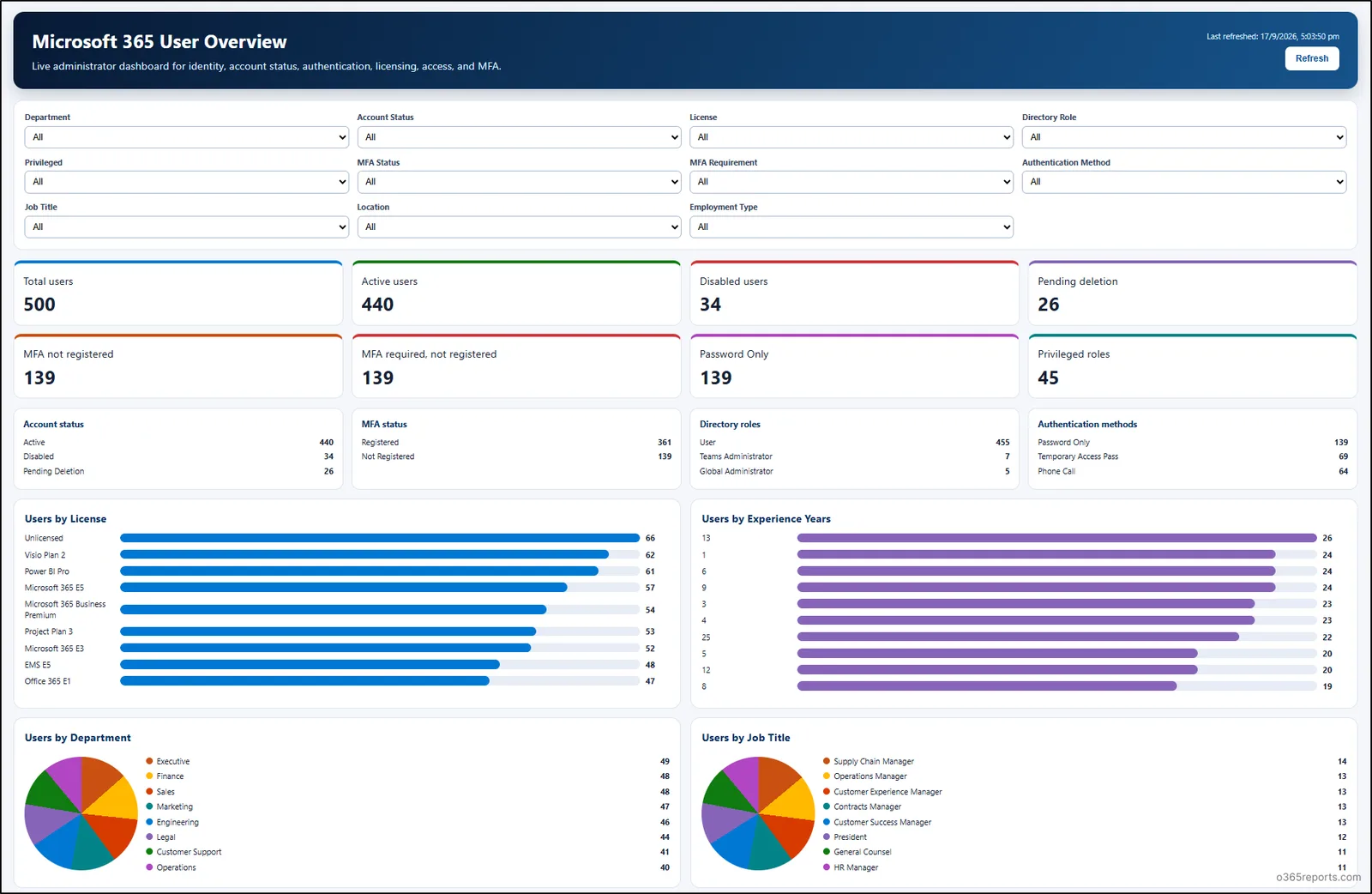
After each change, temporarily change a test value in the list, refresh the dashboard and compare the relevant indicator with the source. No guaranteed propagation delay is given here: do not conclude that synchronisation works correctly merely because a Refresh button exists. The August 2026 announcements on connected HTML dashboards give further examples of use.
Implementation
Creation happens here in Copilot Chat; the check of the generated HTML can be repeated locally. No additional PowerShell module or installation is required for the scripts below. You only need to be able to read and download the HTML file: read access to that file is the minimum for the local audit, but does not by itself grant the right to verify the permissions of the whole list.
Download a copy of the file, then open it in a text editor without running it. Look for external scripts, network calls, URLs, identity data possibly embedded in the document and unexpected dependencies. Compare these findings with the access planned for readers.
The expected output is a Controle / Occurrences table. It flags patterns, not proven vulnerabilities: a URL may be legitimate, and sensitive data may be present in another form. A Microsoft Tech Community discussion about these dashboards also recommends inspecting the HTML and JavaScript before going to production.
To keep a fingerprint of the reviewed version, run this second check on the same file. It returns a SHA-256 hash; a different value in a later check indicates that the local file has changed, without telling you anything about the freshness of the list data.
1# Calculer l'empreinte de la copie HTML approuvée.2$chemin = Read-Host 'Chemin complet du fichier HTML à vérifier'3if (-not (Test-Path -LiteralPath $chemin -PathType Leaf)) {4 throw 'Fichier introuvable : vérifiez le chemin saisi.'5}6Get-FileHash -LiteralPath $chemin -Algorithm SHA256 |7 Select-Object Path, Algorithm, HashPublish the link without widening access
Publication follows a simple order: review permissions, test with distinct accounts, then add the navigation. From the file, copy the link under More Actions and examine Link settings before distributing it. To add it to the site, use Edit navigation, give it a clear label and save. This entry improves access to the dashboard; it is not a security boundary.
Test at least two profiles: a reader allowed to view the list and the HTML, then a user who must not see the data. Check what each can open, what the charts display and what happens after a refresh. If the second profile sees prohibited information, remove the published link and fix the list, the file or the HTML content before testing again.
Hiding a site does not remove its permissions
Restricted Content Discovery acts on content discovery, not on permissions. According to the discussion about its use after 1 November 2026, it requires a Copilot licence and SharePoint Advanced Management, and covers SharePoint sites but not OneDrive. It therefore never replaces fixing existing oversharing.
Do not change the tenant scope for a single dashboard
A tenant-wide change to discovery or Copilot access can affect other sites and users. For a local dashboard, first have the permissions of the site, list and file validated by their owners; do not deploy a global setting as a substitute for this review.
Since September 2026, Microsoft also provides an HTML instructions page specific to each tenant, _html at its root, updated automatically. It can help an AI assistant produce HTML compatible with the SharePoint sandbox, notably for connected lists; it does not remove the need for the review of permissions and code. To put this capability in the context of the product's overall changes, see also our overview of Copilot in SharePoint in August 2026.
Troubleshoot creation and displayed data
An empty or incomplete dashboard has no single cause. First isolate the step that fails — generation, file access, source reading or refresh — before changing tenant settings.
| Symptom | Likely cause | Resolution |
|---|---|---|
| No file created | The conversation was started in an agent or the destination is not accessible | Retry in Copilot Chat; check the requested library and write permissions |
| File not found after generation | The actual destination differs from the expected one | Search for the created file, then explicitly specify the library in the next prompt |
| Inconsistent totals or filters | Missing columns, incorrect source data or unverified refresh | Compare with the list, check column names, modify a test row and refresh |
| Incomplete protected Excel data | A sensitivity label may affect display | Check the source and its label; do not disable a global protection to fix a single dashboard |
| Data visible to the wrong audience | Overly broad access or content exposed in the file | Remove the published link, review permissions and HTML, then retest with an unauthorised account |
For an Excel file protected by a sensitivity label, a message may indicate that some data does not display correctly. The EnableAIPIntegration setting may be present in the environment, but its value alone does not prove the cause of the error. Keep the label and have the behavior diagnosed instead of changing a tenant-wide protection.
Frequently asked questions
Do you need a Microsoft 365 Copilot licence to create the HTML?
Yes. Microsoft Learn classes HTML file creation among the common uses included in this licence; some advanced operations use Copilot Credits. Also check the actual availability of Copilot on your site.
Can a Copilot agent create the same file?
Not necessarily. For this procedure, use Copilot Chat: an agent can use information from its sources without having the generation and write actions needed to save the HTML.
Does Restricted Content Discovery fix list oversharing?
No. It concerns SharePoint content discovery and does not change permissions. Review access to the list, the library and the file, then test the result with accounts that have different rights.
Three checks before making it available
Start with a test list whose totals and authorised readers you know. If the dashboard handles identity data, have its audience validated before asking Copilot for a detailed table of all columns.
Publication decision
- Compare the indicators with the list, then confirm they change after a controlled modification and refresh.
- Check each filter, inspect the HTML and JavaScript, then keep the fingerprint of the approved version.
- Test the link and display with an authorised reader and an account that must not access the data.
- Add the link to the navigation only after these checks are validated.
Going further
- Get started with Copilot in SharePoint — Microsoft Learn: licences, credits and setting changes.
- Connected HTML dashboards announced in August 2026: use cases and example prompt.
- General availability announcement: timeline and hybrid model.
- Create an HTML dashboard with Copilot — SharePoint Maven: hands-on tests and choice of save location.