Non-human identities: a new governance perimeter
The emergence of autonomous AI agents is fundamentally reshaping identity management strategies. For a long time, security teams focused on human users, then on workload identities — applications and services. Today, a third wave is emerging: entities capable of acting autonomously, chaining API calls, consuming cloud resources, and accessing sensitive data without direct human intervention.
These agents, bots, and orchestrators now constitute an attack surface in their own right. Treating them as second-class citizens in the Zero Trust strategy is no longer tenable. This article proposes a reference architecture for applying conditional access to non-human identities, with concrete recommendations for Identity & Access Management teams.
Microsoft Reference
Microsoft documents workload identities and managed identities within the Entra ID framework. For AI agents, governance relies on the same primitives, extended to a dynamic execution context. See: Microsoft Entra Workload Identities
Enterprise identity mapping: four distinct families
Before defining policies, it is essential to understand the complete landscape of identities present in a Microsoft 365 and Azure environment. Four major categories can be distinguished:
- Human identities: end users, administrators, guest accounts — managed via Microsoft Entra ID.
- Workload identities: applications, CI/CD pipelines, backend services — represented by service principals or managed identities.
- Non-human identities: AI agents, conversational bots, autonomous orchestrators — the emerging category at the heart of this article.
- Service identities: service accounts, managed identities, service principals dedicated to specific automations.
This segmentation is not merely a matter of nomenclature. Each family exhibits distinct behavior, its own attack surface, and different control requirements. An AI agent can make decisions, invoke external tools, and modify the state of third-party systems — capabilities that a standard user account does not possess. Applying the same policies to these entities without adaptation would amount to ignoring their fundamentally different nature.
Warning
Forcing AI agents into the governance model designed for human users creates critical blind spots. An agent has no MFA session, no Intune device, and its behavior may evolve dynamically based on the tools assigned to it.
Agent context: key attributes for conditional evaluation
Classic conditional access evaluates three dimensions: user identity, device compliance, and network location. For an AI agent, this model must be enriched with a set of context-specific attributes:
Agent identity attributes
- Agent ID: unique and immutable identifier of the agent within the identity registry.
- Owner / Creator: owner or team responsible for the agent — essential for accountability.
- Purpose: declared purpose of the agent (HR data processing, log analysis, IT automation, etc.).
- Capabilities: list of tools and permissions granted to the agent.
Operational and risk attributes
- Runtime: execution environment (Azure Container Apps, Azure Functions, on-premises, etc.).
- Data Access Needs: scope of data required to accomplish the task.
- Tooling: third-party or internal tools that the agent can invoke (Graph API, Power Platform connectors, etc.).
- Risk Score: dynamically calculated risk score, accounting for recent behavior and detected anomalies.
This enriched context is the foundation material for any effective conditional access policy. Without it, the security gateway can only evaluate an anonymous identity, without understanding what it does or why.
Tip
To score the risk of an AI agent, integrate signals from Microsoft Sentinel and Entra ID Protection. Behavioral anomalies — unusual API calls, access to out-of-scope resources — should feed the score in real time.
Architecture of the conditional access policy gateway
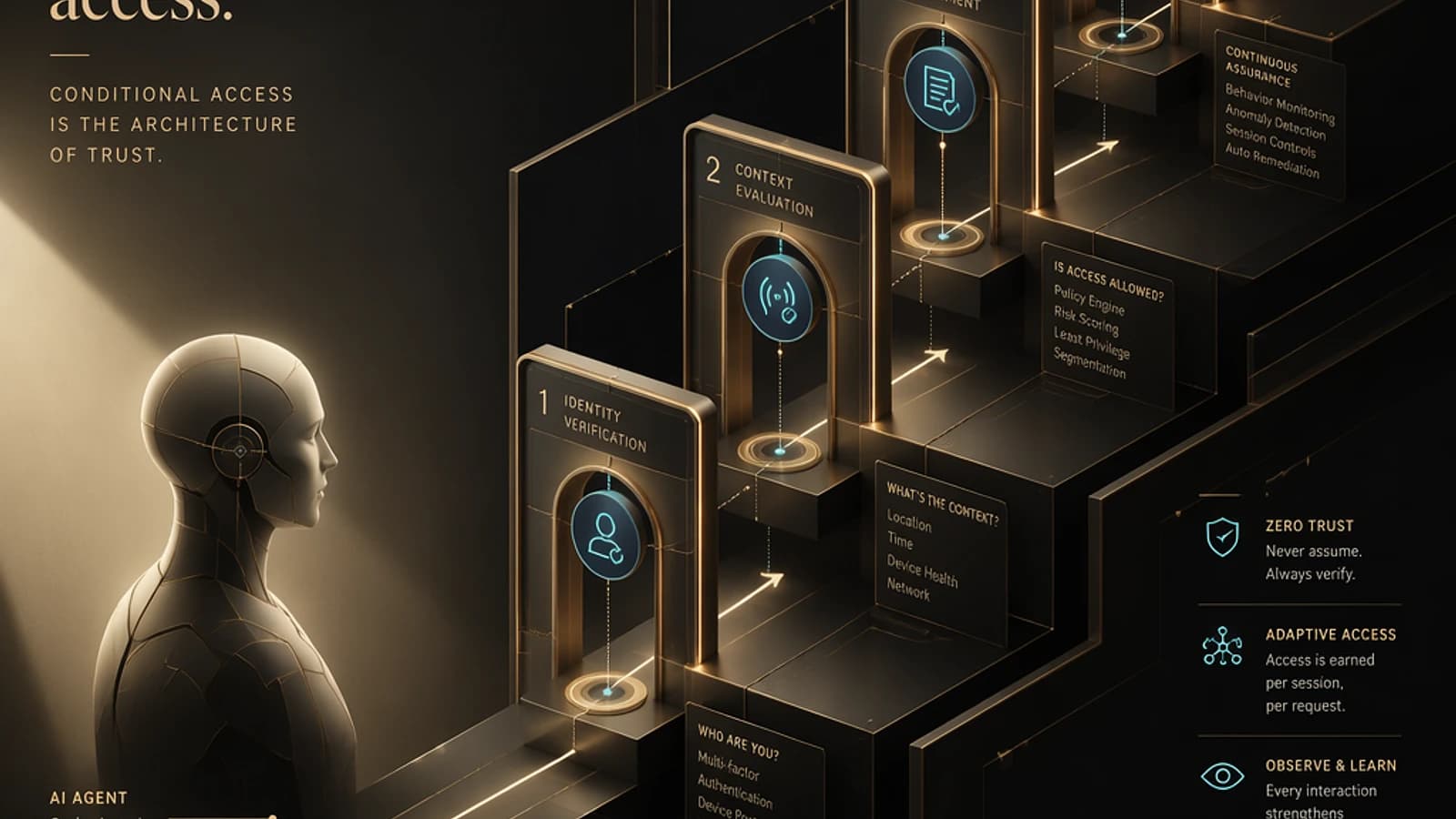
Between the AI agent and the organization's protected resources stands a policy gateway structured in four sequential steps. This gateway constitutes the central control point for non-human identity governance.
Identity Verification (Verify Identity)
The agent must present verifiable credentials — certificate, OAuth 2.0 token via client credentials flow, or Azure managed identity. This step validates that the entity requesting access corresponds to a registered agent in the identity inventory.
Example of retrieving a token for an agent via the Client Credentials flow:
1curl -X POST https://login.microsoftonline.com/{tenantId}/oauth2/v2.0/token \2 -H "Content-Type: application/x-www-form-urlencoded" \3 -d "client_id={agentClientId}" \4 -d "client_secret={agentClientSecret}" \5 -d "scope=https://graph.microsoft.com/.default" \6 -d "grant_type=client_credentials"Context Assessment (Assess Context)
The gateway evaluates all context attributes of the agent: its execution environment, current risk score, runtime compliance, and the legitimacy of the requested resource in relation to its declared purpose. This step is equivalent to device compliance verification for a human user.
Policy Enforcement (Enforce Policy)
If the context is compliant, the policy grants access according to the principle of least privilege. If anomalies are detected, the policy may block access, trigger a temporary privilege elevation subject to human approval, or force a read-only session mode.
Example of conditional access policy targeting workload identities via Microsoft Graph (PowerShell):
1# Create a conditional access policy for workload identities2$params = @{3 displayName = "CA-AgentIA-RiskControl"4 state = "enabled"5 conditions = @{6 clientAppTypes = @("all")7 servicePrincipalRiskLevels = @("high", "medium")8 applications = @{9 includeApplications = @("All")10 }11 servicePrincipals = @{12 includeServicePrincipals = @("All")13 excludeServicePrincipals = @("excludedAgentGroupId")14 }15 }16 grantControls = @{17 operator = "OR"18 builtInControls = @("block")19 }20}21 22New-MgIdentityConditionalAccessPolicy -BodyParameter $paramsLogging and Monitoring (Log & Monitor)
Every access decision — granted or denied — is recorded with the full context of the agent. These logs feed Microsoft Sentinel for anomaly detection and constitute the audit trail essential for regulatory compliance.
1// KQL query to monitor access from AI agents in Sentinel2SigninLogs3| where AppDisplayName startswith "Agent-"4| where RiskLevelDuringSignIn in ("high", "medium")5| project TimeGenerated, AppDisplayName, ResourceDisplayName, RiskLevelDuringSignIn, ConditionalAccessStatus6| order by TimeGenerated descProtected resources: the scope of policy application
Conditional access policies for AI agents must cover all resources that may be reached by these autonomous entities:
- Cloud workloads: Azure virtual machines, containers (AKS), serverless functions.
- APIs and services: Microsoft Graph API, internal APIs exposed via Azure API Management, partner services.
- Data sources: SQL/NoSQL databases, Azure Data Lake, Azure Blob Storage.
- Tools and platforms: SaaS connectors, DevOps pipelines, automation platforms (Power Automate).
- AI and analytics services: Azure OpenAI Service, Azure Machine Learning, Azure Cognitive Services.
Important
Access to Azure OpenAI Services and foundation models constitutes a particularly sensitive data exfiltration vector. Systematically apply least privilege policies to these resources and enable request-level logging at the service level.
Three operational pillars for effective governance
1. Identity Inventory (Identity Inventory)
Impossible to secure what you don't know. Inventory is the absolute foundation of any AI agent governance strategy. This involves:
- Discovering all deployed agents, whether developed internally or from third-party solutions.
- Mapping their access paths: which APIs do they call? Which data do they read?
- Identifying their owners and responsible teams.
- Maintaining this inventory up to date via automated processes (regular scanning of service principals in Entra ID).
1# List all active service principals in Entra ID (candidate agents for inventory)2Get-MgServicePrincipal -All | Where-Object { $_.AppRoles.Count -gt 0 } |3 Select-Object DisplayName, AppId, CreatedDateTime |4 Export-Csv -Path "agent-inventory.csv" -NoTypeInformation2. Runtime Attestation (Runtime Attestation)
An AI agent doesn't have a device in the traditional sense — impossible to verify its Intune compliance. However, its execution environment can and must be attested:
- Validate that the runtime (container, function, virtual machine) meets defined security standards.
- Use mechanisms like Azure Confidential Computing or workload identity attestations to guarantee environment integrity.
- Block any access from unattested or unrecognized environments.
Reference: Azure Attestation Service
3. Policy Drift Control (Policy Drift Control)
AI agents evolve: new capabilities are regularly attributed to them, new tools connected. Each extension of an agent's scope must automatically trigger a governance review:
- Implement alerts on role or permission modifications for service principals.
- Integrate agent access review into Entra ID Access Reviews cycles.
- Document each capability change with its business justification.
Reference: Entra ID Access Reviews
Comparison: user conditional access vs AI agent
| Dimension | Human User | AI Agent |
|---|---|---|
| Identifier | UPN / Entra ID account | Agent ID / Service Principal |
| Authentication | MFA, FIDO2, Passwordless | Client Credentials, Managed Identity, Certificate |
| Compliance Signal | Device Compliance (Intune) | Execution Runtime Attestation |
| Location Signal | IP, Country, Named Network | Execution Environment, Azure Region |
| Risk Evaluation | Entra ID Protection (user risk) | Dynamic Risk Score, API Behavior |
| Access Review | Periodic Access Reviews | Automated Policy Drift Control |
| Logging | Sign-in Logs | Sign-in Logs + Enriched Application Logs |
Integration into a global Zero Trust strategy
AI agents should not be governed in isolation. Their integration into the organization's Zero Trust strategy relies on the same fundamental principles — verify explicitly, apply least privilege, assume compromise — but with controls adapted to their non-human nature.
Within the Microsoft 365 and Azure ecosystem, several services directly contribute to this governance:
- Microsoft Entra ID: identity registry, conditional access, Access Reviews.
- Microsoft Sentinel: behavioral anomaly detection, log correlation.
- Microsoft Defender for Cloud: workload and runtime protection.
- Azure API Management: governance and throttling of agent API calls.
- Microsoft Purview: classification and protection of data accessed by agents.
Conclusion: inventory as an inescapable foundation
Governance of autonomous AI agents is not an incremental evolution of traditional IAM — it is a paradigm shift. These entities act, decide, and access sensitive resources at a scale and speed that manual processes cannot follow.
The message is clear: identity inventory is the non-negotiable starting point. Without comprehensive knowledge of deployed agents, their owners, their purposes, and their access paths, no conditional access policy can be effective.
As autonomous agents proliferate across Microsoft 365, Azure, and Power Platform environments, integrating non-human identities into the Zero Trust strategy is no longer a future project — it is a governance obligation to address today.
Where to Start?
Begin with an audit of service principals in your Entra ID tenant. Identify those not assigned to any owner, those whose permissions have not been reviewed in more than 90 days, and those with access to critical APIs. This is your starting point for a non-human identity inventory.