Introduction
In today's digital environment, managing a secure, scalable, and compliant cloud infrastructure is essential to business success. Microsoft 365 managed services offer a comprehensive solution to simplify IT operations, reduce costs, and empower global teams.
A Microsoft 365 managed services specialist takes charge of your entire Microsoft ecosystem, from tenant deployment and proactive monitoring to advanced security and continuous user support. Avoid burdening your IT team with repetitive tasks like password resets and focus on strategic initiatives.
What are Microsoft 365 Managed Services?
Microsoft 365 managed services consist of outsourcing administration, continuous monitoring, security management, and user support for Microsoft 365 cloud environments. This includes managing key applications such as Exchange Online, SharePoint Online, OneDrive, Microsoft Teams, and Microsoft Defender.
By collaborating with a Microsoft 365 managed services provider, businesses can:
- Significantly reduce IT costs
- Ensure strict compliance with standards such as HIPAA and SOC 2
- Guarantee 99.9% network availability
- Optimize cloud architecture
- Strengthen protection against threats
- Provide daily technical support
Good to Know
These services are essential for improving operational efficiency while ensuring the security and compliance of your Microsoft 365 environment.
Managing Key Microsoft 365 Components
Exchange Online: Enterprise Messaging and Archiving
Exchange Online is a robust solution for professional communication. We manage not only mailbox creation, but also:
- Configuration of advanced mail flow rules
- Implementation of spam and phishing filters
- Management of shared mailboxes
- Strict enforcement of data retention policies
SharePoint Online: Intranet and Document Management
A poorly configured SharePoint Online can quickly become chaotic. We offer a secure architecture with:
- Logical site structures
- Role-based access management (RBAC)
- Document lifecycle processes
OneDrive for Business: Secure Personal Storage
OneDrive allows individual users to back up and share their files. We:
- Resolve synchronization issues
- Configure external sharing permissions to prevent data leaks
- Guarantee quick recovery in case of ransomware
Microsoft Teams: Unified Communication and Telephony
With Microsoft Teams, we help structure channels, integrate third-party applications, and manage Microsoft Teams Voice (VoIP). We also ensure your environment remains organized through governance policies.
Microsoft Entra ID: Identity Management
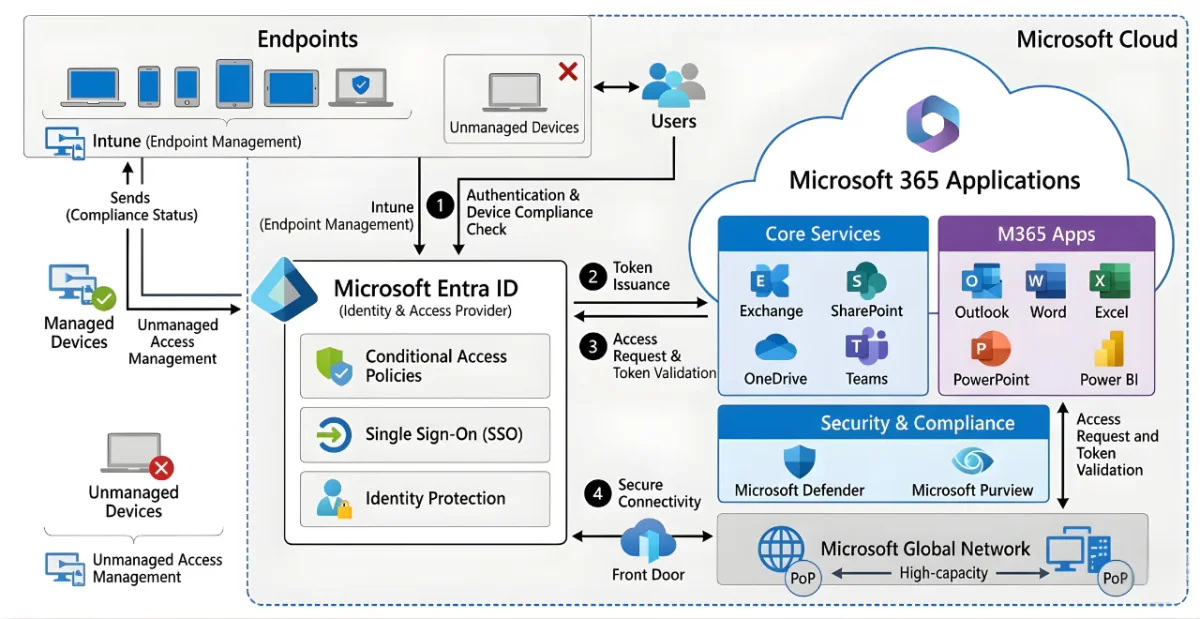
Digital identity is essential for security. We centralize identity management with Microsoft Entra ID, deploy single sign-on (SSO), and monitor sign-in logs.
Microsoft Defender: Advanced Threat Protection
With default security settings being insufficient, we deploy and administer Microsoft Defender XDR, which includes:
- Defender for Endpoint
- Defender for Office 365
- Defender for Cloud Apps
Microsoft Intune: Mobile Device Management
We use Microsoft Intune to enroll devices, apply compliance policies, and secure business data without compromising personal data.
Power Platform: Automation and Data Analytics
Through Power Automate, we create custom workflows and optimize Power BI connection security for business intelligence dashboards.
Extended Services and Benefits
Daily User and License Management
We continuously monitor your Microsoft 365 environment to optimize license usage. For example, we:
- Automate the employee onboarding and offboarding process
- Reallocate or adjust unused licenses to reduce costs
Support and Application Troubleshooting
Thanks to our specialized team, we offer instant assistance for all Microsoft 365 tools. Whether it's synchronization issues in OneNote or errors in Outlook, we guarantee efficient interventions.
Enhanced Security and Compliance
We apply zero trust principles in Microsoft 365 management service account, including data loss prevention (DLP) policies and advanced configurations using Microsoft Purview.
To Learn More:
🔗 Microsoft 365 Configuration and Management Documentation 🔗 Microsoft 365 Security Guide
Tip
Use Microsoft Secure Score and Purview Compliance Portal tools to monitor your security and compliance regularly.
Glossary of Essential Terms
- Microsoft Entra ID: Formerly Azure Active Directory, identity management tool.
- Zero Trust: Security approach that systematically verifies each access.
- DLP (Data Loss Prevention): Policy to prevent sensitive data leaks.
- MFA (Multi-Factor Authentication): Multi-level authentication method.
Practical PowerShell Script
Here is an example to audit users with MFA enabled in a tenant:
1Connect-MgGraph2Get-MgUserAuthenticationMethod -All -Property UserPrincipalName | Where-Object { $_.Method -eq 'Phone' }Conclusion
Microsoft 365 managed services do more than just improve your IT operations. They secure your infrastructure, optimize your processes, and ensure regulatory compliance. Contact a specialized provider to transform your cloud environment into an engine for success.